Mobile App Suite is Insider One’s all-in-one platform for creating, launching, and analyzing mobile app campaigns that drive user engagement, conversions, and measurable business impact, no coding required.
With Mobile App Suite, you can:
Reach users instantly with App Push and In-App Messages tailored to real-time behavior and user intent.
Orchestrate seamless journeys from onboarding to loyalty with automated triggers and Architect integration.
Deliver personalized content and recommendations using AI-powered Smart Recommendation and Content Optimizer.
Collect in-app feedback with App Surveys to measure satisfaction and improve user experience.
Run high-impact use cases like onboarding nudges, cart recovery, price drop alerts, loyalty perks, gamified templates, and transactional updates.
Personalize at scale using user attributes, predictive segments, and real-time event triggers.
Measure and optimize continuously with built-in analytics for delivery, open, conversion, and opt-out rates.
Stay compliant and user-friendly with explicit opt-in, frequency capping, and clear opt-out options.
In this guide, you’ll learn how to turn the Mobile App suite into a reliable driver for time-sensitive campaigns, real-time updates, and conversational experiences that build loyalty and drive action.
Whether you’re just getting started or optimizing a mature setup, you don’t have to read everything in order, but we recommend skimming the full flow once.
What’s new (2024–2025 highlights)
Let’s start with what’s changed recently, so you’re working with the latest capabilities and not old assumptions.
Visibility depends on the products enabled in your contract.
Feature/Update | Why It Matters | When to Use | Business Impact |
|---|---|---|---|
Ready-to-use gamified experiences (Wheel of Fortune, Scratch Coupon) | For engagement, loyalty, or retention campaigns | Boosts session time, CTR, and delight | |
Interactive push actions (e.g., “Buy Now”) | For transactional or promotional CTAs | Improves click and conversion rates | |
Centralized creation and analytics | For integrated push-to-in-app workflows | Simplifies workflow, enhances reporting | |
Advanced design flexibility | For enterprise or creative teams | Supports brand consistency and unique UX | |
Multi-event, parameter-based targeting | For event-based journeys or personalization | Delivers contextual in-app experiences | |
Manage and automate coupon lists | For ecommerce and promos | Improves CTR and campaign efficiency | |
Guided SDK setup and testing | For onboarding or QA | Reduces setup time and errors | |
Centralized metrics for delivery, interaction, and conversion | For performance reviews | Enables smarter optimization and benchmarking |
These updates shape how you’ll use the Mobile App today, especially when it comes to performance and reporting.
Some features may require activation. For the latest updates, see the Mobile App What's New.
Now, let’s quickly revisit what Mobile App can do and how the core pieces fit together in your InOne panel.
Core Mobile App capabilities
The Mobile App suite is built around a few essential building blocks. Once you’re comfortable with these, every strategy in this guide will feel much easier to apply.
Key features
App Push & In-App campaigns: Design and preview campaigns visually, add CTA buttons, and leverage HTML editing for advanced customization.
Targeting & personalization: Segment by behavior, lifecycle, and predictive data. Use Enhanced Triggers and Smart Recommendation for AI-powered suggestions.
Gamification & engagement: Use templates like Wheel of Fortune and Scratch Coupon, pair with Coupon Management, and collect feedback with App Surveys.
Analytics & optimization: Track delivery, open, conversion, and opt-out rates via App Push Analytics (Delivery & Engagement Metrics) and Mobile App Analytics (App Engagement & Revenue Performance).
Compliance & frequency management: Enable frequency capping, activation status, and always include opt-out options.
How to apply
Connect templates to the user journey
Choose templates that match each stage of your app user journey:
Onboarding: Welcome and activation nudges.
Engagement: Personalized offers, gamified templates, and loyalty perks.
Conversion: Cart recovery, price drop alerts, and transactional updates.
Re-engagement: Win-back campaigns and feedback surveys.
Template types
Enhanced App Templates: Responsive, customizable, and support advanced features.
Gamified Templates: Wheel of Fortune, Scratch Coupon, and more.
Survey Templates: Collect feedback and measure satisfaction.
With these core concepts in mind, you’re ready to put the Mobile App to work.
Quick wins
If you want to see impact fast, start here. These quick wins take 10–30 minutes to implement and are designed to deliver visible results without heavy setup or cross-team dependencies.
Validate your SDK and push setup before launching any campaigns.
Use personalization (name, product, location) for higher engagement.
A/B test message copy, timing, and CTA placement to optimize results.
Keep push messages short and actionable (max 160 characters).
Use Conversion push notifications for abandoned cart, order updates, and reminders.
Explore the Use Case Library for mobile campaign inspiration.
Once you’ve tested one or two of these wins, you’ll have a baseline for how the Mobile App performs in your environment.
To keep everyone aligned and move from “one-off experiments” to a shared plan, use these prompts with your team.
Team conversation starters
Use these conversation starters to help your team align on priorities, review performance, and identify the most impactful next steps with the Mobile App.
Which campaigns or triggers generated the strongest push opens this week?
Are we using the right segments for our push journeys?
Do we need to refresh our push creative or timing?
Have we tested automated vs. manual pushes for this audience?
Are there moments in the app experience where push could reduce drop-off?
What’s our #1 business goal for the next quarter, and how can mobile help us get there?
Where do we see the biggest drop-off in our app user journey?
How are we currently segmenting our app users? Should we try predictive or RFM segmentation for better targeting?
Are we seeing different behaviors between iOS and Android users?
Should we test new campaign ideas from the Use Case Library or try a new in-app format?
These discussions will surface where you are today and what your team expects from the Mobile App in the next 1–3 quarters.
Next, let’s connect the Mobile App to the bigger picture: how it supports your growth, retention, and Ever Success goals.
Strategic guidance: Connect Mobile App Suite to your goals
Strategically, Mobile App works best when it supports a clear set of business outcomes, rather than running as a standalone channel.
1. Validate your integration
Ensure your Mobile App Business Account, Sender ID, and API/webhook integrations are set up and tested.
Use the Mobile SDK Guide and Test Devices.
2. Map templates to the user journey
Strategically place templates across onboarding, engagement, conversion, and re-engagement stages.
3. Enrich targeting & personalization
Use predictive segments, RFM, and behavioral triggers.
4. Monitor, optimize, and troubleshoot
Track key metrics in App Push Analytics (Delivery & Engagement Metrics) and Mobile App Analytics (App Engagement & Revenue Performance).
Run the Health Checklist if metrics dip.
5. Review and scale
Tie campaign outcomes to revenue uplift, opt-in growth, and conversion rates.
Identify unused templates or segments and propose expansion.
Once you’re clear on the role of Mobile App in your overall strategy, it’s time to tailor your approach to your current maturity level.
The playbook below helps you focus on the right actions based on where you are today, from early activation to advanced optimization.
Strategic playbook by stage
Use this table to choose your next steps by adoption stage. You don’t have to do everything at once. Pick the row that matches your current reality and work from there.
Stage | Goal | Focus & Actions | What Success Looks Like |
|---|---|---|---|
Start Strong | Launch core app push quickly and reliably. | • Validate integration + test devices. • Launch first app pushes. • Use basic segmentation. • Keep messages simple. | • Successful delivery + opens. • First pushes show meaningful engagement. • Integration stable. |
Level Up | Personalize & automate app engagement. | • Use predictive segments. • Launch automated pushes via Architect. • Add geo/behavior triggers. • A/B test timing + creatives. | • Higher open + conversion rates. • Retention improves. • Automated flows outperform manual pushes. |
Get Back on Track | Fix delivery or engagement issues. | • Audit token health. • Simplify push logic. • Retarget active users first. • Refresh copy/visuals. | • Delivery improves. • Engagement stabilizes. • Active user decline slows. |
Optimize & Orchestrate | Merge app with multi-channel journeys. | • Connect app pushes to Email/Web Suite. • Use deep linking. • Add in-app templates for surveys/NPS. • Integrate app analytics across channels. | • Cohesive mobile + web journeys. • Stronger retention loops. • Clear multi-channel lift. |
As you move through these stages, your metrics will tell you whether your strategy is working or needs adjustment.
Now let’s look at the key metrics that matter for Mobile App, where to find them, and what to do when they’re off.
Key metrics: Diagnose & take action
The table below turns each metric into a simple diagnostic: where to find it, why it matters, what red flags to watch for, and which actions to take inside your inOne panel.
About dashboard names
In these guides, dashboard names appear with a short description in parentheses to clarify what insights each view provides.
Total users / installs
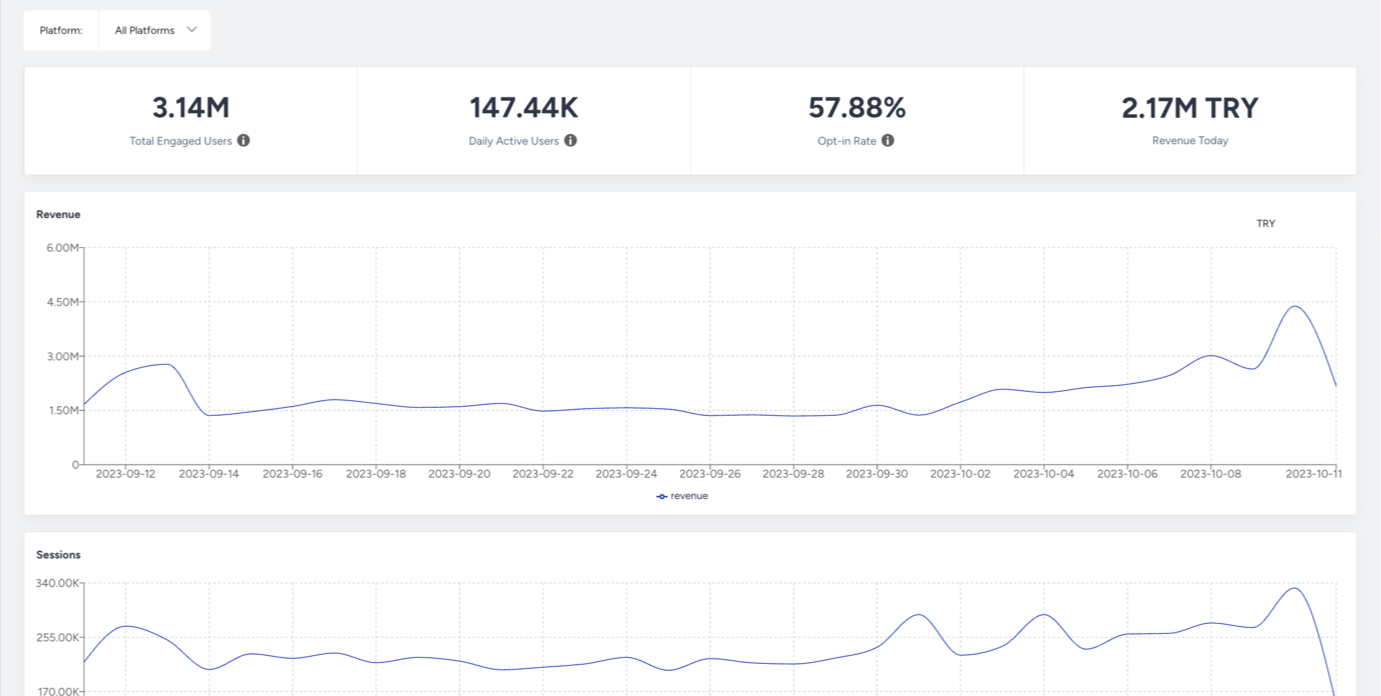
Where to find it: Mobile App Suite Home Page Analytics
Why it matters: Indicates total potential reach of your push and in-app campaigns. Reflects overall app adoption.
What to watch for (decline / below benchmark): Slow or flat growth = weak app promotion or reduced acquisition. Sudden drops = SDK or tracking issues.
Actions to take / features to use: Promote app installs via onsite banners, Email/SMS/WhatsApp. Validate SDK integration, ensure app events are coming through.
Benchmarks / watch for: Compare installs vs your marketing traffic trends; sudden deviations usually signal integration issues.
Frequency: Monthly
Examples: You see installs drop sharply after an app update → likely SDK not firing.
Monthly active users
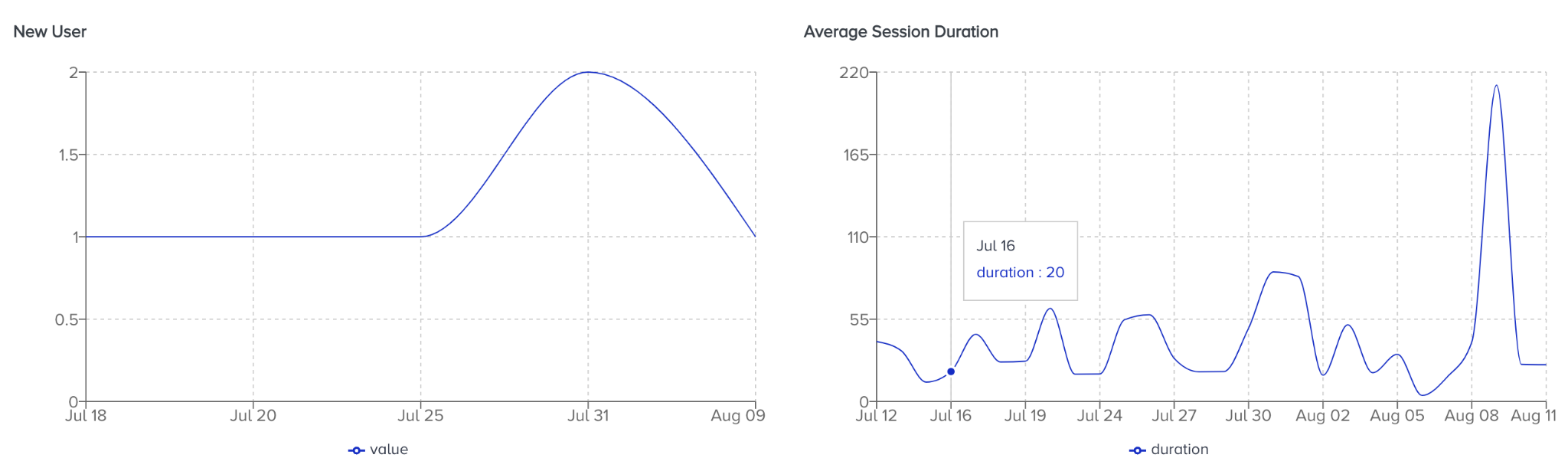
Where to find it: Mobile App Suite Home Page Analytics
Why it matters: Measures user retention and overall app “stickiness.” A key health indicator.
What to watch for (decline / below benchmark): Declining MAU = reduced relevance, poor app experience, or weak push/onboarding engagement.
Actions to take / features to use: Build re-engagement journeys, launch lifecycle-based push flows, enrich in-app content, improve onboarding.
Benchmarks / watch for: Healthy MAU should remain stable or trending upward relative to install base.
Frequency: Monthly
Examples: MAU declines after reducing push usage → users might be forgetting about the app.
Uninstalls
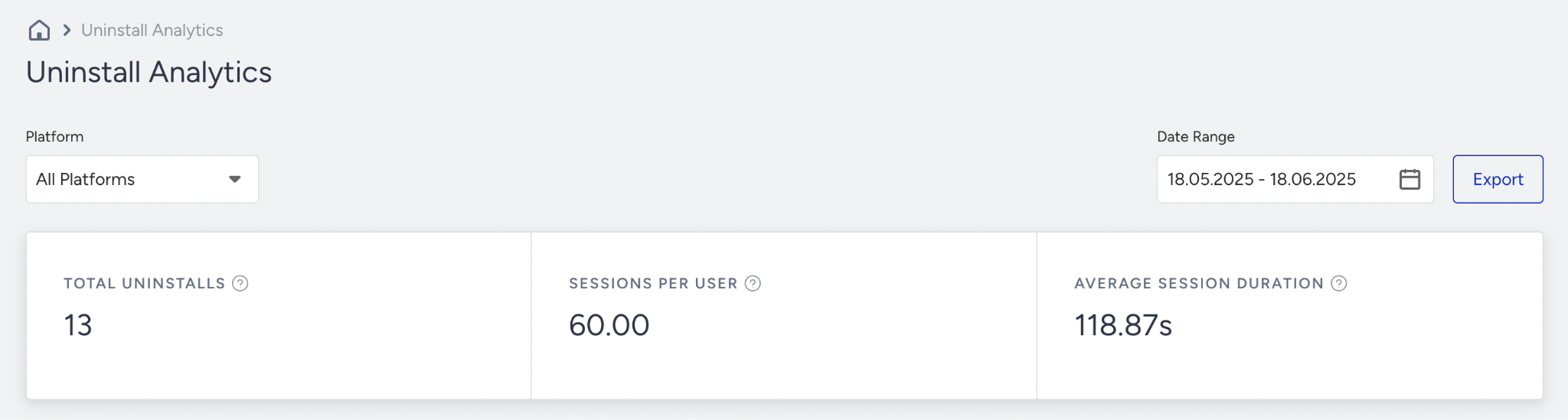
Where to find it: App Uninstall Analytics
Why it matters: Shows how many users removed your app. Indicates experience and messaging quality.
What to watch for (decline / below benchmark): Rising uninstalls = push fatigue, poor UX, slow load times, or irrelevant messaging.
Actions to take / features to use: Reduce push frequency, improve content relevance, refine onboarding, use event-based help or tips to retain users.
Benchmarks / watch for: Look for stable uninstall rate; spikes signal user frustration.
Frequency: Monthly
Examples: Uninstalls spike after 4 push notifications in one day → frequency issue.
App push delivered/open rate
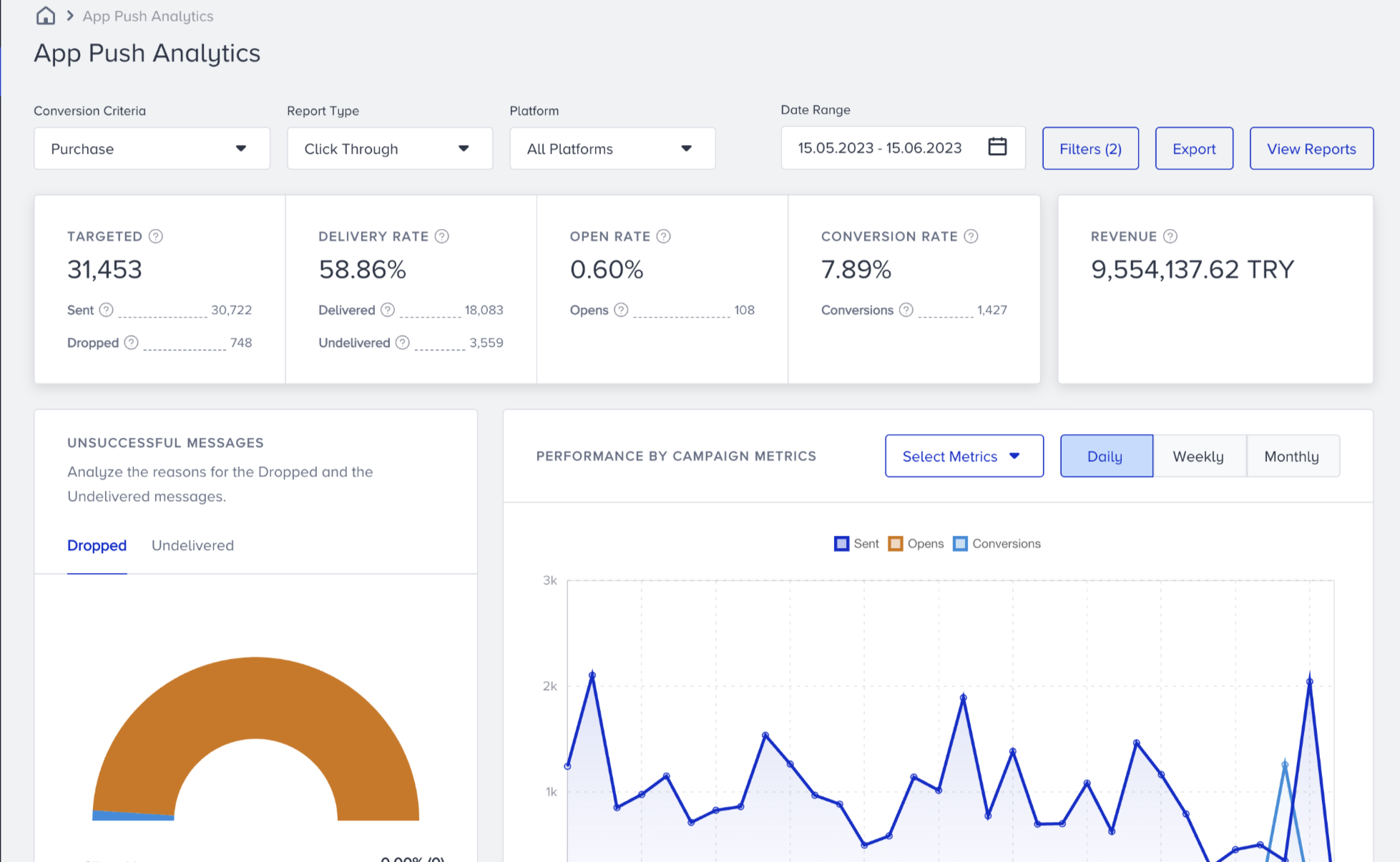
Where to find it: App Push Analytics (Delivery & Engagement Metrics)
Why it matters: Measures how many pushes reach users and how many engage. Core metrics for app re-engagement.
What to watch for (decline / below benchmark): Delivered <90% = token decay or SDK issues. Open Rate <5–10% = weak CTA, wrong timing, or irrelevant messaging.
Actions to take / features to use: Validate push token health, optimize permission UX, A/B test timing + copy, segment by behavior, add geolocation or activity triggers.
Benchmarks / watch for: Delivered ideally >90%; Open Rate benchmark 5–10%+ depending on use case.
Frequency: Weekly
Examples: Push delivery drops after app release → token refresh issue.
In-app impressions/conversions
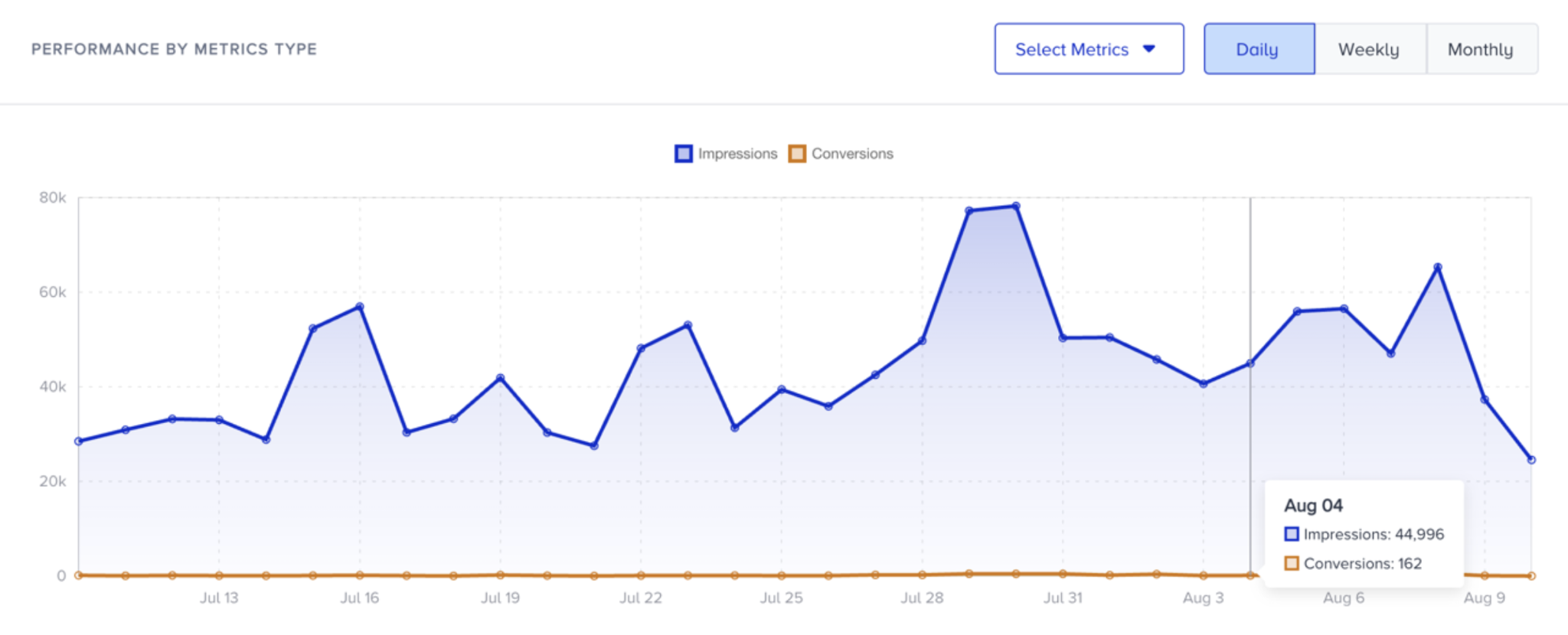
Where to find it: Overall App Templates Analytics
Why it matters: Shows how many users saw your in-app templates and how effectively they completed the desired action.
What to watch for (decline / below benchmark): Low impressions = incorrect targeting, trigger issues, or template conflicts.Low conversions = friction, unclear CTA, or weak value.
Actions to take / features to use: Verify placement and targeting rules, test simplified templates, add incentives, personalize content, and use behavioral triggers.
Benchmarks / watch for: Impressions should align with app traffic; conversions depend on use case, but should show clear uplift when optimized.
Frequency: Weekly
Examples: New PDP in-app promo gets impressions but 0 conversions → CTA or offer misaligned.
Opt-in rate
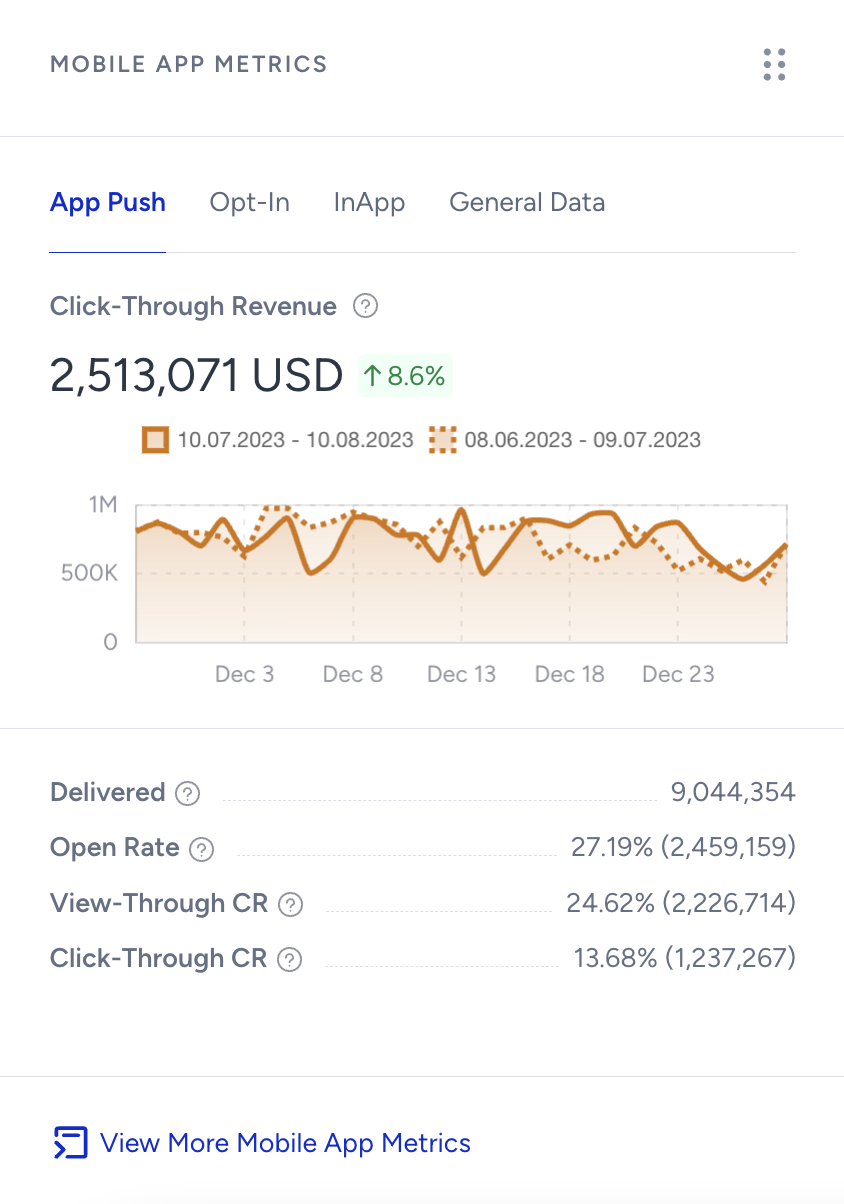
Where to find it: Mobile App Suite Home Page Analytics
Why it matters: Determines the size of your reachable push audience. Essential for all downstream app engagement.
What to watch for (decline / below benchmark): Opt-in <40–60% (varies by app) → permission prompt shown too early or without context.
Actions to take / features to use: Trigger push permission prompt after meaningful events (e.g., first purchase, key browse action). Explain benefits clearly.
Benchmarks / watch for: Many apps aim for 40–60%+ opt-in, depending on vertical and UX.
Frequency: Monthly
Examples: Asking for permission on first app open yields 18% opt-in → move prompt later.
Revenue
.png)
Where to find it: Mobile App Suite Home Page Analytics
Why it matters: Revenue influenced by app push or in-app templates. Measures real business impact of mobile engagement.
What to watch for (decline / below benchmark): Flat revenue despite strong impressions/clicks = weak offer, wrong segment, or landing friction.
Actions to take / features to use: Use deep links, target high-value users, promote best-sellers, test incentives, refine cart recovery or abandonment templates.
Benchmarks / watch for: Look for positive revenue trend as app engagement increases.
Frequency: Weekly / Monthly
Examples: Pushes drive high CTR but no revenue → offer misaligned or landing page issue.
If a number doesn’t change immediately, expand the date range or compare with the previous period to validate performance trends.
Once you know what “good” looks like and how to read your numbers, the next step is making sure your foundation is solid.
Use this checklist to confirm that Mobile App is set up correctly before you chase more complex optimizations.
Health checklist: Mobile App success to-do list
Run through these checks monthly or whenever performance shifts unexpectedly. A small misconfiguration can easily lead to a significant performance drop.
Integration & data health
Verify SDK integration, device tokens, and permissions (Guide).
Test events and attributes using Test Lab.
Feature & campaigns
Launch high-impact templates such as onboarding, cart recovery, and promotions.
Use personalization and rich media.
Test and review campaigns before launch.
Optimize conversion & revenue
A/B test message copy, timing, and CTA.
Monitor opt-in, open, and conversion rates.
Adjust frequency and targeting as needed.
Reduce drop-off & churn
Use win-back and feedback campaigns.
Monitor uninstall and opt-out trends.
If something still doesn’t look right after you’ve reviewed the basics, it’s time to troubleshoot.
Here are common cases you might see in your analytics, along with practical steps you can take to resolve them.
Troubleshooting cases
Use this section when you notice a specific issue, like drops in engagement, revenue, or reach, and want a focused path to investigate and fix it.
Once you’ve stabilized performance and fixed the obvious issues, you’re ready to go beyond “working” to “working really well.”
These best practices and tips are designed to help you get more value from Mobile App with the same or less effort.
Best practices & pro tips
You don’t need to adopt every tip at once. Treat this section as an idea bank and apply what matches your goals and capacity.
Segment your audience for relevance.
Time your sends to avoid notification fatigue.
Monitor delivery, open, and opt-out rates.
Use rich media and interactive elements.
Use A/B testing and control groups to prove what works best.
Set frequency limits to control how often users see campaigns, preventing overexposure and reducing opt-outs.
Always include clear opt-out instructions and follow all platform guidelines.
Combine app push with other channels for an omnichannel approach.
Always test your campaigns on both iOS and Android devices to ensure a seamless experience.
As you apply these ideas, you’ll likely run into the same recurring questions we hear from other teams.
FAQ & troubleshooting
This FAQ covers the most common topics, so you don’t have to guess.
Q: Why aren’t our push notifications delivering?
A: Check SDK integration, device tokens, permissions, and opt-in compliance. See App Integration Wizard.
Q: Why is our open or conversion rate low?
A: Personalize messages, test timing, and ensure offers are relevant.
Q: Why are opt-outs increasing?
A: Review message frequency/content, ensure opt-out instructions, and segment your audience.
Q: How do we escalate a technical issue?
A: Collect logs/screenshots, confirm checklist items, and submit via Insider One Help Center.
Additional resources
Use the resources below to continue learning, test more advanced strategies, or get extra help when you need it.
Bookmark this guide and revisit it whenever you launch new campaigns, review performance, or plan your next quarter with Mobile App.
Save and return to this guide as needed. For inspiration across all Insider channels, explore the Use Case Library. This resource is best for gathering ideas, not for replacing strategic planning.