Eureka is Insider One's AI-powered product discovery platform, designed to help your customers find what they want, quickly and intuitively. With Eureka, you can deliver smarter, personalized search and category results, highlight the most relevant products, and optimize every search experience for speed, relevance, and user satisfaction.
With Eureka, you can:
Boost product discovery: Connect customer intent to the right products with AI-powered search and merchandising.
Enhance engagement: Surface relevant items based on user behavior, attributes, and business priorities.
Reduce "no result" frustration: Use synonyms, smart variant grouping, and global filtering to ensure every search leads somewhere.
Personalize every journey: Tailor results by user affinity, locale, and merchandising rules.
Drive measurable results: Track key metrics like Click-Through Rate (CTR) and No Result Rate to optimize discovery and satisfaction.
In this guide, you'll learn how to turn Eureka into a reliable driver for time-sensitive campaigns, real-time updates, and conversational experiences that build loyalty and drive action.
What's new (2024–2025 Highlights)
These updates shape how you'll use Eureka today, especially in terms of performance and reporting.
Visibility depends on the products enabled in your contract. In addition, some features may require activation. For the latest updates, see the Eureka What's New.
Feature/Update | Why It Matters | When to Use | Business Impact |
|---|---|---|---|
Real-time dashboards for search trends and anomalies | For all customers | See the full picture of search performance, from first query to final purchase | |
Tracks search activity volume and usage | For usage monitoring and billing | Transparent reporting, prevents overages | |
Groups product variants (color, size) in results | For catalogs with multiple SKUs per item | Cleaner, more intuitive search experience | |
Tailor results by region/language | For multi-regional brands | Personalized, localized discovery | |
Filter by category, price, attributes | For all customers | Easier product discovery, lower no-result rate | |
Redirect for unavailable products | For all customers | Maintains engagement, prevents dead ends | |
Map search terms, control product order | For all customers | Improves relevance, optimizes exposure | |
Consistent filtering across placements | For large catalogs, multi-placement | Data accuracy, product consistency | |
Personalizes results by user behavior | For brands seeking higher engagement | Increases relevance, reduces scroll fatigue | |
Prioritize products by business goals | For campaign or inventory priorities | Aligns discovery with strategy |
Now, you can continue with revisiting what Eureka can do and how the core pieces fit together in your InOne panel.
Core Eureka capabilities
Eureka is built around a few essential building blocks. Once you're comfortable with these, every strategy in this guide will feel much easier to apply.
Data foundation & catalog integrity
Validate catalog integration via XML or API (Product Catalog Data Integration)
Confirm key product attributes (ID, category, price, stock, image, locale) are mapped
Use the XML Integration Validator to detect and fix catalog errors
Schedule regular indexing to keep results fresh
Algorithm & relevance tuning
Define Searchable Attributes for precision
Enable Affinity-Based Personalization for tailored results
Use Smart Variant Grouping for cleaner results
Apply Synonyms, Facets, Sorting, and Global Filtering for relevance
Merchandising & business control
Set Merchandising Rules to boost or demote products
Schedule Global or Time-Based Merchandising
Add Banner Merchandising for campaigns
Localization & consistency
Configure Locale and Localization Keys for multi-region accuracy
Measurement & optimization
Monitor CTR, No Result Rate, Add-to-Cart Rate, and Search Volume in Eureka Analytics (Search & Discovery Performance)
Use Search Usage Analytics for platform health
How to apply
Connect Eureka to the Customer Journey
Homepage: Highlight trending or personalized products
Category Pages: Enable filtering and refinement
Search Results: Speed up product findability with autocomplete and facets
Mobile Apps: Ensure unified experience across channels
With these core concepts in mind, you're ready to put Eureka to work, not just understand it.
Quick wins
If you want to see impact fast, start here. These quick wins take 10–30 minutes to implement and are designed to deliver visible results without heavy setup or cross-team dependencies.
Validate your product catalog integration and search event tracking before evaluating performance. A clean feed = accurate results.
Focus on discovery health: Monitor Click-Through Rate (CTR) and no-result rate as leading indicators of Eureka performance.
Start smart: Launch with proven search templates and facet strategies, customized to your vertical (e.g., fashion, electronics, grocery).
Use analytics proactively: Leverage Eureka Analytics (Search & Discovery Performance) and Search Usage dashboards to detect trends, search drop-offs, or high-performing queries.
Refine relevance: Adjust synonyms, attributes, and merchandising rules to improve precision and prevent "no result" frustration.
Set discovery KPIs: Track search CTR, no-result rate, add-to-cart rate, and average query depth, focus on findability, not just revenue.
Keep optimizing: Reindex catalogs regularly and review new features, such as Affinity-Based Personalization and Smart Variant Grouping, to maintain result quality.
Once you've tested one or two of these wins, you'll have a baseline for how Eureka performs in your environment.
To keep everyone aligned and move from "one-off experiments" to a shared plan, use these prompts with your team.
Team conversation starters
Use these conversation starters to help your team align on priorities, review performance, and identify the most impactful next steps with Eureka.
Which search queries have the highest conversion rate?
Do we need to improve synonyms or ranking rules?
Are zero-result searches increasing, and why?
Are we using search insights to improve merchandising or onsite content?
What feature should we test next (filters, facets, autocomplete)?
What is our #1 business priority for product discovery this quarter: better relevance, faster results, or fewer 'no results'?
Are customers finding key products quickly, or do we see high bounce after search?
Where are users abandoning search, and how can we fix it with merchandising or synonyms?
Which categories should consistently appear at the top of the results to align with our brand priorities?
How can Eureka help connect intent (search queries) with our growth goals, like category visibility or inventory sell-through?
Framing Tip: When discussing KPIs, shift from "How many sales came from search?" to "Are users finding what they need efficiently?" This reframing reinforces Eureka's discovery-first value proposition.
These discussions will surface where you are today and what your team expects from Eureka in the next 1–3 quarters.
Next, let's connect Eureka to the bigger picture: how it supports your growth, retention, and Ever Success goals.
Strategic guidance: Connecting Eureka to your goals
Strategically, Eureka works best when it supports a clear set of business outcomes, rather than running as a standalone channel.
Set the Foundation
Confirm catalog feeds, product attributes, and event tracking are configured (Product Catalog Data Integration)
Test integration and monitor data freshness
Launch High-Impact Discovery
Start with homepage, category, and search placements
Use proven templates and facet strategies
Monitor, Learn, and Optimize
Track CTR, No Result Rate, Add-to-Cart Rate in Eureka Analytics (Search & Discovery Performance)
Adjust synonyms, attributes, and merchandising rules based on performance
Evaluate Impact and Celebrate Wins
Visualize before-and-after metrics (e.g., CTR increase, no-result rate drop)
Highlight keyword insights and data hygiene improvements
Sustain Growth & Address Blockers
Scale top-performing strategies to new channels
Review "No-Result Queries" and "Top Queries" quarterly
Escalate persistent issues via Help Center: Zendesk
Once you're clear on Eureka's role in your overall strategy, it's time to tailor your approach to your current maturity level.
Strategic playbook by stage
Use this table to choose your next steps by adoption stage. You don't have to do everything at once; pick the row that matches your current reality and work from there.
Stage | Goal | Focus & Actions | What Success Looks Like |
|---|---|---|---|
Start Strong | Improve basic product search experience. | • Validate search integration. • Enable autocomplete. • Review top search queries. • Add no-results recommendations. | • Fast, relevant results. • Reduced zero-result searches. • Early search-driven conversion lift. |
Level Up | Personalize & optimize search relevance. | • Add synonyms + custom boosts. • Tune category/brand relevance. • Use segments for personalized results. • A/B test ranking logic. | • Higher search usage. • More conversions via search. • Improved relevance. |
Get Back on Track | Fix issues affecting search quality. | • Review zero-result terms. • Fix catalog gaps. • Improve filters/facets. • Audit latency. | • Fewer dead ends. • Faster results. • Customers find products more easily. |
Optimize & Orchestrate | Turn search into a discovery engine. | • Use onsite discovery modules. • Integrate search behavior into journeys. • Use advanced ranking rules. • Align search to seasonal priorities. | • Search becomes a revenue driver. • Highly relevant discovery. • Scalable improvement path. |
As you move through these stages, your metrics will tell you whether your strategy is working or needs adjustment.
Now let's look at the key metrics that matter for Eureka, where to find them, and what to do when they're off.
Eureka key metrics: Diagnose & take action
The table below turns each metric into a simple diagnostic: where to find it, why it matters, what red flags to watch for, and which actions to take inside your InOne panel.
About Dashboard Names:
In these guides, dashboard names appear with a short description in parentheses to clarify what insights each view provides.
Revenue
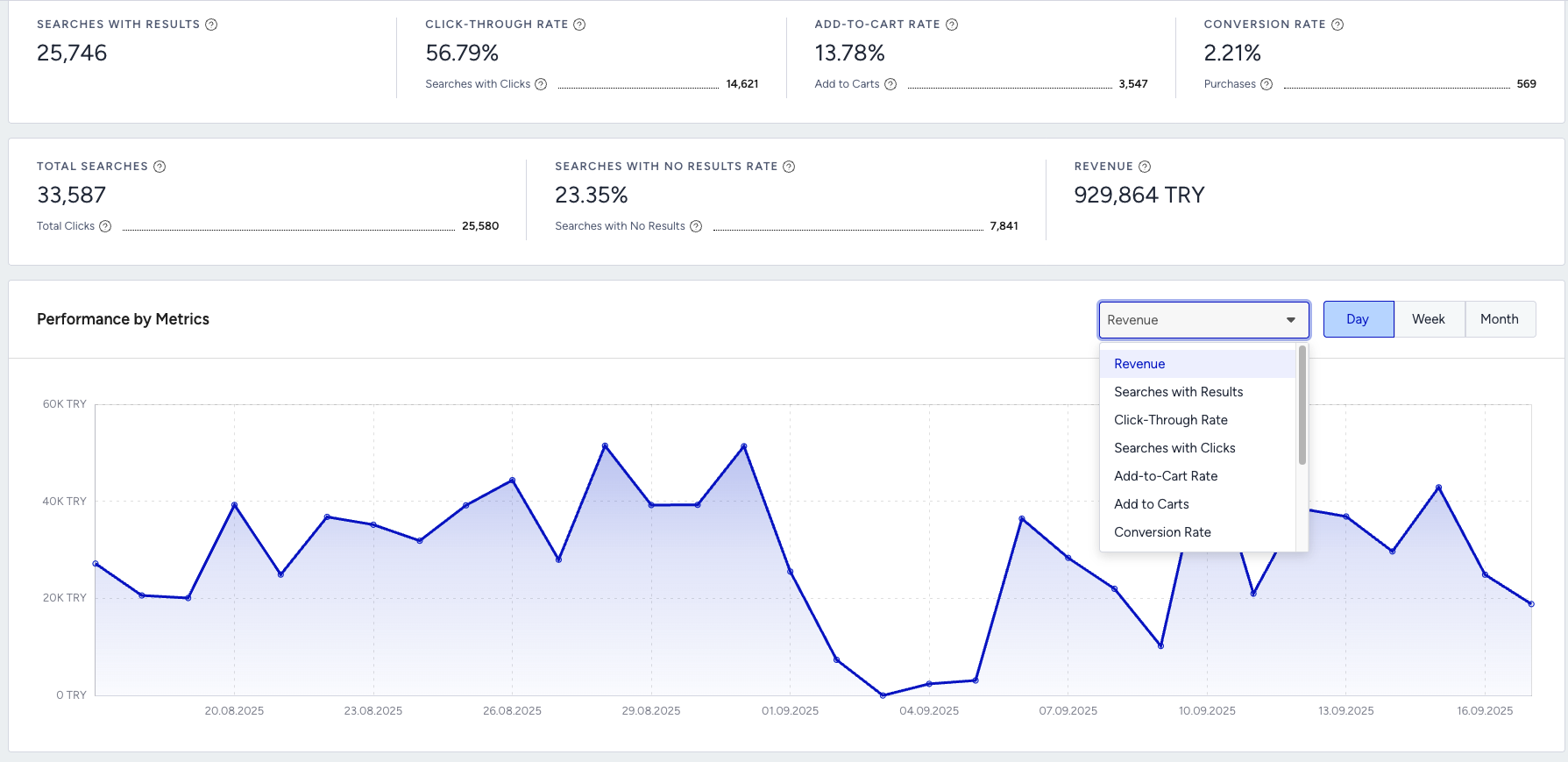
Where to find it: Eureka Analytics (Search & Discovery Performance)
Why it matters: Shows total revenue generated or influenced by search and discovery experiences. Indicates how effectively Eureka helps users find and buy products.
What to watch for: Flat or declining revenue despite strong search volume; revenue inconsistent across product categories.
Actions to take: Improve product feed (titles, images, categories), refine ranking rules, optimize top queries, add personalization in search results, and fix broken or missing attributes.
Benchmark: Look for steady revenue growth as relevance improves.
Frequency: Weekly / Monthly
Example: Revenue flat even though impressions are high → search results aren't matching user intent.
Conversion Rate
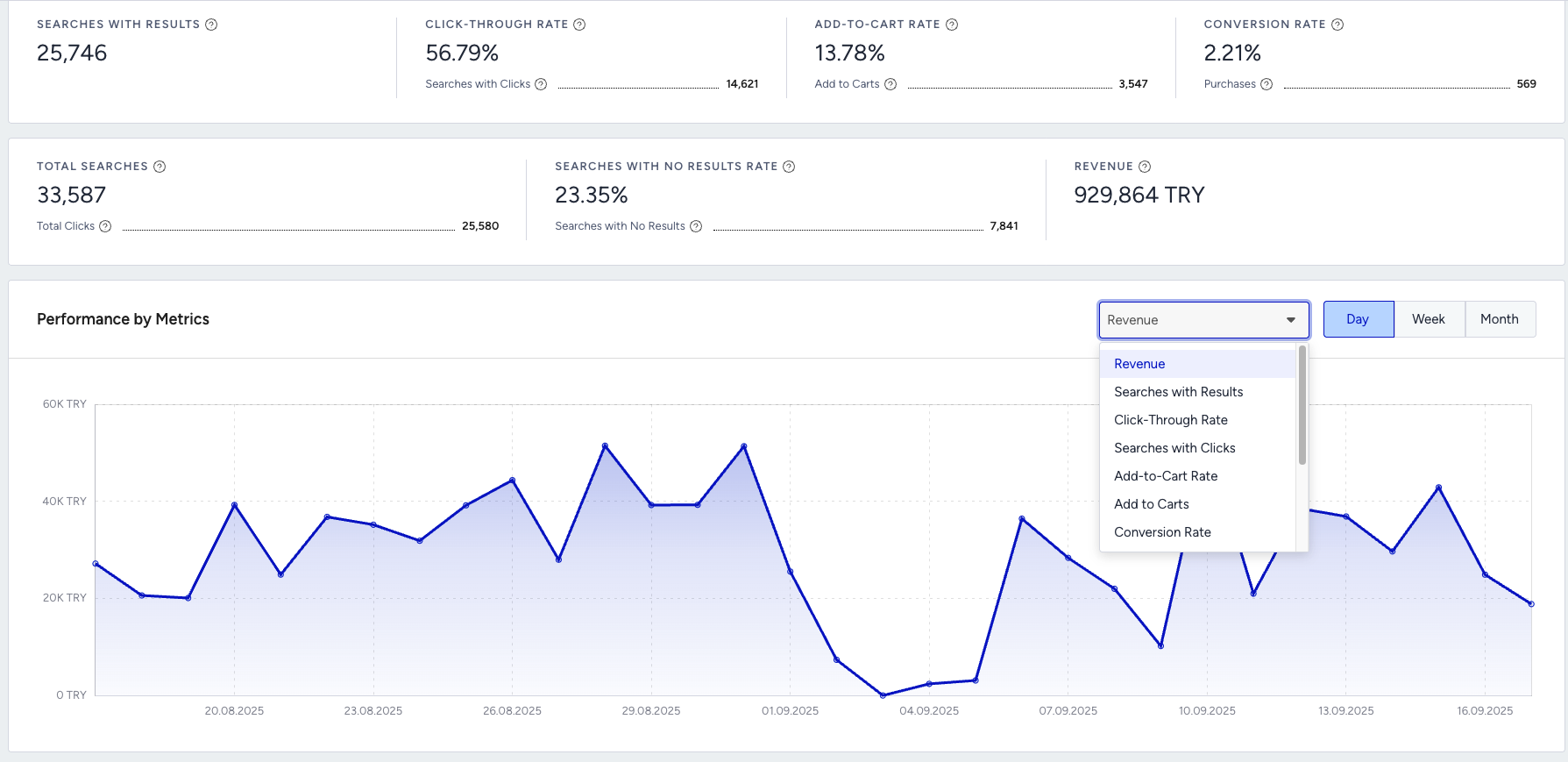
Where to find it: Eureka Analytics (Search & Discovery Performance)
Why it matters: % of users who convert after performing a search. Reflects how relevant and helpful search results are in the purchase journey.
What to watch for: Low conversion rate despite high CTR; sudden drops after feed updates or site restructuring.
Actions to take: Tune ranking rules, add synonyms, boost top sellers or trending items, fix missing product data (stock, price, categories), and reduce friction on landing pages.
Benchmark: Track trends relative to category-level CVR.
Frequency: Weekly
Example: Conversion falls after adding a new product line → likely category or attribute mapping missing.
Click-Through Rate
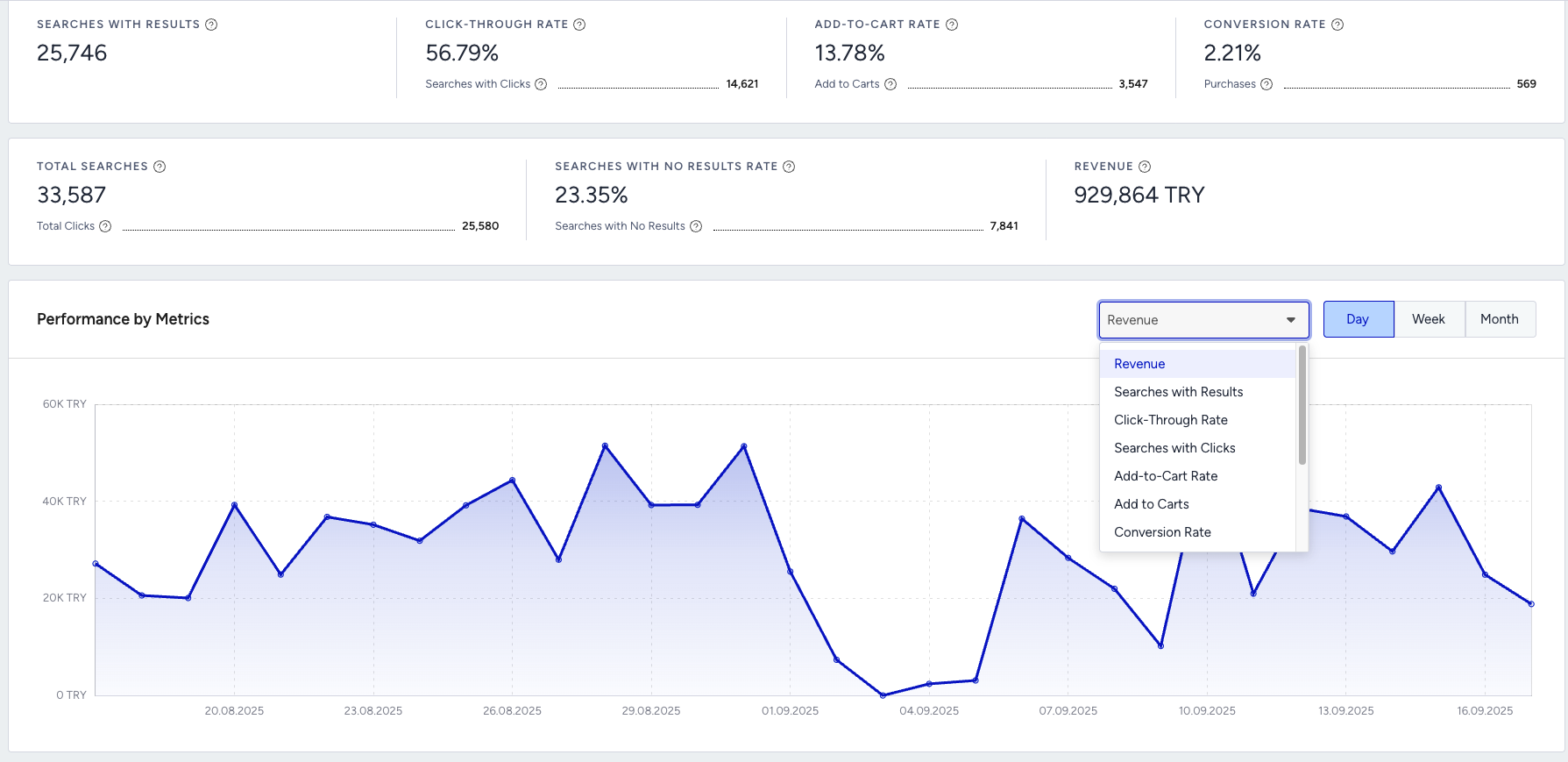
Where to find it: Eureka Analytics (Search & Discovery Performance)
Why it matters: % of searchers clicking a result. Indicates whether your top search results are relevant and compelling.
What to watch for: CTR trending down → top results irrelevant, poor metadata, unattractive product images/titles.
Actions to take: Improve top result accuracy, enhance titles/images, boost high-performing items, add visual filters, and adjust result ranking.
Benchmark: Healthy search CTR usually aligns with relevance score — compare vs your historical baseline.
Frequency: Weekly
Example: CTR falls after a merch update → top results became less relevant or visually appealing.
Add to Cart Rate
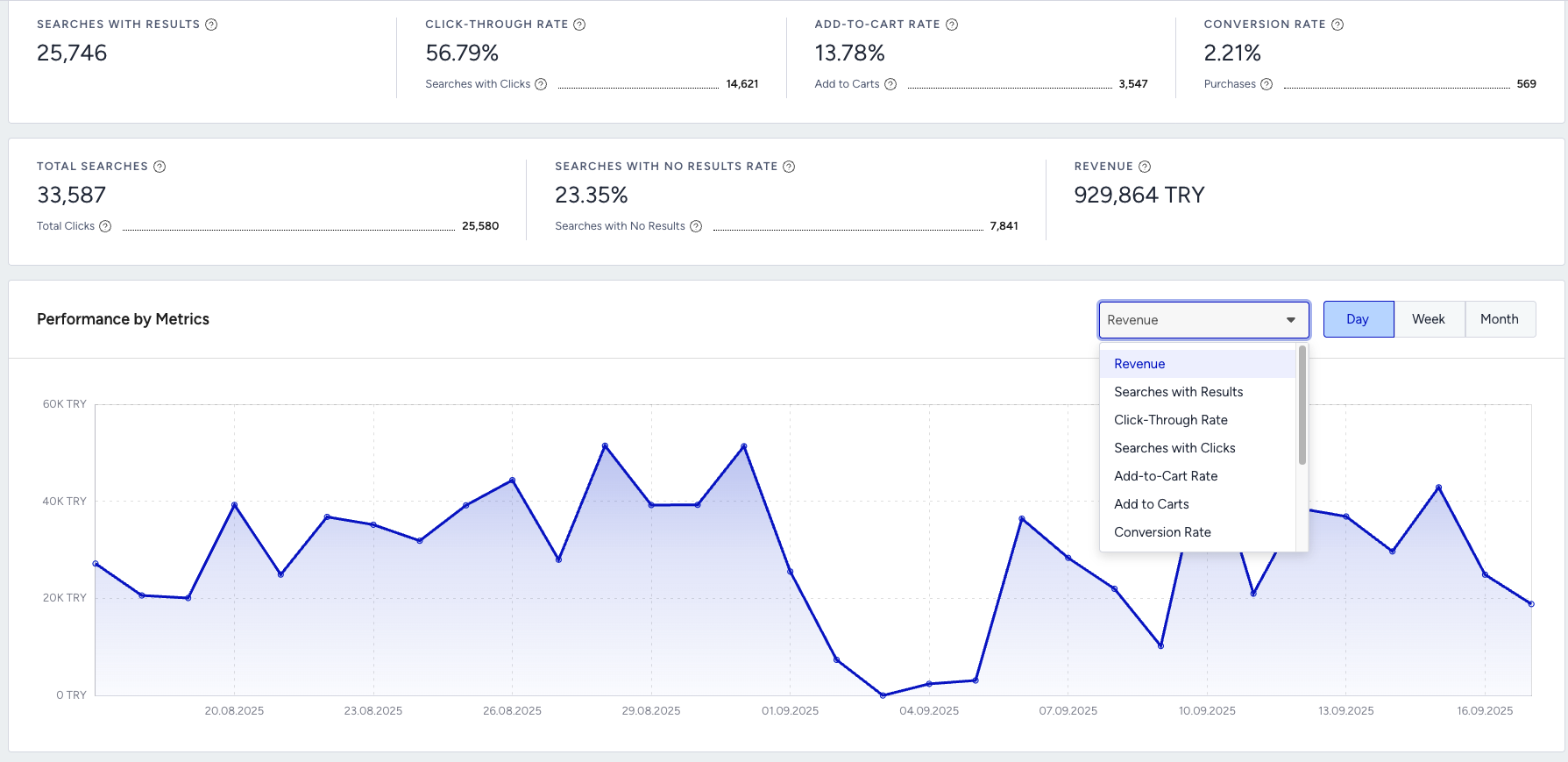
Where to find it: Eureka Analytics (Search & Discovery Performance)
Why it matters: % of users adding a product to the cart after viewing search results. Shows how well results match purchase intent.
What to watch for: Low ATC despite strong CTR → users click, but dislike what they find.
Actions to take: Promote high-intent products in search results, refine ranking logic, fix inaccurate or incomplete product attributes, and use "smart ordering" of items.
Benchmark: ATC should track with your funnel health; sudden drops indicate misalignment.
Frequency: Weekly
Example: Users click results but don't add to cart → irrelevant products or bad metadata (e.g., wrong sizes).
No Result Rate
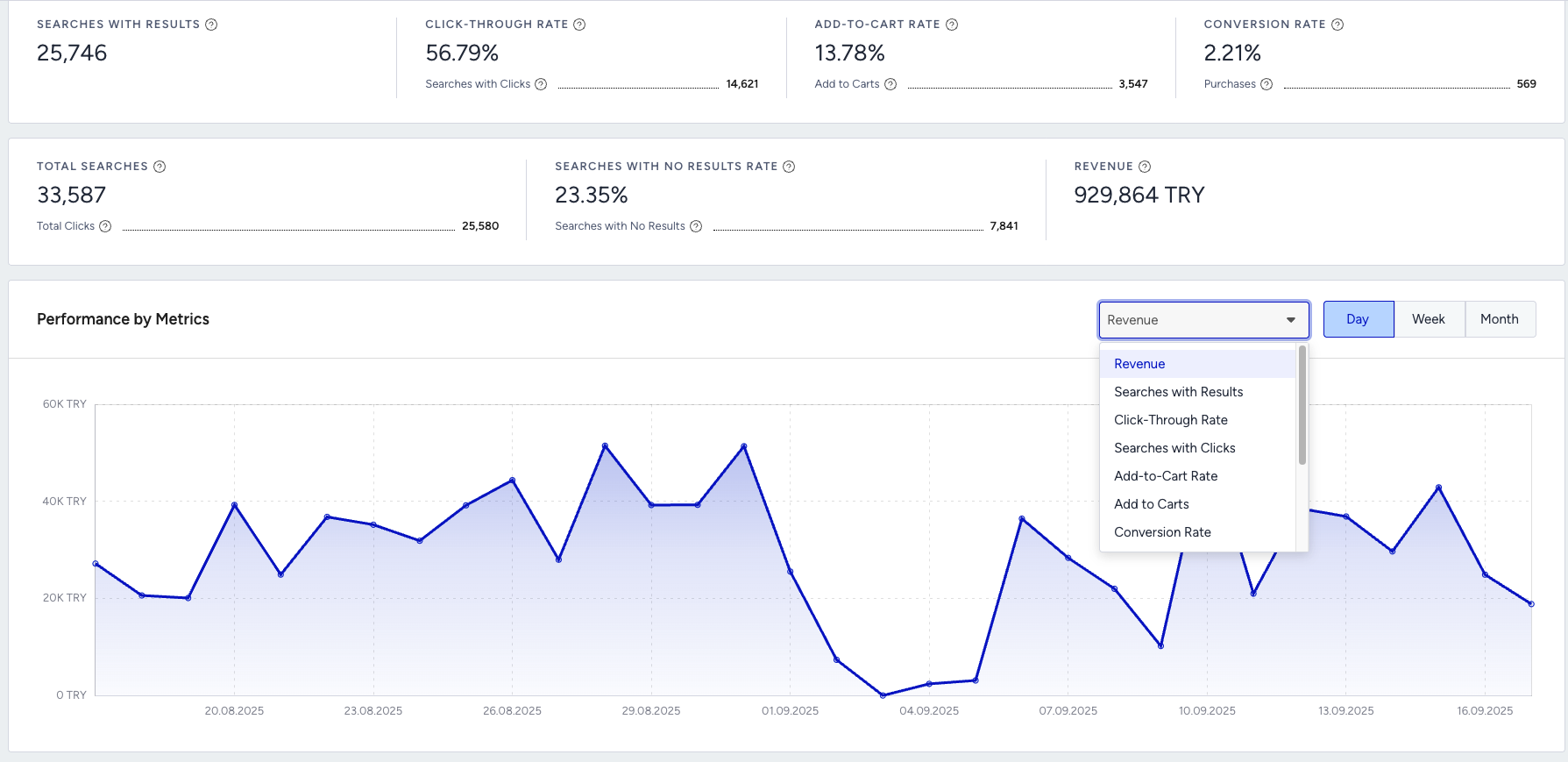
Where to find it: Eureka Analytics (Search & Discovery Performance)
Why it matters: % of searches returning zero results. High values indicate catalog gaps or search misunderstanding.
What to watch for: No Result Rate > 5–8% (varies by catalog size); spikes after product feed changes.
Actions to take: Add synonyms, fix category mapping, enrich product attributes, create redirects for high-frequency "zero result" terms, optimize search query rules.
Benchmark: Aim to keep No Result Rate as low as possible; <5–8% is a common healthy target.
Frequency: Weekly
Example: Users search for "air fryer" but get no results because the catalog uses "kitchen fryer" → add synonyms.
If a number doesn't change immediately, expand the date range or compare with the previous period to validate performance trends.
Once you know what "good" looks like and how to read your numbers, the next step is making sure your foundation is solid.
Troubleshooting scenarios
Use this section when you notice a specific issue, such as drops in engagement, revenue, or reach, and want a focused path to investigate and fix it.
Symptom | Likely Cause | What to Do |
|---|---|---|
Many "no results" searches | Missing catalog data or unsupported queries | Review top "no results" terms, enrich catalog attributes, and add synonyms or redirects where appropriate. |
Users often abandon search | Poor relevance, weak filters, or slow results | Check search performance in analytics, improve ranking rules, and review filters/facets and response time. |
Irrelevant top results | Ranking or boosting misaligned | Adjust boosting rules, add synonyms, and test results for key queries manually. |
Low search usage | Search bar not visible or not promoted | Improve search bar placement and visibility, and encourage users to search with helper text or prompts. |
Once you've stabilized performance and fixed the obvious issues, you're ready to go beyond "working" to "working really well."
These best practices and tips are designed to help you get more value from Eureka with the same or less effort.
Best practices & pro tips
You don't need to adopt every tip at once; treat this section as an idea bank and apply what matches your goals and capacity.
End-to-End Discovery Mapping: Follow the customer journey from search to product view and add-to-cart.
Behavioral Segmentation: Group users by their actions and value for personalized results.
Continuous Testing: A/B test search elements like synonyms, filters (facets), and display formats (layouts).
Key Metrics (Non-Revenue): Focus on engagement indicators like Click-Through Rate (CTR), "No Result" Rate, and Add-to-Cart Rate.
Catalog Quality: Keep product data accurate, complete, and up-to-date.
Measure UX: Celebrate gains in relevance and user experience, not just sales.
Weekly Search Health Check: Monitor CTR and "No Result" Rate as early warnings for search issues.
Regular Data Audits: Schedule feed audits to ensure fresh catalog data and correct attribute mapping.
Universal Personalization: Use affinity-based personalization for all visitors—new and returning.
Business-Driven Merchandising: Use rules to promote products based on business priorities without needing a developer.
FAQ & Troubleshooting
This FAQ covers the most common "Wait, what about…?" topics so you don't have to guess.
Q: Why aren't my search results displaying?
A: Check feed integration, event tracking, attribute mapping, and indexing status.
Q: Why is my CTR or conversion rate low?
A: Test new synonyms, adjust merchandising rules, optimize search UX, and use A/B testing.
Q: How do I handle "No Result" cases?
A: Fix attribute mapping, add synonyms, validate catalog completeness, and use global filtering.
Q: How do I escalate a technical issue?
A: Gather logs/screenshots, confirm checklist items, and submit via Insider One Help Center.
If your question isn't covered here, or if you want to go deeper, there's more you can explore.
Additional resources
Use the resources below to continue learning, test more advanced strategies, or get extra help when you need it.
Bookmark this guide and revisit it whenever you launch new campaigns, review performance, or plan your next quarter with Eureka.
Next Step:
Bookmark and return to this guide as needed. For inspiration across all Insider channels, explore the Use Case Library. This resource is best for gathering ideas, not for replacing strategic planning.