Smart Recommender is Insider One's AI-powered recommendation engine that helps you deliver personalized, contextual, and relevant product suggestions across your website, app, and digital channels. Every visitor sees products that match their interests and intent, driving more engagement, higher conversions, and greater revenue at every stage of the funnel.
With Smart Recommender, you can:
Boost conversions and Average Order Value (AOV): Recommend products most likely to convert based on user behavior, intent, and affinity.
Enhance engagement: Encourage visitors to explore more by surfacing relevant items that extend browsing sessions and increase click-through rates (CTR).
Maximize ROI: Turn passive website traffic into personalized shopping experiences that lead to measurable business results.
Deliver contextual recommendations: Support users from discovery to purchase through AI-driven suggestions on homepage, product pages, cart, and more.
Drive loyalty and retention: Keep customers returning by recommending products based on past purchases, viewed products, and cross-channel behavior.
In this guide, you'll learn how to turn Smart Recommender into a reliable driver for time-sensitive campaigns, real-time updates, and conversational experiences that build loyalty and drive action.
What's new (2024–2025 Highlights)
These updates shape how you'll use Smart Recommender today, especially regarding performance and reporting.
Visibility depends on the products enabled in your contract. In addition, some features may require activation. For the latest updates, see the Smart Recommender What's New.
Feature/Update | Why It Matters | When to Use | Business Impact |
|---|---|---|---|
Show top-selling or trending products across all users | For simple, universal recommendations | Quick setup, faster time-to-value | |
Adapt recommendations by page type or user context | For different recommendations on the homepage, PDP, or cart | Higher relevance, improved CTR | |
Tailor suggestions based on user behavior and history | For returning users and strong data maturity | Significant lift in conversions and AOV | |
Combine multiple algorithms in one placement | For large catalogs or diverse audiences | 15–25% higher engagement vs. single-strategy | |
Unified view of all algorithms and performance | For advanced users managing multiple sites | Smarter optimization, easier monitoring | |
Real-time product updates and inventory sync | During onboarding or integration health checks | Reliable data foundation, fewer errors | |
Removes unavailable items from feeds | For dynamic stock environments | Improves UX, prevents dead-end clicks | |
Drag-and-drop widgets for visual placements | For a quick, no-code setup | Accelerates setup, empowers non-technical users | |
API-first design for deep integration | For cross-channel recommendation delivery | Consistent personalization across web, app, and email |
Now, you can continue with revisiting what Smart Recommender can do and how the core pieces fit together in your InOne panel.
Core Smart Recommender capabilities
Smart Recommender is built around a few essential building blocks. Once you're comfortable with these, every strategy in this guide will feel much easier to apply.
Data foundation & catalog integrity
Validate catalog integration through XML, API, or Clickstream feed (Product Catalog Data Integration).
Confirm key product attributes (ID, category, price, stock, image, locale) are mapped.
Use the XML Integration Validator to detect and fix catalog errors.
Enable Out-of-Stock Management to hide unavailable products.
Schedule periodic feed audits using Proactive Feed Monitoring.
Algorithm selection & strategy design
Use Generic Algorithms for trending or popular items.
Apply Contextual Algorithms for relevance by page type or funnel stage.
Enable Personalized Algorithms for tailored suggestions.
Combine approaches using Multi-Strategy Algorithms.
Track performance and adjust with the Algorithm Management Dashboard.
Integration & channel orchestration
Confirm integration across web, app, and email environments.
Use JavaScript SDK-based Smart Recommender for omnichannel consistency.
Embed recommendations in email and Architect Journeys for full-funnel continuity.
Test campaign data flow and goal attribution in Test Lab before go-live.
Personalization & user context
Ensure behavioral events (view, add-to-cart, purchase) are tracked.
Configure locale and store settings for multi-language or multi-region accuracy.
Personalize placements using Product Attributes.
Use Widget-Based Recommender for easy setup or API-Based for technical flexibility.
A/B test placements and algorithms to identify the most engaging mix.
Measurement & optimization
Monitor Cart Rate, Conversion Rate, AOV, and Revenue Lift per campaign.
Compare performance across algorithms using the Algorithm Management Dashboard.
Validate campaign performance in Smart Recommender Analytics (Recommendation Revenue & Product Performance) or Power BI.
Use Test Campaigns to compare strategy variations.
Experience quality & relevance control
Avoid repetition with Product Exclusion Rules (e.g., exclude already purchased or out-of-stock items).
Update campaigns regularly with new imagery and layouts.
Test algorithms quarterly to maintain relevance as trends change.
Validate rendering and speed performance across devices.
How to apply
Connect Recommendations to the Customer Journey
Homepage: Personalized "Recommended for You" carousels.
Product Page: "Similar Products" or "Frequently Bought Together" modules.
Cart Page: "Complete the Look" or "You May Also Like" suggestions.
Post-Purchase or Email: Retarget users with "Recently Viewed" or "Recommended for You" blocks.
With these core concepts in mind, you're ready to put Smart Recommender to work, not just understand it.
Quick wins
If you want to see impact fast, start here. These quick wins take 10–30 minutes to implement and are designed to deliver visible results without heavy setup or cross-team dependencies.
Validate your catalog and feed health before launching any recommendation campaigns.
Start with proven algorithms (Bestseller, Trending, Similar, Personalized) before layering in multi-strategy combinations.
Use contextual placements to match the user journey (homepage, product, cart, post-purchase).
A/B test algorithm types, placement layouts, and personalization depth for ongoing optimization.
Use the Algorithm Management Dashboard to identify and replicate top-performing strategies.
Review feed freshness and integration logs using the XML Integration Validator and Proactive Monitoring.
Connect recommendations across channels, Web, App, and Email, for true omnichannel personalization.
Explore industry-specific templates and ideas in the Use Case Library.
Once you've tested one or two of these wins, you'll have a baseline for how Smart Recommender performs in your environment.
To keep everyone aligned and move from "one-off experiments" to a shared plan, use these prompts with your team.
Team conversation starters
Use these conversation starters to help your team align on priorities, review performance, and identify the most impactful next steps with Smart Recommender.
Are our recommendation widgets placed in the highest-impact areas?
Which strategies (e.g., trending, personalized) perform best for each audience?
Does our product feed need improvement (images, attributes)?
Are we testing different widget designs or placements?
Where could recommendations support the funnel next?
What's our #1 revenue goal for the next quarter? How can we design a recommendation strategy around that?
Where are we seeing the biggest drop-off in discovery on our site?
Should we explore multi-strategy setups or algorithm showcases tailored to our industry?
Are we ready to personalize by user affinity, not just category?
These discussions will surface where you are today and what your team expects from Smart Recommender in the next 1–3 quarters.
Next, let's connect Smart Recommender to the bigger picture: how it supports your growth, retention, and Ever Success goals.
Strategic guidance: Connecting Smart Recommender to your goals
Strategically, Smart Recommender works best when it supports a clear set of business outcomes, rather than running as a standalone channel.
Set the Foundation
Confirm catalog feeds, product attributes, and user events are configured (Product Catalog Data Integration).
Test integration using the XML Integration Validator and monitor data freshness.
Launch High-Impact Recommendations
Start with high-impact placements, Homepage, PDP, Cart, Email, or In-App.
Use proven algorithms as a baseline.
Match algorithm types to funnel stages.
Monitor, Learn, and Optimize
Track Impressions, Clicks, CTR, Conversion Rate, AOV, and Revenue Lift via Smart Recommender Analytics (Recommendation Revenue & Product Performance).
Adjust algorithms, placements, and creative elements based on performance.
Evaluate Impact and Celebrate Wins
Assess incremental improvements in key metrics.
Visualize results and provide clear next steps.
Highlight success stories to reinforce ROI.
Sustain Growth & Address Blockers
Scale top-performing strategies to new channels.
Build a quarterly review cadence to reassess algorithm effectiveness.
Escalate persistent issues via the Help Center in Zendesk.
Once you're clear on the role of Smart Recommender in your overall strategy, it's time to tailor your approach to your current maturity level.
The playbook below helps you focus on the right actions based on where you are today, from early activation to advanced optimization.
Strategic playbook by stage
Use this table to choose your next steps by adoption stage. You don't have to do everything at once; pick the row that matches your current reality and work from there.
Stage | Goal | Focus & Actions | What Success Looks Like |
|---|---|---|---|
Start Strong | Launch first recommendation widgets. | • Activate SR in Web Suite + Email. • Validate catalog sync. • Use simple strategies. • Place widgets on high-traffic pages. | • Stable impressions. • Early CTR/AOV uplift. • Catalog synching correctly. |
Level Up | Deepen personalization. | • Add affinity-based strategies. • Use predictive segments .• Integrate SR into journeys .• A/B test widget logic + placement. | • Higher widget engagement. • Improved conversion lift. • Stronger incremental revenue. |
Get Back on Track | Fix catalog or performance issues. | • Audit attributes & feed quality. • Improve image/availability quality. • Test simpler strategies. • Fix indexing or errors. | • Fewer catalog issues. • Widget impressions recover. • Stabilized performance. |
Optimize & Orchestrate | Scale recommendations across the funnel. | • Connect SR to Email/App/WhatsApp. • Build multi-step SR flows. • Use dynamic personalization. • Tie SR to quarterly KPIs. | • Recommendations impact multiple channels .• AOV + revenue uplift grows. • Scalable personalization. |
As you move through these stages, your metrics will tell you whether your strategy is working or needs adjustment.
Now let's look at the key metrics that matter for Smart Recommender, where to find them, and what to do when they're off.
Smart Recommender key metrics: Diagnose & take action
The table below turns each metric into a simple diagnostic: where to find it, why it matters, what red flags to watch for, and which actions to take inside your InOne panel.
About Dashboard Names:
In these guides, dashboard names appear with a short description in parentheses to clarify what insights each view provides.
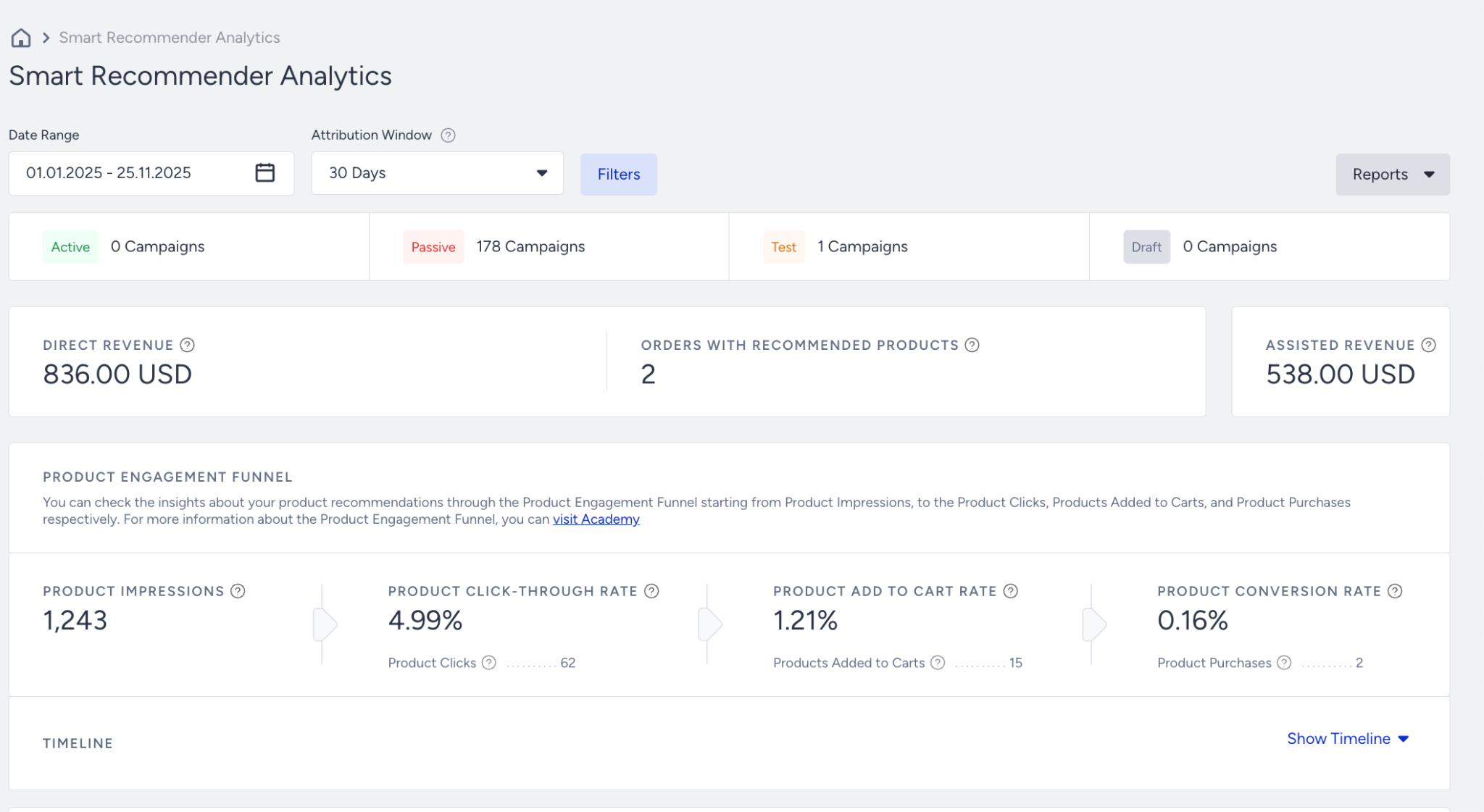
Direct Revenue
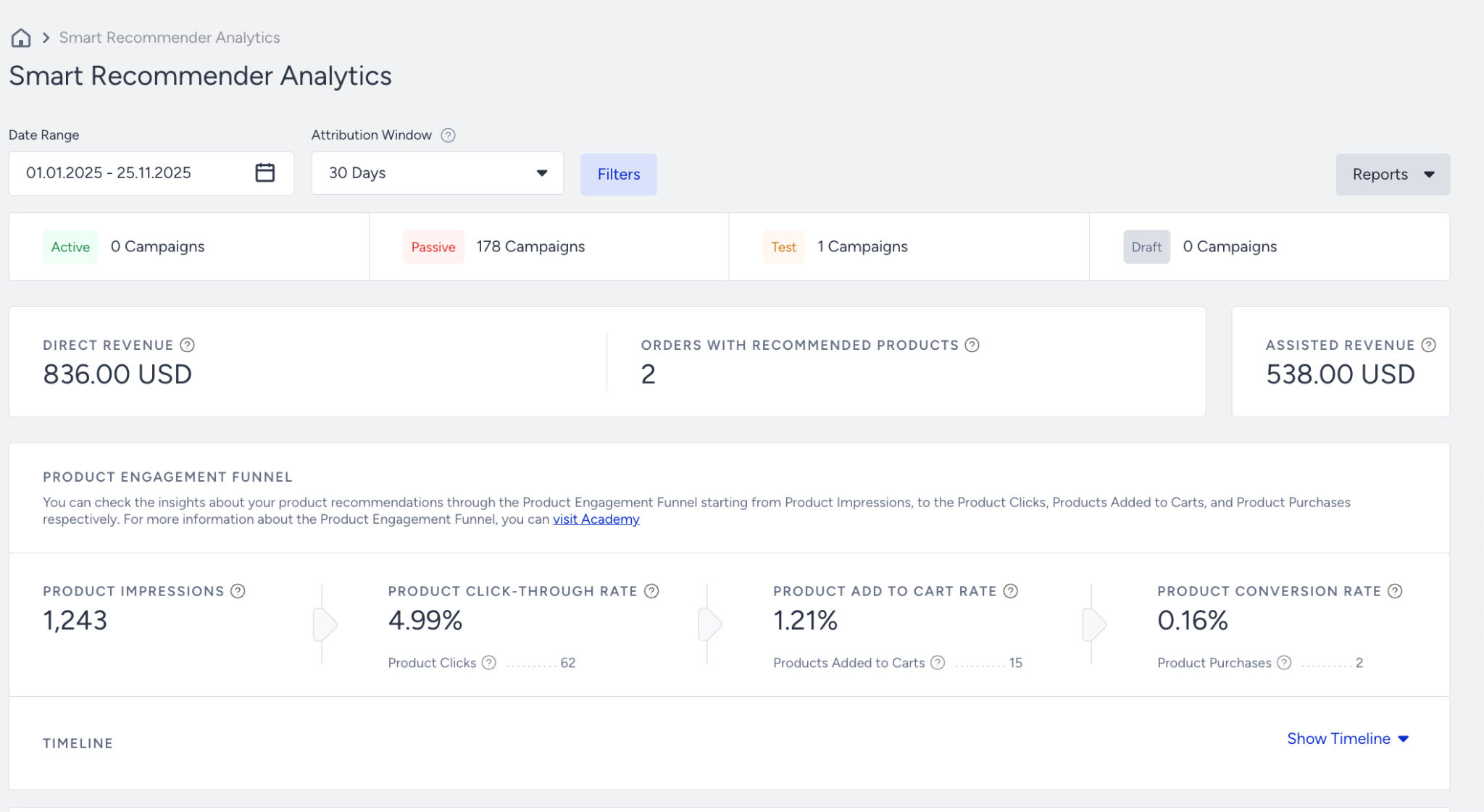
Where to find it: Smart Recommender Analytics (Recommendation Revenue & Product Performance)
Why it matters: Shows how much revenue is directly influenced by recommendations. Core indicator of whether SR placement and strategy are working.
What to watch for: Flat or declining revenue even with stable traffic and impressions; revenue inconsistent across widget types.
Actions to take: Move widgets to high-impact pages (PDP, PLP, Cart), test strategies (Trending, Personalized, Similar Items), fix missing catalog attributes, highlight high-converting product sets.
Benchmark: Look for consistent or increasing revenue as widgets mature.
Frequency: Weekly / Monthly
Example: Revenue from PDP widgets drops after a redesign → widget moved below the fold.
Orders with recommended products
Where to find it: Smart Recommender Analytics (Recommendation Revenue & Product Performance)
Why it matters: Measures how often users purchase recommended items. Reflects SR influence on basket size.
What to watch for: Low count or declining number of orders that include recommended products.
Actions to take: Improve widget placement, diversify strategies, personalize results, enable Add-to-Cart recommendations, and fix catalog mapping.
Benchmark: Growing % of orders containing SR items indicates strong influence.
Frequency: Weekly / Monthly
Example: Only 2% of orders include recommendations → likely poor placement or irrelevant strategy.
Product Conversion Rate
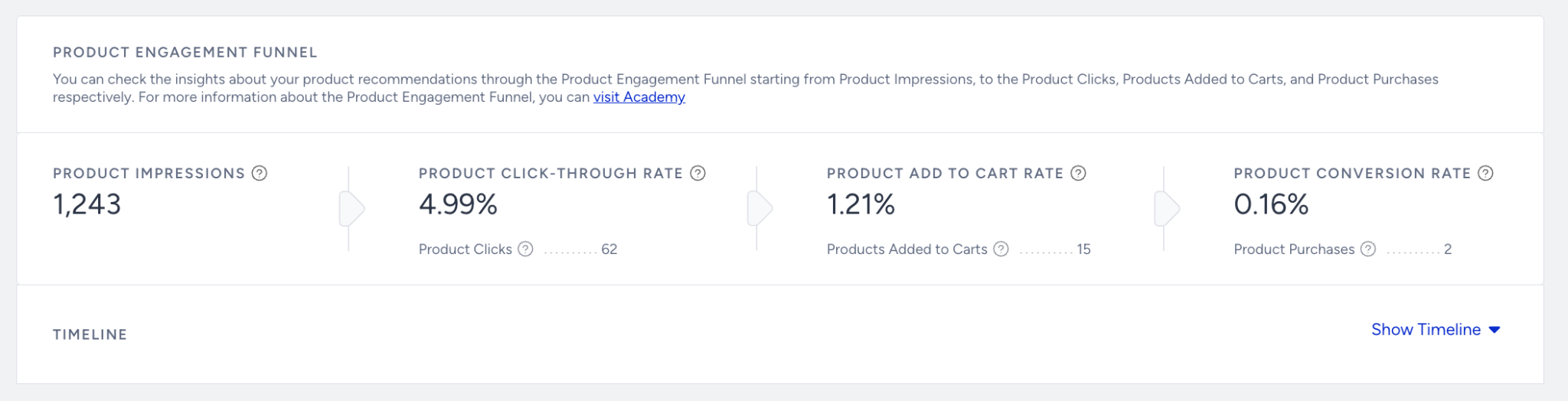
Where to find it: Smart Recommender Analytics (Recommendation Revenue & Product Performance)
Why it matters: % of impressions that led to a purchase. Shows how relevant the recommended products are to users.
What to watch for: Low or falling conversion = poor product relevance, missing data, or weak ranking strategy.
Actions to take: Use affinity or personalized strategies, clean catalog tags, adjust exclusions (e.g., out-of-stock products), test contextual placements (PDP/PLP).
Benchmark: No universal benchmark; track vs your historical trend.
Frequency: Weekly
Example: Conversion drops after adding a new category → category mapping incomplete.
Add to Cart Rate
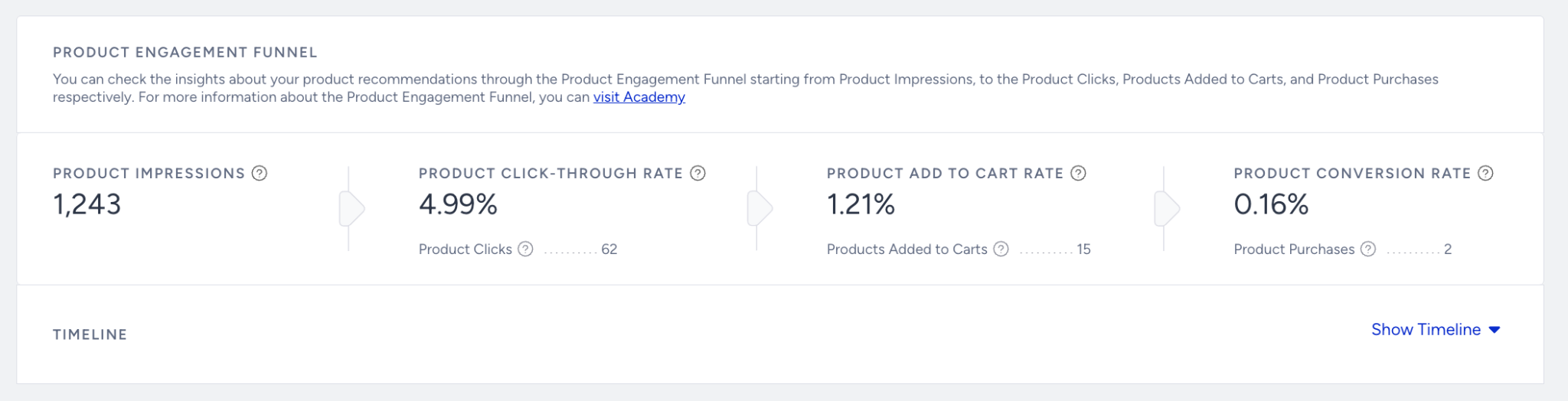
Where to find it: Smart Recommender Analytics (Recommendation Revenue & Product Performance)
Why it matters: % of users who add recommended items to cart. Strong signal of product interest.
What to watch for: Declining ATC rate indicates irrelevant products, unattractive widget design, or low-value offers.
Actions to take: Test new widget designs, improve product titles/images, use "Complete the Look," remove low-stock or low-performing products.
Benchmark: ATC rate should stay stable or increase as strategies improve.
Frequency: Weekly
Example: ATC rate falls after switching to a minimalist widget layout → design not compelling enough.
Product Impressions
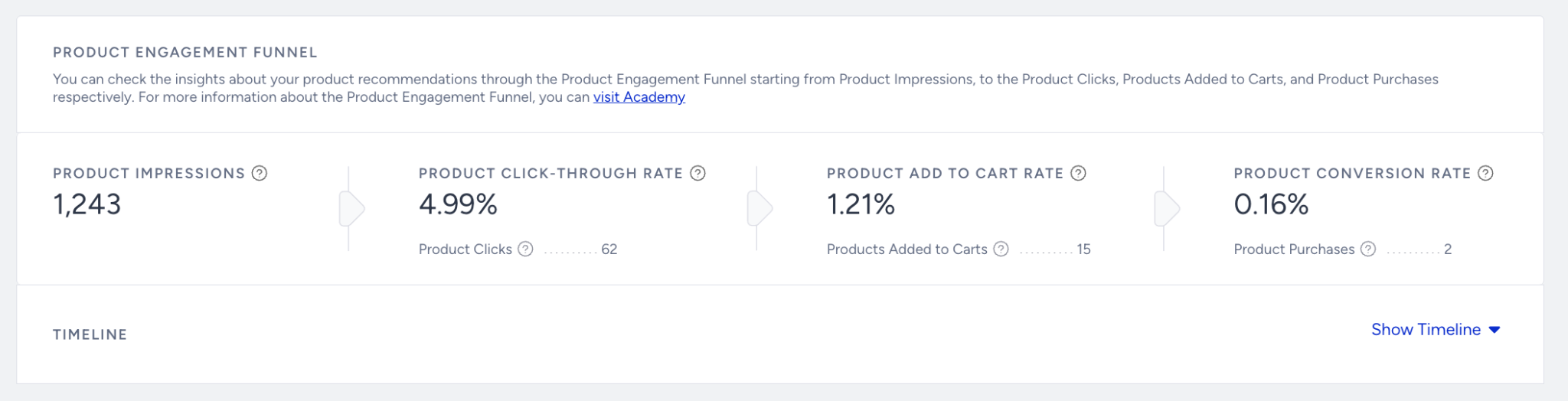
Where to find it: Smart Recommender Analytics (Recommendation Revenue & Product Performance)
Why it matters: Number of times recommended items were displayed. Dictates your potential reach.
What to watch for: Low impressions = widget hidden, placed too low, not loading, or targeting too narrow.
Actions to take: Move widgets above the fold, add widgets to additional pages (Home, PLP, Cart), broaden targeting, verify SR script loads correctly.
Benchmark: Focus on steady impressions, aligned to site traffic.
Frequency: Daily / Weekly
Example: PDP widget impressions drop after adding a sticky banner → page layout conflict.
Active Campaigns
Where to find it: Smart Recommender Analytics (Recommendation Revenue & Product Performance)
Why it matters: Shows how many SR widgets/placements are currently active. More coverage typically = more revenue impact.
What to watch for: Very few active placements → underutilization of SR; gaps in funnel coverage.
Actions to take: Add widgets to key funnel pages (Home, PLP, PDP, Cart), activate SR in Email and App channels, and expand cross-channel recommendations.
Benchmark: Most brands use multiple placements per funnel for maximum impact.
Frequency: Weekly
Example: Only one SR widget lives on PLP → many missed opportunities on PDP and Cart.
Top 1000 Product Analytics
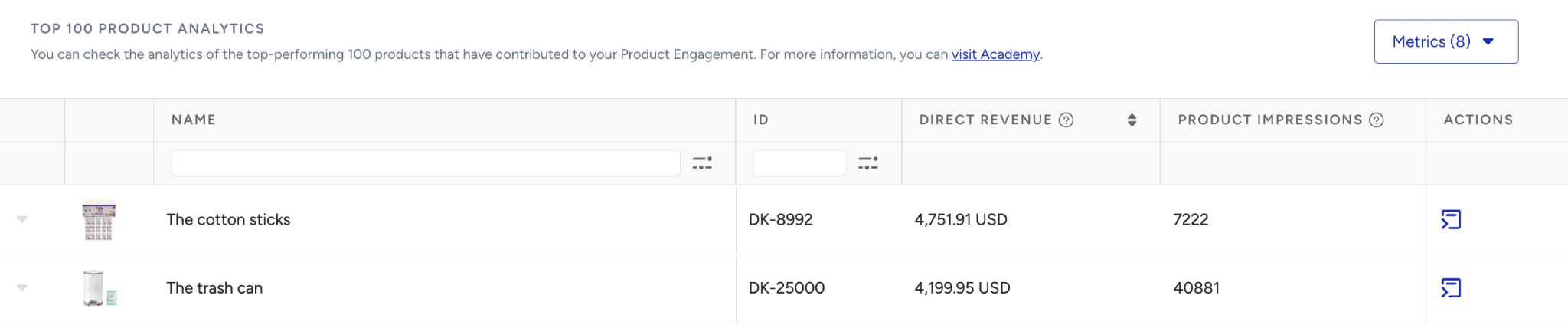
Where to find it: Smart Recommender Analytics (Recommendation Revenue & Product Performance)
Why it matters: Shows engagement and performance for your highest-traffic products. Identifies catalog issues and recommendation accuracy.
What to watch for: Missing attributes, poor images, incorrect categories → weak recommendation quality.
Actions to take: Optimize product feed (titles, categories, metadata), boost high performers, demote poor performers, add synonyms/cross-links, fix category mapping.
Benchmark: Cleaner catalog = higher relevance → higher CR and ATC rates.
Frequency: Monthly
Example: Top products show missing images → SR results become irrelevant → fix feed and category mapping.
Tip: If a number doesn't change immediately, expand the date range or compare with the previous period to validate performance trends.
Once you know what "good" looks like and how to read your numbers, the next step is making sure your foundation is solid.
Use this checklist to confirm that Smart Recommender is set up correctly before you chase more complex optimizations.
Troubleshooting scenarios
Use this section when you notice a specific issue, such as drops in engagement, revenue, or reach, and want a focused path to investigate and fix it.
Symptom | Likely Cause | What to Do |
|---|---|---|
No or low widget impressions | Placement not loaded or conditions too narrow | Check page integration, verify widget placement, and broaden targeting if overly restrictive. |
Widgets show irrelevant products | Poor catalog attributes or mismatched strategy | Review feed quality (categories, attributes), choose a better-fit recommendation strategy, and ensure exclusions are set (e.g., out of stock). |
Good impressions, low clicks | Widget design or position not compelling | Try more prominent placements, update design and copy, and A/B test widget layouts. |
Clicks but no conversions | Post-click experience not aligned | Make sure landing pages match the recommendation context and review conversion events in analytics. |
Once you've stabilized performance and fixed the obvious issues, you're ready to go beyond "working" to "working really well."
These best practices and tips are designed to help you get more value from Smart Recommender with the same or less effort.
Best practices & pro tips
These best practices and tips are designed to help you get more value from Smart Recommender with the same or less effort.
Map the journey end-to-end: Place recommendations across the funnel.
Segment customers by behavior and value for better relevance.
Continuously test: Compare algorithm types, product filters, and layout designs using A/B testing.
Define clear success metrics for each module.
Monitor for drop-offs and friction points, and adjust as needed.
Maintain clean data: Regularly check feed freshness, remove out-of-stock items, and audit catalog health and attribute mapping.
Use multi-channel orchestration for consistent personalization.
Compliance is key: Always ensure clear opt-out options and follow all platform guidelines.
FAQ & Troubleshooting
This FAQ covers the most common topics, so you don't have to guess.
Q: Why aren't my recommendations displaying?
A: Check feed integration, event tracking, placement, and visibility rules, and test in preview mode.
Q: Why is my CTR or conversion rate low?
A: Test different algorithms, adjust placement, optimize creative layout, and use A/B testing.
Q: How do I escalate a technical issue?
A: Gather logs/screenshots, confirm checklist items, and submit via Insider One Help Center.
If your question isn't covered here, or if you want to go deeper, there's more you can explore.
Additional resources
Use the resources below to continue learning, test more advanced strategies, or get extra help when you need it.
Bookmark this guide and revisit it whenever you launch new campaigns, review performance, or plan your next quarter with Smart Recommender.
Next Step:
Bookmark and return to this guide as needed. For inspiration across all Insider channels, explore the Use Case Library. This resource is best for gathering ideas, not for replacing strategic planning.