This guide provides an overview of how to use SMS to engage users, drive conversions, and build trust.
SMS enables you to communicate with customers directly on their mobile devices. It is well-suited for time-sensitive and high-priority messages, helping you deliver updates, prompt actions, and support your overall cross-channel strategy.
With SMS, you can:
Deliver messages that cut through the noise, open rates over 98%.
Personalize every interaction using dynamic fields and behavior-based triggers.
Automate engagement with Architect Journeys for real-time reminders and confirmations.
Build trust and visibility with the Two-Step Method (iOS 26) and Virtual Contact Cards (VCC).
Respect compliance and user experience with refined unsubscribe flows, Silent Hours, and country-specific rules.
Track measurable impact with SMS Analytics and UCD Event Logging.
Use this guide as a practical playbook:
Start with the fundamentals,
Move into quick wins and strategy,
End your journey with diagnostics and optimization.
What’s new? (2024–2025 highlights)
These updates shape how you’ll use SMS today, especially when it comes to performance and reporting.
Some features might require activation. For the latest updates, see the SMS What's New.
Feature/Update | Why It Matters | When to Use | Business Impact |
|---|---|---|---|
Instantly send predefined, on-brand SMS | Fast, compliant responses | Faster response, improved CX | |
Deeper visibility into opt-in/out trends | Scaling subscriber base, analyzing churn | Better segmentation, higher retention | |
Multiple unsubscribe methods, transparent feedback | Global audiences, high send volumes | Stronger compliance, improved trust | |
Brand name/logo in messages, saves to contacts | iOS 26 updates, brand visibility | Higher inbox placement, brand trust | |
Prevents delivery during sensitive hours | Global, multi-time-zone messaging | Reduced opt-outs, higher satisfaction | |
Lead Collection Templates for SMS & RCS (Two-Step SMS & Email Lead Collection Template) | “Known Sender” classification for iOS | iOS-heavy audiences | Higher deliverability, main-inbox placement |
Logs delivery events in UCD | Transactional SMS, analytics | Better data integrity, transparent reporting | |
SMS Multi-language Campaigns | Localized messaging, improved translation | International/regional campaigns | Higher engagement, relevance |
URL Shortener for SMS | Tracks clicks, saves space, and ensures attribution | All SMS with links | Improved CTR tracking, cleaner UX |
Prevents message fatigue | Recurring/triggered campaigns | Reduced opt-outs, higher retention | |
Improved SMS Analytics Dashboard (Send, Engagement & Opt-In Metrics) | Unified view of engagement, deliverability, revenue | All customers | Clearer insights, faster optimization |
Now, you can continue with revisiting what SMS can do and how the core pieces fit together in your InOne panel.
Core SMS capabilities
SMS is built around a few essential building blocks. Once you’re comfortable with these, every strategy in this guide will feel much easier to apply.
Key features
Sender Setup & Compliance: Register Sender ID, ensure opt-in compliance, set up unsubscribe flows, and validate country-specific rules. SMS Channel Setup
Integration & Infrastructure: Confirm API/webhook/tag integrations, Two-Step Method for iOS, and VCC setup. Refer to SMS Integration and Settings.
Message Composition & Personalization: Keep messages concise, use merge tags, add short links with UTM tracking, and always include a CTA and opt-out. Refer to SMS Content Guidelines.
Targeting, Triggers & Orchestration: Use predictive/RFM segments, trigger from Architect Journeys, set Silent Hours, and align with other channels. Refer to the Architect SMS.
Measurement & Optimization: Track sent, delivered, failed, click, conversion, and unsubscribe rates in SMS Analytics. Refer to SMS Analytics.
Frequency & Experience Management: Configure Frequency Capping, use Silent Hours, and monitor opt-out spikes. Refer to SMS Silent Hours.
How to apply
Validate Setup:
Register Sender ID, set up VCC, and enable Two-Step Method.
Confirm opt-in compliance and unsubscribe flows.
Integrate & Test:
Confirm API/webhook/tag integrations.
Test phone number formatting and carrier compatibility.
Launch & Optimize Campaigns:
Use Quick Response Templates for instant messaging.
Trigger SMS from Architect Journeys for real-time engagement.
Personalize content and optimize timing with Silent Hours and Frequency Capping.
Measure & Improve:
Monitor SMS Analytics and Subscriber Analytics (Audience Growth & Health) for delivery, clicks, conversions, and opt-outs.
Use A/B testing (via Architect) to refine content and timing.
Scale & Sustain:
Tie SMS metrics to business outcomes.
Share insights and celebrate wins during QBRs.
Expand best-performing templates and triggers to new segments.
With these core concepts in mind, you’re ready to put SMS to work, not just understand it.
Quick wins
If you want to see impact fast, start here. These quick wins take 10–30 minutes to implement and are designed to deliver visible results without heavy setup or cross-team dependencies.
Validate your Sender ID registration, opt-in compliance, and unsubscribe setup before launching campaigns.
Set up a Virtual Contact Card (VCC) to help recipients recognize and save your sender for better inbox placement.
Activate Lead Collection Templates for SMS & RCS | Two Step SMS & Email Lead Collection Template to ensure your messages appear under “Known Senders.”
Use Quick Response Templates for instant, on-brand messaging (e.g., confirmations, alerts, reminders).
Leverage Silent Hours and Frequency Capping to avoid intrusive or late-night messages.
Test message copy, timing, and CTA wording for continuous improvement (A/B testing available via Architect).
Keep SMS short and actionable (max 160 characters) with a clear CTA and opt-out link.
Use triggered SMS for abandoned cart recovery, order confirmations, and time-sensitive updates.
Monitor Subscriber Analytics (Audience Growth & Health) Page to track opt-in growth and retention.
Explore the Use Case Library for campaign inspiration by industry, channel, or goal.
Once you’ve tested one or two of these wins, you’ll have a baseline for how SMS performs in your environment.
To keep everyone aligned and move from “one-off experiments” to a shared plan, use these prompts with your team.
Team Conversation Starters
Use these conversation starters to help your team align on priorities, review performance, and identify the most impactful next steps with SMS.
Are our SMS sends aligned with high-intent moments?
Which segments convert best through SMS?
Are we balancing frequency to avoid audience fatigue?
Which templates need testing or refinement?
Are we using SMS where it drives the most ROI (e.g., reminders, alerts)?
What is our #1 business goal for SMS this quarter: engagement, reactivation, or conversions?
Where do we see the biggest drop-off in your SMS funnel, delivery, clicks, or conversions?
How are we currently segmenting your users? Should we explore predictive or RFM segmentation together?
Would we like to test a triggered SMS journey next, maybe tied to a cart or browse event?
These discussions will surface where you are today and what your team expects from SMS in the next 1–3 quarters.
Next, let’s connect SMS to the bigger picture: how it supports your growth, retention, and Ever Success goals.
Strategic Guidance: Connect SMS to your goals
Strategically, SMS works best when it supports a clear set of business outcomes rather than running as a standalone channel.
Set up for Success:
Validate integration, enable Two-Step Method, register Sender ID, set up VCC, and ensure opt-in/unsubscribe compliance.
Set Silent Hours to prevent delivery during restricted times.
Execute with Precision:
Launch Quick Response Templates for instant messaging.
Use triggered SMS for real-time journeys (cart, order, renewals).
Personalize content and optimize timing.
Optimize for Impact:
Monitor SMS Analytics and Subscriber Analytics (Audience Growth & Health).
Cross-check transactional events in UCD.
Refine segmentation and iterate on content.
Scale & Sustain:
Analyze results and tie SMS metrics to business outcomes.
Share insights and expand best practices to new segments or regions.
Once you’re clear on the role of SMS in your overall strategy, it’s time to tailor your approach to your current maturity level.
The playbook below helps you focus on the right actions based on where you are today, from early activation to advanced optimization.
Strategic Playbook by Stage
Use this table to choose your next steps by adoption stage. You do not have to do everything at once. Pick the row that matches your current reality and work from there.
Stage | Goal | Focus & Actions | What Success Looks Like |
|---|---|---|---|
Start Strong | Establish compliance and delivery readiness. |
|
|
Level Up | Increase personalization and expand impact. |
|
|
Get Back on Track | Manage cost and re-engage effectively. |
|
|
Optimize & Orchestrate | Make SMS a high-value conversion channel. |
|
|
As you move through these stages, your metrics will tell you whether your strategy is working or needs adjustment.
Now let’s look at the key metrics that matter for SMS, where to find them, and what to do when they are off.
SMS key metrics: Diagnose & take action
This guide explains how to monitor key SMS metrics, where to find them in your InOne panel, what they indicate, which changes to watch for, and what actions to take accordingly.
In this guide, dashboard names appear with a short description in parentheses to clarify what insights each view provides.
Sent

Where to find it: Overall SMS Analytics (Top Metrics)
Why it matters:
Shows total SMS messages attempted for delivery.
Confirms whether your campaign is reaching the intended audience.
What to watch for (decline / below benchmark):
Sudden drop in Sent count vs previous sends
Segment too small
Campaign paused
Frequency caps limiting sends
Actions to take / features to use:
Confirm campaign is Active
Verify segment size and filters
Check frequency caps
Confirm opt-in and consent sync
Benchmarks/ watch for:
No fixed target
Look for stable send volume relative to your list size
Frequency: Daily / Weekly
Example: A campaign normally sends to 20K users, but suddenly sends to only 5K → frequency caps or segment shrinkage
Dropped

Where to find it: Overall SMS Analytics (Top Metrics)
Why it matters: Messages rejected by carriers due to invalid numbers, formatting issues, or compliance problems.
What to watch for (decline / below benchmark):
Rising dropped count
List decay
Number formatting issues
Compliance problems
Actions to take / features to use:
Validate phone number formats
Ensure correct country codes
Regularly cleanse SMS lists
Confirm regulatory compliance
Benchmarks / watch for:
Keep dropped rate as low as possible
Spikes signal urgent list quality issues
Frequency: Weekly
Example: After importing a new CRM list, your dropped count triples → bad data quality
Delivered

Where to find it: Overall SMS Analytics (Top Metrics)
Why it matters:
Number of SMS successfully delivered to carriers/devices.
Indicates list quality and technical delivery health.
What to watch for (decline / below benchmark):
Decline in delivery
Invalid phone numbers
Blocked sender ID
Carrier filtering
Actions to take / features to use:
Clean invalid contacts
Check opt-in source
Validate sender ID
Avoid spam-like content (e.g., too many links)
Benchmarks/watch for:
Healthy programs typically see a high 90% delivery
Depends on the market
Frequency: Daily / Weekly
Example: Delivery drops from 97% to 85% after adding a new region → local carrier restrictions, or invalid formats
Click-through Rate

Where to find it: Overall SMS Analytics (Top Metrics)
Why it matters:
The percentage of delivered messages that generated a link click.
Shows how compelling your SMS content and CTA are.
What to watch for (decline / below benchmark):
CTR < 2–3% or drops after content changes
Weak CTA
Poor timing
Irrelevant content
Actions to take / features to use:
A/B test copy and CTAs
Add urgency (“ends today”)
Personalize offers
Target high-intent segments
Send closer to user behavior triggers
Benchmarks/watch for: Many teams aim for 2–5% CTR, depending on segment and offer
Frequency: Weekly
Example: CTR drops from 4% to 1% after removing personalization → restore personalized tokens
Conversion Rate

Where to find it: Overall SMS Analytics (Top Metrics)
Why it matters:
The percentage of users completing the defined conversion goal after clicking on an SMS.
Indicates total funnel quality.
What to watch for (decline / below benchmark):
Low conversion despite strong CTR
Landing page friction
Message/intent mismatch
Actions to take / features to use:
Improve landing page UX
Use deep links
Align messaging to page content
Optimize checkout flow
Target higher-value segments
Benchmarks/watch for:
Watch for conversion stability
Compare vs internal baselines and previous months
Frequency: Weekly
Example: CTR 4% but conversion 0.3% → landing page mismatch or checkout friction
Tip: If a metric does not change immediately, extend the date range or compare it with a previous period to evaluate performance trends.
Unsubscribers
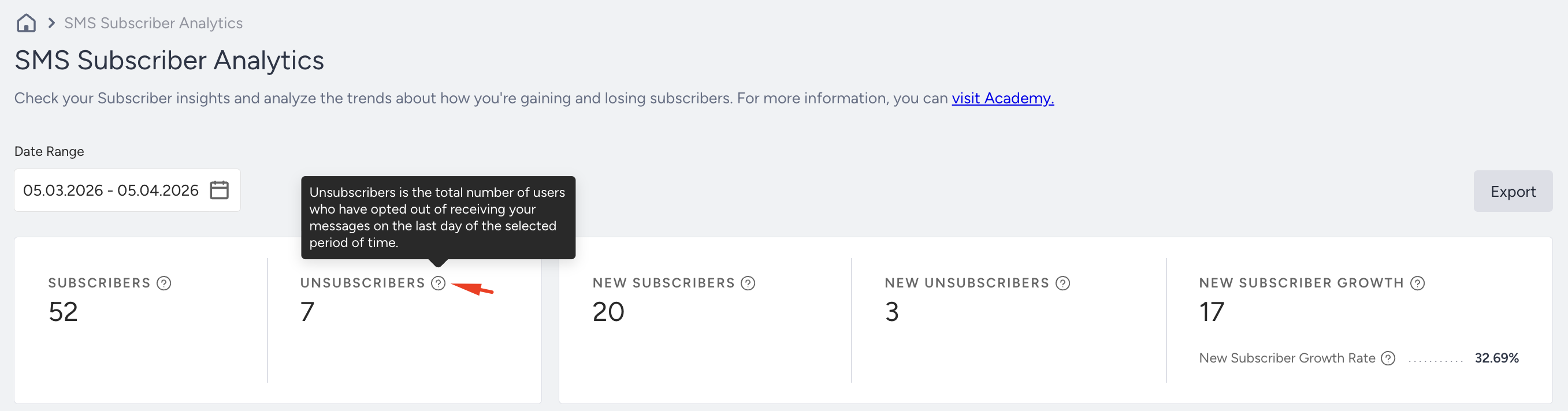
Where to find it: SMS Subscriber Analytics
Why it matters: Measures how quickly users opt out. Reflects audience fatigue, frequency issues, or low perceived value.
What to watch for (decline / below benchmark):
Spikes in unsubscribes after specific campaign types
Increased send frequency
Actions to take / features to use:
Reduce frequency
Personalize content
Use Preference Center (if enabled)
Rotate message themes
Avoid SMS for low-urgency communications
Benchmarks/watch for:
Keep unsubscribe rate low and stable
Spikes indicate relevance issues
Frequency: Weekly
Example: Users unsubscribe after 3 SMS in one week → frequency is too high for SMS
New Subscriber Growth
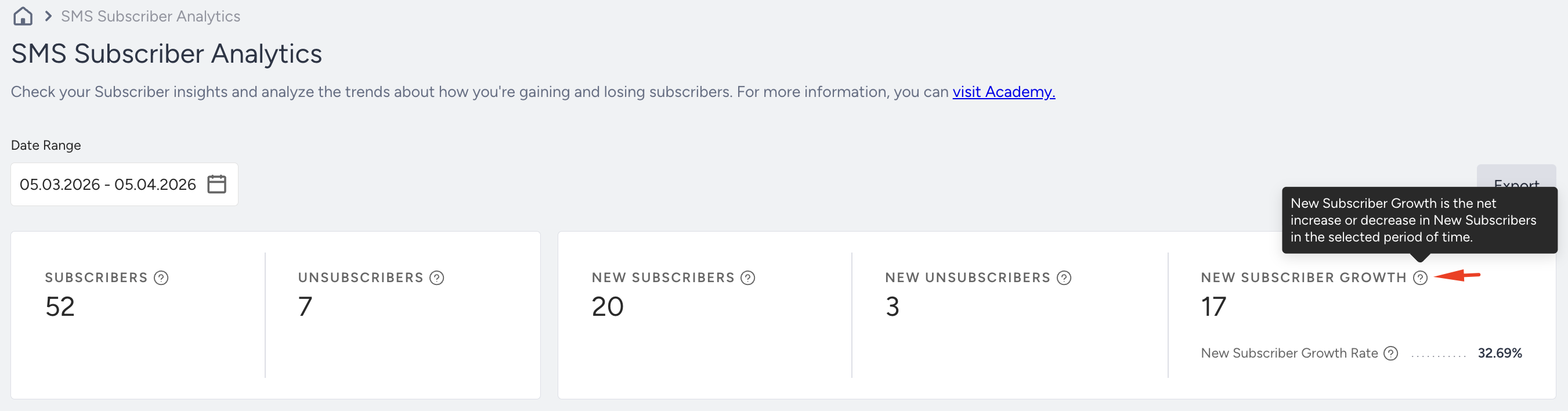
Where to find it: SMS Subscriber Analytics
Why it matters: Tracks how fast your SMS list is growing. Essential for long-term channel scalability.
What to watch for (decline / below benchmark):
Slow subscriber growth
Weak opt-in placement
Outdated signup flow
No incentive to subscribe
Actions to take / features to use:
Add SMS opt-in to signup flows
Use onsite lead generation templates
Run SMS-only offers
Promote the value of alerts (order updates, VIP deals)
Benchmarks/watch for:
Watch for steady upward growth, especially after promotions
Frequency: Weekly / Monthly
Example: Adding SMS opt-in at checkout increases subscriber growth rate by +40% week-over-week
Once you understand expected performance and how to interpret your metrics, the next step is to ensure your setup is configured correctly.
Troubleshooting Scenarios
Use this section when you notice a specific issue, such as drops in engagement, revenue, or reach, and want a focused path to investigate and resolve it.
Symptom | Likely Cause | What to do |
|---|---|---|
Delivery failures increase | Carrier filtering or invalid numbers | Review SMS delivery reports, clean invalid numbers, and ensure content complies with local regulations. |
CTR is low | Messages not relevant or poorly timed | Use more targeted segments, send closer to high-intent events (e.g., cart, shipment), and test message length and framing. |
Opt-outs spike | Over-sending or poor value | Reduce frequency, ensure each SMS has clear value, avoid repeating the same promotion, and make opt-out clear but not accidental. |
Costs rise without performance | Sending to broad, low-intent audiences | Focus on high-intent segments (e.g., recent purchasers, high RFM), and shift low-intent content to cheaper channels (e.g., email). |
Once you stabilize performance and resolve the main issues, you can focus on improving results further.
These best practices and tips help you get more value from SMS with the same or less effort.
Best Practices & Pro Tips
You do not need to apply every tip at once. Treat this section as an idea bank and use what aligns with your goals and capacity.
Segmentation: Use predictive or RFM segments to improve relevance.
Timing: Respect user experience with Silent Hours, frequency capping, and timezone-based scheduling.
Visibility: Improve deliverability by setting up VCCs and the Two-Step Method.
Compliance & Trust: Use double opt-in to improve list quality and compliance. Keep opt-in and unsubscribe flows transparent, communicate privacy clearly, and monitor opt-in and opt-out trends weekly in Subscriber Analytics (Audience Growth & Health).
Messaging: Use short, actionable messages with clear CTAs and opt-out links.
Analytics: Track outcomes using SMS Analytics and UCD Event Logs.
Omnichannel: Integrate SMS with email, push, and WhatsApp for a consistent and broader journey.
As you apply these practices, you may encounter recurring questions similar to those faced by other teams.
Additional Resources
Use the resources below to continue learning, test more advanced strategies, or get extra help when you need it.