Please note that data for New Subscribers, New Unsubscribers, and New Subscriber Growth is available only after April 9, 2025, as the tracking feature was introduced on this date.
SMS Subscriber Analytics helps you track and analyze the number of subscribers engaging with your SMS campaigns. You can track these numbers to see growth and create more effective campaigns to gain more users and grow your subscriber base.
To reach the dashboard,
Navigate to Reports > SMS Analytics > SMS Subscriber Analytics.
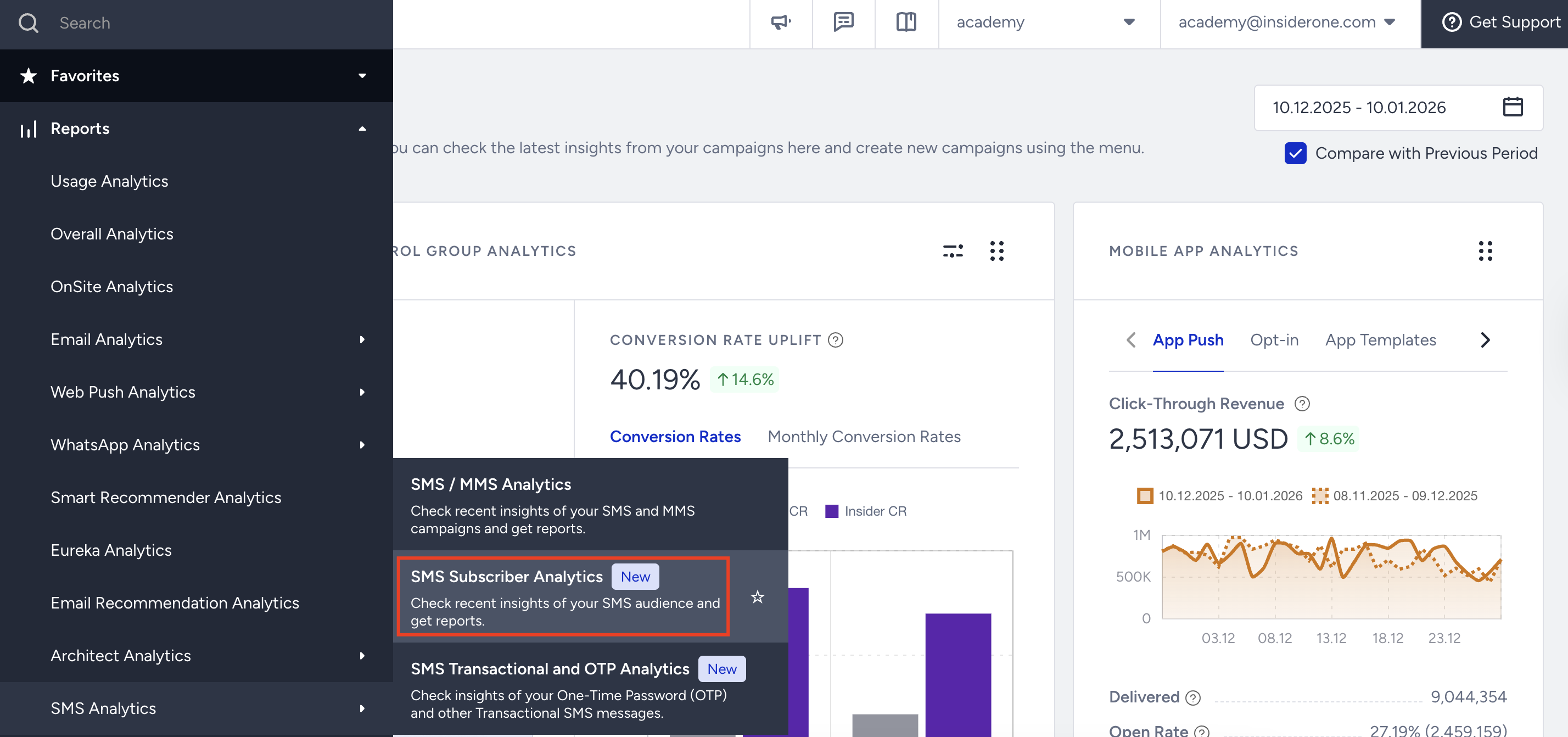
To filter the performance metrics, use the date picker at the top left corner of the page to select a time range.
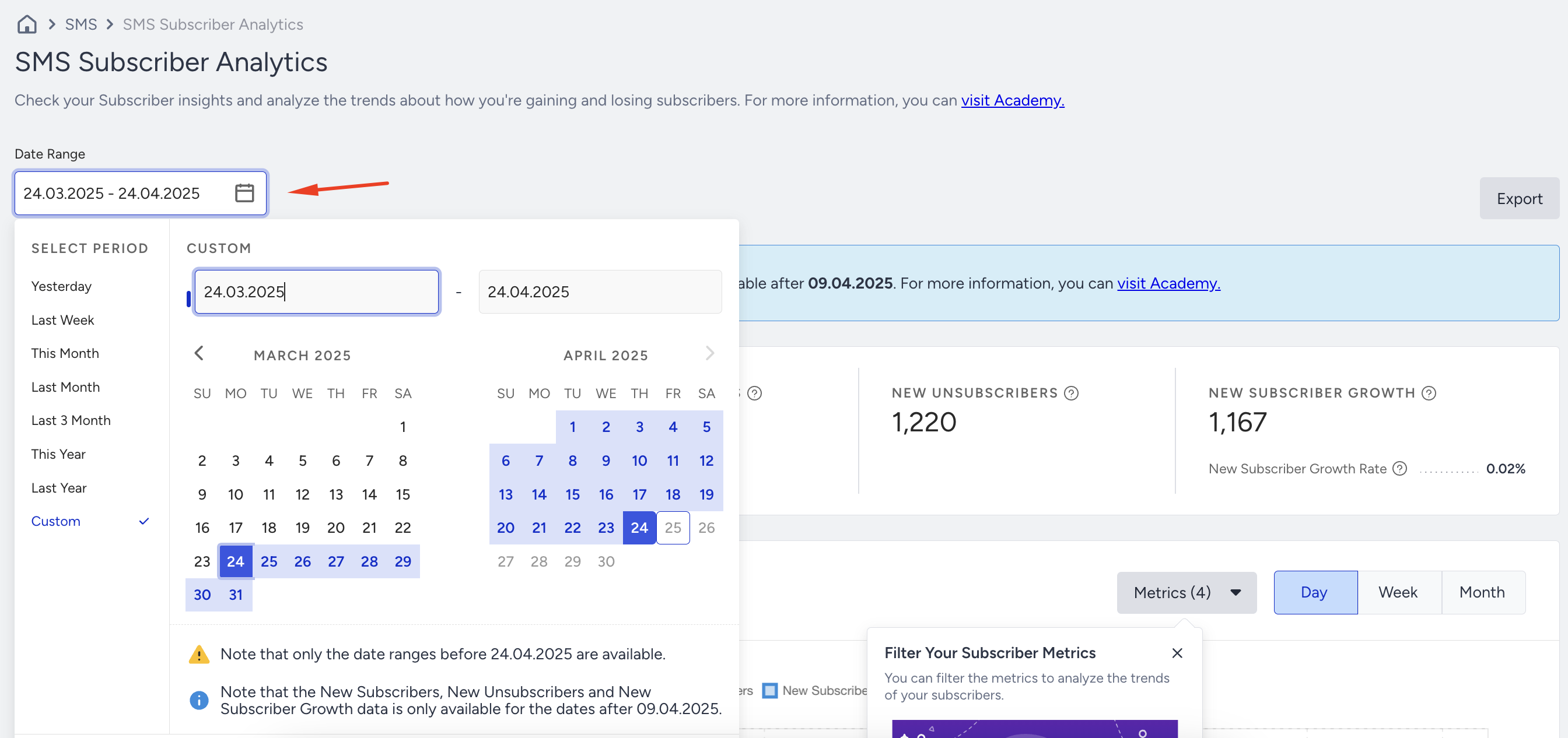
Based on your selection, the dashboard displays the following metrics:

Subscribers: The total number of users who have opted in to receive your messages and are reachable on the last day of the selected period of time.
Unsubscribers: The total number of users who have opted out of receiving your messages on the last day of the selected period of time.
New Subscribers: The number of new users who opted in to receive your messages and became reachable in the selected period.
New Unsubscribers: The number of new users who opted out of receiving your messages in the selected period.
New Subscriber Growth: The net increase or decrease in New Subscribers in the selected period.
New Subscriber Growth Rate: The percentage of the New Subscriber Growth to the Subscribers in the selected period.
Subscriber & Reachable: A user is considered a Subscriber & Reachable when they have a valid phone number, have agreed to receive SMS messages, have not unsubscribed, and have given proper GDPR consent. The system also confirms that the phone number is valid and active.
In parametric terms:
The phone number field is filled.
SMS opt-in is true,
SMS opt-out is false,
The phone number is marked as valid by the system.
GDPR consent is not false.
These users are considered reachable and eligible to receive SMS messages.
Unsubscriber: An Unsubscriber is a user who has not given permission to receive SMS messages or has chosen to unsubscribe. If the user’s phone number is saved in the system, they won’t be considered reachable and will not receive any SMS messages.
In parametric terms:
SMS opt-in is false, or
SMS opt-out is true,
The phone number field is not empty.
Such users are excluded from the reachable audience.
Subscriber Insights
The chart section provides visual representations of subscriber trends. You can view line charts displaying net growth for Subscribers, Unsubscribers, New Subscribers, and New Unsubscribers based on your selected time range.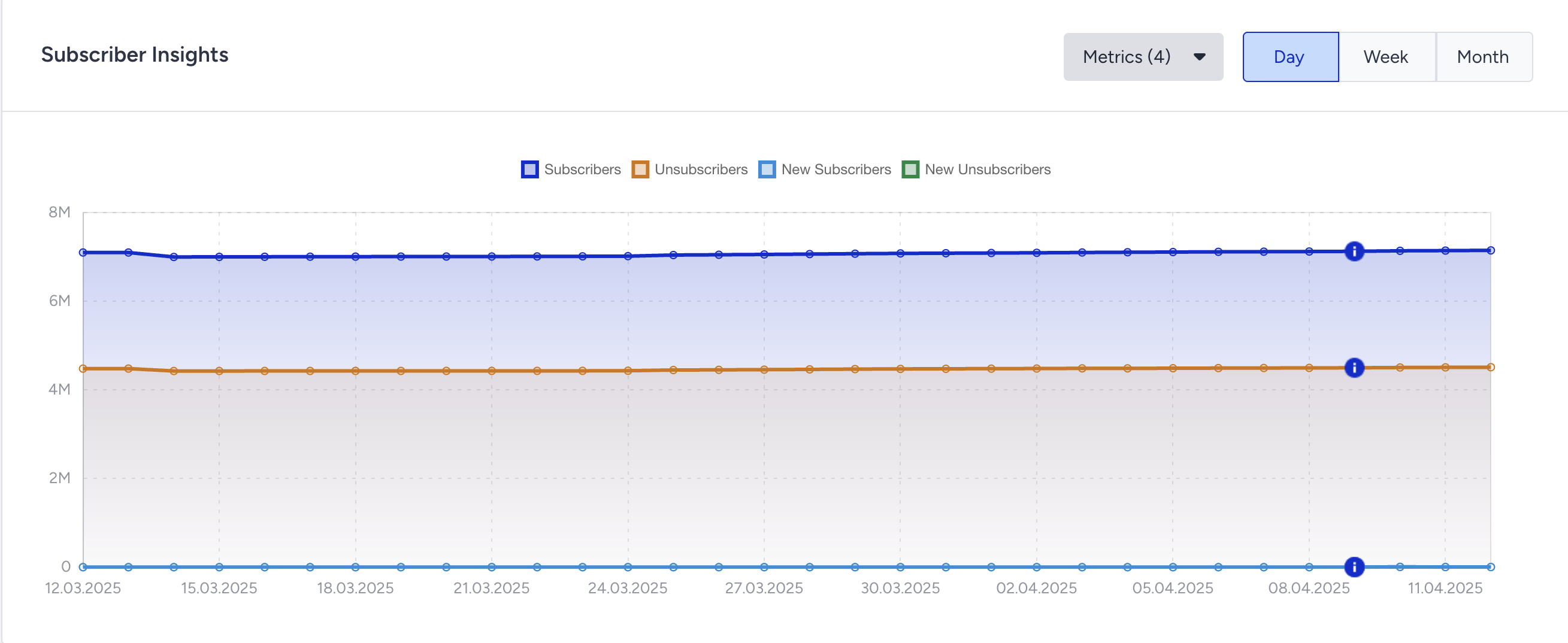
You can filter the metrics to analyze the trends of your subscribers.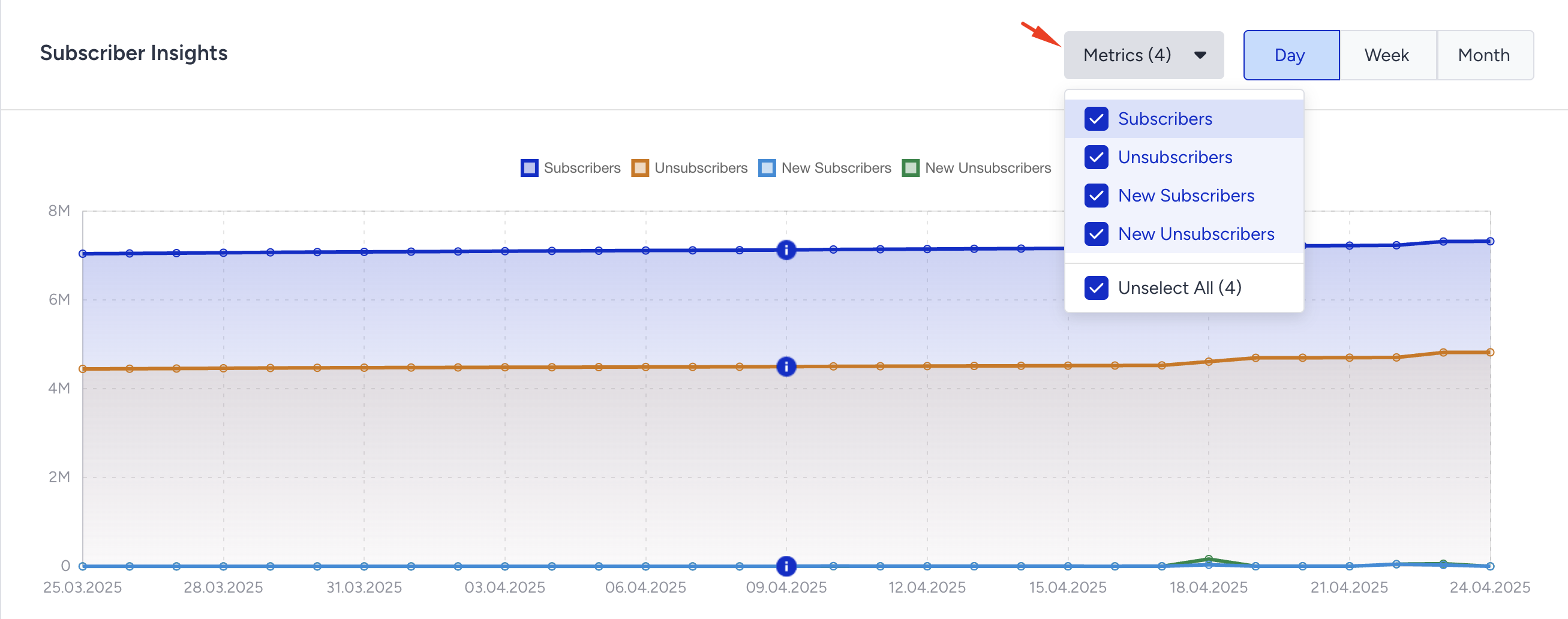
New Subscriber Growth
This chart helps you track changes in your New Subscriber Growth over time.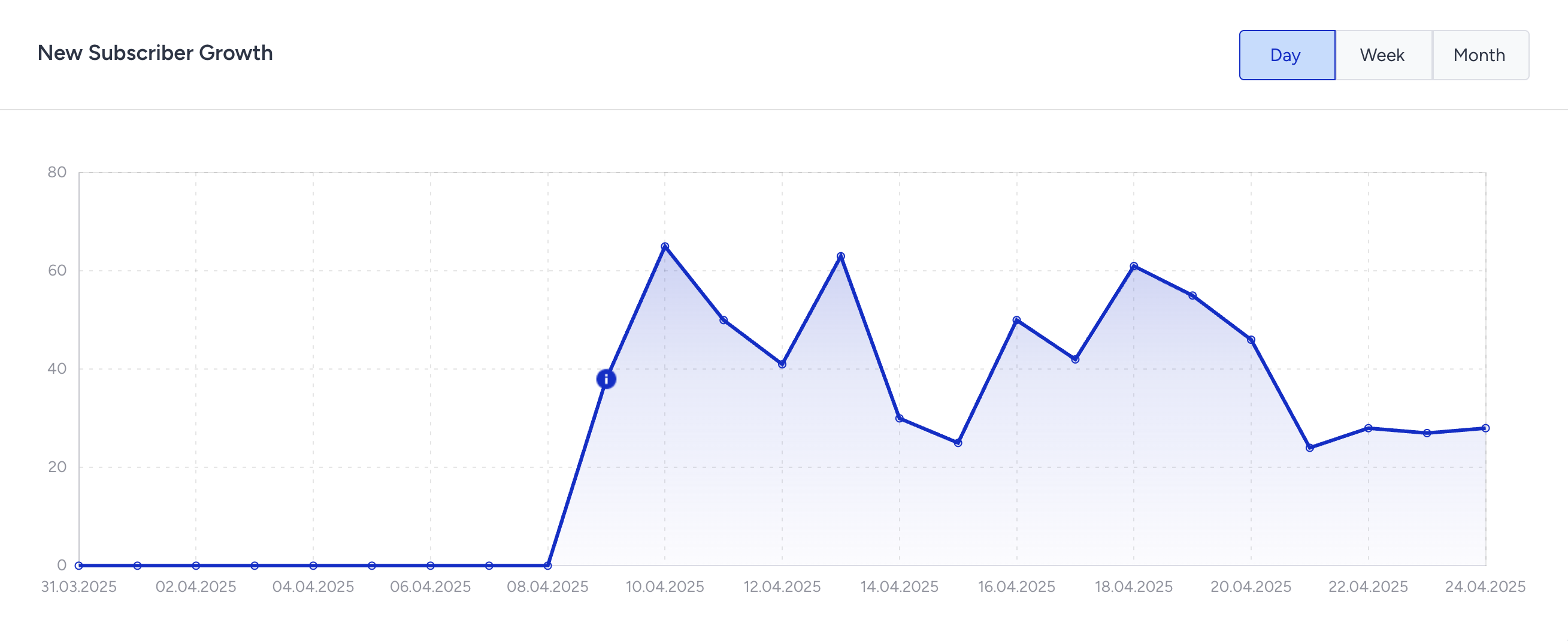
New Subscribers and Unsubscribers by Source
These charts show where and how users subscribe or unsubscribe, helping you understand which channels contribute most to your audience growth.
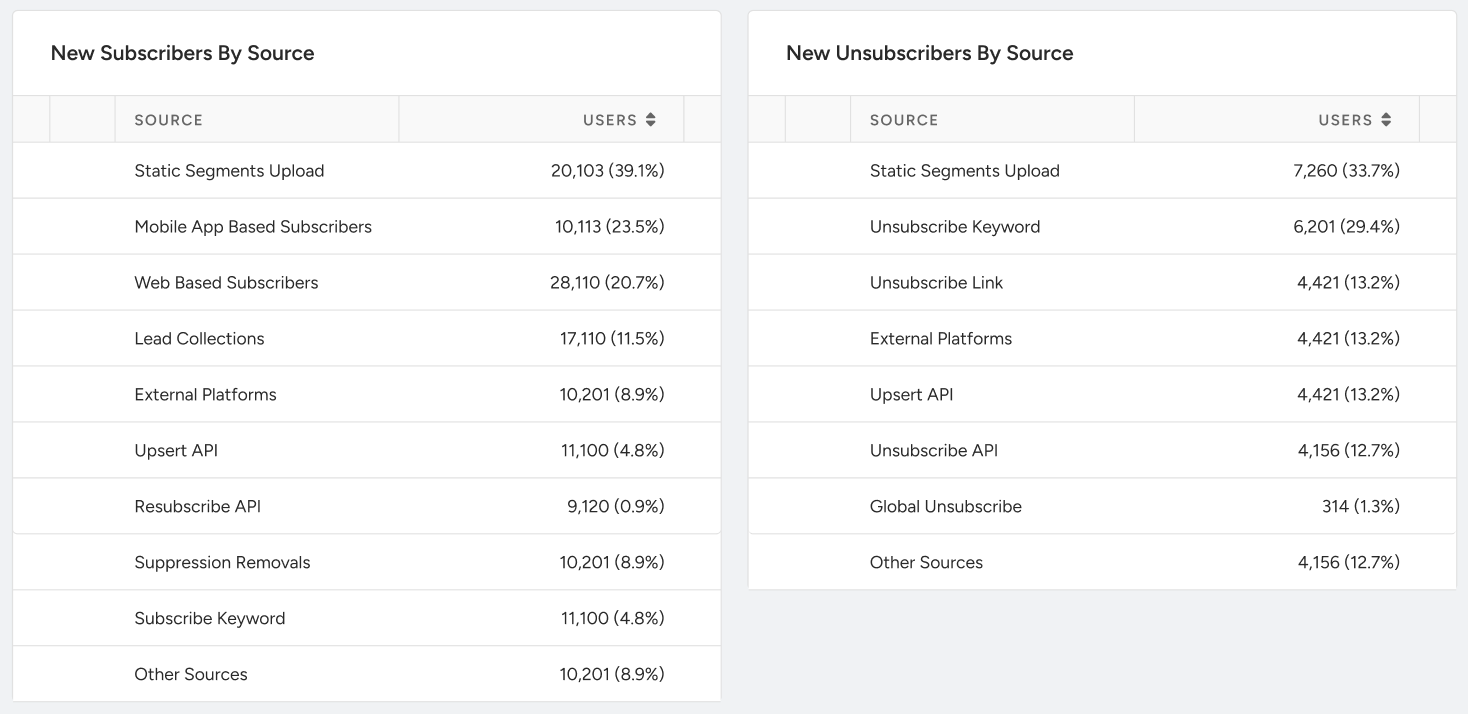
New Subscribers by Source
This section provides a breakdown of where your new SMS subscribers are coming from. Understanding which sources contribute the most helps you focus on the most effective acquisition channels.
Static Segments Upload: The number (and percentage) of New Subscribers who got subscribed via a Static Segment or a Contact List upload.
Mobile App-Based Subscribers: The number (and percentage) of New Subscribers who subscribed via Mobile App SDK integrations.
Web-Based Subscribers: The number (and percentage) of New Subscribers who subscribed via Web SDK or IO integrations.
Lead Collections: The number (and percentage) of New Subscribers who subscribed via Lead Collection campaigns.
External Platforms: The number (and percentage) of New Subscribers who subscribed to other integrations.
Upsert API: The number (and percentage) of New Subscribers who subscribed via the Upsert API.
Resubscribe API: The number (and percentage) of New Subscribers who subscribed via the Resubscribe API.
Suppression Removals: The number (and percentage) of New Subscribers who got subscribed by removal from suppression.
Subscribe Keyword: The number (and percentage) of New Subscribers who subscribed via Subscribe Keyword.
Other Sources: The number (and percentage) of New subscribers who subscribed via various other sources.
New Unsubscribers by Source
This section shows how users unsubscribe from your SMS campaigns. The metrics below enable you to identify which sources are most responsible for unsubscribes, allowing you to take targeted action to improve retention.
Static Segments Upload: The number (and percentage) of New Unsubscribers who unsubscribed via a Static Segment or a Contact List upload.
Unsubscribe Keyword: The number (and percentage) of New Unsubscribers who unsubscribed via Unsubscribe Keyword.
Unsubscribe Link: The number (and percentage) of New Unsubscribers who unsubscribed via the Unsubscribe Link.
External Platforms: The number (and percentage) of New Unsubscribers who unsubscribed from other integrations.
Upsert API: The number (and percentage) of New Subscribers who subscribed via the Upsert API.
Unsubscribe API: The number (and percentage) of New Subscribers who subscribed via the Unsubscribe API.
Global Unsubscribe: The number (or percentage) of New Unsubscribers who got unsubscribed via an uploaded Unsubscribe List.
Mobile App-Based Unsubscribers: The number (and percentage) of New Unsubscribers who unsubscribed via Mobile App SDK integrations.
Web-Based Unsubscribers: The number (and percentage) of New Unsubscribers who unsubscribed via Web SDK or IO integrations.
Other Sources: The number (and percentage) of New Unsubscribers who unsubscribed via various other sources.
If the data displayed in the Mobile App-Based Unsubscribers section does not meet your expectations or appears inconsistent, please review your integration setup and contact the Insider One team.
Factors Affecting Subscriber Metrics
You might notice discrepancies between the Total Subscribers and Total Unsubscribers compared to the net values shown under New Subscribers and New Unsubscribers. The following factors explain these differences:
Data update frequency: The numbers for New Subscribers, New Unsubscribers, and their associated sources are updated in real-time on the dashboard. However, Total Subscribers and Total Unsubscribers are calculated and updated once daily.
Unified Customer Database (UCD) endpoint deletion: If a user is deleted via Insider One’s Unified Customer Database API (UCD), their data is removed from all systems. Since the user no longer exists, they cannot be attributed to a specific source and are not included in New Subscriber or New Unsubscriber metrics. These users are removed from the Total Subscribers count, but the Total Unsubscribers count remains unaffected.
Inactive user cleanup: If a user profile hasn’t been updated in the last 12 months, it is automatically deleted along with all related data. These removals do not affect real-time New Unsubscriber, New Subscriber, or Source data. These users are removed from Total Subscribers, but Total Unsubscribers remains unchanged.
Phone number identifier requirement: If phone numbers are not defined as identifiers and a keyword is used for opt-out management, the related data cannot be displayed in the Sources section. However, the Total Unsubscribers is accurately displayed on the dashboard.