Insider One Email is your lifecycle marketing engine for delivering personalized, behavior-driven messages across the customer journey. Use Email to nurture, convert, and retain your audience, while protecting sender reputation and optimizing every campaign for impact.
With Insider One Email, you can:
Deliver personalized, behavior-driven messages from onboarding to reactivation.
Turn every inbox touchpoint into measurable revenue with dynamic content, predictive targeting, and triggered journeys.
Protect sender reputation and ensure inbox placement with strong deliverability and list hygiene.
Optimize campaigns continuously with A/B testing, Smart Delivery, and advanced analytics.
Align marketing and transactional messages for a seamless, trust-building customer experience.
In this guide, you’ll learn how to turn Email into a reliable driver of growth, engagement, and long-term customer value.
What’s new (2024–2025 Highlights)
Let’s start with what’s changed recently, so you’re working with the latest capabilities and not old assumptions.
Visibility depends on the products enabled in your contract. In addition, some features may require activation.
Feature/Update | Why It Matters | When to Use | Business Impact |
|---|---|---|---|
Fast, guided setup | New customers | Faster time-to-value, higher adoption | |
Optimized delivery timing | Low open rates | Boosts open rates, engagement | |
Personalization at scale | Diverse audiences | Increases relevance, engagement | |
1000+ premium templates | Design refresh, industry-specific needs | Faster creation, higher engagement | |
Modern UI, mobile design, real-time co-editing | Collaborative teams, mobile-first | Improved design, faster go-live | |
Centralized template management | Custom workflows, integrations | Streamlined ops, easier integrations | |
Edit once, sync everywhere | Brands with strict design consistency | Saves time, ensures consistency | |
Manage multiple locales, A/B test per locale | Global/multi-language campaigns | Higher relevance, better engagement | |
Send from dynamic addresses | Multiple sub-brands, reply-to needs | Personalization, improved deliverability | |
Restrict to trusted domains | Regulated industries | Reduces risk, ensures compliance | |
Gmail/Yahoo compliance | All senders, high-volume | Improves deliverability, reduces spam | |
Automated IP assignment | Enterprise, high-volume | Improves sender reputation, inbox placement | |
Consistent analytics | Need for accurate attribution | Accurate reporting | |
Growth/source breakdown | Acquisition, engagement tracking | Data-driven optimization | |
Up to 90-day conversion tracking | Long sales cycles | More accurate ROI measurement | |
Activity tracking, MPP handling | Refined targeting, troubleshooting | Smarter targeting, cleaner segments | |
Better user identification | Advanced tracking | Improved targeting, analytics | |
Events written to profiles | Behavioral triggers | Advanced journeys, segmentation | |
Dynamic content | Content-heavy/news brands | Keeps emails fresh, automates content | |
Custom unsubscribe links | Custom HTML needs | Compliance, improved UX | |
Warns for bot clicks | B2B, all senders | Reduces false unsubscribes | |
Reuse, notifications, segmentation | Frequent promotions | Efficient ops, better targeting | |
Dynamic, personalized blocks | Advanced personalization | Higher engagement, faster design |
These updates shape how you’ll use Email today, especially when it comes to performance and reporting.
Some features may require activation. For the latest updates, see the Email What's New.
Core Email capabilities
Email is built around a few essential building blocks. Once you’re comfortable with these, every strategy in this guide will feel much easier to apply.
Key features
Channel Setup & Authentication: Ensure SPF, DKIM, DMARC, and sender reputation are healthy.
Content & Templates: Use Drag-and-Drop or HTML editors, AMP for Email, and a rich template library.
Segmentation & Personalization: Target by behavior, lifecycle, or value. Personalize with attributes, events, and dynamic content.
Automations & Journeys: Trigger emails from Architect events (cart, browse, lifecycle).
Deliverability & Compliance: Monitor bounce, block, and complaint rates. Enable one-click unsubscribe and Preference Center.
Measurement & Optimization: Track opens, clicks, conversions, and revenue. Use A/B testing and multivariate tests.
List Growth & Hygiene: Enforce double opt-in, run regular list hygiene, and use the Preference Center.
How to apply
Validate setup:
Confirm SPF, DKIM, DMARC, and sender reputation.
Guide through IP warmup and sender management.
Grow subscribers:
Use double opt-in and Preference Center.
Launch welcome series and recurring campaigns.
Optimize content:
Use responsive templates and dynamic content.
Test subject lines, send times, and CTAs with A/B testing.
Monitor & troubleshoot:
Track deliverability signals and run list hygiene.
Use seed lists and placement tests for inbox issues.
Review & scale:
Measure open, click, and conversion rates.
Highlight incremental revenue and recommend cross-channel opportunities.
With these core concepts in mind, you’re ready to put Email to work.
Quick wins
If you want to see impact fast, start here. These quick wins take 10–30 minutes to implement and are designed to deliver visible results without heavy setup or cross-team dependencies.
Enable the Central Bounce Filter to instantly reduce invalid sends and improve deliverability.
Launch Segment-Based Send Time Optimization (STO) to lift open rates with zero extra content effort.
Encourage Preference Center adoption to reduce unsubscribes and give users more control.
Review your Deliverability Dashboard regularly to spot and resolve issues before they escalate.
Add a personalized banner or dynamic content to your next campaign to quickly boost CTR.
Once you’ve tested one or two of these wins, you’ll have a baseline for how Email performs in your environment.
To keep everyone aligned and move from “one-off experiments” to a shared plan, use these prompts with your team.
Team conversation starters
Use these conversation starters to help your team align on priorities, review performance, and identify the most impactful next steps with Email.
Which campaigns or automations drove the highest engagement last week?
Do we need to refresh any templates or subject lines?
Are we using segmentation effectively to reduce list fatigue?
Which journeys need optimization or cleanup?
What’s our next testing opportunity (timing, design, segmentation)?
What is our #1 goal for your email program this quarter, and how can we achieve faster time to ROI?
Where do we see the biggest drop-off in your email funnel (opens, clicks, conversions)?
How are we currently segmenting your email audience? Would you like to explore predictive or RFM segmentation to improve targeting?
Are we noticing different engagement patterns between mobile and desktop users?
Would we like to test new campaign ideas using the Email Wizard or Template Library?
Are we using the latest Mail Privacy Protection (MPP) and recipient activity features in your segmentation?
Are our campaigns set up with one-click unsubscribe and a dedicated IP for optimal deliverability?
Would we like to test dynamic sender addresses or global UTM tracking for better personalization and analytics?
Have we checked the Subscriber Analytics (Audience Growth & Health) Dashboard for recent trends or opportunities?
These discussions will surface where you are today and what your team expects from Email in the next 1–3 quarters.
Next, let’s connect Email to the bigger picture: how it supports your growth, retention, and Ever Success goals.
Strategic guidance: Connect Email to your goals
Strategically, Email works best when it supports a clear set of business outcomes, rather than running as a standalone channel.
Kickoff & onboarding:
Confirm setup and authentication.
Guide through IP warmup and sender reputation.
Use basic templates for fast ROI.
Grow subscribers:
Coach opt-in strategy and Preference Center.
Launch welcome series and recurring campaigns.
Optimize content:
Review templates for mobile readiness.
Test subject lines, send times, and CTAs.
Layer in personalization.
Monitor & troubleshoot:
Track deliverability signals and run list hygiene.
Use seed lists and placement tests.
Quarterly review:
Measure open, click, and conversion rates.
Highlight incremental revenue and cross-channel opportunities.
Iterate:
Refresh segments and creative.
Retire inactive subscribers to protect sender score.
Once you’re clear on the role of Email in your overall strategy, it’s time to tailor your approach to your current maturity level.
The playbook below helps you focus on the right actions based on where you are today, from early activation to advanced optimization.
Strategic playbook by stage
Use this table to choose your next steps by adoption stage. You don’t have to do everything at once. Pick the row that matches your current reality and work from there.
Stage | Goal | Focus & Actions | What Success Looks Like |
|---|---|---|---|
Start Strong | Build reliable email delivery + early engagement. | • Validate SPF/DKIM/DMARC. • Launch welcome & simple campaigns. • Use basic segments. • Test subject lines & CTAs. | • Strong deliverability. • Healthy initial open/click rates. • Stable technical setup. |
Level Up | Personalize + automate email flows. | • Add behavioral triggers. • Use predictive segments. • Build modular templates. • Run structured A/B tests. | • Rising CTR + CVR. • Automated flows outperform broadcasts. • Stronger incremental revenue. |
Get Back on Track | Improve deliverability + stabilize engagement. | • Audit bounce/spam rates. • Clean lists (sunset inactive users). • Simplify flows. • Refresh templates + value messaging. | • Improved open/click rates. • Lower bounce/spam rates. • Recovering flow performance. |
Optimize & Orchestrate | Build multi-channel email journeys. | • Integrate email with OnSite/Web Push/App triggers. • Build full-funnel Architect journeys. • Use dynamic content + recommendations .• Align to quarterly goals. | • Email drives consistent incremental impact. • Strong cross-channel attribution. • Scalable automated programs. |
As you move through these stages, your metrics will tell you whether your strategy is working or needs adjustment.
Now let’s look at the key metrics that matter for Email, where to find them, and what to do when they’re off.
Key metrics: Diagnose & take action
The table below turns each metric into a simple diagnostic: where to find it, why it matters, what red flags to watch for, and which actions to take inside your inOne panel.
About dashboard names
In these guides, dashboard names appear with a short description in parentheses to clarify what insights each view provides
Sent
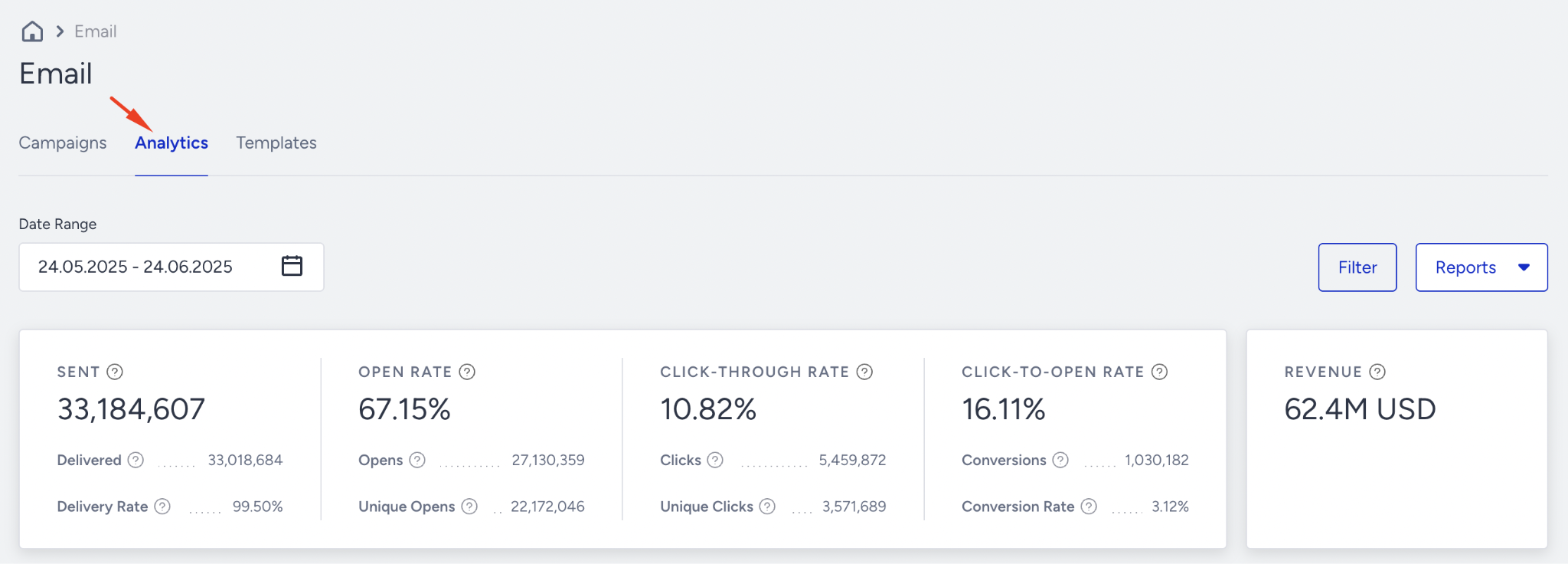
Where to find it: Email Analytics
Why it matters: Shows how many emails were attempted. Confirms audience size and sending volume.
What to watch for (decline / below benchmark): Sudden drop in “Sent” count compared to previous sends or similar campaigns.
Actions to take / features to use: Confirm campaign is Active; check segment size and filters; review frequency caps and send settings.
Benchmarks / watch for: No fixed %; watch for unexpected drops vs your normal sending volume.
Frequency: Daily / Weekly
Examples: A BAU newsletter usually sends to 80K but one week only 25K are sent → segment or filter change.
Delivered
.png)
Where to find it: Email Analytics
Why it matters: Emails that reached recipients (inbox or spam). Core signal of list quality and technical health.
What to watch for (decline / below benchmark): Decline in delivered while “Sent” stays similar; more blocks/bounces.
Actions to take / features to use: Clean inactive/invalid contacts; verify domain warm-up; monitor bounce reasons and resolve technical issues.
Benchmarks / watch for: Aim for >95% of Sent delivered for healthy programs.
Frequency: Daily / Weekly
Examples: Delivered drops from 97% to 90% after a big list upload → list hygiene issue.
Delivery rate
.png)
Where to find it: Email Analytics
Why it matters: % of sent emails that were successfully delivered. High-level deliverability indicator.
What to watch for (decline / below benchmark): Delivery Rate trending down over time or below normal baseline.
Actions to take / features to use: Remove invalid domains, fix SPF/DKIM/DMARC, pause sending to high-bounce segments, clean old lists.
Benchmarks / watch for: Many teams target >95% Delivery Rate.
Frequency: Weekly
Examples: After adding a new region, your Delivery Rate falls to 92% → check authentication and list source.
Open rate
.png)
Where to find it: Email Analytics
Why it matters: % of delivered emails opened. Reflects inbox placement + subject line effectiveness.
What to watch for (decline / below benchmark): Open Rate dropping across several campaigns; big change after sender name/subject line change.
Actions to take / features to use: A/B test subject lines and preview text; segment by engagement level; improve deliverability and reputation.
Benchmarks / watch for: Typical: 15–25%, varies by industry, list, and send type.
Frequency: Weekly
Examples: You change the sender name and Open Rate falls from 24% to 14% → revert or test alternatives.
Click rate
.png)
Where to find it: Email Analytics
Why it matters: % of delivered emails that got at least one click. Shows content relevance and CTA strength.
What to watch for (decline / below benchmark): CTR below your baseline; campaigns with good opens but weak clicks.
Actions to take / features to use: Test different CTAs, button placement, layout, and hero content; refine segmentation so content matches user intent.
Benchmarks / watch for: Many see 2–5% CTR as healthy, depending on vertical.
Frequency: Weekly
Examples: Your promo email gets 23% opens but only 1% CTR → content/CTA not strong enough.
Click-to-open rate (CTOR)
.png)
Where to find it: Email Analytics
Why it matters: % of openers who clicked. Pure measure of how engaging the content is after they open.
What to watch for (decline / below benchmark): CTOR <10% or suddenly lower vs similar campaigns.
Actions to take / features to use: Refresh copy and design; A/B test CTAs; ensure email and landing page promise match; reduce clutter and focus on one main action.
Benchmarks / watch for: Many teams aim for 10–20% CTOR depending on email type.
Frequency: Weekly
Examples: Two campaigns have similar opens, but one has CTOR 7% vs 18% → that email’s content/offer needs work.
Conversion rate
.png)
Where to find it: Email Analytics
Why it matters: % of users who completed the defined conversion goal (e.g., purchase, form submit).
What to watch for (decline / below benchmark): Low conversion despite good CTR; sudden drop after landing page or funnel changes.
Actions to take / features to use: Improve landing page UX, reduce steps, align offer with audience; use Predictive Segments to reach high-intent users.
Benchmarks / watch for: Track against your own historical performance; look for consistent improvement.
Frequency: Weekly
Examples: Email drives 3% CTR but conversions fall from 1.5% to 0.4% after a checkout redesign → fix friction there.
Revenue attributed
.png)
Where to find it: Email Analytics
Why it matters: Revenue generated or influenced by email campaigns. Shows real business impact.
What to watch for (decline / below benchmark): Flat or declining revenue even when engagement is strong (opens/clicks are healthy).
Actions to take / features to use: Validate conversion tracking events; target high-value or likely-to-purchase segments; promote best-sellers and proven offers; test incentives.
Benchmarks / watch for: Watch for steady or growing revenue trend relative to send volume.
Frequency: Weekly
Examples: Open & click rates are strong, but revenue is flat → likely tracking issue or weak offer.
Unsubscribe rate
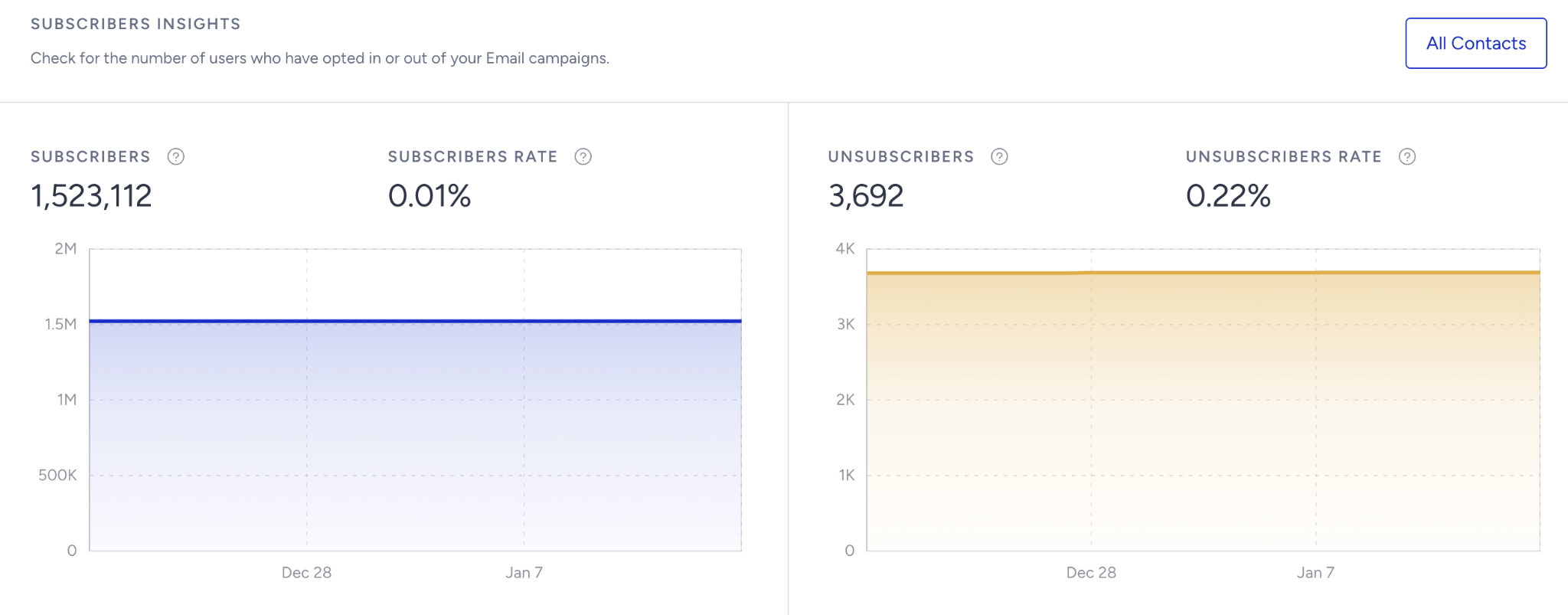
Where to find it: Email Subscriber Analytics (Audience Growth & Health)
Why it matters: % of recipients opting out. Indicates how relevant, valuable, and well-paced your emails are.
What to watch for (decline / below benchmark): Unsubscribe Rate > your normal levels, especially after certain content types or sends.
Actions to take / features to use: Reduce frequency; improve personalization and segmentation; clarify value in your copy; offer Preference Center for topic/frequency control.
Benchmarks / watch for: Many brands aim to keep <0.2–0.5% per send.
Frequency: Weekly
Examples: A promo series drives 1% unsubscribes vs usual 0.2% → too frequent or off-target content.
Bounce rate
.png)
Where to find it: Email Analytics
Why it matters: % of emails rejected by recipient servers (invalid addresses, mailbox full, etc.).
What to watch for (decline / below benchmark): Bounce Rate above normal or rising for specific lists or sources.
Actions to take / features to use: Remove invalid emails; use double opt-in; review list sources; check domain reputation and authentication.
Benchmarks / watch for: Try to stay <2% Bounce Rate.
Frequency: Weekly
Examples: You import a legacy list and bounce rate jumps to 6% → stop sending to that list and clean it.
Spam reports
.png)
Where to find it: Email Analytics
Why it matters: Number of recipients marking your email as spam. Critical for reputation with ISPs.
What to watch for (decline / below benchmark): Rising spam complaints, especially after specific campaigns or topics.
Actions to take / features to use: Reduce frequency; avoid misleading subject lines; send only to opted-in, engaged users; clarify why users receive your emails.
Benchmarks / watch for: Aim for as close to 0 as possible; spikes are a red flag.
Frequency: Weekly
Examples: A “flash sale” email with aggressive subject line gets more spam reports than normal → adjust tone and targeting.
Blocks
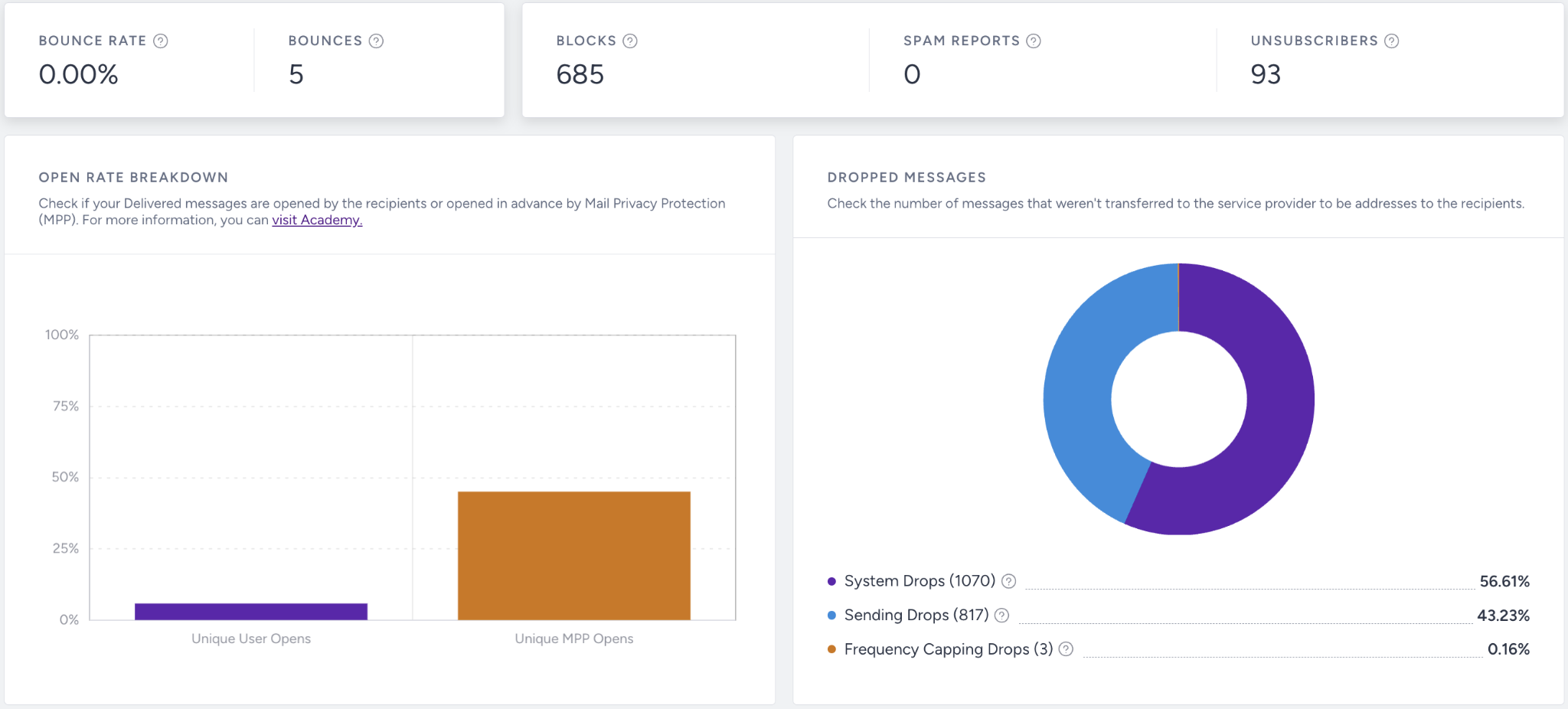
Where to find it: Email Analytics
Why it matters: Emails blocked due to provider rules (IP/domain reputation, content, or policy issues).
What to watch for (decline / below benchmark): Sudden spike in blocks for specific ISPs or geos.
Actions to take / features to use: Improve content quality; remove risky links; scale sending more gradually; review authentication and sending history.
Benchmarks / watch for: Any spike in blocks should be treated as urgent.
Frequency: Weekly
Examples: You see a block spike for a major mailbox provider → pause heavy sends to that ISP and review content + reputation.
If a number doesn’t change immediately, expand the date range or compare with the previous period to validate performance trends.
Once you know what “good” looks like and how to read your numbers, the next step is making sure your foundation is solid.
Use this checklist to confirm that Email is set up correctly before you chase more complex optimizations.
Health checklist: Email success to-do list
Run through these checks monthly or whenever performance shifts unexpectedly. A small misconfiguration can easily lead to a significant performance drop.
Maximize deliverability & list health
Warm up IPs and monitor sender reputation.
Enable Central Bounce Filter.
Enforce double opt-in.
Run regular list hygiene.
Test email headers.
Grow subscribers & engagement
Personalize subject lines & content.
Use segmentation and predictive segments.
Showcase value with Use Case Library examples.
Test new content types (GIFs, videos, AMP).
Use Recipients Activity for troubleshooting.
Reduce unsubscribes & spam
Promote upgraded Preference Center.
Audit frequency & content relevance.
Run spam tests before major sends.
Increase revenue from Email
Review revenue attribution in Analytics.
Launch high-impact flows (abandoned cart, personalized offers).
Expand targeting with Predictive and RFM Segments.
A/B test subject lines & offers.
Boost open & click rates
Optimize subject lines & preview text.
Test Smart Send for timing optimization.
Use dynamic content and countdowns.
Ensure all campaigns are mobile-optimized.
If something still doesn’t look right after you’ve reviewed the basics, it’s time to troubleshoot.
Here are common symptoms you might see in your analytics, along with practical steps you can take to resolve them.
Troubleshooting cases
Use this section when you notice a specific issue, like drops in engagement, revenue, or reach, and want a focused path to investigate and fix it.
Symptom | Likely Cause | What to Do |
|---|---|---|
Open rates drop | Deliverability problems or weak subject lines | Check bounce/spam metrics in Email Analytics, verify SPF/DKIM/DMARC, and A/B test subject lines + preview text. |
Click rates drop while opens are stable | Low-impact content or poor CTAs | Review the email layout, simplify the content, strengthen CTAs, and test different visual hierarchies or button placements. |
Spam complaints increase | Misaligned expectations or send frequency too high | Review signup journeys, clarify expectations, reduce frequency, and avoid sending to long-inactive users. |
Revenue flat despite strong engagement | Not targeting high-intent or high-value segments | Create focused campaigns using RFM or Predictive Segments, feature stronger offers, and highlight best-selling products. |
Too many hard bounces | Old or low-quality list | Clean your list, stop emailing invalid domains, and use engagement-based segments for future sends. |
Once you’ve stabilized performance and fixed the obvious issues, you’re ready to go beyond “working” to “working really well.”
These best practices and tips are designed to help you get more value from Email with the same or less effort.
Best practices & pro tips
You don’t need to adopt every tip at once. Treat this section as an idea bank and apply ideas that match your goals and capacity.
Always align date filters in reporting before sharing results.
Use the latest responsive templates for mobile-friendly campaigns.
Apply UTMs for consistent attribution.
Enable List Unsubscribe and Preference Center to improve trust and retention.
Lean on advanced segmentation (predictive, recipient activity, RFM) to stay relevant.
Review Subscriber Analytics (Audience Growth & Health), Email Analytics Dashboard, and deliverability metrics on a weekly basis to spot risks early.
FAQ
This FAQ covers the most common topics, so you don’t have to guess.
Q: Why don’t numbers match between dashboards?
A: Align date ranges and filters. See metric notes for details.
Q: How do we track campaign performance?
A: Use UTM tracking and monitor the Subscriber Analytics (Audience Growth & Health) Dashboard.
Q: Open rates dropped suddenly. What should we do?
A: Run the Deliverability & Engagement Checklist.
Q: How do we fix a high bounce or block rate?
A: Enable Central Bounce Filter, validate list quality, check DNS/blacklists.
Q: How do we comply with Gmail/Yahoo sender requirements?
A: Enable one-click List Unsubscribe, use the Preference Center, and authenticate domains.
Q: What’s the best way to boost open rates?
A: Use Segment-Based Send Time Optimization, personalize subject lines, and A/B test send times.
Q: How do we manage unsubscribes & preferences?
A: Enable the upgraded Preference Center.
Additional resources
Use the resources below to continue learning, test more advanced strategies, or get extra help when you need it.
Bookmark this guide and revisit it whenever you launch new campaigns, review performance, or plan your next quarter with Email.
Save and return to this guide as needed. For inspiration across all Insider channels, explore the Use Case Library. This resource is best for gathering ideas, not for replacing strategic planning.