A conversion refers to any desired action a user takes in response to a marketing effort. It represents the moment when a user completes a specific goal defined by the marketer. Conversions can vary depending on the business objectives and the marketing strategy in place. They indicate how effectively marketing efforts achieve business goals. Businesses can track and optimize for conversion to improve ROI (return on investment), better understand customer behavior, and refine their marketing strategies to meet specific objectives.
When a user engages with any of the messages sent through a journey and performs this desired action, it is called a conversion and attributed to the channel the user last interacted with. This desired action is defined at the Launch step of the journey and called Conversion Goal or Journey Goal.
This guide explains the following concepts:
Conversation Goal Selection
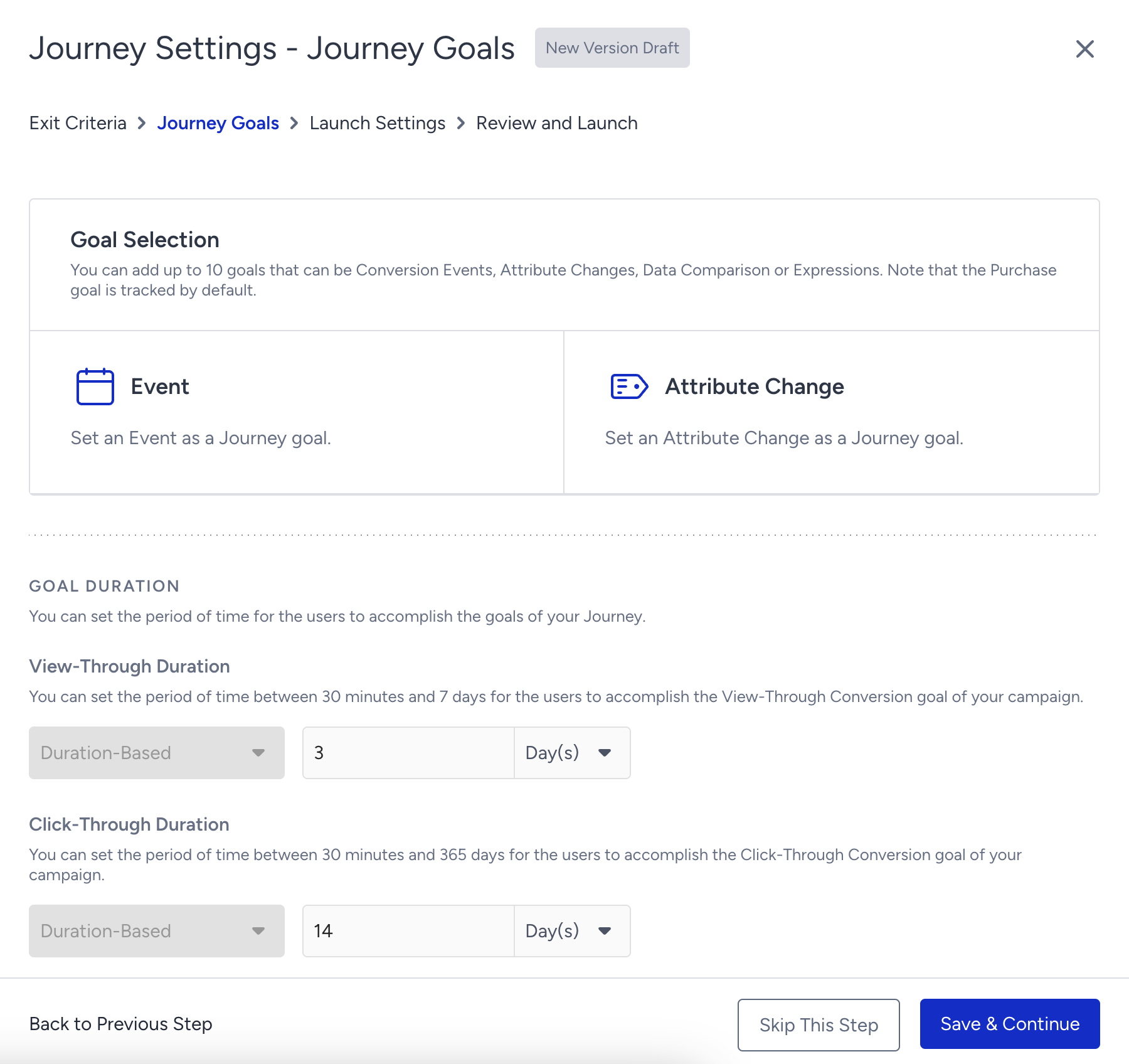
You can define the desired goal you expect users to perform after receiving a message through the journey. Goals can be defined via events or attribute changes. They can be from any source (web, app, or Upsert User Data API), and can be default or custom.
The purchase activity is tracked by default through the journey even if you do not choose it as the goal. You can always see the “purchase” activity as a conversion metric on the analytics pages. The purchase event is used for attribution no matter which source it is sent from (app, web, or Upsert User Data API). For example, you might have online selling on your web/mobile platforms, or you might have offline sales where you send purchase events through the Upsert API. All these sales will be displayed as conversions in Architect Analytics.
Journey Goals is located within the Go to Launch sequence. You can select up to 10 goals.
Insider One tracks each goal on its own. If two goals use the same event, for example, a purchase goal and a purchase goal filtered by product category, a single purchase counts toward both goals. Do not add the revenue of different goals together, because the total includes some conversions more than once. The same applies to the Architect Analytics API responses.
Journey Conversion Attribution Model
Users can proceed on the journey flow based on their actions and behavior and may receive several messages, and then can make a purchase or perform the desired action, which is actually your goal. The journey has a conversion attribution model to attribute conversions and their revenues to the right channel.
The journey tracks each user’s actions on messages that are sent through the journey, such as received and click activities and processes all the data with the timestamp of each activity. Thus, the journey accurately attributes a conversion to the right channel on the journey flow.
Architect has two attribution models: last click and last view. The last click model attributes the conversion to the last clicked campaign in that journey, while the last view model attributes it to the last viewed campaign.
Below is an example case.
> A journey consists of email, web push, and SMS channels sequentially.
> The user enters the journey, receives an email, and clicks the link in the email but does not make a purchase.
> The user continues on the flow and receives a web push notification but does not click the web push.
> The user makes a purchase after receiving the web push notification.
> The user continues on the flow, receives an SMS, and clicks the link in the message.
> Once you visit the analytics of this journey, you will see the click-through report by default, which is the user last click model. Conversion is attributed to the Email channel based on the last click model.
> Web push is the last touched channel the user received a message from before making a purchase. But the user didn't click on the web push message.
> Even the user clicked on the link in SMS, the user made a purchase before receiving SMS.
> The user received an email and clicked the link in the email. Even though the email was not the last channel before making a purchase, the click activity outweighs the other channels' activities.
> You then changed the Report Type to View-through.
> For the Last View model, the conversion is attributed to the Web push as it is the last viewed channel before the user made a purchase.
Revenue for custom goals can be calculated if you are sending usp or up default parameters with the event. Otherwise, the revenue for the custom goal cannot be calculated and will be shown as zero.
Google Analytics uses different attribution models than Insider One, so your Google data may not match your Insider One data. For more information, you can refer to Troubleshooting: The Data Differences between Google Analytics and Insider One.
Conversion Goal Duration (Attribution Window)
The default Conversion Goal duration is 14 days for Click-through and 3 days for View-through. The attribution model considers the goal duration to attribute a conversion to a specific channel. You can change the duration in the Launch sequence under the “Set Journey Goals” settings on the canvas, based on your business use case.
For Click-through, you can select any duration between 30 minutes to 90 days. For View-through, you can select any duration between 30 minutes to 7 days.
Below is an example case:
> A journey consists of email and web push channels sequentially. The conversion goal duration is 1 day.
> The user enters the journey, receives an email, and clicks the link in the email but does not make a purchase.
> The user continues on the flow, receives a web push notification, and clicks it. The user makes a purchase 3 days after clicking the web push.
> The conversion is not attributed to any channel for either model as the user made the purchase after the goal duration was over.
> If the conversion goal duration were 5 days, the conversion would be attributed to the web push channel as it would be the last channel the user clicked and viewed before making a purchase.
The conversion attribution model does not consider whether the user is still in the journey before attributing a conversion. Goal duration is the only parameter that can limit the duration of attributing a conversion to a channel.
Conversion Rate Calculation
You can see the conversion rate of the channels in your journeys on overall analytics and the following channel analytics dashboards:
As web push, app push, email, SMS, and WhatsApp are messaging channels, they have sent and delivered metrics for sending messages.
As on-site and in-app are live campaign channels to display on your website or mobile app when the user is online, they have the impression metric.
Each channel has the same conversion rate calculation logic.
Conversion Rate = Conversion / Delivered or Impression
The difference between conversion attribution and conversion rate calculation
Conversion rate is a formula to calculate the rate. It indicates the percentage of successful goal accomplishments via a channel.
The conversion attribution model is a system that automates and fairly assigns the conversion to the respective channel. There are various attribution systems, such as last-click, first-click, view-through, linear, time decay, position-based, etc.
While conversion is assigned to a channel via the attribution model, the conversion rate is calculated by the given formula. They are not related to each other. The denominator of the conversion rate formula does not change for different attribution models.
Architect has both last-click and last-view attribution systems as they are the most logical systems for customer journey flows when considering many channels and user interactions on the same journey flow.