Email channel enables you to reach out to your users on the offsite as it stays in their inboxes unless they delete it. Rather than notifications, users can see emails whenever they want, as many times as they wish. This creates a permanent brand message in users' inboxes.
Architect uses the email channel for many business use cases, such as cart abandonment, browse abandonment, welcome/onboarding, etc.
You can design your email using one of the available alternatives: Drag&Drop Editor, HTML Editor, or pre-built templates. You can customize your emails by specifying your sender email address, subject line, pre-header, display conditions, attributes, etc.
This article explains the following:
Requirements
Ensure you confirm the steps listed in Before Architect Integration.
Complete the Email Integrationbefore setting up Email in Architect, covering the following configurations:
Web SDK integration for your website
SDK integration for your mobile application
Upsert User Data API if you want to pass a user's email address and opt-in information
If you are already using Insider One's Email product, you do not need to make any additional integration for the Email channel in your journeys.
How does the Email channel work?
Before sending an email, the system checks if the user is reachable on the email channel. If they are, they receive the email.
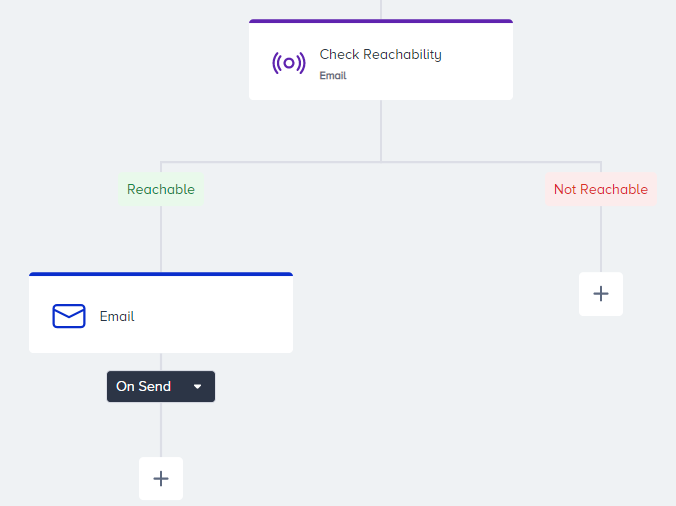
If they are not reachable, they will be dropped from the journey. The reachability function checks the user's email address, email opt-in, and GDPR opt-in.
The journey does not attempt to send an email to a user;
If they do not have an email address registered on our end.
If they have not opted in to receive emails.
If they unsubscribed from Email and Global unsubscribe is true.
If their GDPR opt-in is false.
If your company obtains your users' consent in compliance with the local regulations, make sure to pass the GDPR opt-in field to Insider One. If you want to stop collecting and processing the data of an identified user, GDPR opt-in field should have the false value. Insider One cannot be held liable if these obligations are not fulfilled and reserves the right to seek compensation from your company.
The system uses each user's attributes or event parameters to personalize the email content.
An email is sent out in 1-minute maximum. This duration might vary depending on the audience volume.
If this video does not load in your region, you can watch it on our YouTube Channel.
Use cases
With the Email channel in your journeys, you can send:
Cart abandonment emails,
Browse abandonment emails,
Post-purchase emails,
Welcome emails to new users,
New offers to silent users,
Emails about new seasons to active users.