Web Push lets you reach both anonymous and known users with timely, personalized notifications, directly in their browser. Use Web Push to recover drop-offs, boost conversions, and add a high-ROI channel to your cross-channel journeys.
With Web Push, you can:
Grow your subscriber list with native and custom opt-in prompts.
Send personalized, actionable notifications to drive engagement and revenue.
Target the right users with segmentation, predictive audiences, and real-time triggers.
Track performance and optimize with InOne Analytics and actionable insights.
You can use this guide as a practical playbook:
Start with the fundamentals
Move into quick wins and strategy
End your journey with diagnostics and optimization
What’s new (2024–2025 highlights)
These updates shape how you’ll use Web Push today, especially when it comes to performance and reporting.
Visibility depends on the products enabled in your contract. In addition, some features may require activation. For the latest updates, see the Web Push What's New .
Feature/Update | Why It Matters | When to Use | Business Impact |
|---|---|---|---|
Instant campaign ideas | New customers, slow launches | Faster time-to-value, higher adoption | |
Auto-generates visuals for notifications | No design support, seasonal campaigns | Improves CTR, reduces design time | |
AI-powered summaries & insights | Performance reviews, QBRs | Saves analysis time, surfaces trends | |
Mobile-first, seamless UX | High mobile traffic | Boosts mobile engagement and conversion | |
Smarter targeting | Large user base, low CR | Higher conversion, better ROI | |
Display content to users who dismiss the opt-in | High bounce/exit rates | Reduces churn, increases retention | |
Personalized product pushes | E-commerce, retail | Higher AOV, more conversions | |
Fast, on-brand visuals | Limited design resources | Saves time, increases engagement | |
Expanded reach | Apple device users | Larger audience, higher opt-ins | |
Timely, relevant engagement | Retention, cart recovery | Automates lifecycle touchpoints | |
Multi-link engagement, surveys | Direct user input | Increases interaction rates | |
Automated, CRM-triggered pushes | Enterprise, publishers | Enables real-time, programmatic sends | |
Improved list hygiene | Re-engagement, list cleaning | Better targeting, reporting accuracy |
Now, you can continue with revisiting what Web Push can do and how the core pieces fit together in your inOne panel.
Core Web Push capabilities
Web Push is built around a few essential building blocks. They help you apply every strategy in this guide more easily.
Key features
Opt-In Acquisition: Use native or custom prompts. Test timing, placement, and value messaging for higher opt-in rates.
Push Composition: Create concise, action-oriented messages. Add rich images, icons, and action buttons for higher engagement.
Targeting & Personalization: Segment by behavior, attributes, or predictive scores. Personalize with user details and product recommendations.
Measurement: Track opt-ins, CTR, conversions, and revenue in Web Push Analytics (Delivery & Engagement Metrics).
Privacy & Compliance: 100% GDPR-compliant, cookie-free delivery, and robust security controls.
How to apply
Validate Integration:
Ensure that the Service Worker and the Insider One Tag are installed on all pages.
Grow Your List:
Use both native and custom opt-in prompts.
Test copy, design, and timing for best results.
Aim for Opt-in CTR of 8–12%.
Launch & Optimize Campaigns:
Start with Single, Trigger, Cart Reminder, Price Drop, Back in Stock, and Welcome Push.
Use segmentation and personalization for relevance.
Test creative elements and send times.
Measure & Improve:
Monitor key metrics in Web Push Analytics (Delivery & Engagement Metrics).
Run A/B tests and use control groups to prove incremental lift.
Review opt-in health, engagement, and unsubscribe trends monthly.
Stay Compliant:
Web Push is privacy-friendly and secure by design.
With these core concepts in mind, you’re ready to put Web Push to work, not just understand it.
Quick wins
If you want to see impact fast, start here. These quick wins take 10–30 minutes to implement and are designed to deliver visible results without heavy setup or cross-team dependencies.
Run a quick health check: Ensure your Insider Tag and Service Worker are active for accurate tracking.
Grow your subscriber base: Use opt-in prompts and value-driven copy to boost opt-ins.
Target smarter: Apply predictive, RFM, and custom segments for high-intent audiences.
Test and optimize: Treat every major campaign change as a test opportunity for content, visuals, and send times.
Keep it concise: Short, punchy titles and tasteful emojis can increase click-through rates.
Get inspired: Explore the Use Case Library for campaign ideas by industry, channel, or goal.
Once you’ve tested one or two of these wins, you’ll have a baseline for how Web Push performs in your environment.
To keep everyone aligned and move from “one-off experiments” to a shared plan, use the following prompts with your team:
Team conversation starters
Use these conversation starters to help your team align on priorities, review performance, and identify the most impactful next steps with Web Push.
Are we growing our Web Push subscriber base at a healthy rate?
Which segments respond best to our pushes?
Do we have any delivery issues we should fix this week?
What message or timing tests should we prioritize next?
Are automated reminders performing better than one-off broadcasts?
What is our #1 business priority for web campaigns this quarter, and how can Web Push help achieve it?
Where are users dropping off in your conversion funnel, and which campaign strategies could address this?
How are we currently segmenting our users? Would we like to try predictive or RFM segmentation?
Are we seeing different behaviors on mobile vs. desktop?
Which areas of our current web or push campaigns, if optimized, would deliver the highest revenue or engagement impact?
These discussions will surface where you are today and what your team expects from Web Push in the next 1–3 quarters.
Next, continue with connecting Web Push to the bigger picture: how it supports your growth, retention, and Ever Success goals.
Strategic guidance: Connect Web Push to your goals
Strategically, Web Push works best when it supports a clear set of business outcomes, rather than running as a standalone channel.
1. Validate Integration:
Check Service Worker and Insider Tag on all domains and pages.
Define measurable goals (opt-in CTR, CTR, conversion rate, incremental revenue).
2. Map Campaigns to the User Journey:
Entry: Promote opt-in with value (price drop, back-in-stock, order updates).
Discovery: Highlight categories/products.
Consideration: Price Drop/Back in Stock pushes.
Conversion: Cart Reminder, triggered pushes.
Re-engagement: Notification Center, recurring sends.
3. Enrich Targeting & Personalization:
Use predictive, RFM, and behavioral segments.
Personalize with tokens for product, category, and name.
Add Action Buttons for multi-intent.
4. Monitor, Optimize, and Troubleshoot:
Test creative and timing.
Monitor impressions, CTR, conversion, and revenue in Web Push Analytics (Delivery & Engagement Metrics).
Run the Health Checklist if metrics dip.
5. Review and Scale:
Tie outcomes to revenue uplift and conversion rate.
Identify unused features and propose expansion.
Once you decide the role of Web Push in your overall strategy, tailor your approach to your current level of maturity.
The playbook below helps you focus on the right actions based on where you are today, from early activation to advanced optimization.
Strategic playbook by stage
Use this table to choose your next steps by adoption stage. You don’t have to do everything at once; pick the row that matches your current reality and work from there.
Stage | Goal | Focus & Actions | What Success Looks Like |
|---|---|---|---|
Start Strong | Build a healthy subscriber base and launch first pushes. | • Set up subscription prompts • Validate delivery events. • Launch first targeted broadcast. • Use simple segments. | • Steady subscriber growth. • Successful delivery + clicks. • Permissions & triggers working. |
Level Up | Drive higher engagement & conversions. | • Add predictive or RFM targeting. • Set automated reminders. • A/B test timing, copy, icons. • Use rich push formats. | • Higher CTR and engagement. • Automated reminders perform strongly. • Conversion lift improves. |
Get Back on Track | Fix delivery, engagement, or subscriber health issues. | • Audit browser compatibility & HTTPS. • Simplify subscription prompts. • Target warm users first. • Refresh copy, visuals, timing. | • Improved delivery. • CTR stabilizes or grows. • Subscriber base recovers. |
Optimize & Orchestrate | Orchestrate Web Push within multi-channel journeys. | • Connect Web Push with Web Suite triggers. • Use Architect for full-funnel journeys. • Optimize timing using analytics. • Align cadence to business goals. | • Push contributes predictable revenue. • Strong cross-channel synergy. • Consistent, orchestrated journeys. |
As you move through these stages, your metrics will tell you whether your strategy is working or needs adjustment.
Now let’s look at the key metrics that matter for Web Push, where to find them, and what to do when they’re off.
Web Push key metrics: Diagnose & take action
This guide translates each metric into a simple diagnostic checklist, covering where to find it, why it matters, key red flags to watch for, and the actions to take within your InOne panel.
About Dashboard Names
In these guides, dashboard names appear with a short description in parentheses to clarify what insights each view provides.
Targeted

Where to find it: Overall Web Push Analytics (Delivery & Engagement Metrics)
Why it matters: Shows how many users matched campaign conditions and were eligible to receive a push; key indicator of segment health and trigger setup
What to watch for (Decline / Below Benchmark): Very low targeted count → overly narrow segments, trigger mismatch, or low push permission base
Actions to take / Features to Use: Broaden targeting, refine triggers, ensure segment size is healthy, verify permission status
Benchmarks / Watch For: No fixed benchmark, focus on stability and growth vs prior weeks
Frequency: Daily / Weekly
Example: New push targets only 50 users → trigger or segment too narrow
Sent
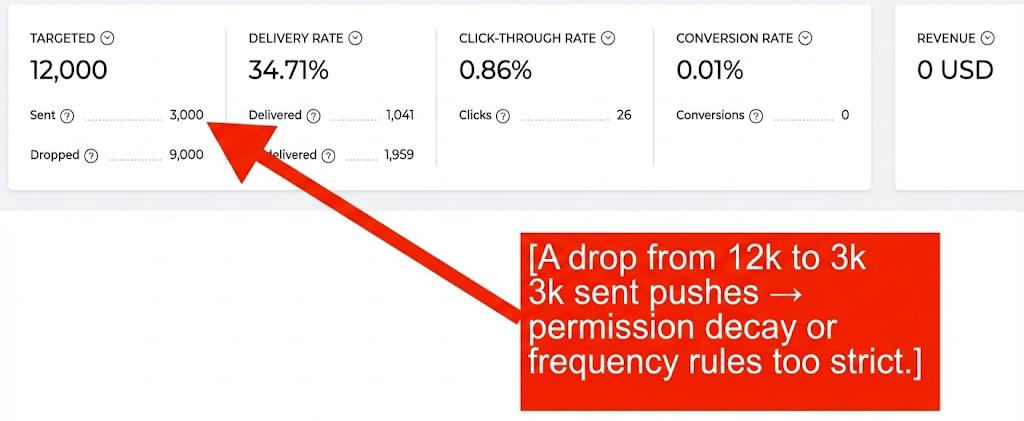
Where to find it: Overall Web Push Analytics (Delivery & Engagement Metrics)
Why it matters: Total push notifications attempted; reflects campaign eligibility and frequency caps
What to watch for (Decline / Below Benchmark): Sudden drop in sent volume → segment changes, frequency caps, paused campaign, or permission loss
Actions to take / Features to Use: Confirm campaign is active, check caps, validate push tokens
Benchmarks / Watch For: Stable sends relative to targeted audience size
Frequency: Daily / Weekly
Example: Drop from 12k to 3k sends → permission decay or strict frequency rules
Dropped
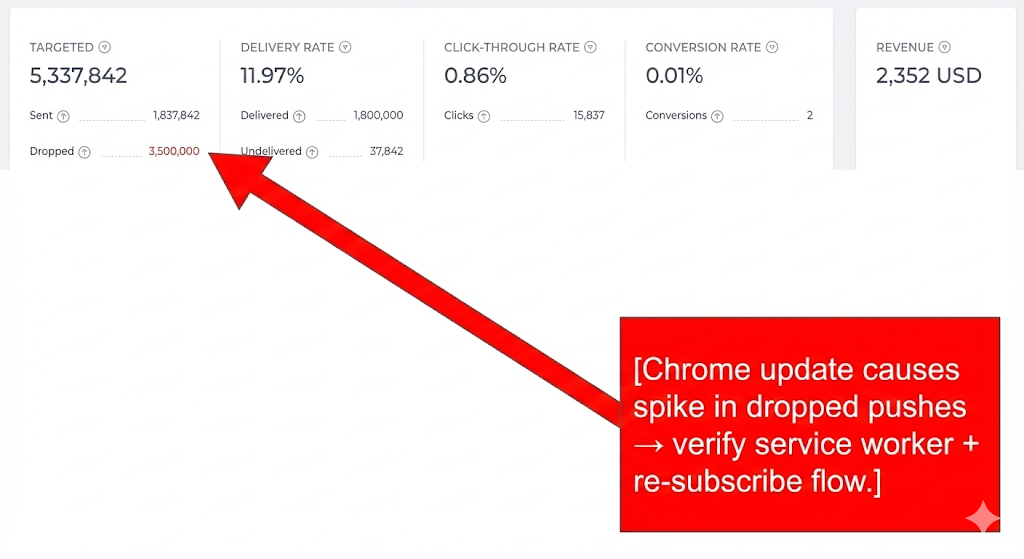
Where to find it: Overall Web Push Analytics (Delivery & Engagement Metrics)
Why it matters: Pushes attempted but rejected by browser/OS
What to watch for (Decline / Below Benchmark): High drop count → permission decay, inactive browsers, Service Worker issues
Actions to take / Features to Use: Target engaged browsers, exclude incompatible devices, verify HTTPS + Service Worker setup
Benchmarks / Watch For: Drops are normal; spikes indicate issues
Frequency: Weekly
Example: Chrome update causes spike → verify service worker and re-subscribe flow
Delivery Rate
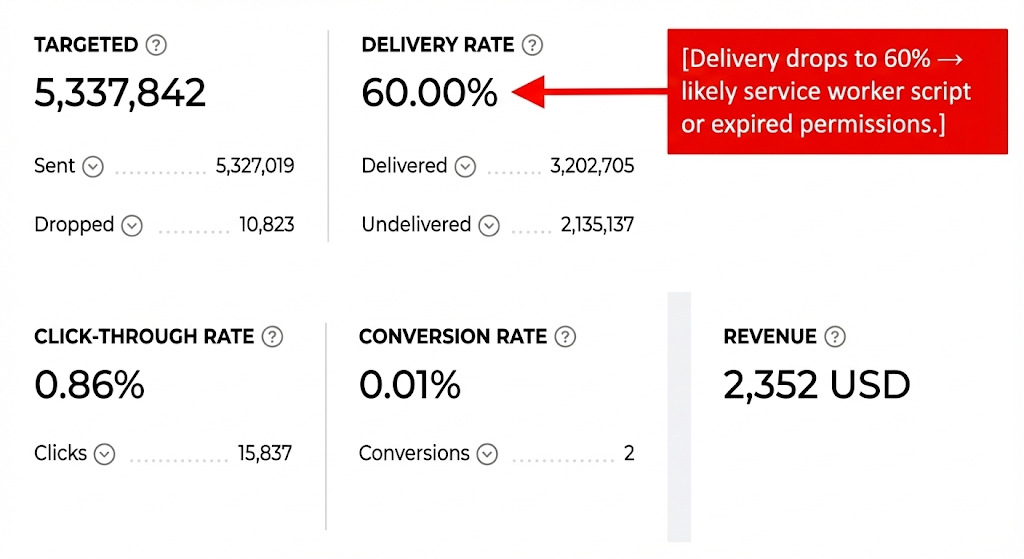
Where to find it: Overall Web Push Analytics (Delivery & Engagement Metrics)
Why it matters: % of sent pushes successfully delivered; reflects infrastructure and permission quality
What to watch for (Decline / Below Benchmark): Decline → token issues, service worker failure, permission revocation
Actions to take / Features to Use: Validate service worker, retarget active users, refresh permission UX
Benchmarks / Watch For: ~80%+ depending on browser mix
Frequency: Daily / Weekly
Example: Drop to 60% → likely service worker or expired permissions
Delivered
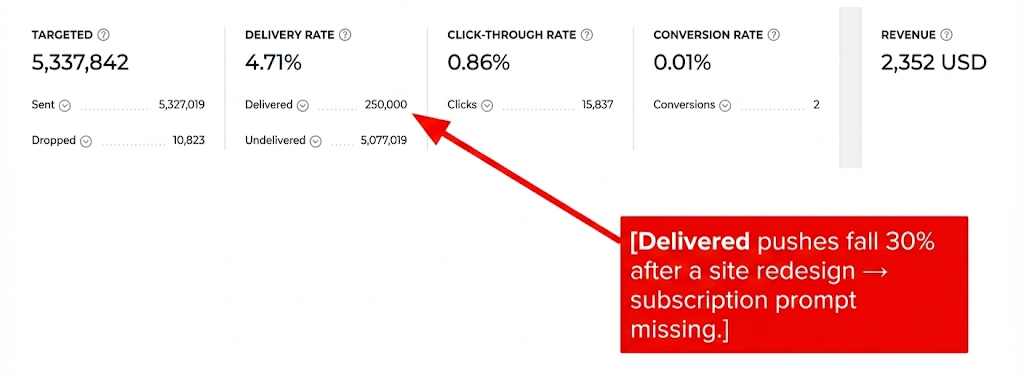
Where to find it: Overall Web Push Analytics (Delivery & Engagement Metrics)
Why it matters: Number of pushes successfully delivered
What to watch for (Decline / Below Benchmark): Decline despite stable “Sent” → permission loss, OS blocks, invalid tokens
Actions to take / Features to Use: Encourage re-subscription, exclude inactive tokens, review device mix
Benchmarks / Watch For: Declining delivered count = permission decay
Frequency: Weekly
Example: 30% drop after redesign → missing subscription prompt
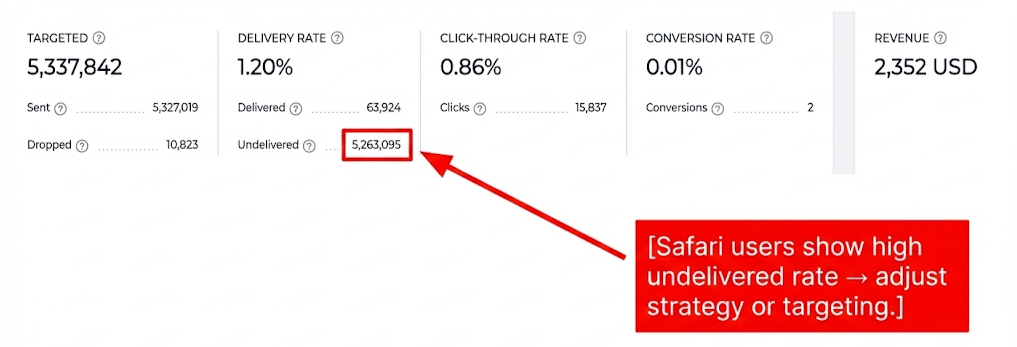
Undelivered
Where to find it: Overall Web Push Analytics (Delivery & Engagement Metrics)
Why it matters: Pushes that failed due to invalid tokens, blocks, or OS restrictions
What to watch for (Decline / Below Benchmark): Rising count → stale or inactive subscribers
Actions to take / Features to Use: Re-engage onsite, clean tokens, encourage permission updates
Benchmarks / Watch For: Keep as low as possible; spikes need investigation
Frequency: Weekly
Example: High undelivered on Safari → adjust targeting/strategy
Click-through Rate (CTR)
.png)
Where to find it: Overall Web Push Analytics (Delivery & Engagement Metrics)
Why it matters: Measures how compelling push notifications are; early signal of creative quality
What to watch for (Decline / Below Benchmark): CTR < 4–6% → weak creative, irrelevant targeting, poor timing
Actions to take / Features to Use: Test copy/icons/timing, refine segments, add personalization
Benchmarks / Watch For: 4–8% typical; higher for promotions
Frequency: Weekly
Example: CTR drops after icon change → revert or test alternatives
Conversion Rate
Where to find it: Overall Web Push Analytics (Delivery & Engagement Metrics)
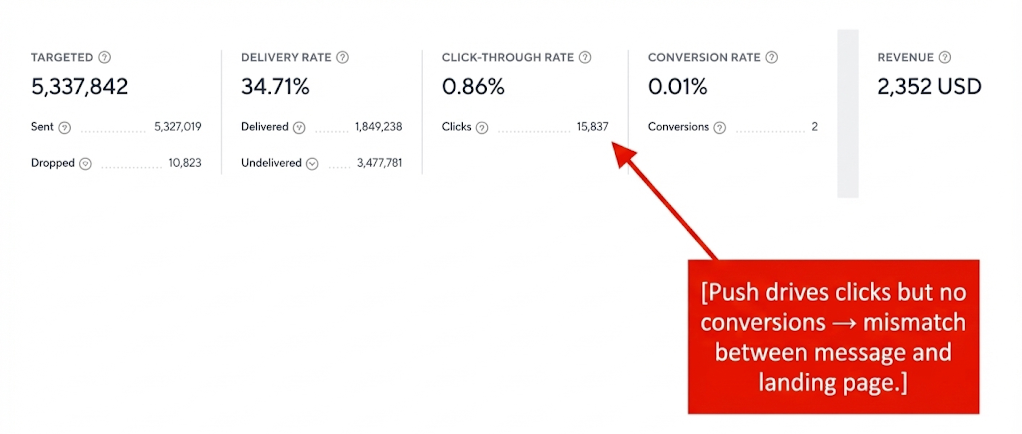
Why it matters: % of users who converted after clicking; shows message–intent fit
What to watch for (Decline / Below Benchmark): Below average → targeting mismatch or landing page friction
Actions to take / Features to Use: Use predictive segments, align message with landing page, test incentives
Benchmarks / Watch For: No fixed benchmark; compare to past performance
Frequency: Weekly
Example: High clicks but no conversions → message/landing mismatch
Revenue
Where to find it: Overall Web Push Analytics (Delivery & Engagement Metrics)
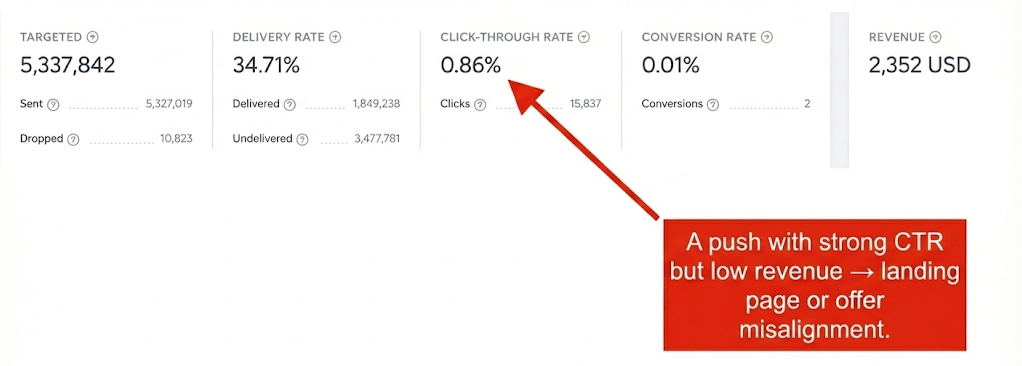
Why it matters: Revenue generated or influenced by push campaigns
What to watch for (Decline / Below Benchmark): Flat revenue despite high delivery → weak offer, misaligned CTA, poor segments
Actions to take / Features to Use: Focus high-intent segments, improve offers, test creatives
Benchmarks / Watch For: Look for a positive trend over time
Frequency: Weekly
Example: Strong CTR but low revenue → landing page or offer issue
Total Subscribers

Where to find it: Web Push Subscriber Analytics (Audience Growth & Health)
Why it matters: Total users who allowed notifications; key for scalability
What to watch for (Decline / Below Benchmark): Slow growth → poor prompt placement or timing
Actions to take / Features to Use: Improve prompt UX, optimize timing/placement
Benchmarks / Watch For: Consistent upward trajectory
Frequency: Weekly
Example: Only 10 new/week on high traffic → prompt not visible
Engaged Subscribers
Where to find it: Web Push Subscriber Analytics (Audience Growth & Health)
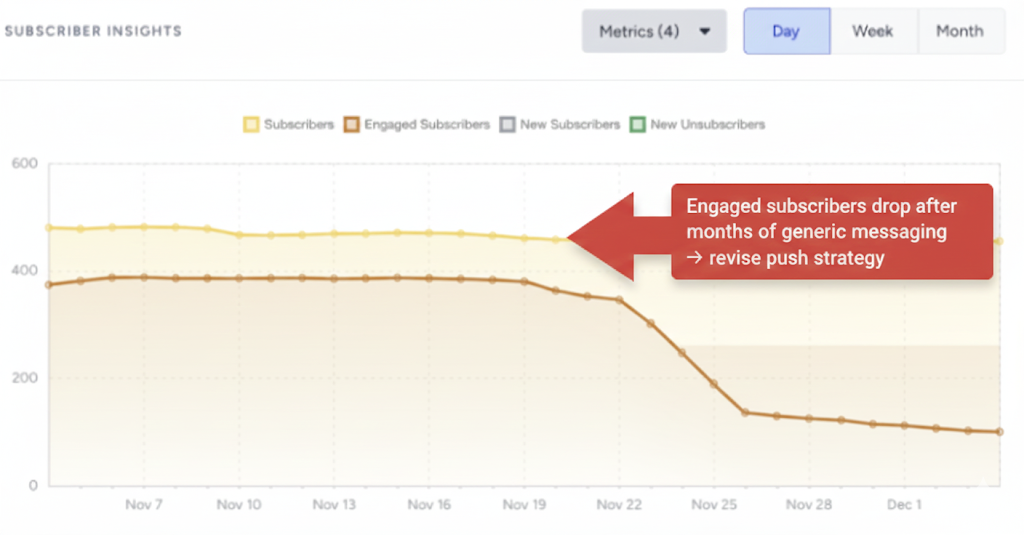
Why it matters: Users who interacted in the last 365 days; key audience quality metric
What to watch for (Decline / Below Benchmark): Shrinking base → stale audience or irrelevant content
Actions to take / Features to Use: Target warm users, refresh campaigns, use reactivation flows
Benchmarks / Watch For: Stable or growing engagement
Frequency: Monthly
Example: Drop after generic messaging → revise strategy
Opt-in CTR
.png)
Where to find it: Opt-in Prompt Insights
Why it matters: % of users who allow notifications after seeing the prompt
What to watch for (Decline / Below Benchmark): <2–3% → poor placement, unclear value, bad timing
Actions to take / Features to Use: Test placements, adjust triggers (scroll/delay), simplify design
Benchmarks / Watch For: <2% signals need for optimization
Frequency: Weekly
Example: Moving prompt improves CTR from 1.2% → 3.8%
If a number doesn’t change immediately, expand the date range or compare with the previous period to validate performance trends.
Once you interpret your numbers, the next step is making sure your foundation is solid. Use this checklist to confirm that Web Push is set up correctly before you chase more complex optimizations.
Troubleshooting scenarios
Use this section when you notice a specific issue, such as drops in engagement, revenue, or reach, and want a focused path to investigate and fix it.
Symptom | Likely Cause | What to Do |
|---|---|---|
Subscriber growth stalls | Prompt not visible, bad timing, or UX friction | Review where/when subscription prompts appear, test alternative timing, and confirm HTTPS + service worker setup. |
Delivery rate drops | Browser/permission issues or a misconfigured sender | Check Web Push delivery metrics, test from multiple browsers, and verify your domain + configuration. |
High delivery, low CTR | Irrelevant content, bad timing, or overuse | Segment more narrowly, test new message angles, icons, and send times, and reduce frequency for less engaged users. |
Opt-outs increase after campaigns | Too frequent or low-value notifications | Review frequency, avoid generic blast campaigns, and shift focus to high-intent or event-based notifications. |
Best practices & pro tips
These best practices and tips are designed to help you get more value from Web Push with the same or less effort.
Web Push is privacy-friendly and works even when users aren’t on your site.
For best results, combine with OnSite campaigns and Email for a full-funnel strategy.
Align date ranges between InOne Analytics and any external reporting tools for consistency.
Focus on engaged subscribers for higher ROI.
Refresh campaign visuals and copy quarterly.
Use predictive and RFM segments for smarter targeting.
Monitor unsubscribe trends to prevent fatigue.
Treat Web Push as an “always-on performance lab”, test, learn, and iterate!
You don’t need to adopt every tip at once; treat this section as an idea bank and apply what matches your goals and capacity.
Additional resources
Use the resources below to continue learning, test more advanced strategies, or get extra help when you need it.
Bookmark this guide and revisit it whenever you launch new campaigns, review performance, or plan your next quarter with Web Push.
Next Step:
Bookmark and return to this guide as needed. For inspiration across all Insider channels, explore the Use Case Library. This resource is best for gathering ideas, not for replacing strategic planning.