Rules act as your campaign’s timing framework. Instead of displaying a message immediately when a page loads, you can choose to trigger it only when the visitor has scrolled 50%, stayed on the page for 30 seconds, added a high-value product to the cart, or experienced a specific contextual signal such as rainy weather in their location.
When timing aligns with intent, two things happen:
Relevance increases: The experience matches the shopper’s exact context.
Performance improves: Fewer impressions deliver more conversions, ensuring more efficient budget use.
Rules evaluate real-time signals such as:
Page type or URL
Scroll depth
Cart contents or basket value
User actions (idle time, exit intent)
Contextual factors (location, weather, time of day)
The Smart Recommender widget is displayed only when the predefined conditions are met.
How rules help you
Rules give you precise control over when intent meets opportunity. By aligning campaign delivery with real-time signals, you create experiences that feel timely, personal, and highly effective.
Precision timing: Display offers at the exact moment a user is most likely to engage — for example, when they pause on the checkout page.
Contextual relevance: Deliver location-aware experiences, like promoting umbrellas during local rainstorms.
Higher ROI through relevance: Eliminate unnecessary impressions and maximize impact by showing campaigns only in high-intent moments.
Weather-triggered campaigns: Promote seasonal or weather-appropriate products, such as umbrellas or jackets, when it rains in the shopper’s city.
Cart Value Nudges: Encourage customers to add just one more item to qualify for free shipping, without resorting to blanket discounts.
Exit Intent Recovery: Detect when a user is about to abandon the checkout page and display a personalized incentive to retain them.
Personalized First Impressions: Greet first-time visitors with curated bestsellers, while returning users see “Welcome back” messages tied to their browsing history.
Segments define which customers are eligible while Rules define when and where those customers see the campaign. Together, they ensure your campaigns are audience-focused and timed for maximum effectiveness.
The available rules options are:
To see what it looks like in practice, let’s look at real-world-inspired examples:
Scenario 1: “Rain-Ready Picks” Carousel
Vertical: Outdoor apparel
Carousel title: “Stay Dry Today”
Algorithm: Trending Products (Category = Rain Gear)
Design: 4-item scroll
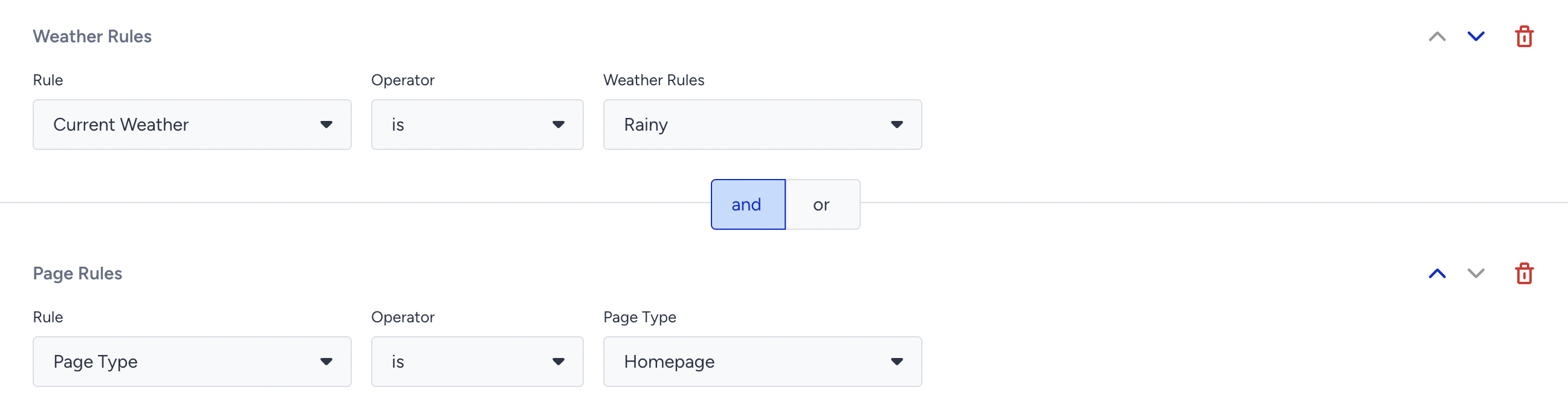
Rules: Weather Rule – Current Weather Rainy + Page Type – Category = Homepage
How it worked
Only shoppers located in rainy cities saw the carousel when they landed on the homepage. Click-throughs soared 38% and direct revenue from rain jackets doubled, even though it was invisible to sunny-day visitors.
Scenario 2: “Almost-Free Shipping” Upsell
Vertical: Home décor ecommerce
Carousel in mini-cart drawer title: “Add One More & Ship Free”
Algorithm: Checkout Recommendation
Layout: 3 products in a row
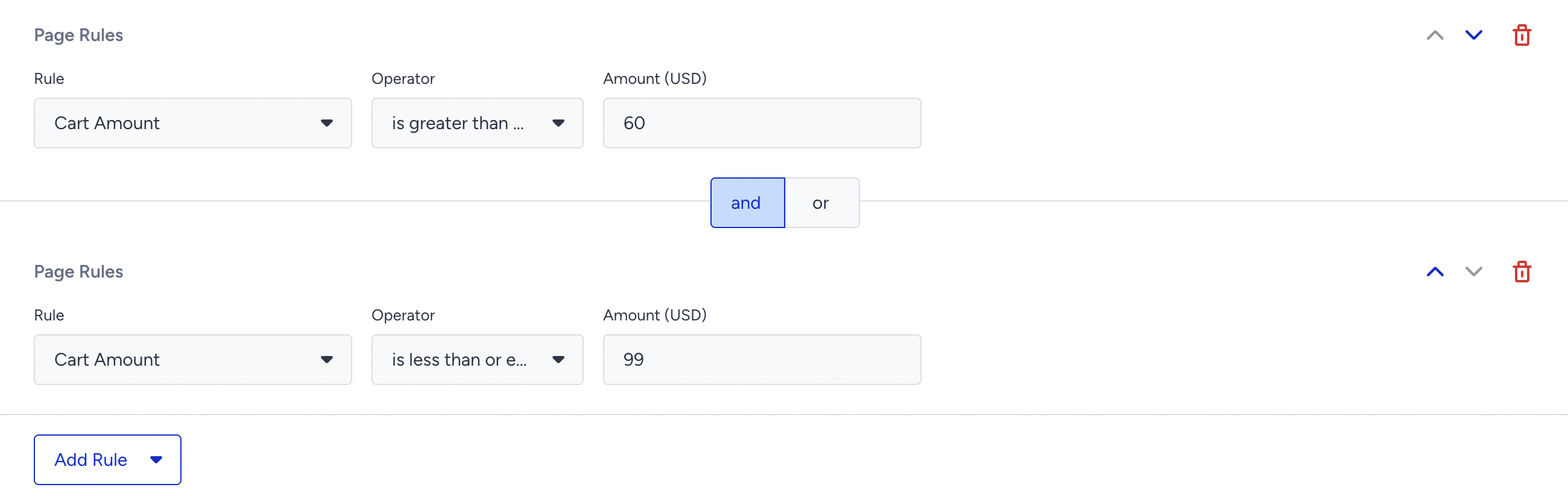
Rules: Cart Amount $60–$99 (free-shipping threshold $100)
How it worked
When the cart value sat just under $100, the mini-cart expanded to show cushions & candles that cost $12–$20. 24% of exposed sessions added at least one item; AOV rose 17%.
Scenario 3: “Come Back, Tech Lover!” Exit-Intent Rescue
Vertical: Electronics retailer
Overlay carousel title: “Still Thinking? You Might Also Like…”
Algorithm: Similar & Accessories
CTA: “Save to Wishlist”
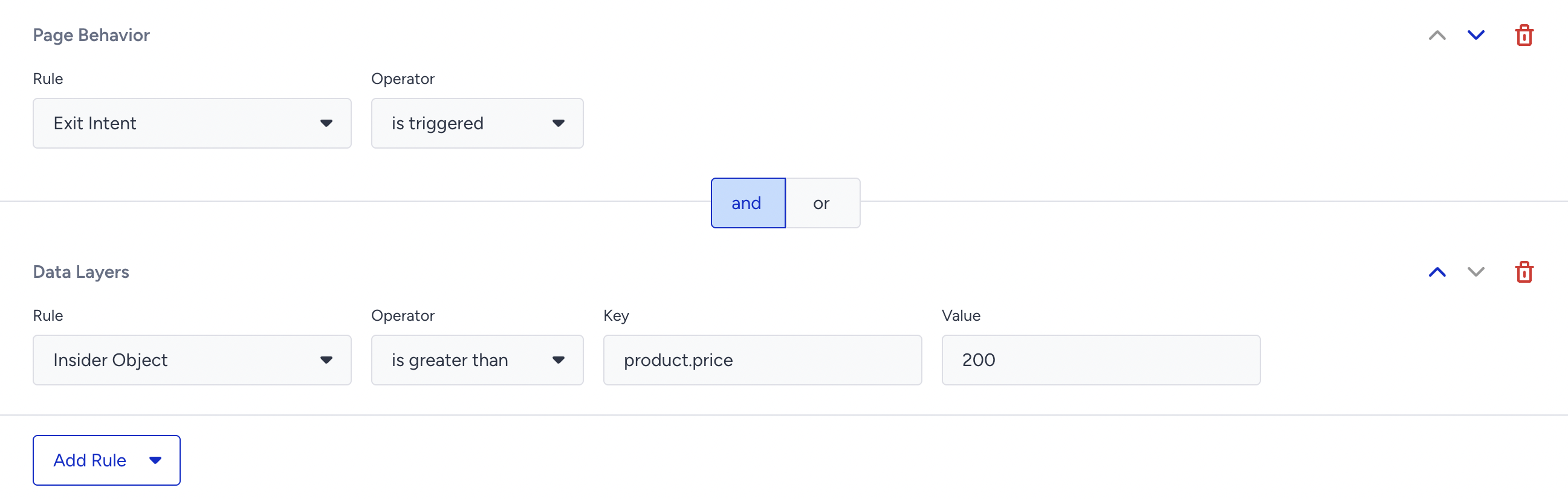
Rules: Page Behavior – Exit Intent + Product Price (Data Layer) ≥ $200
How it worked
If a shopper tried to close the tab while viewing a laptop priced at $ 200 or more, an overlay suggested sleeves, a mouse, and warranty add-ons. 12% clicked “Save,” emails were captured for wishlist reminders, and assisted revenue grew 9%.
Scenario 5: VIP loyalty push after 3rd purchase
Vertical: Beauty subscription box
Carousel in account dashboard title: “Your VIP Picks”
Algorithm: Premium Tier Exclusive
Design: Badge “Free Deluxe Sample”
Segments: Purchasing Behavior – Purchase Count ≥ 3
Rules: Logged-In User = true

How it worked
VIP users saw a curated carousel of add-ons available at zero cost with their next box. 46% added at least one sample, increasing retention and perceived value.
Closing Tips
Stack rules sparingly
Adding too many conditions reduces campaign reach.
Begin with broad Rules, then refine as you collect performance data.
Mix moment + mindset
Use behavioral Rules to capture the right moment.
Combine with Segmentation to match the right mindset.
Example: Show free shipping nudges only to high-value segments at checkout.
Seasonal swap
Duplicate existing campaigns instead of rebuilding from scratch.
Adjust Weather or Date-based Rules to launch seasonal variants quickly.
Measure gradually
Allow campaigns to run for 3–5 days before analyzing performance.
Ensure you have enough traffic to make reliable decisions.