This resource is designed to help you seamlessly integrate Eureka Search into your websites and native mobile apps. Here, you’ll find answers to key questions about the Search API, including:
Prerequisites for Search API Integration
Before you begin using the Search API, ensure the following setup is complete:
Product Catalog Integration
Your product catalog must be integrated, and all necessary product information should be available.
Locale Initialization and Indexing
The locale needs to be properly initialized.
Initial indexing must be completed to make the catalog searchable.
Eureka Settings
Required configurations within Eureka must be finalized before making Search API requests:
Setting | Required |
|---|---|
Yes | |
Yes | |
Yes, if you have any | |
Yes, if you have any | |
Yes, if you have any | |
Yes, if you have any |
Request parameters
To be able to trigger a successful request to the Search API, you need to send these parameters within the payload.
Parameter | Description |
|---|---|
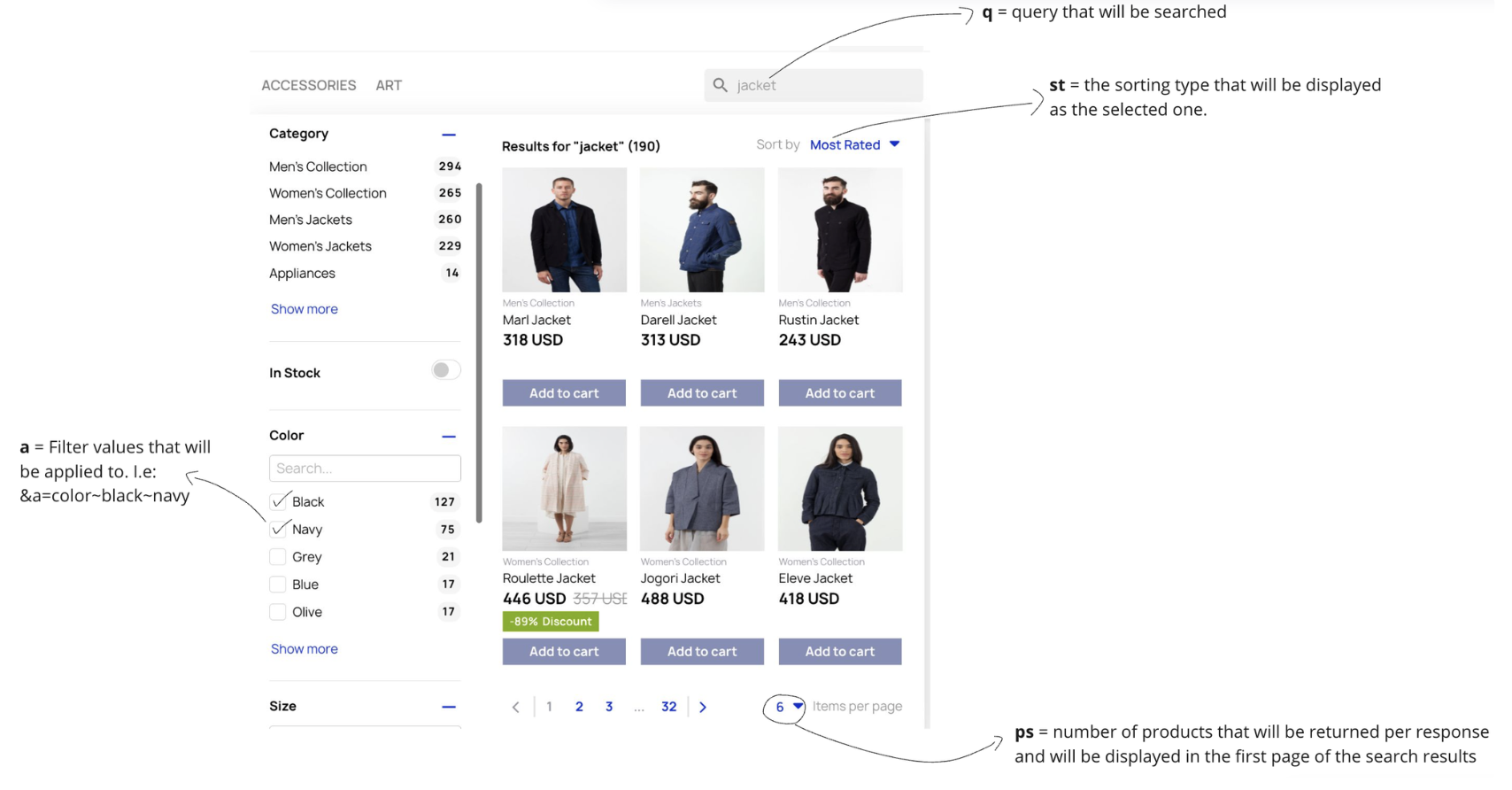
q | Query string that is written in the search bar |
p | Partner ID |
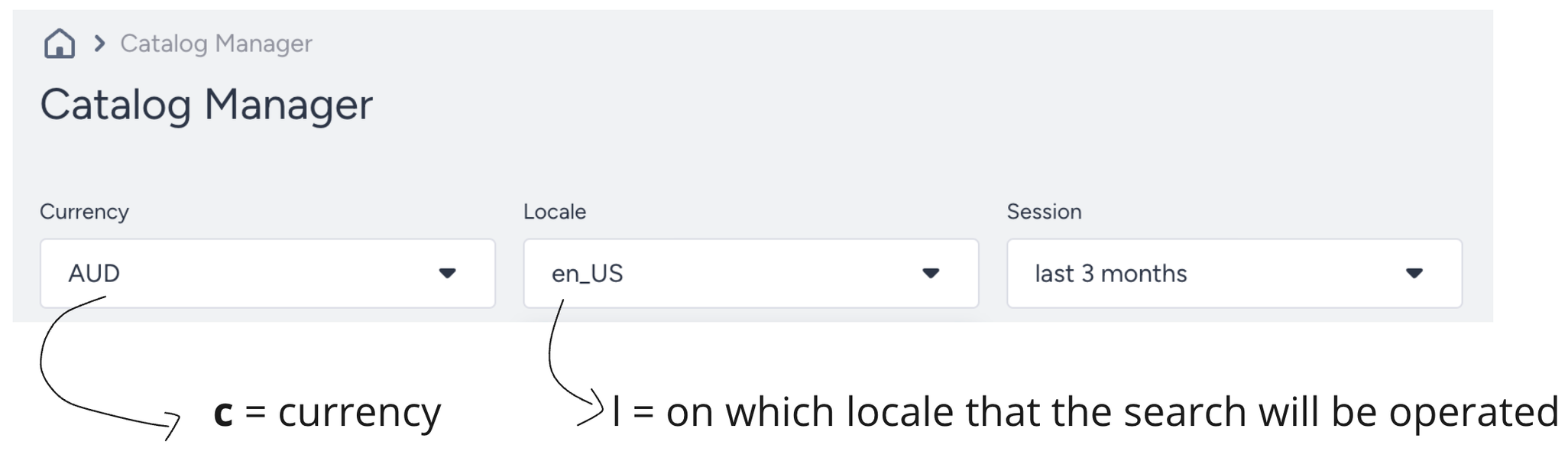
l | Locale that represents language and the region |
c | Currency of the products listed |
Some of the optional but mainly used parameters are:
Parameter | Description |
|---|---|
ps | Number of products that will be sent in a single response. |
a | Filters that have been selected by the users, such as Color: Red, Category: Shoes, etc. |
st | Sorting type that has been selected by the user, such as Newest First, Most Popular First, etc. |

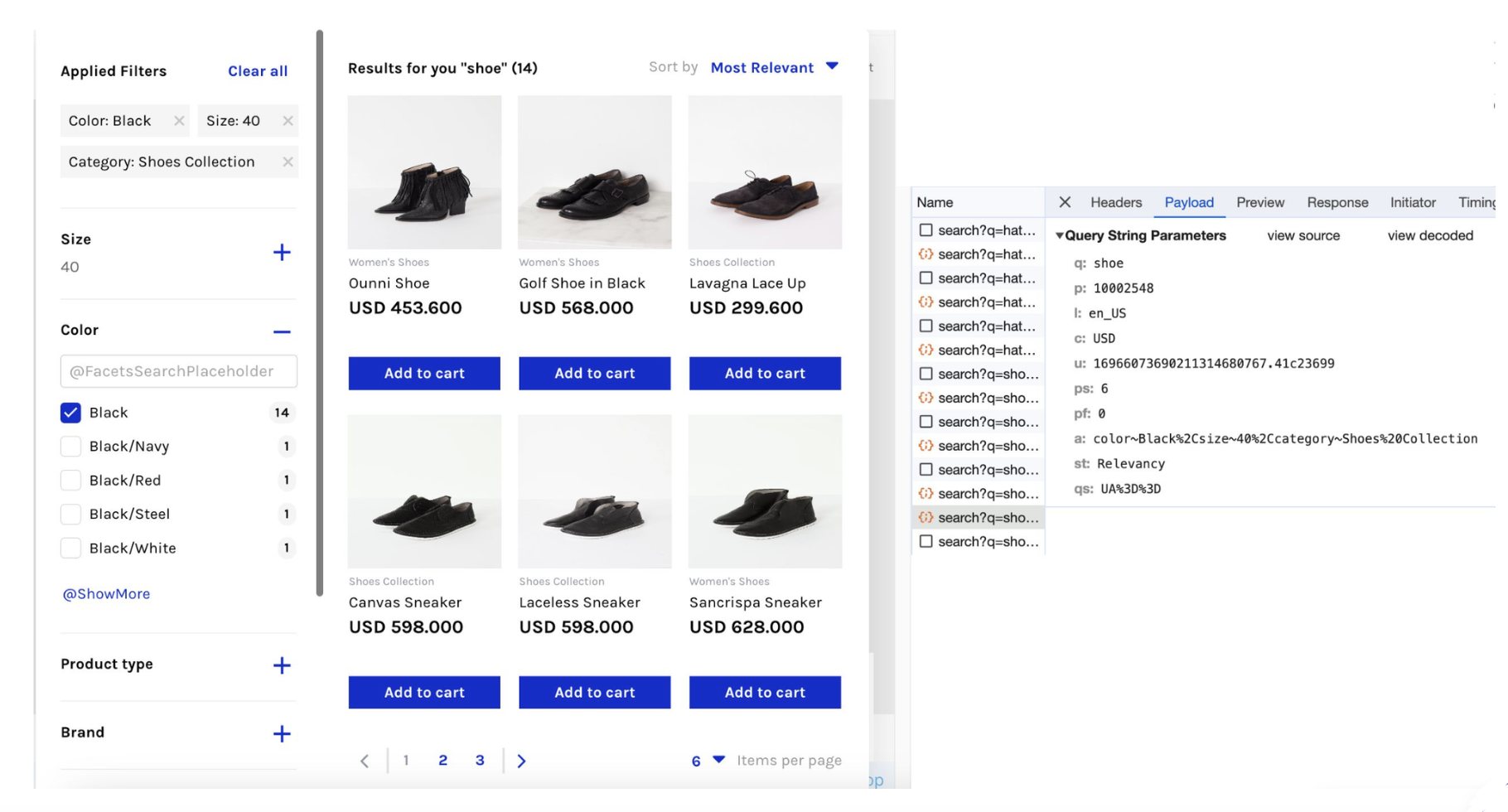
Below, you can see a complete request payload example:
Response parameters
Below, you can see a response example for the Eureka Search API.
{
  "data": {
    "items": [
      {
        "itemId": "46157997244690",
        "itemProperties": {
          "item_card": {
            "name": "Ounni Shoe",
            "price": { "USD": 453.6 },
            "category": ["Women's Collection", "Shoes Collection", "Women's Shoes"],
            "image_url": "https://cdn.shopify.com/s/files/1/0804/7552/1298/products/2015-04-20_Accessories_03_23324_21235.jpg?v=1691700583",
            "product_attributes": {
              "product_type": "women's shoes",
              "color": "Black",
              "size": "40"
            }
          }
        },
        "itemVariants": [
          {
            "price": { "USD": 453.6 },
            "color": "Black",
            "size": "40"
          }
        ]
      },
      {
        "itemId": "46155444781330",
        "itemProperties": {
          "item_card": {
            "name": "Golf Shoe in Black",
            "price": { "USD": 568 },
            "category": ["Women's Collection", "Shoes Collection", "Women's Shoes"],
            "image_url": "https://cdn.shopify.com/s/files/1/0804/7552/1298/products/2015-02-02_Accessories_13_12409_2133.jpg?v=1691694253",
            "product_attributes": {
              "product_type": "women's shoes",
              "color": "Black",
              "size": "40"
            }
          }
        },
        "itemVariants": [
          {
            "price": { "USD": 568 },
            "color": "Black",
            "size": "40"
          }
        ]
      },
      {
        "itemId": "46157703119122",
        "itemProperties": {
          "item_card": {
            "name": "Lavagna Lace Up",
            "price": { "USD": 299.6 },
            "category": ["Men's Shoes", "Shoes Collection"],
            "image_url": "https://poshstreet.shop/cdn/shop/products/2015-03-13_Product_21_23165_12704.jpg",
            "product_attributes": {
              "product_type": "men's shoes",
              "color": "Black",
              "size": "40"
            }
          }
        },
        "itemVariants": [
          {
            "price": { "USD": 299.6 },
            "color": "Black",
            "size": "40"
          }
        ]
      }
    ],
    "aggregations": [
      {
        "name": "size",
        "items": [
          {
            "name": "40",
            "documentCount": 14
          }
        ]
      },
      {
        "name": "color",
        "items": [
          {
            "name": "Black",
            "documentCount": 14
          }
        ]
      },
      {
        "name": "price",
        "items": [
          {
            "name": "300-400",
            "min": 300,
            "max": 400,
            "documentCount": 18
          }
        ]
      }
    ]
  }
}
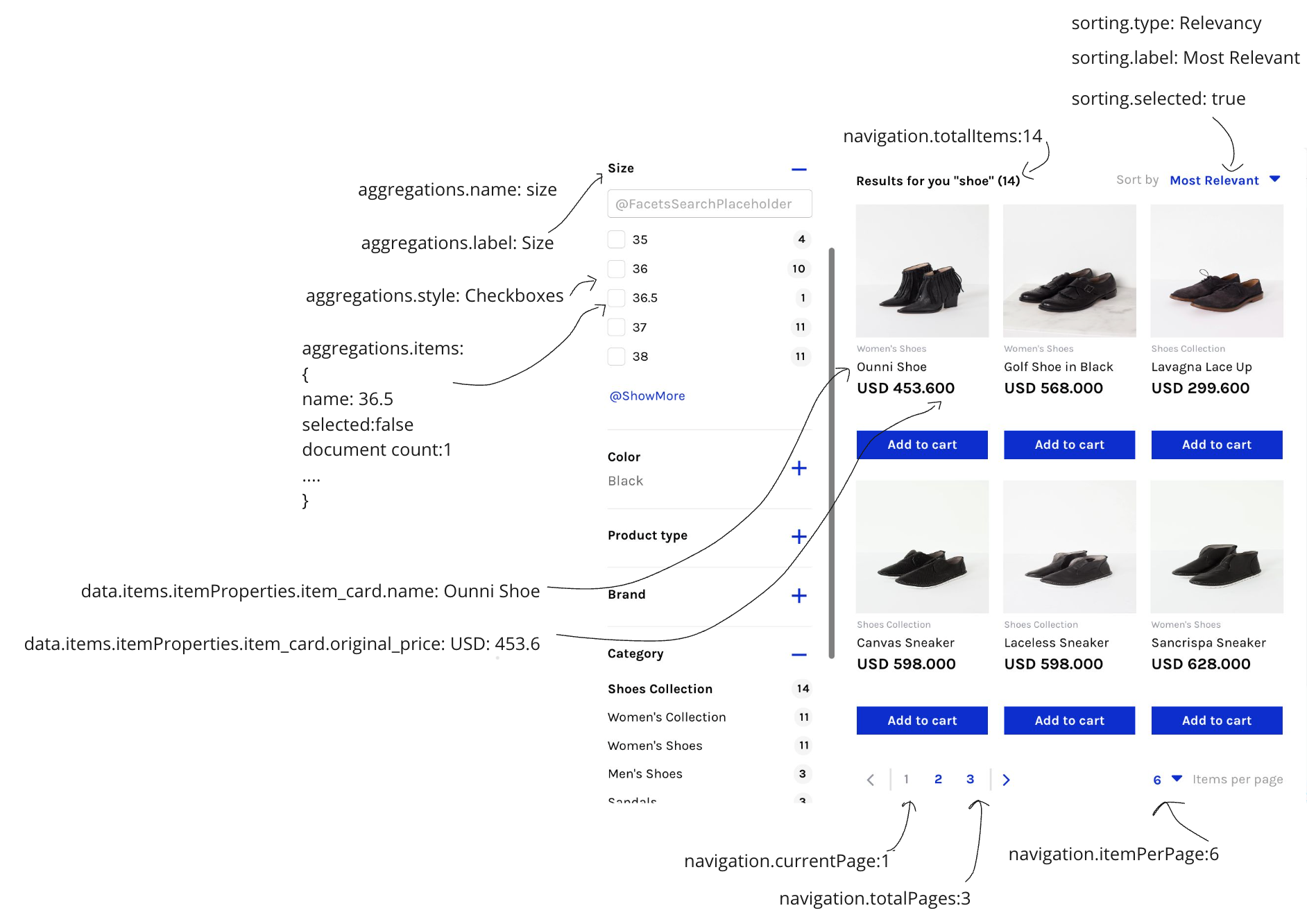
Some of the main response objects that will be used while displaying the search result page are:
data.items: This object contains all the product information in the response to the search operations.
data.items.itemProperties.item_card: This object holds all the details about a specific product. It includes everything needed for displaying the product on a card, like its name, category, price, color, size, and more. It also contains additional information that might not be shown directly, such as its availability, quantity, URL, and attractiveness score.
data. items.itemVariants: If your smart variant grouping setting is enabled in the Eureka settings, the products are grouped according to their group_code, and only one of the variants will be displayed in the search results. However, other variants, such as different colors, will be sent to the response object and the data.items.itemVariants object.
data.Aggregations: This field contains the list of different filters available based on the search results.
data. aggregations.items: This field contains the list of possible values for a filter type. For example, for the size filter, the items can be 38, 40, 2, etc.
data. aggregations.sequence: This field shows the order of the related filter.
data.navigation: This field contains navigation information such as pagination and total item count.
data.sortings: This field contains information about the sorting types, the selected sorting option, and its label.
redirection: This field contains information about the URL redirection, such as URL Redirection Text and the URL that will be redirected to if you have set it under the Eureka settings.
Below are the response objects that are only used in the pre-search and no-search-result states:
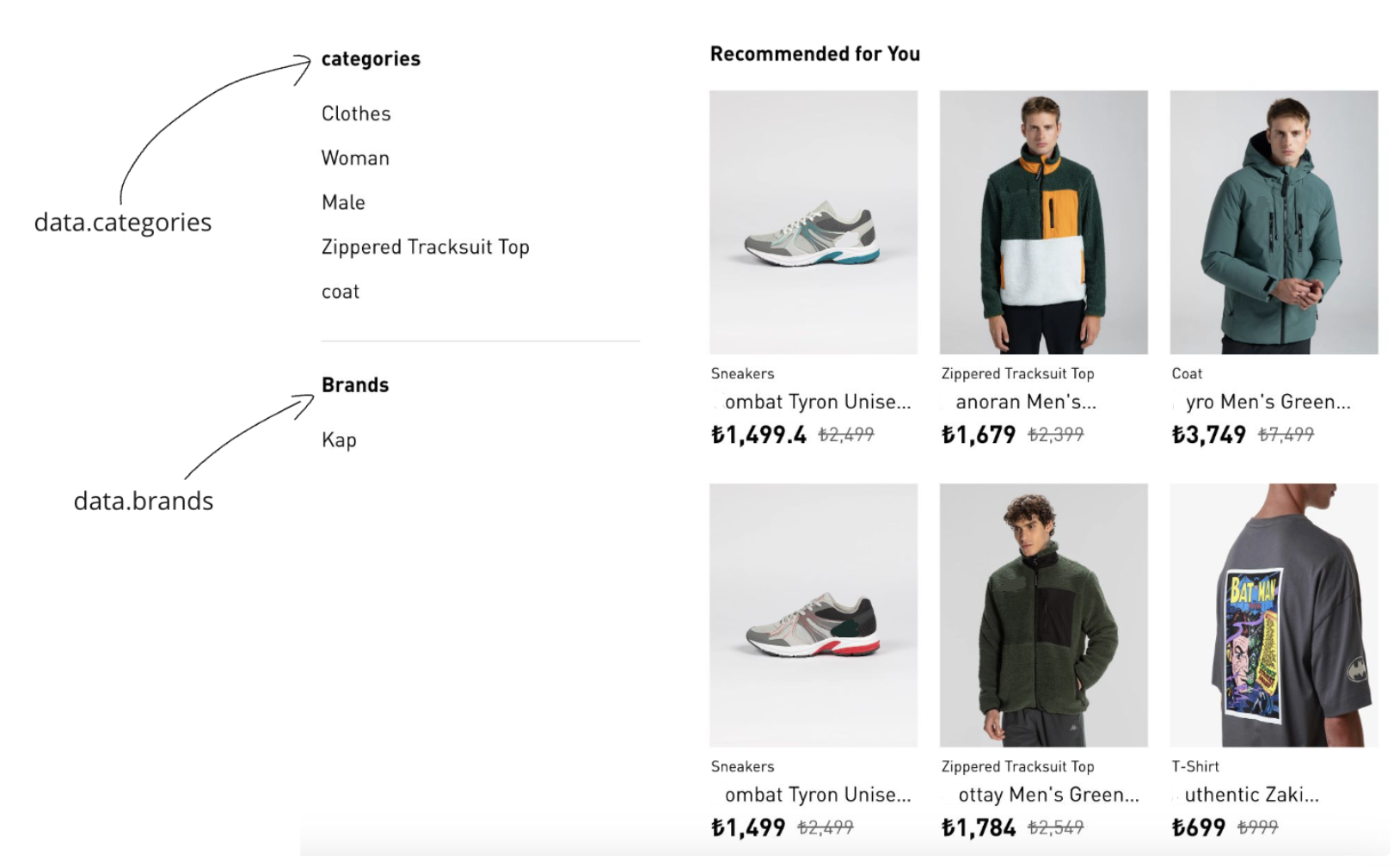
data.categories: This field contains information about the most popular categories that will be displayed in the sidebar of the pre-search and no-search-result states.
data.brands: This field contains information about the most popular brands that will be displayed in the sidebar of the pre-search and no-search-result states.