The Eureka Search API, also known as the developer API for custom on-site search and product ranking, lets you implement Insider One's search engine directly within your website or mobile application. It processes search queries and returns ranked product results in 150–400 ms, regardless of the user's location.
The first step is to send your data to Insider One in the correct format. Eureka will return the results in JSON. The response will include products that match the search criteria, available facet options to further refine the results, and configured merchandising content.
Requirements for Search API
The Insider One team should activate Eureka.
Product Catalog integration methods (XML, Catalog API, and Clickstream) should be created for product details.
Define Eureka settings, such as facets, sorting options, synonyms, URL redirections, etc., in Insider One's InOne panel.
Endpoint
Use POST /api/web/search instead of GET in two cases: when the total URL length exceeds 2048 characters, or when any a filter value contains a comma character.
For URL length, although the HTTP specification does not define a maximum, practical limits are imposed by web browsers and server software. POST moves all parameters into the request body, avoiding these limits entirely. GET requests may return faster responses, but switch to POST as your payload approaches 2000 characters.
Visit our Postman collection to test this request.
The only difference between GET and POST requests is that the values sent as URL parameters in GET requests must be sent in the JSON body of POST requests, as you can see below:
{
  "q": "SEARCH_QUERY",
  "p": "PARTNER_ID",
  "l": "LOCALE",
  "c": "CURRENCY"
}
For security reasons, an authentication exception is thrown when the request is sent. To avoid this, set the X-AUTH-TOKEN header with the token when sending the request.
Request Parameters
Parameter | Description | Data Type | Required | Example |
|---|---|---|---|---|
q | Query String that will be searched | String | Yes | q=sneakers |
p | This is your partner ID. To copy your partner ID, navigate to InOne > Inone Settings > Account Settings. | String | Yes | p=10009999 |
l | Locale is required to receive your products on the website in the current language. Depending on this, product data will be gathered, and the settings will be applied. | String | Yes | l=en_US |
c | The searched products will be displayed in the currency specified in the catalog (the currency the end user selects on your website). | String | Yes | c=USD |
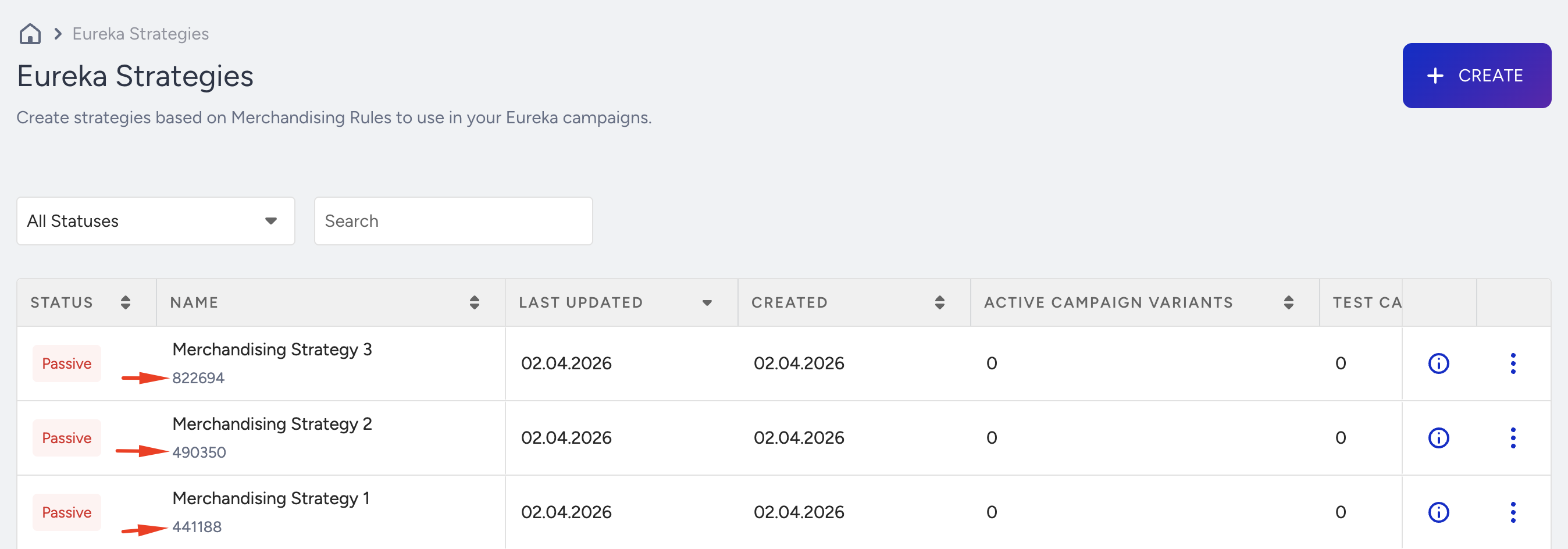
sid | Strategy ID. The unified identifier for a merchandising strategy. If Eureka Strategies are enabled for your account, you need to add this parameter to utilize the strategy. When provided, Merchandising actions such as boosting, burying, pinning, and hiding products are applied to search results based on the rules defined within that strategy. | String | No | sid=123456 |
ps | Page size. Accepted range: 1–100; default: 6. For example, if the phone is searched with ps=6, the API will return the 6 most relevant phones on the current page. | Integer | No | ps=6 |
pf | Page from. Index where the searched products will start in the response. It is used for pagination. For example, if "phone" is searched and the second page is clicked, the request must include pf=6 if ps is set to 6. Results from the 6th product will be displayed. The default value is pf=0. | Integer | No | pf=12 |
a | Filter the products with the following pattern: a={field}~{value}. It is applied when the end-user selects a filter from the facet section. | List of String | No | a=size~38~39 |
st | Sorting type of the searched products. It only takes one of the predefined sorting types. The default value is relevancy. | String | No | st=Relevancy |
u | The User ID. It can be found in local storage under the key name spUID. This key stores a stringified object containing data (the User ID) and expiration (the expiration timestamp). The User ID or Unique User ID must be sent if the personalized search is enabled. | String | No | u=15ca72d9c3.61d3 |
uuid | The Unique User ID. You define and manage the unique user ID. If u is not provided, the uuid must be sent to enable personalized search results. If both uuid and u parameters are provided, the u parameter takes priority. | String | No | uuid=26522777 |
oi | The searched products will only be displayed as item IDs. The default value is false. Note: oi is applied only to search results; when the status is SuccessFallback, recommended products are returned with their complete product data. | Boolean | No | oi=False |
qs | Applied strategies of the search query. It only takes an encoded string auto-generated by the first query in the response. | String | No | qs=UCxQUA== |
dpp | When set to true, the search will not match words that only start with the searched term. For example, if "stand" is searched, products containing "standard" will not be returned. The default value is false. | Boolean | No | dpp=False |
The query q parameter should contain at least 2 characters and no more than 280 characters. Otherwise, a validation exception will be thrown.
The qs parameter should not be included in the initial end-user query request. You can find it in the response body after the first result returns. However, it needs to be added in subsequent requests when applying the facet filter for the same query. Otherwise, the request is accepted as a new query, and the search results may differ.
The sid (Strategy ID) parameter enables strategy-based merchandising. When a valid strategy ID is provided, the API applies the merchandising rules associated with that strategy to the search results. This includes product-level actions (boost, high-boost, bury, high-bury, pin, hide) and attribute-level actions (boost attribute, bury attribute, hide by attribute).
A Eureka Strategy becomes active once it is assigned to a Eureka Campaign. However, when using strategies with the Eureka Search API, a strategy can still be applied to search results even if it is not assigned to any campaign and remains inactive. In this case, the strategy will take effect when the sid parameter is included in the API request.
If sid is omitted, no strategy-based merchandising rules are applied to the search results.
Additionally, if Eureka Strategies are enabled for your account, refer to the image below showing where to locate the sid:
Sorting
The st parameter in the request can only have one value from the predefined sorting types. These types select the sorting algorithm for the searched products. Depending on your data, the sorting types can be active or inactive. You can view these settings on the InOne panel.
Parameter | Sorting Type |
|---|---|
st | Relevancy |
st | PriceAsc |
st | PriceDesc |
st | MostPopularFirst |
st | BestRatedFirst |
st | MostRatedFirst |
st | NewestFirst |
st | MostFavoriteFirst |
st | MostDiscountedFirst |
Filters
Search results can be filtered using fields in filter settings defined in faceting on the Insider One's InOne panel.
Sample Filter Result Regarding the Filter Config
Sample filter request:
&a=category~Skin~Body Lotions&a=price~5~10As a result of this filter request, you can see the matched facets in the related result section below:
{
  "itemProperties": {
    "item_card": {
      "price": {
        "EUR": 7.75,
        ...
      },
      "category": [
        "Skin",
        "Body Lotions",
        ...
      ],
      "in_stock": 1,
      ...
    },
    ...
  },
  ...
}
The field values you can use for facet filtering are provided under data.aggregations in the result.
[
  {
    "name": "price",
    "label": "Price",
    "style": "Slider",
    "items": [
      {
        "name": "0~5",
        "min": 0.0,
        "max": 5.0
      },
      {
        "name": "5~10",
        "min": 5.0,
        "max": 10.0
      },
      ...
    ],
    "prefixUnit": null,
    "suffixUnit": null,
    "sequence": 1,
    "itemOrderType": "KeyAsc"
  },
  {
    "name": "category",
    "label": "Category",
    "style": "List",
    "items": [
      {
        "name": "Skin",
        "selected": true,
        "documentCount": 66
      },
      {
        "name": "Body Lotion",
        "selected": true,
        "documentCount": 61
      },
      ...
    ],
    "prefixUnit": null,
    "suffixUnit": null,
    "sequence": 2,
    "itemOrderType": "CountDesc"
  },
  {
    "name": "in_stock",
    "label": "In Stock",
    "style": "Checkboxes",
    "items": [
      {
        "name": "1",
        "selected": false,
        "documentCount": 12
      },
      ...
    ],
    "prefixUnit": null,
    "suffixUnit": null,
    "sequence": 3,
    "itemOrderType": "CountDesc"
  },
  {
    "name": "evaluation",
    "label": "Evaluation",
    "style": "Rating",
    "items": [
      {
        "name": "1+",
        "label": null,
        "min": 1.0,
        "max": 6.0,
        "selected": false,
        "documentCount": 8
      },
      {
        "name": "2+",
        "label": null,
        "min": 2.0,
        "max": 6.0,
        "selected": false,
        "documentCount": 8
      },
      {
        "name": "3+",
        "label": null,
        "min": 3.0,
        "max": 6.0,
        "selected": false,
        "documentCount": 8
      },
      {
        "name": "4+",
        "label": null,
        "min": 4.0,
        "max": 6.0,
        "selected": false,
        "documentCount": 8
      },
      {
        "name": "5",
        "label": null,
        "min": 5.0,
        "max": 6.0,
        "selected": false,
        "documentCount": 8
      }
    ],
    "prefixUnit": null,
    "suffixUnit": null,
    "sequence": 6,
    "itemOrderType": "CountDesc"
  },
  ...
]
"a" parameter should be passed to the request as a query string when the request method is GET, or it should be passed as a list of strings when the request method is POST. The "a" can take multiple fields; each must be stated separately. Also, the field can take multiple values separated by a tilde (~). Field values should be different; if there is more than one value, they should be separated according to the filter pattern.
?a={field}~{value}&a={field}~{value}{"a": ["{field}~{value}", "{field}~{value}"]}Filter Style | Data Type |
|---|---|
Price | Numeric |
Rating | Numeric |
Range | Numeric |
Slider | Numeric |
Checkboxes | String |
List | String |
Toggle | Boolean |
For filters with numeric data types, such as Slider style, there should be only two values: min and max.
{field}~{minValue}~{maxValue}Sample Filter Parameters
&a=brand~Mybrand&a=category~Birds~Cats~Dogs&a=price~50~100&a=brand~Mybrand&a=price~50~100Sample Responses
Parameter | Definition |
|---|---|
status | It is the field that shows the result of the search. This field can be: |
data | It is the object where items, sortings, aggregations, navigations, and noResultPageText are kept as a result of a given query. |
data.items | This field holds the list of properties for the returned items. |
data.items.itemId | It shows the item ID. |
data.items.itemProperties.item_card | This field holds all of the fields such as original_price, product_attributes (includes list of fields such as review_count, product_brand etc.). |
data.items.itemVariants | This field holds all of the variants of an item. The first element of the list is the item to be displayed in search results. The format of data.items.itemVariants items is the same as the data.items.itemProperties.item_card. |
data.aggregations | This field holds a list of different aggregations. |
data.aggregations.name | This field holds the aggregation name. |
data.aggregations.label | This field holds the aggregation label (which shows the aggregation's name to the end user). |
data.aggregations.style | This field holds the aggregation style. Possible values: |
data.aggregations.items | This field holds a list of item fields for the specified aggregation. |
data.aggregations.items.name | This field holds the aggregation item name. |
data.aggregations.items.label | This field holds the aggregation item label. |
data.aggregations.items.min | This field holds the minimum value of the aggregation item. |
data.aggregations.items.max | This field holds the maximum value of the aggregation item. |
data.aggregations.items.selected | It is a boolean field that indicates whether the aggregation item is selected. |
data.aggregations.items.documentCount | This field holds the total number of documents of the aggregation item. |
data.aggregations.suffixUnit | This field holds the suffix unit for the facet values as a string. For instance, for perfume_size facets, ml is the suffixUnit (50ml - 100ml) |
data.aggregations.prefixUnit | This field holds the prefix unit for the facet values as a string. |
data.aggregations.sequence | This field holds the aggregation sequence to show the aggregations to the end-user in the correct order. |
data.aggregations.itemOrderType | This field holds the item order type of the aggregation. Possible values: KeyAsc, KeyDesc, CountDesc, CountAsc, None |
data.navigation | This dictionary shows information such as pagination and total item count. |
data.navigation.totalPages | This field shows how many pages are returned for a given query. |
data.navigation.currentPage | This field specifies which page the returned result is. |
data.navigation.totalItems | This field shows how many items are returned for a given query. |
data.navigation.itemPerPage | It is the field that shows how many items are on a page. |
data.noResultPageText | If a query does not return any results, this field is used for the empty result page. E.g., No Results |
data.sortings | It is the list where the details about sorting are kept. |
data.sortings.type | It is the field where the sorting type is located. Possible sorting types: Relevancy, PriceAsc, PriceDesc, MostPopularFirst, BestRatedFirst, MostRatedFirst, |
data.sortings.label | It is the sorting label that is displayed to the end user. |
data.sortings.selected | It is a boolean field that indicates whether the relevant sorting is selected. |
data.appliedSearchStrategy | This field holds the encoded string of applied search strategies. |
data.brands | This field holds the list of recommended brands for the given user, if there are any. |
data.categories | This field holds the list of recommended categories for the given user, if there are any. |
data.defaultSortingType | It is the field where the sorting type of the recommended items is located. It is null when no active sorting is found. |
redirection | Redirections can be set from the InOne panel. If the given query matches a redirection rule, this field shows the details. |
redirection.redirectTo | This field holds the URL for the redirection rule. |
redirection.redirectionText | This field holds the redirection text for the redirection banner. |
error | When there is a business exception (501), this field is filled with code and message fields. |
validations | When the request is incorrect (400 Bad Request), this field is filled with an array of type and message fields. |
200 Search
{
  "status": "Success",
  "data": {
    "items": [...],
    "aggregations": [...],
    "navigation": {...},
    "noResultPageText": "...",
    "sortings": [...]
  },
  "redirection": null,
  "partnerResources": {...},
  "error": null,
  "validations": null,
  "appliedSearchStrategy": "..."
}
200 Recommendation
{
  "status": "SuccessFallback",
  "data": {
    "items": [...],
    "brands": [...],
    "categories": [...],
    "noResultPageText": "...",
    "defaultSortingType": null
  },
  "redirection": null,
  "partnerResources": {...},
  "error": null,
  "validations": null,
  "appliedSearchStrategy": "..."
}
400 Validation Exception
{
  "status": "Invalid",
  "data": null,
  "redirection": null,
  "partnerResources": null,
  "error": null,
  "validations": [
    {
      "type": "...",
      "message": "..."
    }
  ],
  "appliedSearchStrategy": null
}
400 Business Exception
{
  "status": "BusinessException",
  "data": null,
  "redirection": null,
  "partnerResources": null,
  "error": {
    "code": "...",
    "message": "..."
  },
  "validations": null,
  "appliedSearchStrategy": null
}
429 Rate Limit Exceeded Exception
{
    "status": "RateLimitExceeded",
    "data": null,
    "redirection": null,
    "partnerResources": null,
    "error": {
        "code": "RATE_LIMIT_EXCEEDED",
        "message": "Rate limit exceeded. Please retry after 1 second."
    },
    "validations": null,
    "appliedSearchStrategy": null,
    "merchandisingRuleBanner": null
}
500 Internal Server Error
{
  "status": "Error",
  "data": null,
  "redirection": null,
  "partnerResources": null,
  "error": {
    "code": "500 INTERNAL_SERVER_ERROR",
    "message": "..."
  },
  "validations": null,
  "appliedSearchStrategy": null
}
Fail Records Messages
Business Exceptions
Message | Definition | HTTP Code |
|---|---|---|
AggregationStyleNotFound | Aggregation style must be provided in the partner config. | 400 |
AggregationConfigNotFound | Aggregation configs must be provided in the partner config. | 400 |
SortingConfigNotFound | Sorting configs must be provided in the partner config | 400 |
SortingFieldNotFound | The sorting field must be provided in the partner config. | 400 |
UnsuccessfulSearchResult | The search results cannot be collected as expected. | 400 |
InvalidPriceAggregationStyle | The incorrect style for price aggregation is provided in the partner config. | 400 |
PartnerConfigNotFound | Partner config cannot be gathered from the cache. | 400 |
AggregationResultNotFound | Unexpected aggregation results were received according to the aggregation configs. | 400 |
RecommendationApiBrandFieldNameNotFound | Name for the brand field used by the Recommendation API cannot be found in the partner configuration. | 400 |
LocalizationLanguageSettingsNotFound | Localization language settings are not defined. | 400 |
QueryStrategyIsNotValid | The query strategy parameter passed is not valid and must be taken from the initial response. | 400 |
Validation Exceptions
Message | Definition | HTTP Code |
|---|---|---|
PartnerIdNotFound | p parameter is not provided in the request. | 400 |
LocaleNotFound | l parameter is not provided in the request. | 400 |
LocaleInvalidFormat | The request provides an incorrect locale format. | 400 |
CurrencyNotFound | c parameter is not provided in the request. | 400 |
CurrencyInvalidFormat | The request provides the wrong currency format. | 400 |
QueryNotFound | q parameter is not provided in the request. | 400 |
QueryInvalidFormat | The request contains an incorrect query format. | 400 |
QueryInvalidLength | The query must contain the number of characters between 2 and 280. | 200 |
PaginationFromInvalidValue | The wrong pf value is provided in the request. | 400 |
PaginationSizeInvalidValue | The wrong ps value is provided in the request. | 400 |
PaginationMaxHitSizeExceeded | Pagination exceeds the allowed maximum size. | 400 |
AggregationNameNotFound | Aggregation name must be provided in the request. | 400 |
AggregationItemsNotFound | Aggregation items must be provided in the request. | 400 |
AggregationInvalidValue | Aggregation items must be valid values. | 400 |
AppliedSearchStrategiesAreRepeated | Applied strategies must be unique. | 400 |
SortingTypeInvalid | The wrong st value is provided in the request. | 400 |
Rate Limit Exceeded Exception
Message | Definition | HTTP Code |
|---|---|---|
RateLimitExceeded | Indicates that the request rate exceeded the allowed limit per account-locale pair. | 429 |
Please note that the Search API has a rate limit of 350 requests per second (RPS) per account-locale pair. If you would like to request a higher limit, contact the Insider One team.
Error reference
Use this table to identify and resolve the errors this endpoint returns. Each row shows the status code, the response body you receive, what causes it, and how to fix it.
Status | JSON response | Cause | Fix |
|---|---|---|---|
400 Validation Exception status: "Invalid" | { "status": "Invalid", "data": null, "redirection": null, "partnerResources": null, "error": null, "validations": [{ "type": "...", "message": "..." }] } | The request itself is invalid. A required query parameter is missing, or a parameter value is malformed. The validations array names each problem, and error stays null. | Read every entry in the validations array, since more than one parameter can fail at once. Correct the named parameters and resend. A Validation Exception is mostly a client-side fix and will not succeed on retry unchanged. |
400 Business Exception status: "BusinessException" | { "status": "BusinessException", "data": null, "redirection": null, "partnerResources": null, "error": { "code": "...", "message": "..." }, "validations": null } | The request is well-formed, but your partner configuration cannot serve it. Codes such as PartnerConfigNotFound, SortingConfigNotFound, AggregationStyleNotFound, and InvalidPriceAggregationStyle all point at configuration rather than at the request. | Look up error.code in the Business Exceptions table on this page. Most of these codes require a change to your partner config rather than to your request, so contact the Insider One team with the code and a sample request. Retrying unchanged will not help. |
429 Rate Limit Exceeded status: "RateLimitExceeded" | { "status": "RateLimitExceeded", "data": null, "error": { "code": "RATE_LIMIT_EXCEEDED", "message": "Rate limit exceeded. Please retry after 1 second." }, "validations": null, "appliedSearchStrategy": null, "merchandisingRuleBanner": null } | You exceeded the allowed request rate. The message names the wait period, which is one second in this example. | Wait for the interval named in error.message, then retry. Because search runs in the user's request path, cache repeated queries client side and debounce typeahead input rather than sending a request per keystroke. |
500 Internal Server Error status: "Error" | { "status": "Error", "data": null, "redirection": null, "partnerResources": null, "error": { "code": "500 INTERNAL_SERVER_ERROR", "message": "..." }, "validations": null } | An unexpected internal error occurred while processing the search. | Retry with exponential backoff. Because this endpoint sits in the user's request path, fall back to your own default results rather than showing an empty state. If the response persists, contact the Insider One team with sample requests. |
200 OK status: "SuccessFallback" | { "status": "SuccessFallback" } | Not an error, but worth handling. Search returned an empty item list, so Eureka Search API called the Recommendation API and returned those items instead. | Branch on status, not on the HTTP code alone. Label these results in your interface so shoppers understand they are recommendations rather than search matches. |
Decommissioning a Eureka API Integration
Stopping or deactivating a Eureka campaign in the InOne panel doesn't stop or remove your integration. Eureka usage is request-based, so every request your integration sends to the Search API, Category API, or Suggestions API counts toward usage until you remove it. For details on how requests are counted, see Eureka Usage Measurement.
Stop the requests
To stop your integration from sending requests:
Remove the integration that calls Eureka endpoints from your frontend, backend, and any proxies.
Disable server-side jobs or services that call Eureka endpoints.
Deploy the change to every environment where the integration is active.
Note: If your mobile app calls Eureka endpoints, older app versions keep sending requests until your users update to a version without the integration.
Verify decommissioning
To confirm the integration no longer sends requests:
Check your application and server logs for new requests to Eureka endpoints.
Navigate to Reports > Usage Analytics > Eureka API Request Volume and confirm the request count stops increasing after the next reporting period.
For integration setup, see Eureka Search API Integration and Eureka Category Merchandising API integration.
Suggested Next
Explore the following guides to extend your Search API integration and measure its performance. Choose the additional APIs that match the experience you want to provide.
To display relevant query suggestions as users type into the search bar, see Eureka Suggestion API.
To display users’ recent searches and let them remove individual searches or clear their entire recent search history, see Eureka Recent Search API.
To display popular search terms for your account and the specified locale, see Eureka Popular Search API.
To manage product ordering on category pages using pin, hide, boost, and bury actions at the product or attribute level, see Eureka Category Merchandising API integration.
To send search, product list view, product click, add-to-cart, and purchase events from your custom API integration to Insider One, see Eureka Event Collection API.
To review engagement funnel metrics and keyword-based search insights after integrating the Event Collection API, see Eureka Analytics.