Attribution methods and frameworks show us how we calculate the output of any campaign (e.g., an OnSite campaign, a Web Push notification, an App Template, an App Push, an Email, an SMS, a WhatsApp message, or an Architect journey). This guide aims to provide general terminology and to answer the following questions:
General Terminology
Attribution Type | Aims to show whether a product uses a view-through, click-through, or unique revenue method of attribution. It is mainly concerned with what action the user has to take within what duration, so the campaign has the revenue attributed to it. |
Re-eligibility Duration | Re-eligibility Duration refers to the time interval after which a user becomes eligible again to be assigned to a variant group of the same campaign. Re-eligibility is triggered based on user interaction, not just by viewing the campaign. If a user sees a campaign but does not click or close it, they might still see the same variant again in later sessions, even before the re-eligibility duration ends. |
Goal Conversion Duration | The time interval starts after a user first interacts with a campaign. This interaction can be viewing or clicking a campaign based on the attribution type set for conversions. During the time interval you set, when your goal is achieved, the campaign will be logged as a conversion. |
Re-eligibility Duration After Click | Used when the user viewed the campaign and clicked on it but did not close the campaign. |
Re-eligibility Duration After Close | Used when the user viewed the campaign and closed it. |
The attribution model does not have attribution between channels. For example, if a user clicks an Email and a Web Push notification in the same duration and makes a conversion, the conversion is attributed to both the Email and the Web Push notification.
Only in Architect, the last click is attributed to the last channel activity. Also, attribution does not happen between journeys. For example, if a user receives an email from Journey A and another from Journey B, clicks both emails, and makes a purchase, we count one conversion for Journey A and one for Journey B. You can contact the Insider One team to activate the deduplication feature to enable Last Click attribution between Journeys.
Read more on Goal Durations.
How do re-eligibility durations work (view options)?
The diagram below shows the campaign eligibility (re-eligibility) duration, re-eligibility duration after click, and re-eligibility duration after close. These durations apply to the OnSite products.
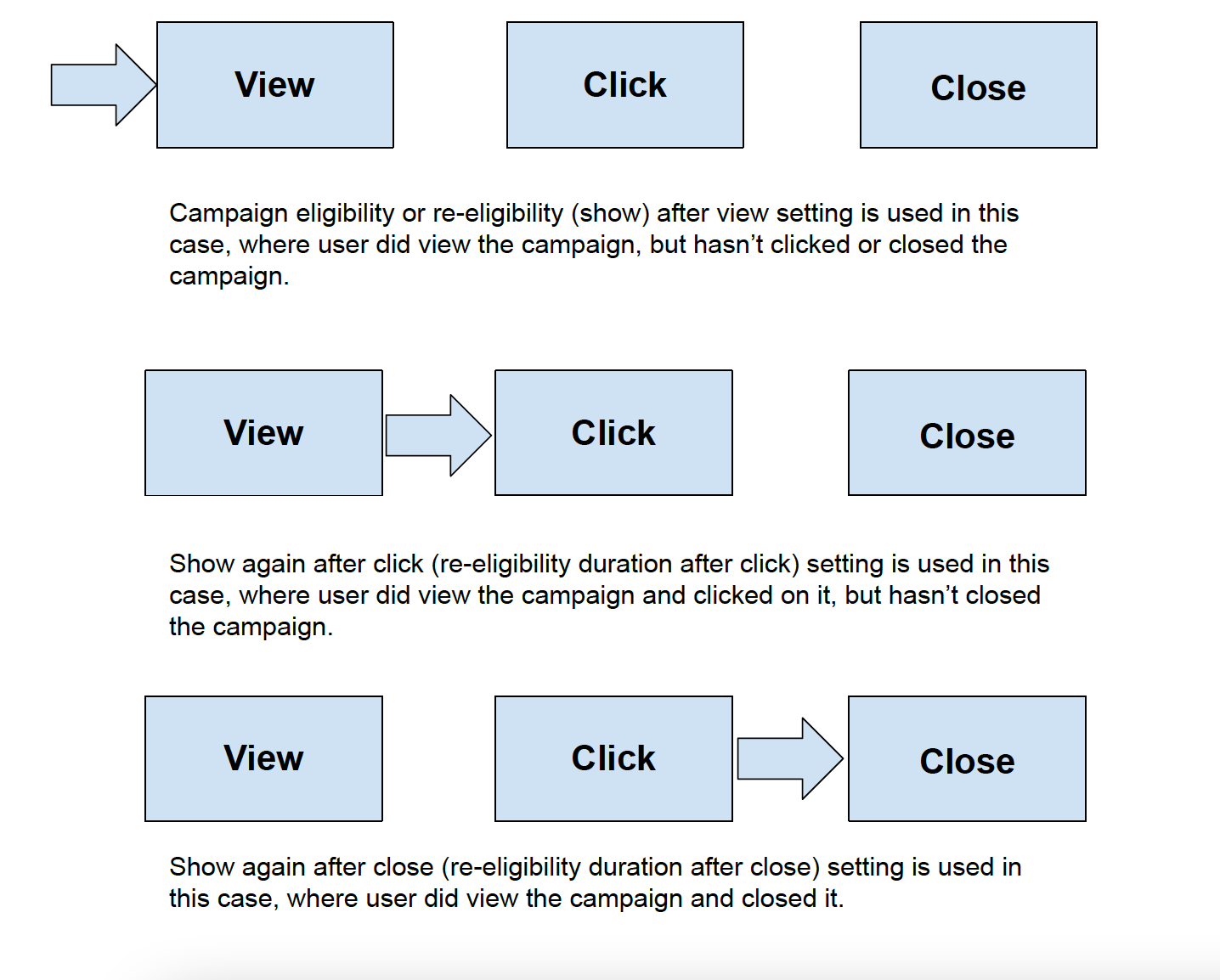
If a user views a campaign but does not interact with it, the same variant may still be shown to the user in future sessions.
If a user views a campaign and clicks but does not close it, the "re-eligibility duration after click" setting is applied.
If a user views and closes a campaign, the "re-eligibility duration after close" setting is applied.
How does Goal Conversion work (goal attribution window)?
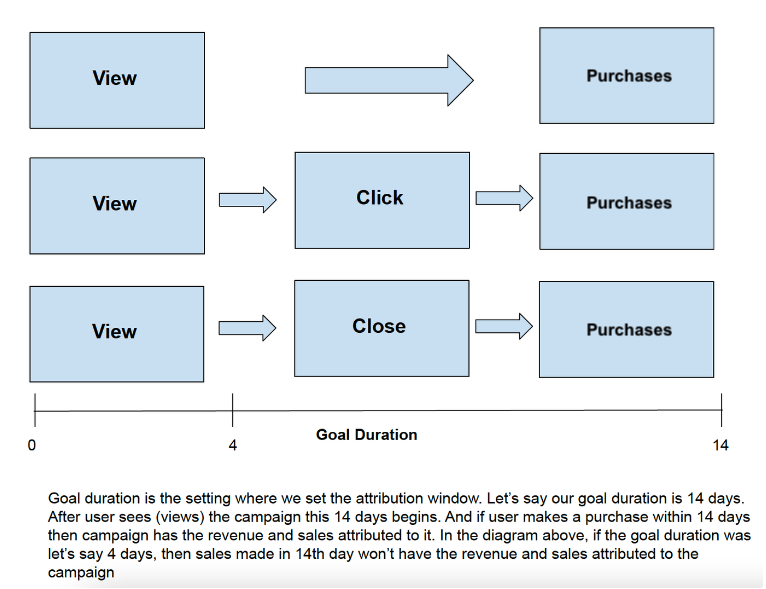
The diagram below shows an example of a goal duration or attribution window.
The user views the campaign and makes a purchase.
The user views the campaign, clicks it, and makes a purchase.
The user views the campaign, closes it, and makes a purchase.
In the above cases, the revenue is attributed to the campaign if the attribution window includes all the steps passed through (between view and purchase events).
Overall Revenue Uniqueness & Cross-Campaign Attribution
The following table summarizes whether each product attributes conversions across campaigns and whether revenue shown on the product’s Overall Analytics page is unique (de-duplicated).
Product | Is there attribution among campaigns? | Is the revenue in overall analytics unique? |
|---|---|---|
SMS | Last click | Yes |
Last click | Yes | |
Architect | Journeys: By Default No* Channels: Last Click/View | By Default No* |
By Default No* | By Default No* | |
OnSite | No | Yes |
App Push | No | Yes |
App Templates | No | Yes |
Web Push | Last click | Yes |
Smart Recommender | - | Yes |
Eureka | - | Yes |
Cross-campaign unique revenue (Optional, off by default in Email & Architect)
When it is off by default, revenue is not deduplicated across campaigns (Email) or journeys (Architect). A purchase can appear in more than one campaign/journey's overall revenue.
When enabled, the purchase is attributed only to the last clicked/last viewed campaign and counted once in Overall Analytics. For Architect, the attribution is written to the journey that owns the last clicked/viewed campaign.
You can contact the Insider One team to enable it for your account.
For Email, Last Click attribution is enabled by default for accounts created after Jul 1, 2026. It is off by default for accounts created before Jul 1, 2026, and can be enabled on request.
What are the default re-eligibility durations for Insider One products?
OnSite Products
You can customize the re-eligibility and goal conversion durations for each OnSite product, template, and campaign as per the following methods:
Session-based duration: If the session ends, the user can still view the campaign; however, their actions will not be counted as a goal conversion.
Day-based duration: User actions are counted as a goal conversion within the defined day interval.
OnSite products utilize both view-through and click-through attribution, depending on the selected goal.
If the goal is Purchases, goal conversions are tracked based on view-through attribution.
If the goal is Purchases from Clicks, the goal conversion is tracked based on click-through attribution.
To measure the incremental conversions and revenue a campaign drives, not just the attributed total, Architect and OnSite campaigns can withhold messages from a defined percentage of users (a control group) and report incremental conversions, incremental revenue, conversion-rate uplift, and AOV uplift against that baseline.
By default, a campaign's re-eligibility is based on the number of views it receives.
Messaging
Re-eligibility is not applicable to most messaging products as they are single campaigns, and users will not be exposed to them for an ongoing duration.
Read more on Web Push Conversion Attribution Windows.
Channels | Campaign Re-eligibility | Default Re-eligibility Duration | Goal Conversion Duration | Default Goal Attribution Window | Attribution Type | Click Attribution Window |
|---|---|---|---|---|---|---|
- | - | Customizable | 7 days after click | Last Click (optional and not enabled by default for customers that onboarded before July 1, 2026) | - | |
- | - | Customizable | 14 days after click | Last Click | - | |
- | - | Customizable | 14 days after click | Last Click | - | |
- | - | Customizable | 14 days after click | Last Click | - |
Conversions for Web Push, SMS, and WhatsApp campaigns are attributed using the last-click model. This means that only the last eligible campaign clicked within the attribution window will receive credit for a conversion.
- If a user clicks multiple campaigns across Web Push, SMS, or WhatsApp before making a purchase, the conversion will be credited only to the most recent eligible campaign.
- If no campaign qualifies within the attribution window, the conversion will not be attributed.
Note: Attribution works separately within each product (Web Push, SMS, WhatsApp). There is no cross-product attribution. For example, a WhatsApp campaign and an SMS campaign do not affect each other. However, multiple WhatsApp campaigns can influence attribution among themselves.
The default re-eligibility duration applies only to Trigger Web Push. By default, it is 14 days and can be customized.
To track conversions, Email campaigns require a click event after the user opens the email. The goal conversion duration starts when the user clicks the link in the email content, not when they open the email.
Mobile Products
The table below displays details on re-eligibility and goal conversion for mobile products.
Channels | Is Campaign Re-eligibility customizable? | Default Re-eligibility Duration | Re-eligibility Types | Is Goal Conversion Duration customizable? | Default Conversion Duration | Attribution Type | Display Options |
|---|---|---|---|---|---|---|---|
One-Off Pushes | No | - | - | Customizable | 6 hours | View-through & Click-through | - |
Automated Pushes | Customizable | Closed | After View | Customizable | 6 hours | View-through & Click-through | - |
App Templates & Survey | Customizable | Closed | After View | Customizable | Duration-based | View-through & Click-through | Customizable |
App Survey | Customizable | Closed | After View | Customizable | Session-based & Duration-based | View-through | Customizable |
App Cards | Customizable | Closed | After View | Customizable | Duration-based | View-through & Click-through | Customizable |
App Frames | Customizable | Closed | After View | Customizable | Duration-based, default 6 hours | View-through & Click-through | Customizable |
App Content Optimizer | Customizable | Closed | After View | Customizable | Session-based, not configurable | View-through only | Customizable |
The re-eligibility duration is disabled by default. If enabled, the default value is set to 1 hour. However, you can customize the duration with daily or hourly values.
You can use the Display Options, App Templates, and App Survey to configure delay duration, recurring display rules, priority, and frequency capping to show your campaign in a single session.
Smart Recommender
Smart Recommender has different attribution models for the OnSite Analytics and Smart Recommender Analytics pages.
OnSite Analytics Page
The attribution model on Onsite Analytics works similarly to the model used for Onsite products. This page focuses on the overall performance of the launched Smart Recommender campaigns. The metrics are attributed to the campaigns. For example, revenue is attributed to the campaign if a user purchases any item after viewing the Smart Recommender campaign.
Smart Recommender Analytics Page
This page measures the performance of recommended products and algorithms. That's why the metrics are attributed to the products. Campaign performance is tracked at the product level. For example, the revenue is attributed to the campaign only if a user purchases a product recommended in the campaign.
All metrics are based on a 7-day cookie duration. This means that once a website user views and clicks on a product from the recommended products, tracking begins with this click event. If the user views and clicks a product and makes a successful purchase within the next 7 days after this click event, this transaction is counted as a conversion.
Attribution Type | Campaign Re-eligibility | Default Re-eligibility Duration | Re-eligibility Type | Goal Conversion Duration | Default Goal Attribution Window | Goal Conversion Window starts with | |
|---|---|---|---|---|---|---|---|
Onsite Analytics | View-through & Click-through | Customizable | Session-based | After view, After click, After close | Customizable | Session-based | Impression |
Smart Recommender Analytics | Direct Click-Through | Customizable | Session-based | After view, After click, After close | Customizable | 7 days | Viewable impression |
Both analytics pages consider impressions for the goal conversion attribution windows. However, each tracks impressions differently. Once a user views the page where the campaign is located, this view is counted as an impression for OnSite Analytics. However, the user must see the Smart Recommender campaign in their viewport for the view to be counted as an impression for Smart Recommender Analytics. The latter is a more discrete measure of whether an end user actually sees a given campaign.
View-through is a successful purchase within a defined timeframe after a user is exposed to a campaign.
Click-through is a successful purchase within a defined timeframe after a user is exposed to a campaign and clicks it.
Direct click-through is a successful purchase within a defined timeframe after a user is exposed to a Smart Recommender campaign, clicks it, and purchases the item they click in the Smart Recommender. Direct click-through is used only in Smart Recommender Analytics.
Architect
The Architect uses a journey-based attribution model with multiple channels and touchpoints. It offers two attribution models:
Last Click Attribution for Click-through Report Type: Conversion is attributed to the channel/campaign that the user clicked last, provided the attribution window has not yet passed. Click actions are taken into account for Email, Web Push, SMS, WhatsApp, App Push, In-App, and OnSite channels.
Last View Attribution for View-through Report Type: Conversion is attributed to the channel/campaign that the user viewed last, and the attribution window hasn’t passed yet. This view corresponds to different actions for each channel: Open for Email, Open (Read) for WhatsApp, View (Delivered) for Web Push and App Push, Delivered for SMS, View (Impression) for InApp and OnSite.
When you visit any analytics page, you will see Click-through Report Type metrics by default. You can change it from the dropdown at the top.
To measure the incremental conversions and revenue a campaign drives, not just the attributed total, Architect and OnSite campaigns can withhold messages from a defined percentage of users (a control group) and report incremental conversions, incremental revenue, conversion-rate uplift, and AOV uplift against that baseline.
You can set different attribution windows for view and click-through attribution within the Launch section. The default values are 14 days for click-through and 3 days for view-through. These windows are journey-based.
You can select any event or any attribute change as a conversion goal. The source of the event can be App, Web, or Upsert API. You can define up to 10 goals. While selecting a goal, you can also specify the values of the event parameters of the respective event. The purchase event is tracked by default.
Here are some examples of the conversion goals that you can set: add to cart, sign up, purchase of any items under the Shirts category, purchase of any product more than $100, and SMS opt-in attribute changes from false to true.
You might find the following pages useful: User Eligibility, Journey Goals, Architect Analytics Dashboard.