Insider One provides APIs for user data, consent and subscriptions, messaging, analytics, product catalogs, and other use cases. Some operations may appear similar but require different APIs.
Use this guide to identify the API that matches your integration goal before you start development.
This page helps you select the appropriate API for your use case. After choosing an API, refer to its API reference for authentication, request parameters, rate limits, and sample requests.
In this article, you can find answers to these questions:
Choose an API by goal
If you want to... | Use this API | Why |
|---|---|---|
Create a user or update their attributes and events | Creates a profile when one does not exist and updates an existing profile when it does. | |
Change an existing identifier, such as a user’s email address or phone number | Updates an identifier already associated with the profile. Upsert API does not replace an existing identifier. | |
Retrieve selected attributes or events for known users | Returns profile data for users identified in the request. You can retrieve only one user per request. | |
Export user data for a segment | Creates an asynchronous bulk export of user attributes and events for users matching the requested segment and filters. | |
Record a user’s current channel permission | Updates profile attributes such as email_optin, sms_optin, or whatsapp_optin. | |
Unsubscribe a user from Email, SMS, or WhatsApp | Unsubscribe API for that channel. See Data Governance. | Adds the user to the applicable channel suppression state. Use v2 for new integrations where available. |
Make a previously unsubscribed user reachable again | Resubscribe API for that channel. See Data Governance. | Removes the applicable unsubscribe state and restores channel reachability when possible. Use v2 for new integrations where available. |
Delete one or more profile attributes | Removes selected attributes without deleting the entire profile. | |
Remove an identifier from a profile | Removes an identifier value without deleting the entire profile. | |
Remove only personally identifiable information | Anonymizes the profile, removing its PII-selected attributes while retaining the remaining profile data. | |
Delete a user and all associated profile data | Permanently removes the complete user profile. | |
Send a direct transactional message through one channel | The channel’s transactional messaging API. See Messaging APIs. | Sends through a specific channel, such as Email, SMS, WhatsApp, Web Push, or App Push. |
Start a real-time, multi-step transactional flow | Enters the user into an active journey that can contain multiple messages, decisions, waits, or channels. |
See Insider One APIs for all available API categories and endpoints.
Should I use Upsert or an identity API?
Use the Upsert User Data API when you need to create or update profile data.
Common examples include:
Creating a profile for a new lead.
Updating loyalty tier, language, city, or other attributes.
Sending offline or historical events.
Sending consent and channel opt-in attributes.
Adding users to a static segment.
Upsert uses the identifiers in your request to locate the profile. If a matching profile exists, Insider One updates it. If no matching profile exists, Insider One creates one.
For request requirements and examples, see the Upsert User Data API.
Do not use the Upsert User Data API for the following operations:
Goal | Correct API |
|---|---|
Replace an existing identifier with a new value | |
Remove an identifier | |
Remove an attribute |
Example: A user changes their email address
Suppose a profile already uses old@example.com as an identifier.
Do not send new@example.com through Upsert and expect it to replace the existing identifier. Use the Update Identifiers API to change the existing identifier from old@example.com to new@example.com.
Identifier changes can affect user recognition and profile unification. Confirm your Identity Resolution Management configuration before updating identifiers.
Should I use Get User Profiles or Export Raw User Data?
Choose the API based on how you identify users and how you need to process the result.
Requirement | Use |
|---|---|
Retrieve selected data for users whose identifiers you already know | |
Check whether attributes or events were added to a specific profile | |
Use profile data in another real-time or near-real-time workflow | |
Export users belonging to a segment | |
Transfer a large user dataset to a warehouse or analytics system | |
Receive the result as a downloadable export |
The Get User Profiles API returns requested attributes and event information for the users included in your request.
The Export Raw User Data API is intended for asynchronous bulk exports. It prepares a file and sends the result to the configured webhook instead of returning all exported user data directly in the initial response.
Example: Verify an Upsert request
If you sent an attribute or event through Upsert and want to confirm the resulting profile data, use Get User Profiles with the same user identifier.
Do not use Export Raw User Data to validate an individual Upsert request.
Should I use Upsert or the Unsubscribe and Resubscribe APIs?
This choice depends on whether you are updating a profile permission or managing a channel suppression state.
Use Upsert for profile opt-in attributes
Use the Upsert User Data API to send the permission information collected by your CRM, consent form, preference center, or another source.
Examples include:
email_optinsms_optinwhatsapp_optinGDPR-related profile consent
These values become part of the user profile and can affect segmentation and campaign eligibility.
Use Unsubscribe APIs to opt users out
Use the channel-specific Unsubscribe API when a user asks to stop receiving messages through Email, SMS, or WhatsApp. See Data Governance for further details.
The unsubscribe operation manages the suppression state used by the messaging channel. Where both v1 and v2 are available, use v2 for new integrations.
Use Resubscribe APIs to restore reachability
Use the channel-specific Resubscribe API when a previously unsubscribed user gives permission to receive messages again.
Setting an opt-in attribute to true does not by itself guarantee that the user becomes reachable. A user can have email_optin: true and still be unreachable because they remain globally unsubscribed, have bounced, reported spam, or have another blocking status.
The Resubscribe APIs are designed to set an unreachable email address or phone number back to reachable after the user opts in again.
For the relevant subscription endpoints, see Data Governance.
Decision example
User action | API operation |
|---|---|
A new user gives Email consent and must be created in Insider One | Send the profile and |
An existing user withdraws Email consent | Use the Email Unsubscribe API. |
The same user later opts in again | Update the current permission through Upsert, if needed, and use the Email Resubscribe API to restore reachability. |
A user withdraws permission for personal-data processing | Update the applicable consent state and follow the required data-governance or deletion process. |
Do not treat opt-in and reachability as the same value. Opt-in records the user’s permission. Reachability represents whether Insider One can currently send to the user through that channel.
The final result can also depend on the user’s identifiers and the subscription management flow configured for the account. Check the selected API’s identifier requirements before integrating.
Which deletion API should I use?
Choose the deletion operation with the narrowest scope that meets your requirement.
What should be removed? | Use |
|---|---|
A selected attribute, such as date of birth or loyalty tier | |
One value from an array-typed attribute | Delete User Attribute API with partial deletion |
An email address, phone number, UUID, or custom value configured as an identifier | |
Personally identifiable information while keeping the non-PII profile data | |
The complete user profile and all associated data |
Delete an attribute
Use Delete User Attribute when the profile should remain, but one or more attributes should be removed.
Do not send an empty string or null through Upsert as a deletion instruction.
Delete an identifier
Use Delete Identifiers when an identifier should no longer be associated with the profile.
For example, use it when a user removes their phone number from your source system, and you also need to remove that identifier from Insider One.
Delete PII
Use Delete User’s PII Data when you need to anonymize the user while retaining the remaining non-PII profile data. The API removes attributes marked as PII and can make a known profile anonymous when its only identifier is an email address or phone number.
For request requirements and deletion behavior, see the Delete User’s PII Data API.
Delete the complete profile
Use Delete User Profile when you must permanently remove the user and all data associated with the profile.
If you’re deleting profiles to meet a legal or compliance obligation, contact the Insider One team before you start.
Deletion operations cannot be undone. Stop the source integration from sending the deleted data again before making the request. Otherwise, a later import, SDK call, or API request can add the data again.
Should I use a messaging API or a transactional journey?
Both options can be triggered from your backend, but they support different integration models.
Use a channel messaging API
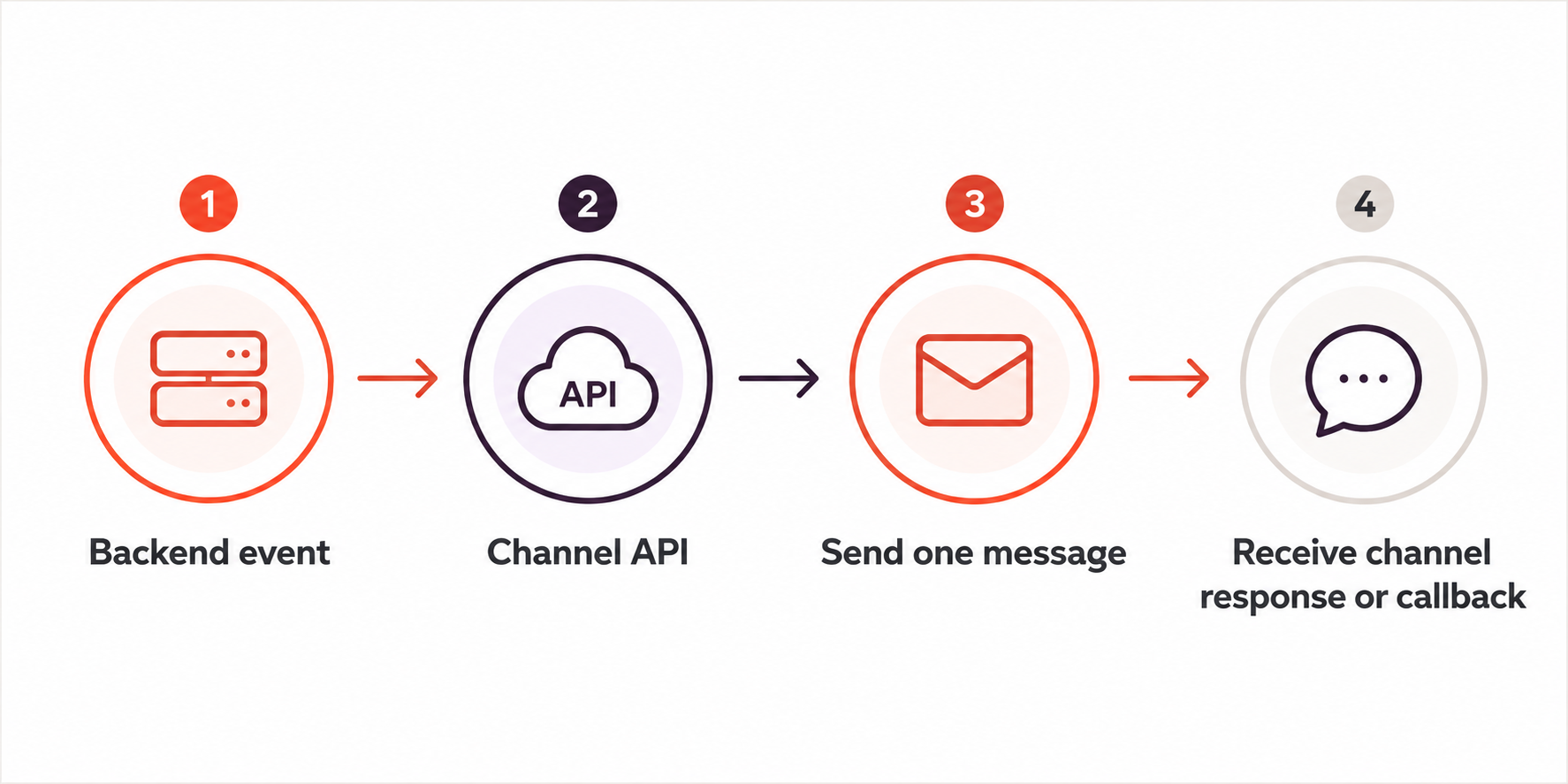
Choose a channel-specific API when your backend needs to send a message directly through one channel.
Examples include:
Sending a transactional email.
Sending a transactional SMS.
Sending a WhatsApp template message.
Sending a single Web Push.
Sending an App Push.
This approach fits a direct flow:
Use the On API Call Starter
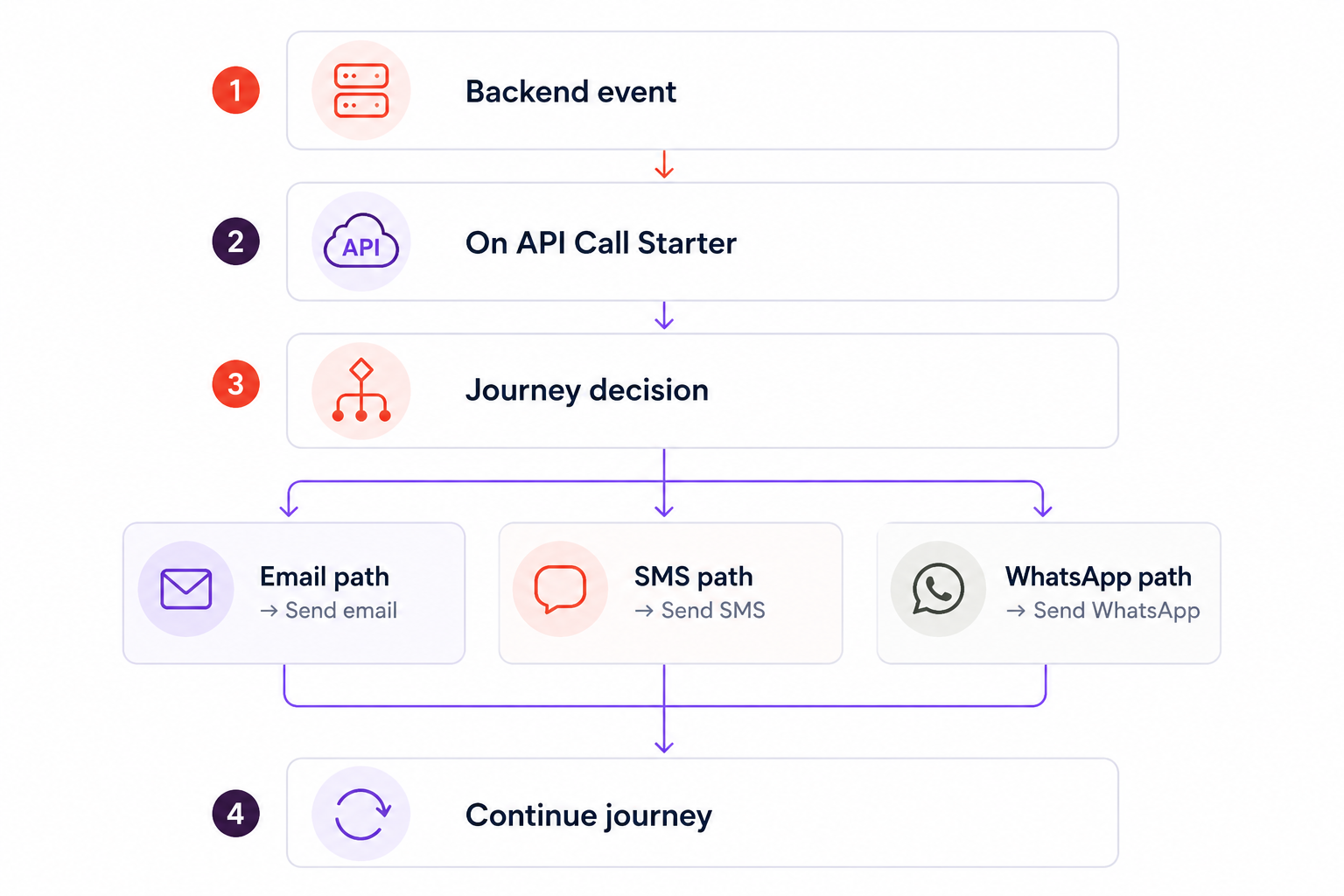
Choose Transactional Journeys: On API Call Starter when an API request should enter the user into an active Architect journey.
This option is suitable when the flow needs:
More than one channel.
Journey-level content management.
Dynamic attributes from the API request.
Conditions or branching.
Multiple messages or steps.
Journey analytics.
A flow that marketing teams can manage in Architect.
Each request explicitly starts a journey instance for the target user. The target journey must be active.
Example: Order confirmation
Use a channel transactional API if your backend only needs to send one order-confirmation email.
Use On API Call Starter if the order should start a managed flow that sends a confirmation, waits for a shipment update, checks a condition, and then sends another message through Email, SMS, or WhatsApp.
Before you integrate
Confirm whether you are working with profile data, identifiers, subscriptions, deletion, or message delivery.
Check whether your operation targets one user, known users, or a segment.
Review your Identity Resolution Management configuration.
Use v2 for new unsubscribe and resubscribe integrations where a v2 endpoint is available.
Review the API’s authentication method, rate limit, request limits, and identifier requirements.
Test with a small set of users before sending production traffic.
Verify the resulting profile, reachability state, export, or message outcome.
Still deciding?
Use the following questions to identify the appropriate API:
Question | If yes |
|---|---|
Are you adding attributes or events? | Use Upsert User Data. |
Are you changing an identifier already associated with a profile? | Use Update Identifiers. |
Are you reading known users? | |
Are you exporting a segment? | Use Export Raw User Data. |
Are you changing a messaging suppression state? | Use the channel’s Unsubscribe or Resubscribe API. |
Are you permanently removing data? | Select the deletion API based on the required scope. |
Are you sending one direct message? | Use a channel messaging API. |
Are you starting a multi-step transactional flow? | Use the On API Call Starter. |