Suggested reading: Create a WhatsApp Business Template on InOne
WhatsApp uses a quality rating system to assess the quality of messages sent by businesses using WhatsApp Business APIs. This quality rating system is an integral part of WhatsApp's policies, ensuring a positive user experience and preventing spam or unwanted messages on their platform.
The quality rating for your message template reflects how messages from your template have been received by your customers over the last 24 hours. You can find the quality rating under the Message Templates section within your WhatsApp Manager in Meta Business Manager.
This article covers the answers to the questions below:
What are the quality ratings of WhatsApp message templates?
Every WhatsApp message template gets a quality rating based on how customers respond and engage with it. You can view this rating in WhatsApp Manager whenever the template is active.
Active – Quality Pending (displayed in green): Every newly approved template begins in this state while Meta collects initial feedback.
Active – High Quality (displayed in green): Indicates strong customer engagement and positive feedback.
Active – Medium Quality (displayed in yellow): Reflects average engagement or some negative feedback.
Active – Low Quality (displayed in red): Signals low engagement or significant negative feedback.
When a template is first approved, it enters the Active – Quality Pending state. This means you can already start using it while Meta collects customer feedback. The 'Quality Pending' label simply indicates that the evaluation is not yet complete; it doesn’t limit or prevent the template from being active.
Refer to Meta's guide for further information on quality rating.
What are the WhatsApp template statuses?
Approved (Active): A template with the “Approved” status has successfully passed the review process and can be used on the WhatsApp Business Platform. Approved means the template is Active, and within this Active state, the template’s quality rating can appear as one of four levels: Pending, High, Medium, or Low, which reflect the current quality status of the message template.
In-Review: The template is still being checked by Meta and can’t be used until the review is complete.
You cannot edit the template during the review, as described in Edit a WhatsApp Template on InOne.
Rejected: The template didn’t pass Meta’s review and cannot be used or sent.
Archived: WhatsApp message templates that have had no activity for 12 months (no sends, edits, or appeals) are now automatically moved to an Archived status. Refer to Archived Message Templates below for further details.
If your template's quality rating drops to a low level, the template's status will change to either Paused or Disabled, and you will receive an email notification.
Paused: If a template’s quality rating drops to Low, it may be paused as a warning. During this time, you cannot send messages with it. If the quality improves to Medium or High for seven consecutive days, the template automatically returns to Approved.
You can edit a Paused template, as described in Edit a WhatsApp Template on InOne.
Disabled: If a template stays at Low quality and doesn’t improve within 7 days, it becomes disabled. In this state, you can’t send or edit the template until the issue is resolved.
You can observe all these statuses under the Status and Quality column on the listing page of the Templates tab of WhatsApp on Insider One's InOne panel.
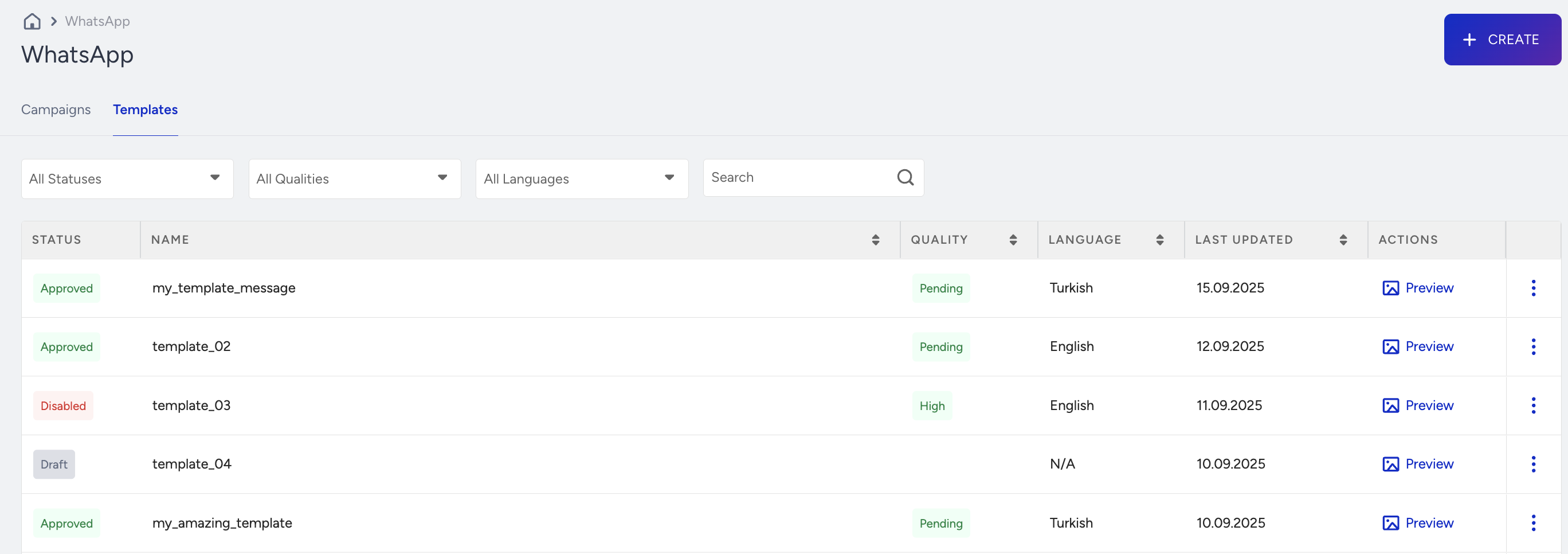
You can refer to Meta's guide for further information on template statuses.
What happens if your template is rejected
When Meta rejects a template, InOne sends an email notification instead of showing an in-panel alert. The only place you'll see this reflected in the panel is the template's status, which changes to Rejected on the Templates page.
This email goes to only two people, not every WhatsApp user on the account: the panel user who created the template and the panel user who last updated it. If the same person did both, they receive a single email. If two different people did, each receives a separate email.
Insider One sends the notification via email with the subject line "Your WhatsApp Template Has Been Rejected." It doesn't include Meta's rejection reason. The email includes only the partner name, template name, recipient name, and template ID.
The same email mechanism applies to five statuses: Approved, Rejected, Disabled, Paused, and Archived. InOne doesn't have a dedicated notification center for these updates, so email is the only channel you'll be alerted through.
You can also track a template's status through the WhatsApp Template Management API. The List WhatsApp Templates endpoint returns each template's current status field, but like the email notification, it doesn't return a rejection reason, only the status itself.
To see why Meta rejected a template, check the template in the Message Templates section of WhatsApp Manager in Meta Business Manager. Review the reason against WhatsApp's Message Templates Guidelines, then make the necessary adjustments and resubmit your template.
Archived Message Templates
WhatsApp message templates that remain inactive for an extended period are automatically moved to the Archived status in InOne. This helps keep your template library organized by showing only the templates you actively use.
Archived templates are not deleted immediately. You have 28 days to restore a template. If you do not restore it within this period, it is permanently deleted and cannot be recovered.
Only templates with no activity for at least 12 months are archived. Activity includes sending a message with the template, editing it, or submitting an appeal. Templates that are used regularly are never archived.
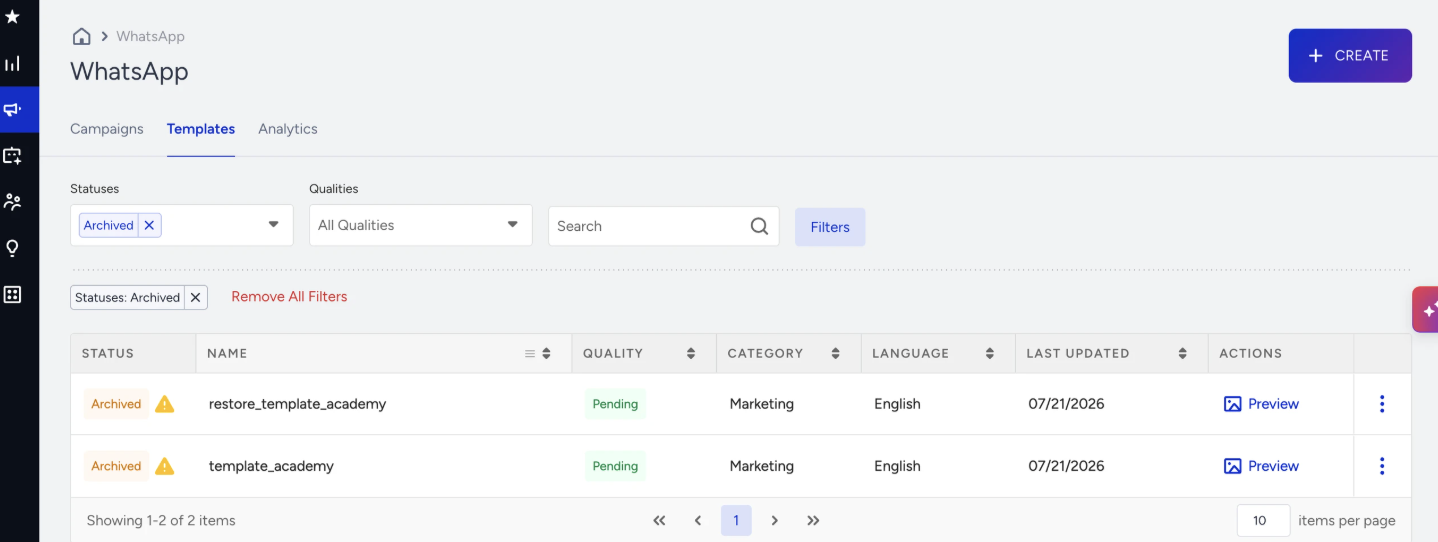
How to identify an archived template
On the Message Templates page, archived templates are marked with an Archived status tag and a caution icon.

Hover over the caution icon to view additional information about the archived template:
The number of days remaining before the template is permanently deleted.
A short explanation of why the template was archived.
A Restore Template button.
To display only archived templates, open the Statuses filter and select Archived.
Restore an archived template
You can restore an archived template in any of the following ways:
Restore from the information card
Navigate to InOne > Campaigns > Messaging > Templates.
Hover over the caution icon next to the Archived tag.
Click Restore Template.
Restore from the three-dot menu
Navigate to InOne > Campaigns > Messaging > Templates.
Click the three-dot menu at the end of the archived template's row.
Click Restore.
The Restore option is available only for archived templates. Archived templates cannot be edited until they are restored.
Restore from the template details page
Navigate to InOne > Campaigns > Messaging > Templates.
Open the archived template.
Click Restore at the bottom of the page.
You will be redirected back to the template list once the restore completes.
What happens after you restore an archived template
Restoring a template takes a short time. You'll first see a notification confirming that the restore has started, followed by another notification once the restore is complete.
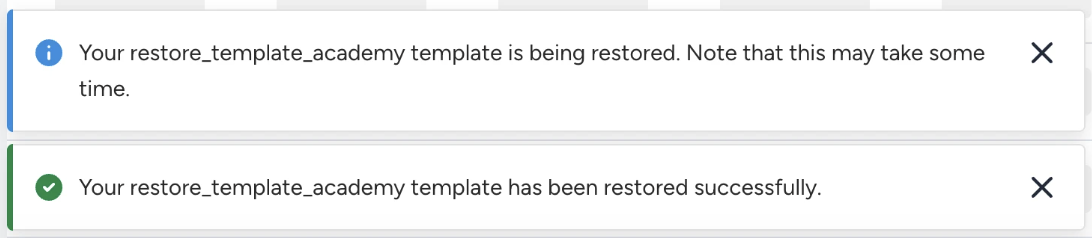
Once the restore is complete, the template returns to the Approved status and becomes available again for campaigns and transactional messages. Its content, language, and category remain unchanged.
If the restore fails, you'll see the following message: Your {template name} template couldn't be restored right now. You can wait for a few minutes and retry.
Archived templates and campaigns
Archived templates cannot be selected when creating or editing campaigns. They are hidden from the template list in the Design step. If a message references an archived template, it is not delivered. This applies to both campaigns and transactional messages.
If a template that is already selected in a campaign or saved draft is later archived, an alert appears in the Design step:
The selected Message Template is unavailable as it's archived. You can restore this template to keep using it.
Click Restore Template in the alert to restore the template without leaving the page. Once the restore is complete, the alert disappears, and you can continue editing the campaign.
You cannot continue with the campaign while the selected template is archived. Restore the template or select another approved template before proceeding.