WhatsApp Template Pacing and Pausing help you control the frequency of messages sent to users. The pacing feature prevents spam and respects customer preferences to ensure well-timed communication, while the pausing feature allows temporary halts for strategy adjustments or compliance.
This guide aims to explain WhatsApp Template Pacing and Pausing and offers solutions.
Template Pacing
The template pacing system provides an opportunity for customers to give early feedback on your WhatsApp templates. It identifies and temporarily suspends templates that receive negative feedback or low engagement and allows you to revise their content before they reach a larger audience. This helps reduce the potential impact of negative feedback on your business.
Template pacing applies to marketing and utility templates. The newly created templates, unpaused templates, and previously created ones that lacked a green quality rating may be subject to pacing. One of the main reasons for template pacing is the template's quality history, such as a pause due to low quality. This may also cause other templates to be paced.
Messages will be sent as usual when a template is paced until an unspecified threshold is met. After reaching this threshold, further messages using that template will be paused to allow time for customer feedback. If a good quality signal is received, the messages will be scaled to the target audience. However, if a bad quality signal is detected, future messages using that template will be dropped. This allows you to adjust the targeting and other factors.
Utility Template Pacing
Utility templates will be subject to pacing only if a utility template has previously been paused. After a template has been paused, any newly created templates, unpaused templates, or templates without a green quality rating may be paced for the following 7 days.
Template Pausing
When a message template receives the lowest quality rating (Active - Low quality status), it will be automatically paused for a certain period to protect the quality rating of the phone numbers that have used the template. The pausing durations are as follows:
1st instance: Paused for 3 hours
2nd instance: Paused for 6 hours
3rd instance: Disabled
When a message template is paused, it cannot be sent to customers, so you should suspend any automated messaging campaigns that use that template. While attempting to send a paused template will not incur charges or reduce your messaging limit, the system will still reject these attempts. Once the template's status is set back to Active, you can resume the campaigns.
Pausing will not immediately affect the business phone number that sent the message template or reduce the phone number's messaging limit. Other high-quality message templates can still be sent from this phone number. However, if a business repeatedly sends message templates marked as Low quality, the phone number could eventually be affected.
Unpausing
A template will automatically unpause once the specified pause duration has been completed. Once unpaused, its status will change to Active, allowing you to resume sending it to customers. If you don't suspend any automated messaging campaigns that depend on the paused template, they will start working again. However, Meta recommends pausing any campaigns that rely on a template until it is unpaused, as the system will reject your requests otherwise.
The template's quality rating will also be updated based on the latest customer feedback it has received.
As with pause notifications, Meta will inform you via a WhatsApp Manager notification, email, and webhook when the template's status is set to Active.
Possible solutions
If your WhatsApp template is paused and you still want to send your campaigns to your users, you can consider the following solutions:
If you have a paused template, you can re-segment it using Held Messages or Paused Templates events.
You can select the relevant parameters in the Events section for the Paused Templates as follows:
.png)
You can select the relevant parameters in the Events section for the Held Messages as follows:
.png)
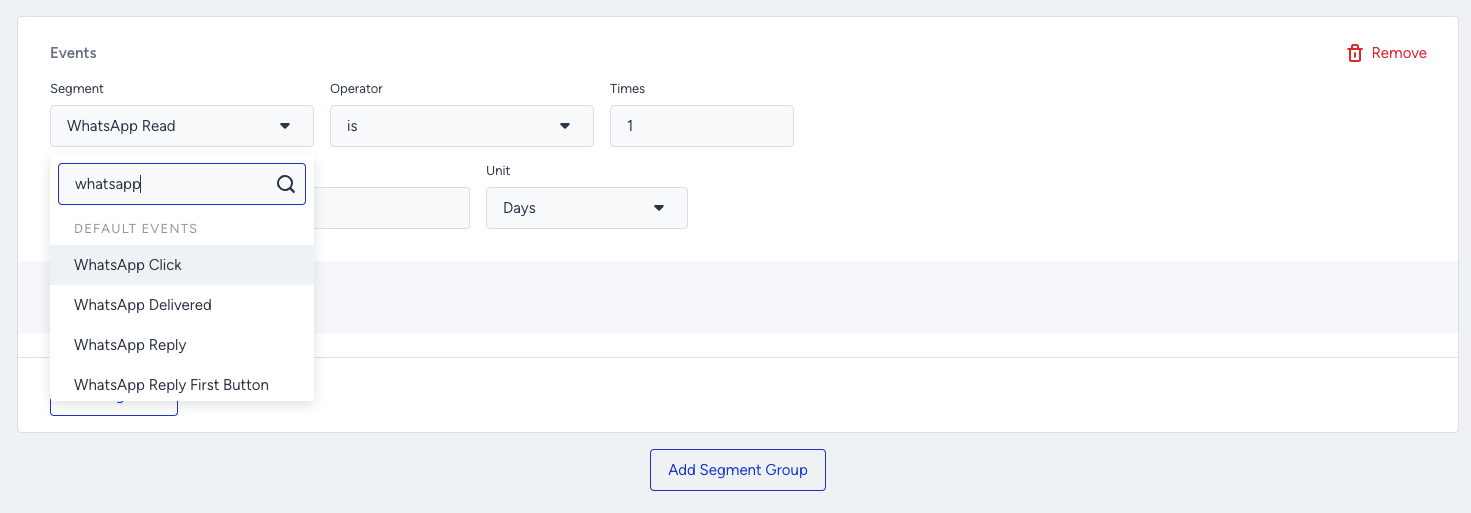
When you create a new template, it needs to receive positive feedback to reduce the risk of a template pause. Therefore, you should first send it to your engaged users. You can use the WhatsApp Click and WhatsApp Read events to segment the users.
You can refer to Meta's article for further information.