The Maximum Price (Max-Price) feature is currently available in limited beta and is not enabled by default. If you would like to use this feature, contact the Insider One team.
To use the Max Price feature, you must have an active WhatsApp Business Account (WABA) registered to the MM API (Marketing Messages API).
Maximum Price (Max-Price) is a Meta feature for WhatsApp marketing messages that allows you to set the maximum amount you are willing to pay per message delivery.
When Max-Price is enabled, Meta uses the bidding limit you specify. For each recipient, Meta determines whether the message can be delivered within that limit and charges you at or below the maximum delivery price.
Unlike the standard pricing model, where all delivered marketing messages are charged at Meta's published rate, Max-Price allows delivery costs to vary by recipient.
This feature only affects WhatsApp marketing messages. The WhatsApp Business Platform continues to use a per-message pricing model.
Area | What changes |
|---|---|
Meta API | Businesses can set a maximum price for WhatsApp marketing message deliveries using Meta's Max-Price bidding model. |
Insider One | You can enable and manage Max-Price directly within Insider One when creating WhatsApp templates and campaigns. Message consumption might vary depending on the delivery cost determined by Meta. |
In this guide, you will learn:
How does Max-Price work?
Max-Price works as a bidding mechanism. You specify the highest amount you are willing to pay for a marketing message delivery, and Meta decides whether to deliver the message to each recipient based on that bid.
The Max-Price value you choose affects both delivery opportunities and message costs. Depending on your business goals, you can choose different bidding strategies:
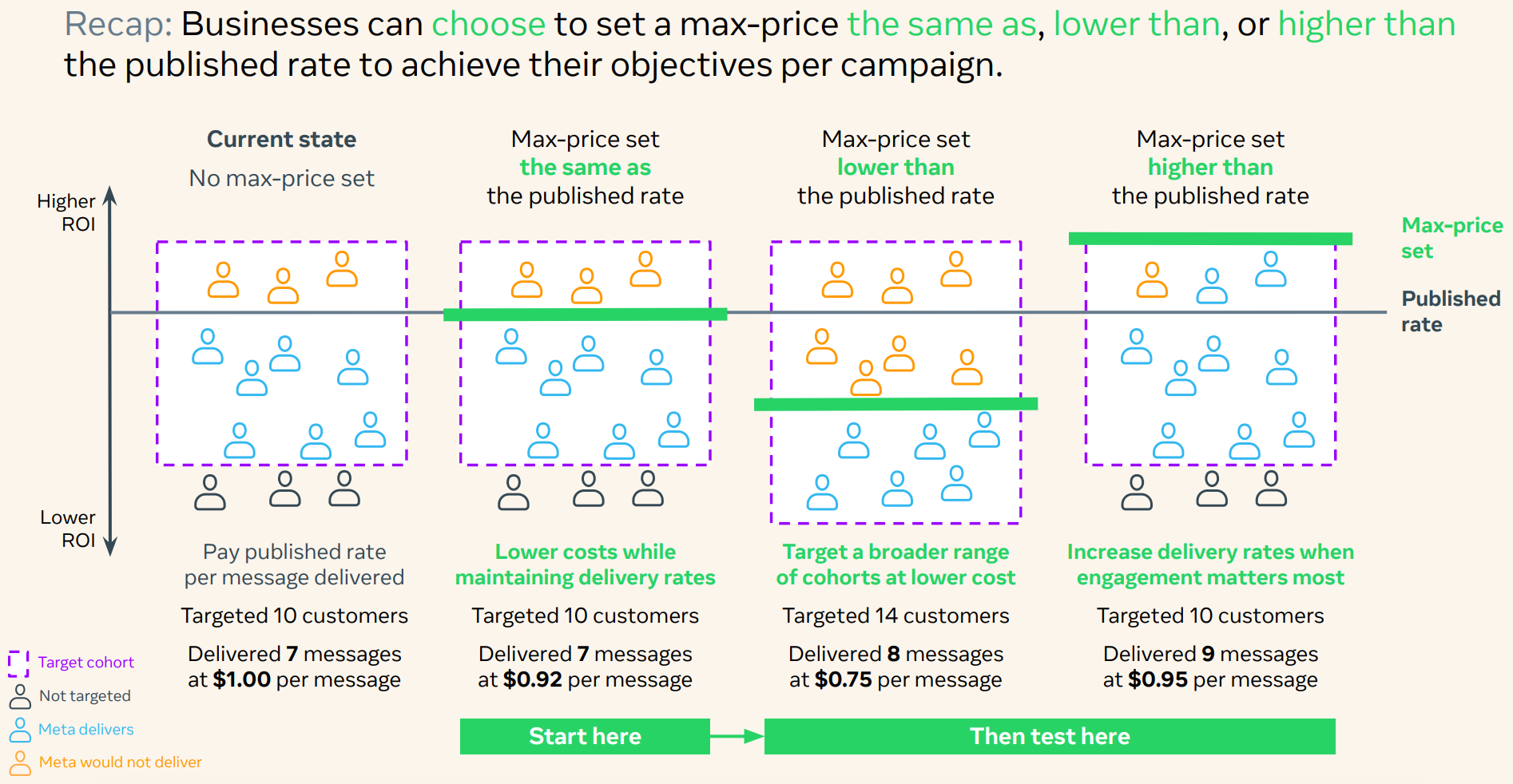
Set the maximum price equal to Meta's standard marketing message rate to maintain similar delivery performance while potentially benefiting from lower delivery costs when Meta charges less than your maximum price.
Set the maximum price below the standard rate to prioritize lower costs and broader reach.
Set the maximum price above the standard rate to increase delivery opportunities during high-priority campaigns, such as seasonal promotions, product launches, or limited-time sales.
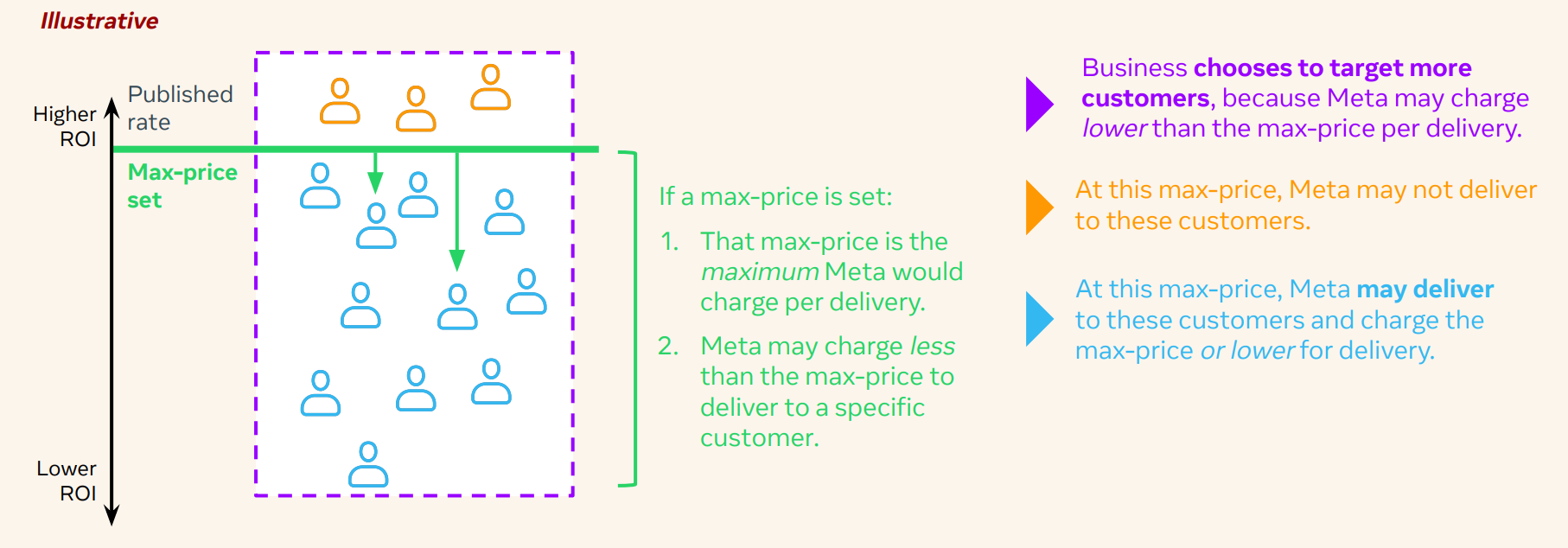
If you use Max-Price, you might notice that message consumption is no longer always 1:1 on the WhatsApp Usage Analytics page. Depending on the delivery cost determined by Meta, a single message delivery can consume between 0.1x and 3.0x messages. Higher bidding strategies typically result in higher message consumption, while lower bidding strategies might consume fewer messages.
Example bidding strategies
The examples below are based on Meta's illustrative benchmarks and are provided to demonstrate how different Max-Price strategies might affect delivery and costs. Actual delivery rates and message costs depend on Meta's bidding system and can vary by audience, market, campaign, and time period.
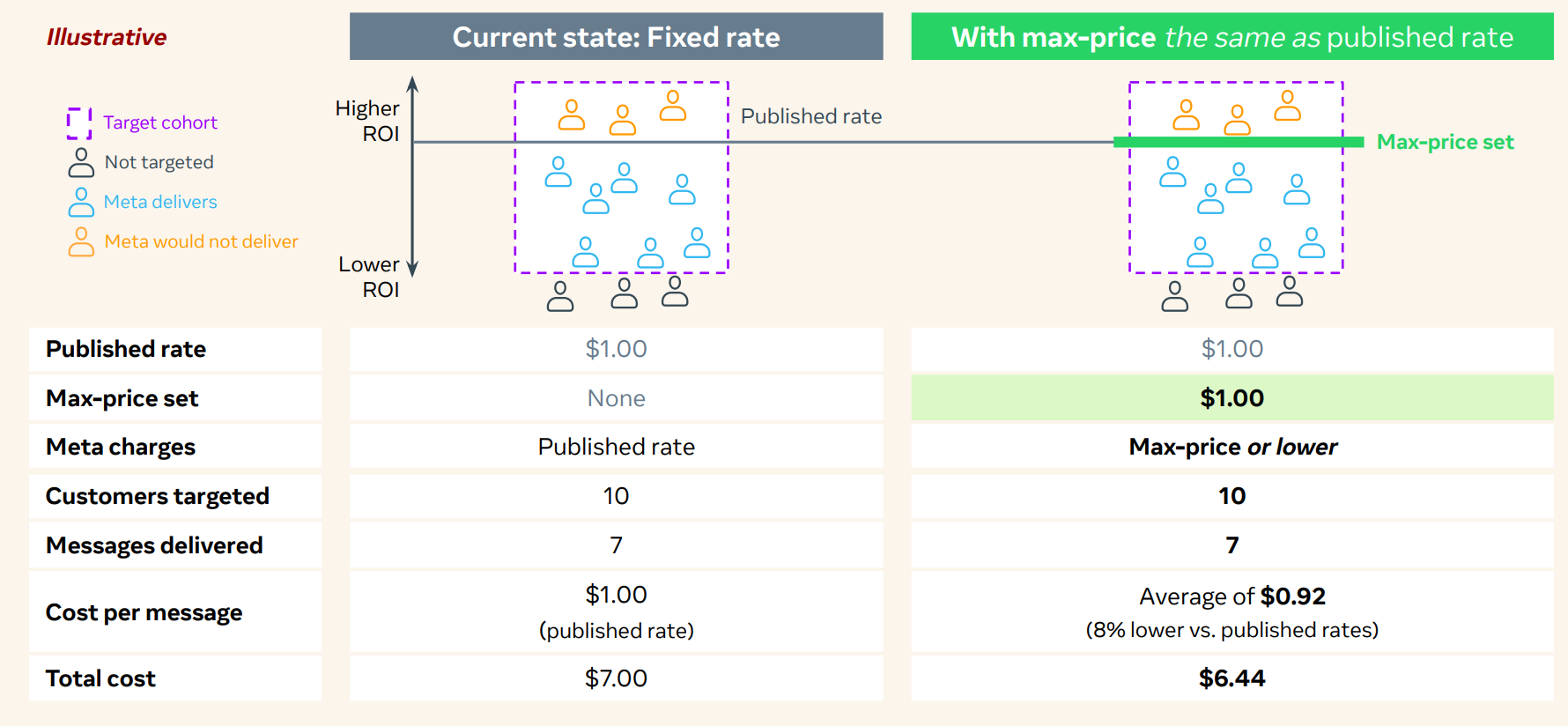
Example 1: Set the Max-Price equal to Meta's standard rate
You can set the Max-Price equal to Meta's standard marketing message rate to maintain similar delivery performance while potentially reducing costs.
In Meta's example below, delivery remains similar to standard campaigns, while some messages are delivered at a lower cost than the maximum price.
Example 2: Set the Max-Price below Meta's standard rate
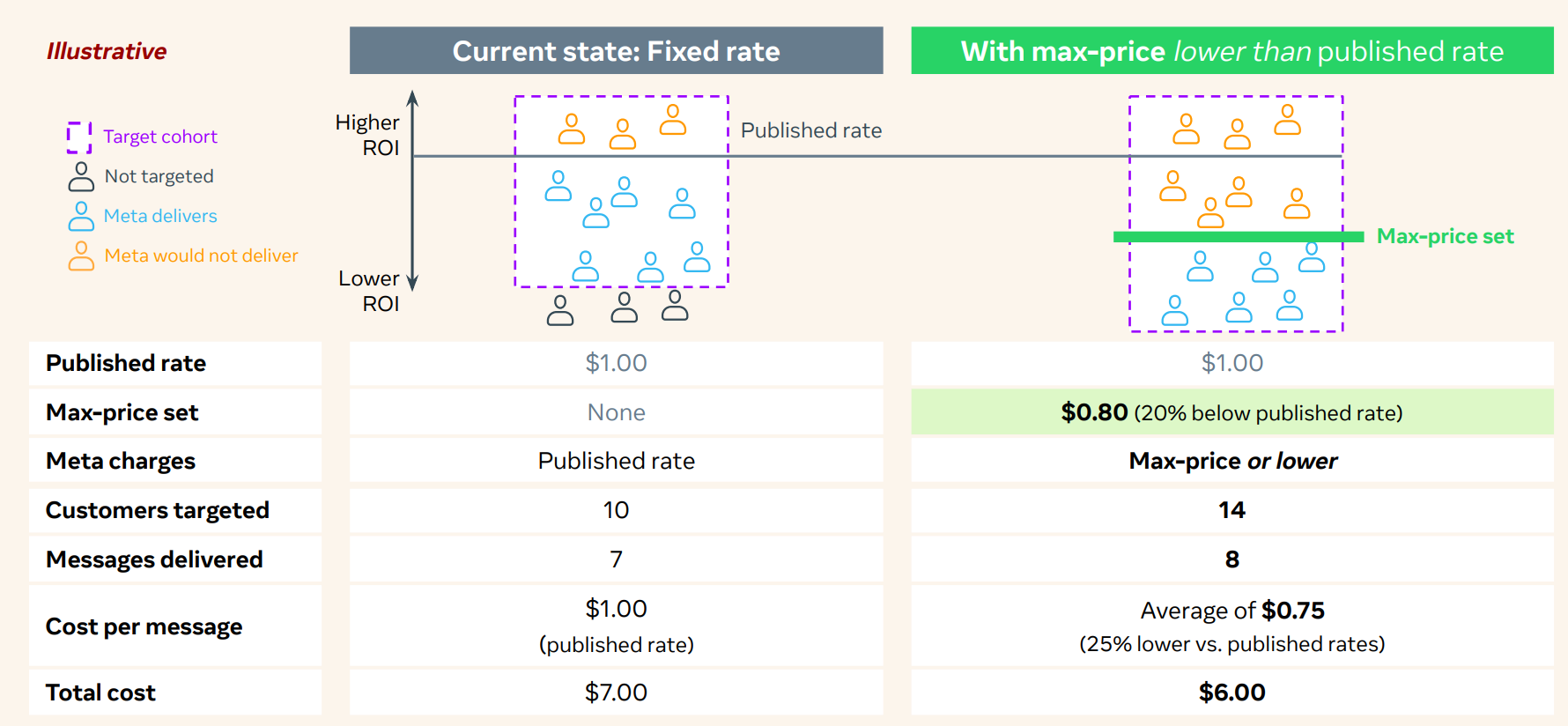
You can set the Max-Price below Meta's standard marketing message rate to prioritize lower delivery costs.
In Meta's example below, messages are delivered to recipients that can be reached within the specified budget, resulting in a lower average cost per delivery.
Example 3: Set the Max-Price above Meta's standard rate
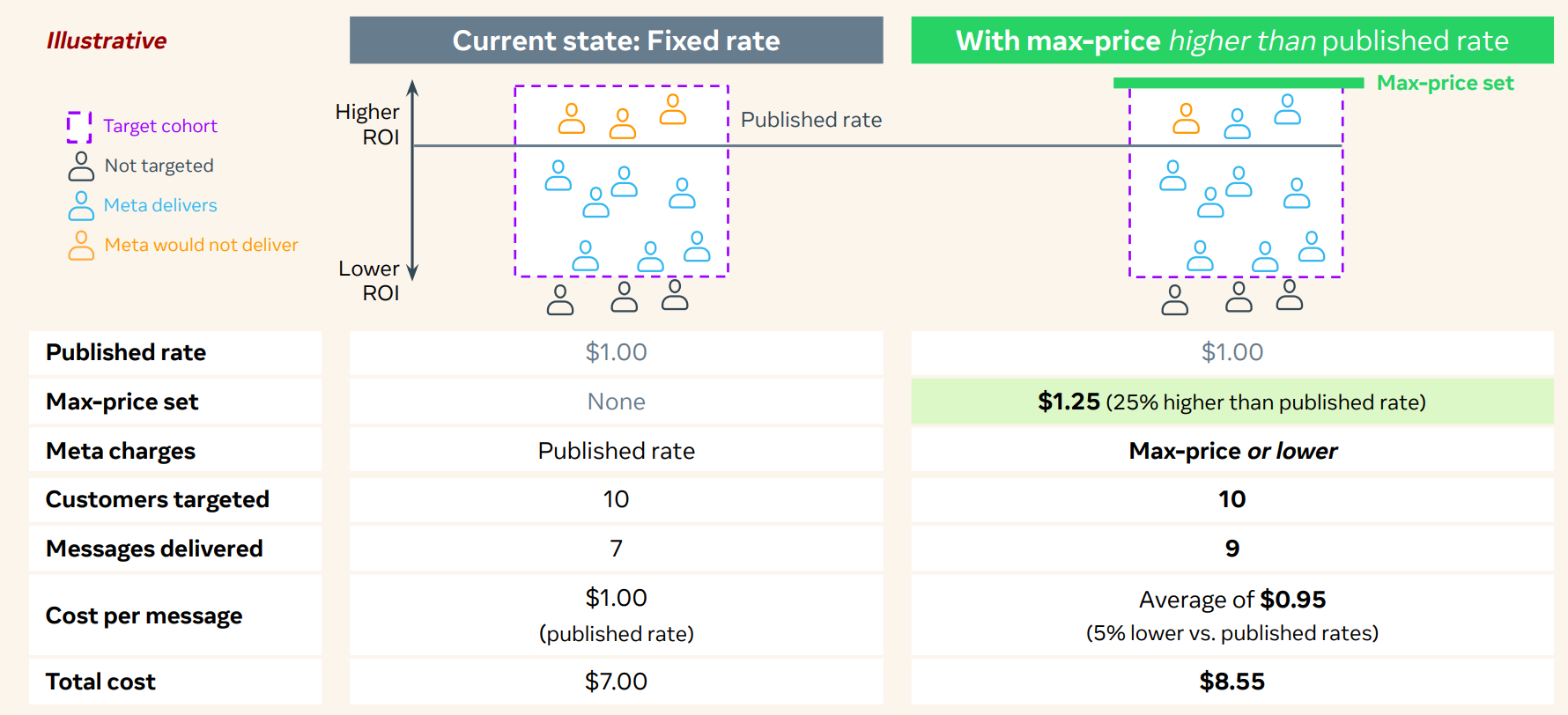
You can set the Max-Price above Meta's standard marketing message rate to increase delivery opportunities during high-priority campaigns, such as seasonal promotions, product launches, or limited-time sales.
In Meta's example below, this approach increases delivery volume while allowing Meta to charge up to the specified maximum price.
Recap: One lever, three objectives
The illustration below shows how different Max-Price strategies can affect delivery opportunities and message costs based on Meta's illustrative benchmark scenarios.
The delivery rates and cost savings shown in the examples are Meta's illustrative benchmarks and are not guaranteed results. Actual performance depends on factors such as audience characteristics, campaign settings, market conditions, and Meta's delivery optimization decisions.
Use the Max-Price feature in InOne
To use the Max-Price feature in InOne, you must first create a WhatsApp template with Max-Price enabled:
Navigate to InOne > Campaigns > Messaging > WhatsApp, and switch to the Templates tab.
Click Create to create a new WhatsApp template.
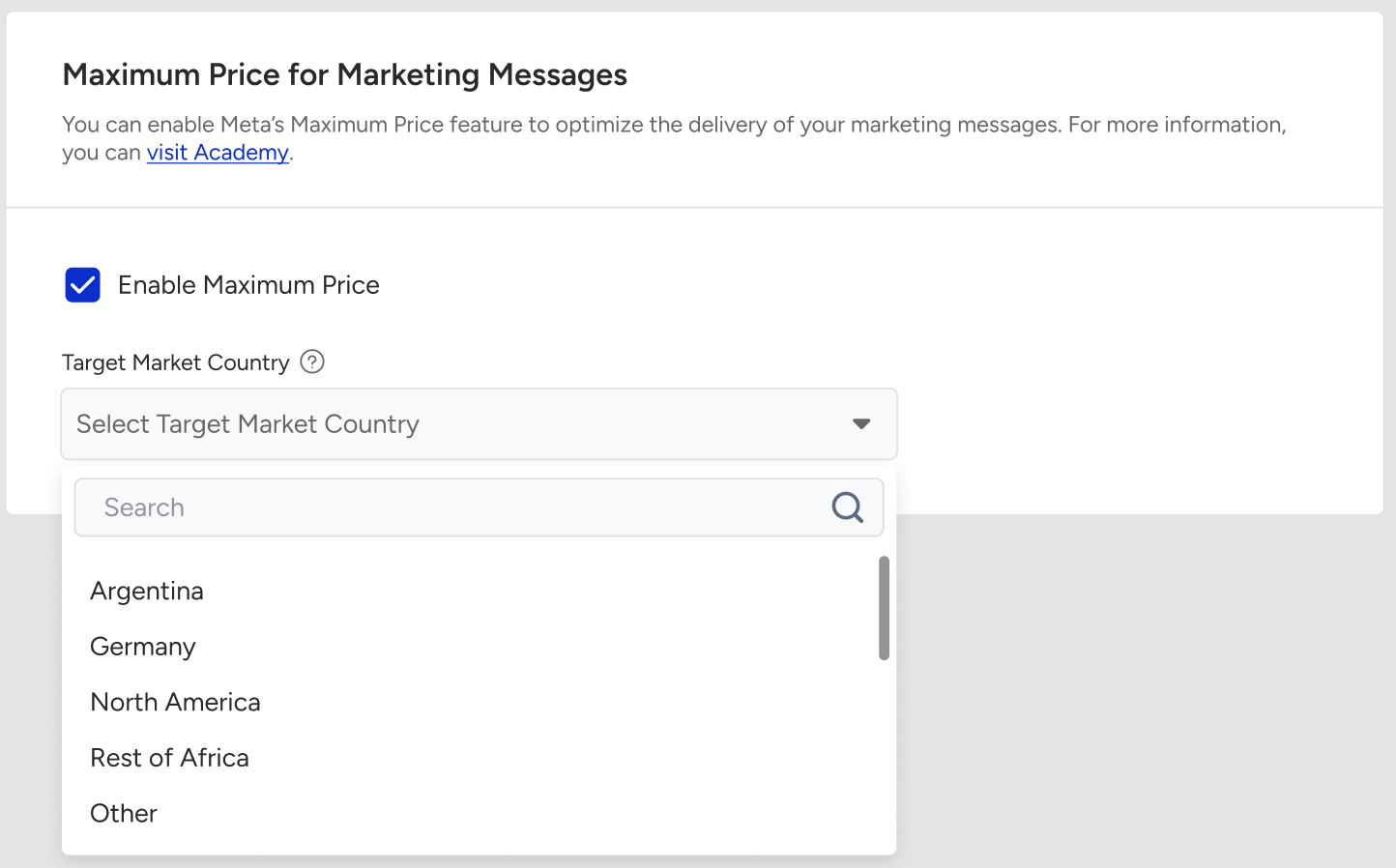
Turn on the Enable Maximum Price toggle.
If your account has quotas for more than one country or region, select the market where the message will be delivered using the Target Market Country dropdown list.
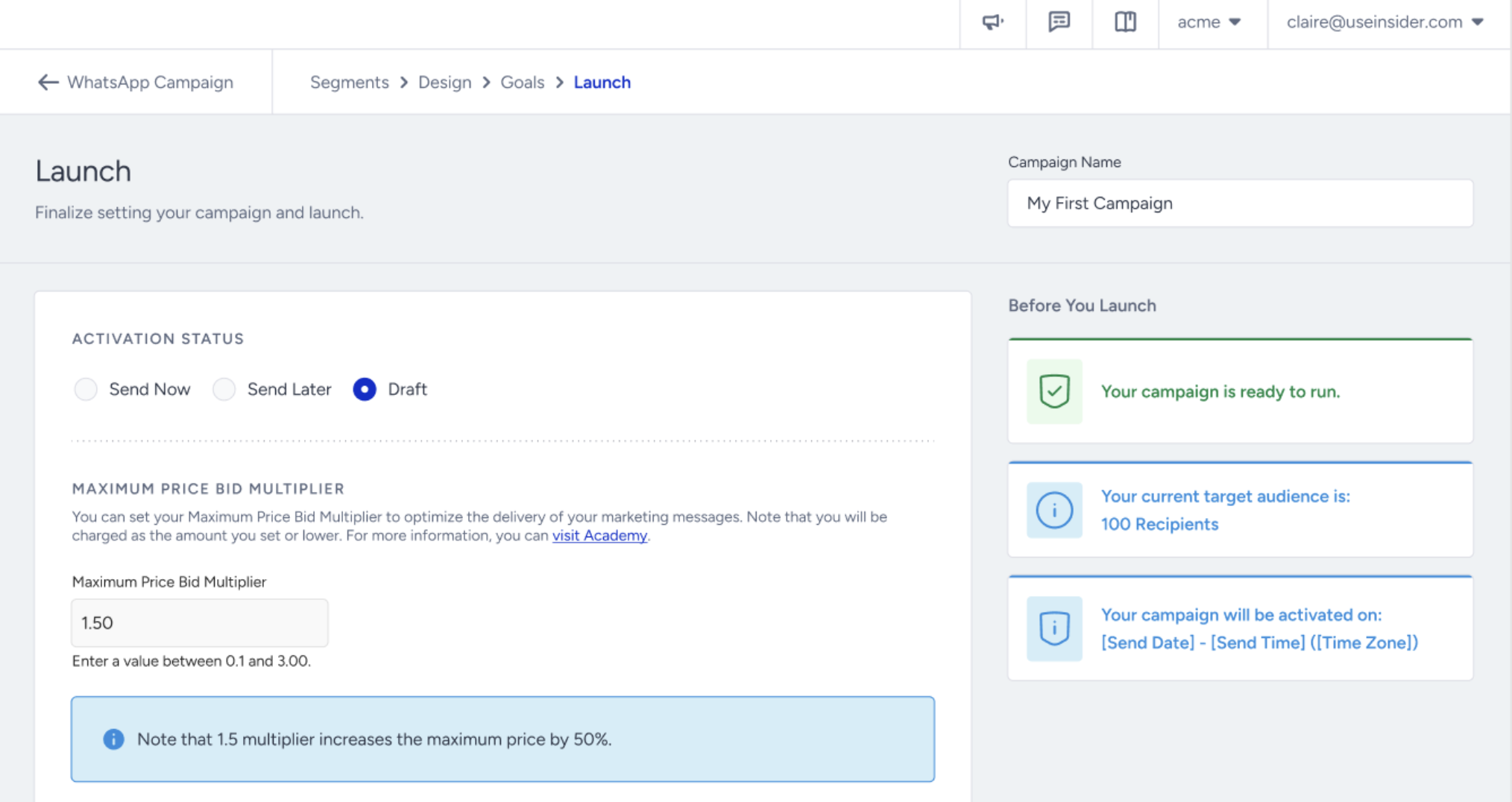
When launching a WhatsApp Marketing campaign on InOne, you can set the bid multiplier field (which defaults to 1.0x). Adjust the multiplier to scale the bid up or down per message or per segment.
When Max-Price is enabled, the WhatsApp Usage Analytics page displays usage in terms of message consumption rather than a fixed message count. Your allowance remains unchanged, but consumption is calculated based on Meta's actual delivery cost. As a result, a single delivered message might consume less than, equal to, or more than one message from your allowance.
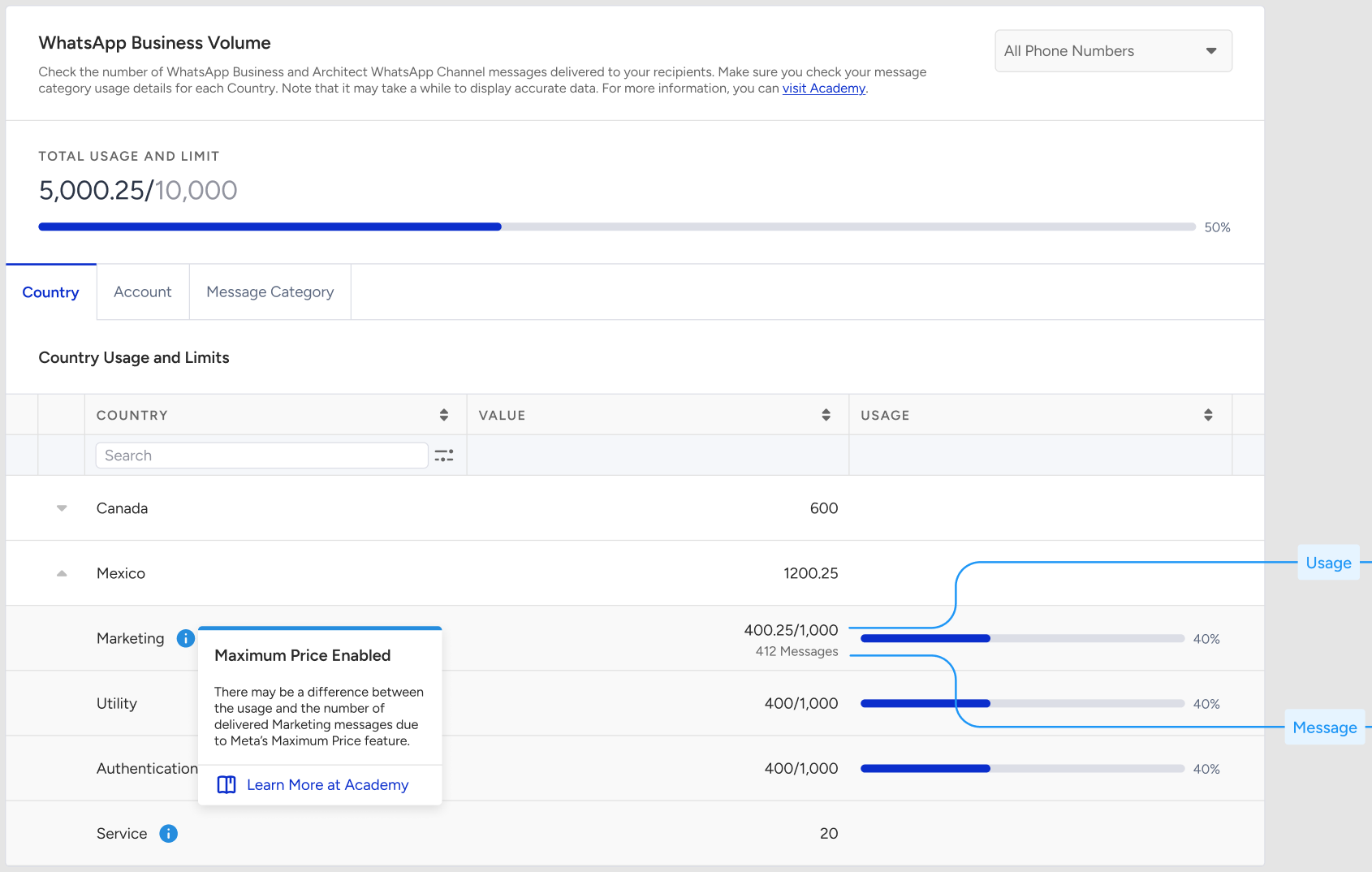
For example:
If Meta's actual delivery cost is lower than the standard rate, the message consumes less of your allowance.
If Meta's actual delivery cost matches the standard rate, the message consumption remains 1:1.
If Meta's actual delivery cost is higher than the standard rate, the message consumes more of your allowance.
This approach ensures that message consumption reflects the actual delivery cost determined by Meta.
When the Max-Price bid multiplier is set below 1.0x, Meta might not deliver messages to recipients whose delivery cost exceeds the specified bid limit. These messages will be marked as undelivered with the Meta Recipient Limits error in the WhatsApp Campaign Analytics.
Max-Price does not change your subscription, message allowance, billing process, quota, or payment terms. The only change is how quickly your allowance is consumed, based on the actual delivery cost determined by Meta.
Refer to Meta’s guide for further information on the Max-Price feature.
FAQ
How does the bid multiplier work?
Your effective maximum price is calculated as your configured maximum price multiplied by the bid multiplier. You never pay more than this effective maximum price, and often pay less.
Meta recommends keeping the bid multiplier between 0.8x and 1.2x of the standard rate card. Going below 0.8x risks significant under-delivery, while going above 1.2x adds only a small amount of extra reach.
Why doesn't raising the multiplier to 3.00 triple my reach?
Reach follows a diminishing returns curve rather than growing in a straight line with the multiplier. At 1.0x, most eligible users are already reachable, and reach starts to saturate between 1.0x and 1.5x. Raising the multiplier further beyond that point adds little additional reach.
Some users cannot be reached at any bid level. This includes users who are inactive, users affected by limited inventory, and users who have hit WhatsApp's frequency capping limits.
How does quota consumption change when Max Price is enabled?
Normally, one delivered message consumes one quota unit. When Max Price is enabled, one delivered message can consume anywhere between 0.1x and 3.0x of a quota unit, depending on the bidding strategy you choose.
Consumption stays 1:1 by default and only changes once you enable Maximum Price at the template step. Your contract terms, including PPU, volume, and overage agreements, do not change. Only the rate at which your credits are consumed changes.
Why isn't consumption exactly 1:1 even with a 1x multiplier?
Maximum price acts as a ceiling rather than a fixed rate. Even at 1x, Meta may deliver some messages below the rate card price. For example, 100 delivered messages might consume 98.5 quota units instead of exactly 100. This difference works in your favor.
What will I see in Usage Analytics?
The Usage Analytics page shows the decimal usage deducted from your quota as the primary figure, with the corresponding delivered message count shown alongside it for reference. Your subscription history and totals are always calculated based on usage, not on the delivered message count.
At what level is Max Price enabled? Can I turn it on for a single WhatsApp account?
Max Price is enabled by the Insider One team at the account level, not per Business ID. All WhatsApp accounts under your account are enabled together, rather than one at a time.
Even after this is enabled, the feature stays inactive until you enable Maximum Price at the template step. Nothing changes for your existing templates unless you enable it yourself.