Design Agent generates a complete campaign design from a written prompt. The more specific the prompt, the closer the first result is to what you want. This library gives you a structured starting point for the patterns customers use most.
Each use case below includes its goal, when to use it, and a prompt template with [BRACKET] variables to fill in. Expand the template's filled version under any template to see the same prompt with every variable completed. Use a template as-is, or adapt it to your brand, campaign, or product.
If Brand Settings is configured, you do not need to specify design details in your prompt. Design Agent applies your saved colors, fonts, and logo automatically. Any design instruction you include in the prompt overrides Brand Settings for that campaign.
Collect leads
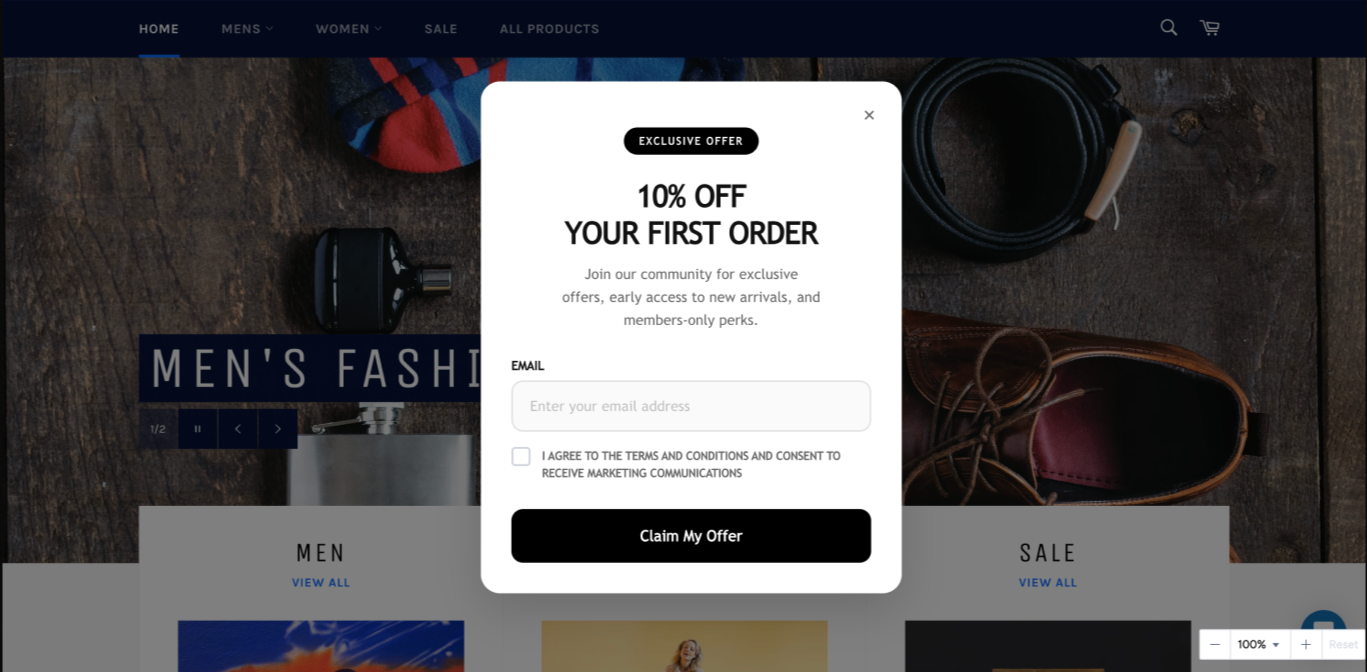
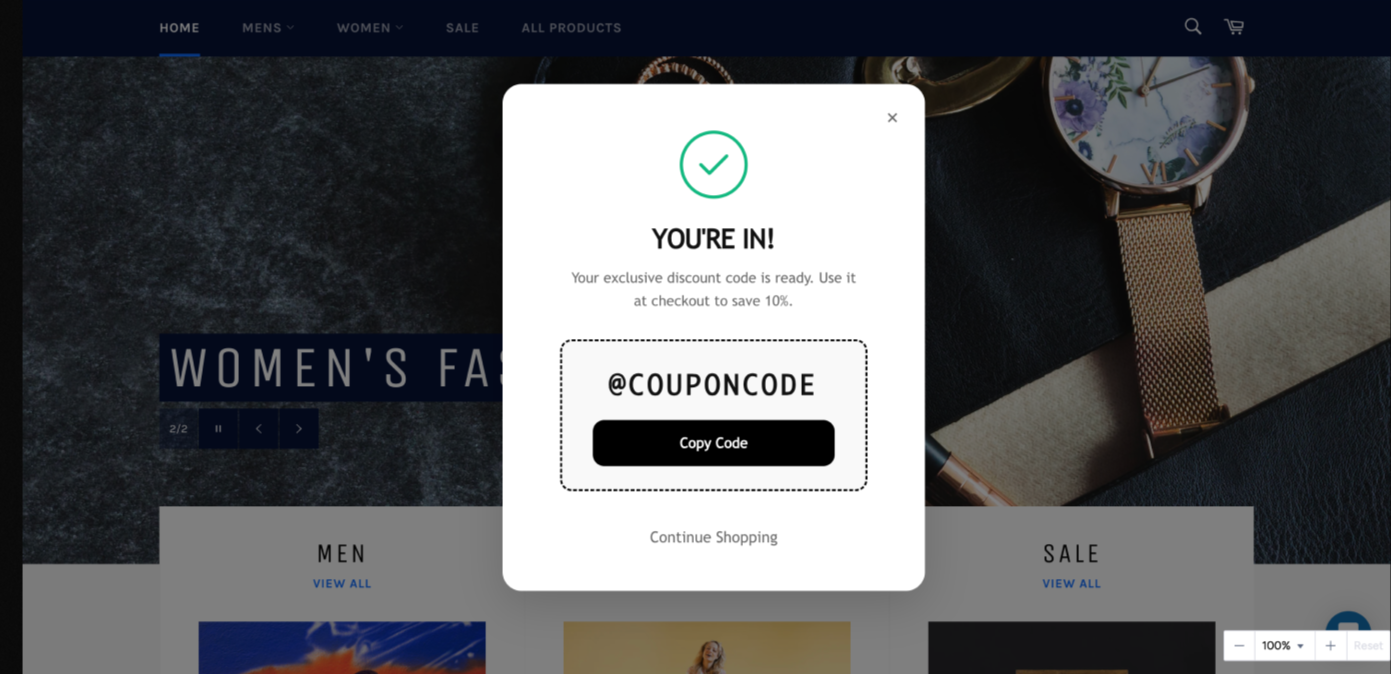
Two-step newsletter conversion flow
Goal: Capture an email in one step, then confirm with a reward on the next.
When to use: Acquisition campaigns with a discount or coupon incentive, aimed at new visitors in their first session
Prompt template:
Design a premium 2-step [CAMPAIGN_TYPE] pop-up for a modern [INDUSTRY] ecommerce brand.

Page 1: Bold headline "[HEADLINE]", supporting message "[SUPPORTING_TEXT]", email input field, and a "[PRIMARY_CTA]" button.

Page 2: Success message "[SUCCESS_MESSAGE]", coupon code "[COUPON_CODE]" as the hero element, a "[COPY_CTA]" button, and a secondary "[SECONDARY_CTA]" action.

Rounded corners, soft shadows. Offer and coupon code should be the most visually dominant elements.

Brand tone: [BRAND_TONE]
Template’s filled version
Design a premium 2-step First-Time Discount pop-up for a modern ecommerce brand.
Page 1: Bold headline "10% Off Your First Order", supporting message about exclusive offers and early access, email input field, and a "Claim My Offer" button.
Page 2: Success message, coupon code "WELCOME10" as the hero element, a "Copy Code" button, and a secondary "Continue Shopping" action.
Rounded corners, soft shadows. Offer and coupon code should be the most visually dominant elements.
Brand tone: Minimal and premium
Sticky mini newsletter capture
Goal: Capture emails with a compact, always-visible widget that stays accessible throughout the browsing session.
When to use:
Always-on list building without interrupting the browsing flow
Content-driven pages where a full pop-up would feel too aggressive
Mobile web sessions where screen space is limited
Prompt template:
Design a premium sticky newsletter signup widget fixed to the bottom-right corner of the page for a modern [INDUSTRY] brand.

[WIDGET_SHAPE] layout, compact and non-intrusive. Bold headline "[HEADLINE]", email input with placeholder "[INPUT_PLACEHOLDER]", full-width "[CTA_LABEL]" button, and a small "Terms & Conditions" link at the bottom.

[BACKGROUND_COLOR] background, [HEADLINE_COLOR] headline, [SUBTEXT_COLOR] secondary text, [BRAND_FONT] font, rounded corners, subtle drop shadow.

Brand tone: [BRAND_TONE]
Template’s filled version
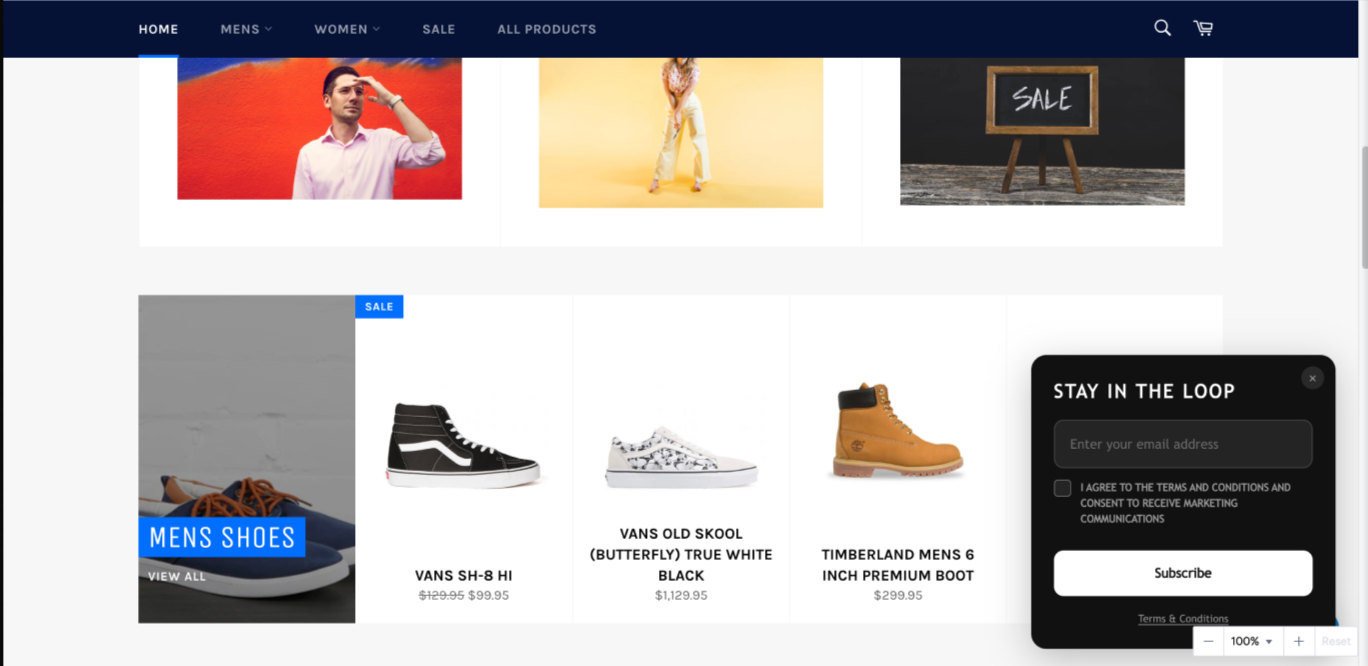
Design a premium sticky newsletter signup widget fixed to the bottom-right corner of the page for a modern fashion brand.
Rounded card layout, compact and non-intrusive. Bold headline "Stay in the Loop", email input with placeholder "Enter your email address", full-width "Subscribe" button, and a small "Terms & Conditions" link at the bottom.
#111111 background, #FFFFFF headline, #999999 secondary text, Geist font, rounded corners, subtle drop shadow.
Brand tone: Minimal and premium
Promote and convert
Free shipping banner
Goal: Increase purchase intent by highlighting a shipping incentive.
When to use:
When the cart value is near the free shipping threshold
Sitewide free shipping promotions
Checkout page to reduce abandonment
Prompt template:
Design a premium sticky notification card at the bottom of the page for a modern [INDUSTRY] ecommerce brand promoting [CAMPAIGN_TOPIC]. Float above page content, centered, max width, not a full-width bar.

Rounded card layout with drop shadow. Left: a [ICON_STYLE] icon in a small rounded square. Right: pill-shaped badge "[BADGE_TEXT]" above the headline, bold headline "[HEADLINE]", subtext "[SUBTEXT]". Far right: a filled "[CTA_LABEL]" button with white text, not a text link, a proper button.

Badge must sit directly above the headline, not beside it.

Brand tone: [BRAND_TONE]
Template’s filled version
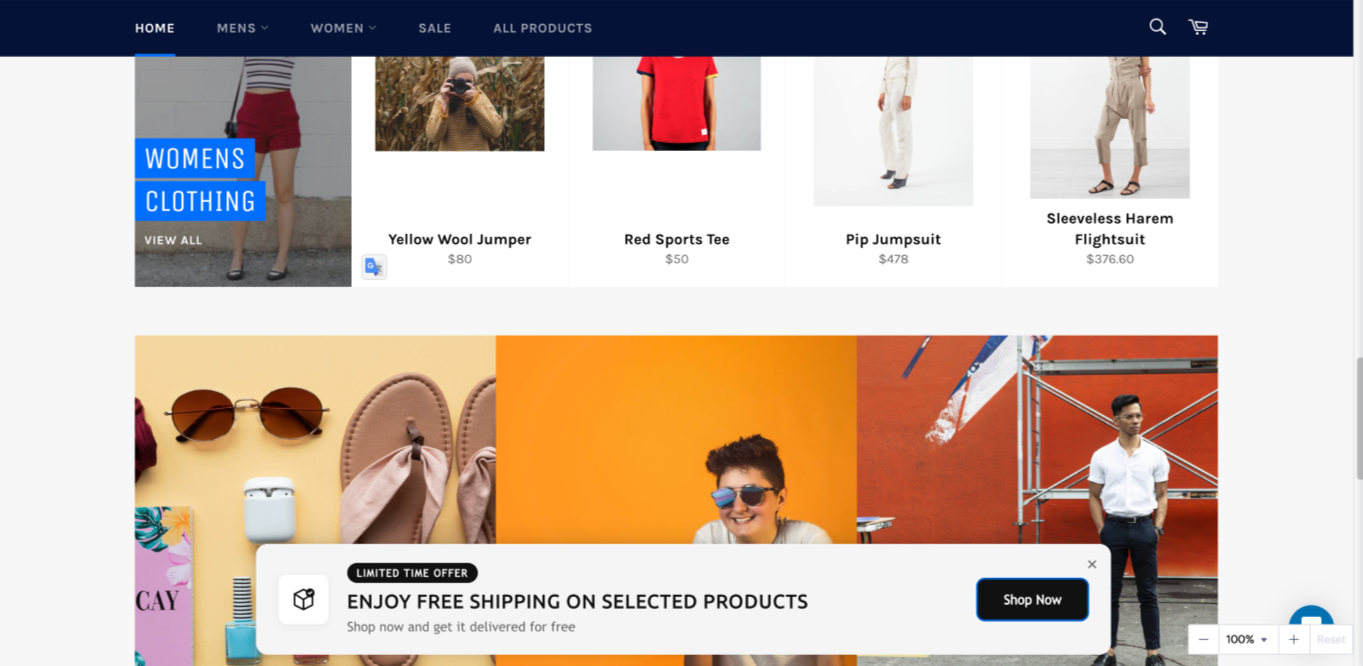
Design a premium sticky notification card at the bottom of the page for a modern fashion ecommerce brand promoting free shipping. Float above page content, centered, max width, not a full-width bar.
Rounded card layout with drop shadow. Left: a minimalist package with a checkmark icon in a small, rounded square. Right: pill-shaped badge "Limited Time Offer" above the headline, bold headline "Enjoy Free Shipping on Your Order", subtext "Shop now and get it delivered for free". Far right: a filled "Shop Now" button with white text, not a text link, a proper button.
The badge must sit directly above the headline, not beside it.
Brand tone: Minimal and premium
Sale announcement hero banner
Goal: Announce a sale or campaign inside the page, for high visibility without interrupting the browsing experience.
When to use:
Homepage hero area
Campaign landing pages
Seasonal sale launches (Black Friday, summer sale).
Prompt template:
Design a premium full-width inline hero banner embedded within a modern [INDUSTRY] ecommerce page, not a pop-up, not sticky, part of the page content.

Centered layout from top to bottom: pill-shaped "[BADGE_TEXT]" badge, a countdown timer showing [COUNTDOWN_UNITS] with clean numeric blocks and labels below each unit, large bold headline "[HEADLINE]", subtext "[SUBTEXT]", and a "[CTA_LABEL]" button with white text, not a text link, a proper button.

[BACKGROUND_STYLE] full-bleed background with overlay for text legibility.

Brand tone: [BRAND_TONE]
Template’s filled version
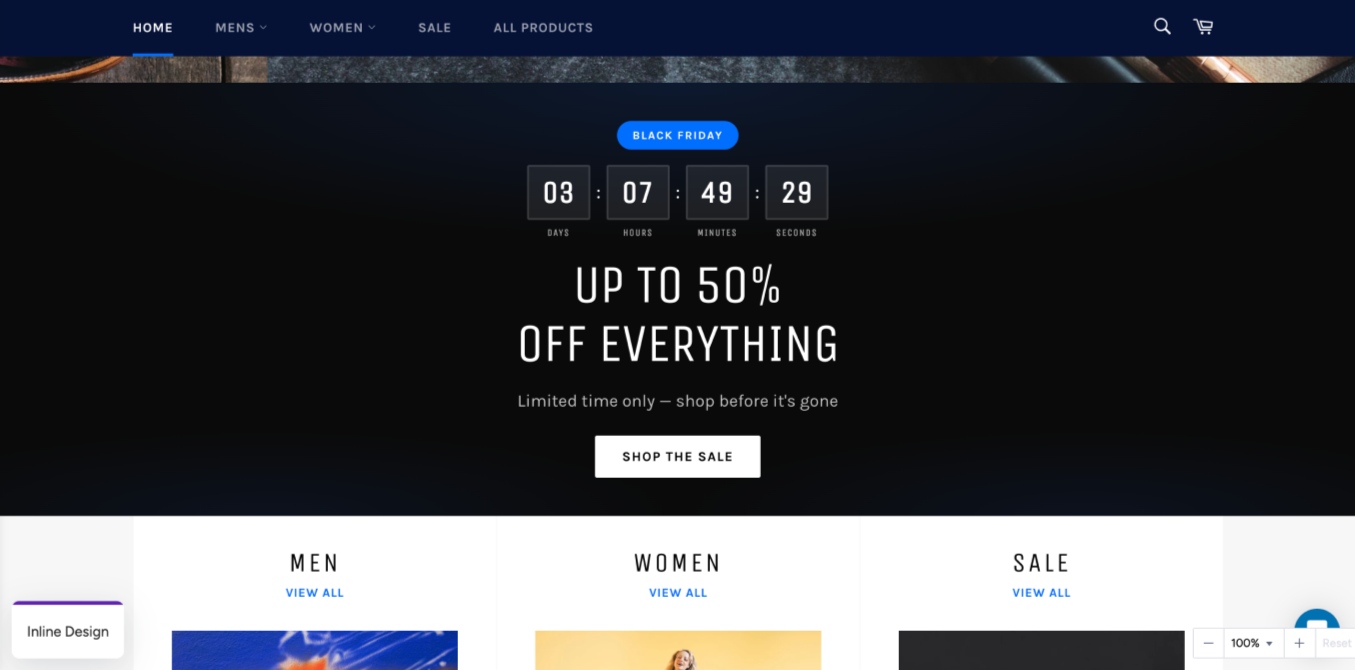
Design a premium full-width inline hero banner embedded within a modern fashion ecommerce page, not a pop-up, not sticky, part of the page content.
Centered layout from top to bottom: pill-shaped "Black Friday" badge, a countdown timer showing days, hours, minutes, seconds with clean numeric blocks and labels below each unit, large bold headline "Up to 50% Off Everything", subtext "Limited time only, shop before it is gone", and a "Shop the Sale" button with white text, not a text link, a proper button.
Dark, atmospheric, full-bleed background with overlay for text legibility.
Brand tone: Bold and dramatic
App-exclusive offer banner
Goal: Convert mobile web visitors into app users with an exclusive incentive.
When to use:
Mobile web visitors who haven't installed the app
Engaged visitors who have browsed two or more pages
Prompt template:
Design a premium sticky app download card fixed to the bottom of the screen for mobile web visitors of a modern [INDUSTRY] brand, sticky and always visible while scrolling. The card does not span the full screen width; the left and right margins match the page content margin, with equal spacing on both sides.

Bold gradient background card. Centered layout: pill-shaped "[BADGE_TEXT]" badge, bold single-line headline "[HEADLINE]", a filled "[CTA_LABEL]" button that spans the full width of the card, centered with equal left and right margins inside the card, contrasting background color, white text, not a text link, a proper button.

Rounded corners, no decorative or script fonts.

Brand tone: [BRAND_TONE]
Template’s filled version
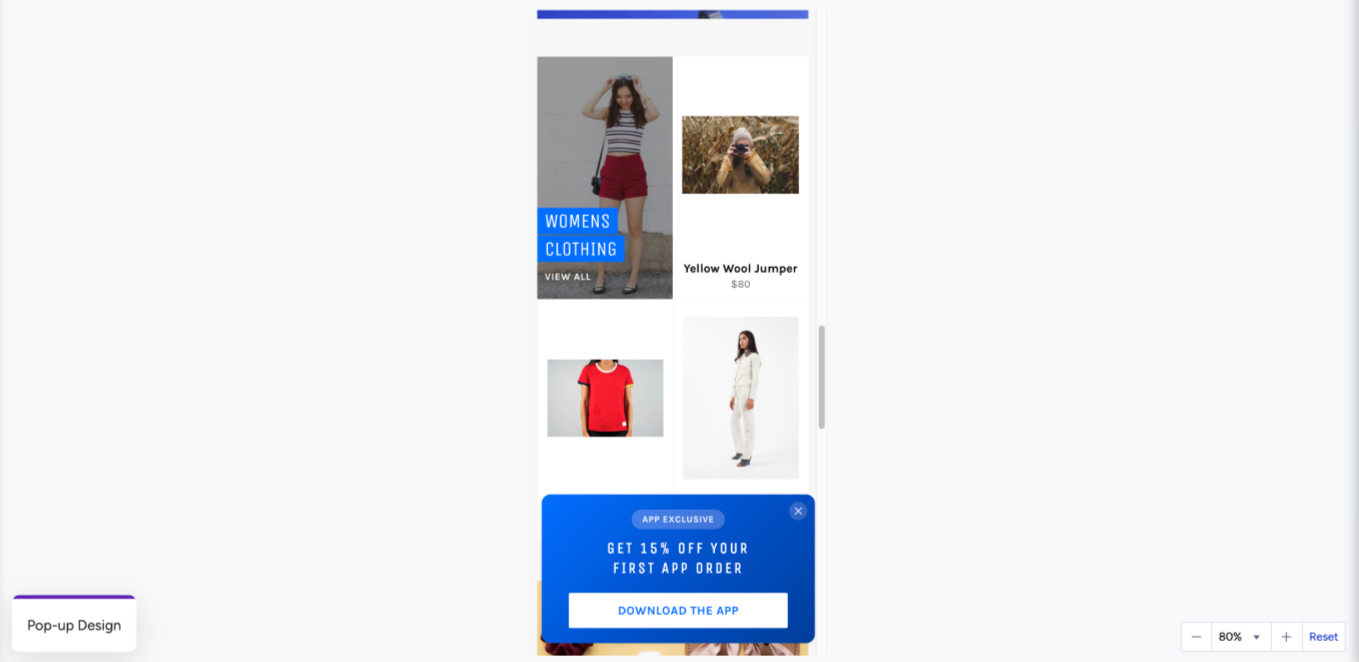
Design a premium sticky app download card fixed to the bottom of the screen for mobile web visitors of a modern fashion brand, sticky and always visible while scrolling. The card does not span the full screen width; the left and right margins match the page content margins, with equal spacing on both sides.
Bold gradient background card. Centered layout: pill-shaped "App Exclusive" badge, bold single-line headline "Get 15% Off Your First App Order", a filled "Download the App" button that spans the full width of the card, centered with equal left and right margins inside the card, contrasting background color, white text, not a text link, a proper button.
Rounded corners, no decorative or script fonts.
Brand tone: Minimal and premium
Before-you-go discount pop-up
Goal: Recover abandoning visitors with a last-chance discount before they leave the page.
When to use:
Exit intent, when a visitor's mouse moves toward leaving the page
New visitors in their first session
Pages with a high exit rate
Prompt template:
Design a premium exit intent pop-up for a modern [INDUSTRY] ecommerce brand. Single page, centered on screen, with a close (X) button in the top-right corner.

Color-blocked layout: top section has a deep charcoal-to-black gradient with large dominant "[OFFER]" and bold headline "[HEADLINE]" in white, editorial, strong typographic hierarchy. Bottom section: clean white background, subtext "[SUBTEXT]", coupon code "[COUPON_CODE]" in a clearly visible code block with primary brand color background and a copy action.

Rounded corners, soft shadows. Modern sans-serif only, no decorative or script fonts.

Brand tone: [BRAND_TONE]
Template’s filled version
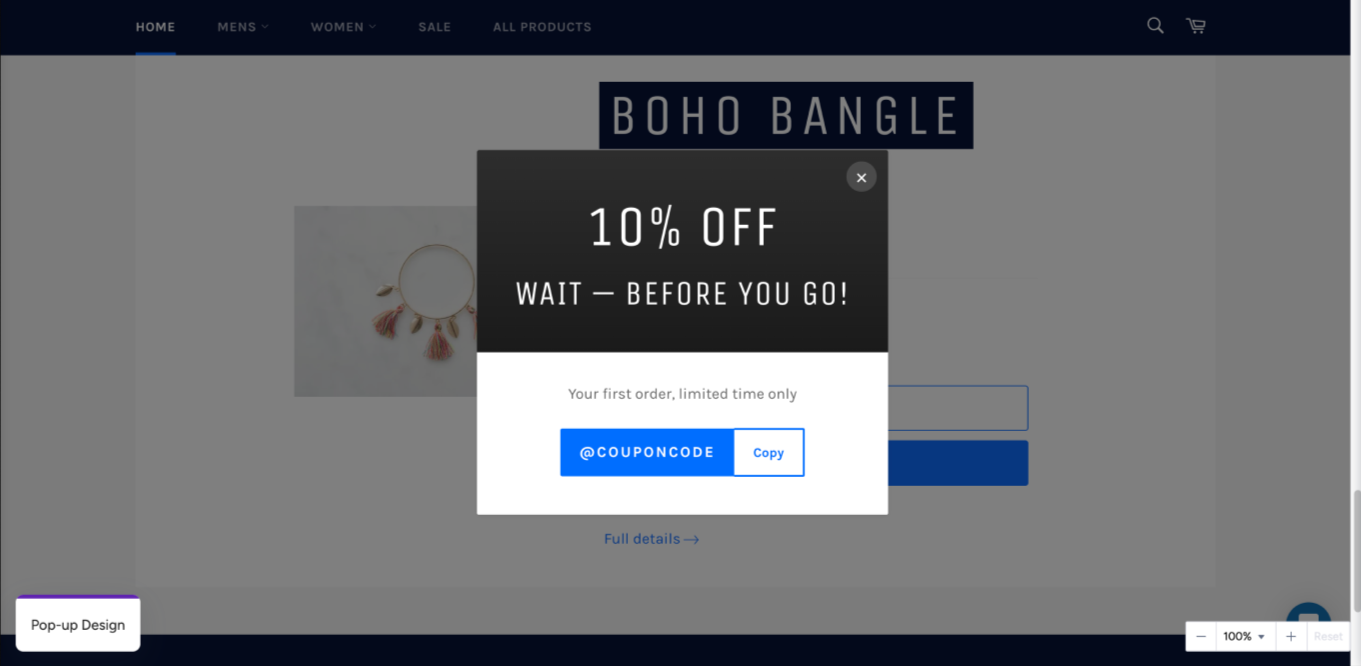
Design a premium exit intent pop-up for a modern fashion ecommerce brand. Single page, centered on screen, with a close (X) button in the top-right corner.
Color-blocked layout: top section has a deep charcoal-to-black gradient with large dominant "10% Off" and bold headline "Wait, Before You Go!" in white, editorial, strong typographic hierarchy. Bottom section: clean white background, subtext "Your first order, limited time only", coupon code "STAY10" in a clearly visible code block with primary brand color background and a copy action.
Rounded corners, soft shadows. Modern sans-serif only, no decorative or script fonts.
Brand tone: Minimal and premium
Gamify and engage
Design Agent generates six game types. The two prompts below cover Tic-Tac-Toe and Guess the Word. For the full list, see Design Agent.
Easter Tic-Tac-Toe game
Goal: Increase engagement and time on site with a themed game that rewards participation with a discount or other incentive.
When to use:
Easter and spring seasonal campaign periods
High-traffic periods where engagement drops, when users browse but don't convert
When a game incentive is needed to re-activate passive visitors
Prompt template:
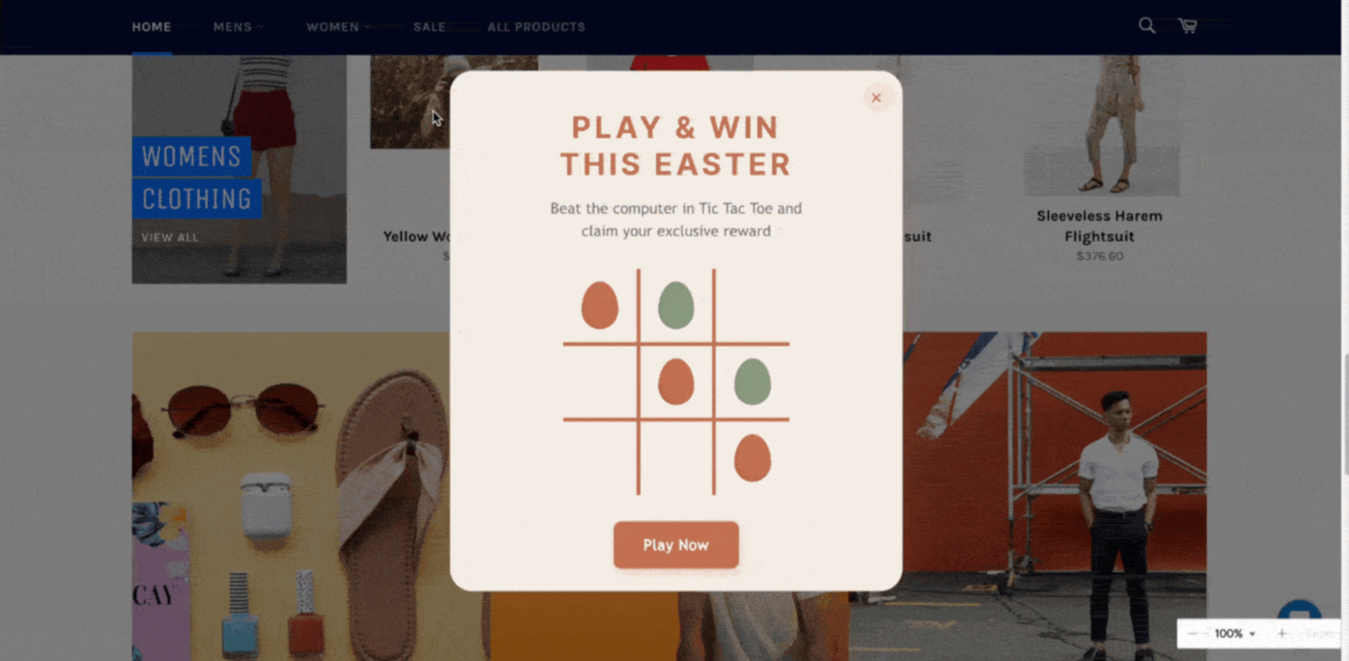
Design a premium Easter-themed Tic-Tac-Toe game for a modern [INDUSTRY] brand.

Markers: two distinct [MARKER_STYLE], minimal and abstract, not cartoon or illustrated. Grid: clean and geometric on [BACKGROUND_COLOR] background with [GRID_COLOR] lines.

Start screen: headline "[GAME_HEADLINE]" and a "[START_CTA]" button.

Win screen: "[WIN_MESSAGE]" with a [WIN_ANIMATION] animation and a "[REWARD_LABEL]" reward reveal.

Warm spring palette: [COLOR_PALETTE]. [BRAND_FONT] font. No cartoon elements, no illustrated characters, no busy patterns.

Brand tone: [BRAND_TONE]
Template’s filled version
Design a premium Easter-themed Tic-Tac-Toe game for a modern [INDUSTRY] brand.
Markers: two distinct [MARKER_STYLE], minimal and abstract, not cartoon or illustrated. Grid: clean and geometric on [BACKGROUND_COLOR] background with [GRID_COLOR] lines.
Start screen: headline "[GAME_HEADLINE]" and a "[START_CTA]" button.
Win screen: "[WIN_MESSAGE]" with a [WIN_ANIMATION] animation and a "[REWARD_LABEL]" reward reveal.
Warm spring palette: [COLOR_PALETTE]. [BRAND_FONT] font. No cartoon elements, no illustrated characters, no busy patterns.
Brand tone: [BRAND_TONE]
Summer Guess the Word game
Goal: Turn a BOGO promotion into a game, so visitors earn the offer by playing rather than receiving it passively.
When to use:
Seasonal campaigns with a BOGO or bundle promotion
High-traffic periods where passive banners aren't converting
When a discount alone isn't differentiated enough from competitors
Prompt template:
Design a premium Guess the Word game for a modern [INDUSTRY] brand with a [CAMPAIGN_TYPE] promotion.

Start screen: Bold headline "[GAME_HEADLINE]", supporting line "[GAME_SUBTEXT]", and a "[START_CTA]" button. Use a [BACKGROUND_STYLE] background evoking [SEASONAL_MOOD].

Gameplay: Hidden words: [WORD_1], [WORD_2], [WORD_3], [WORD_4], [WORD_5]. Letter tiles inspired by [TILE_STYLE], clean and typographic. Correct word: "[CORRECT_MESSAGE]". Wrong guess: shake animation.

Win screen: Bold headline "[WIN_HEADLINE]", message "[WIN_SUBTEXT]", and a "[WIN_CTA]" button. Consistent spacing, no random gaps.

Brand tone: [BRAND_TONE]
Template’s filled version
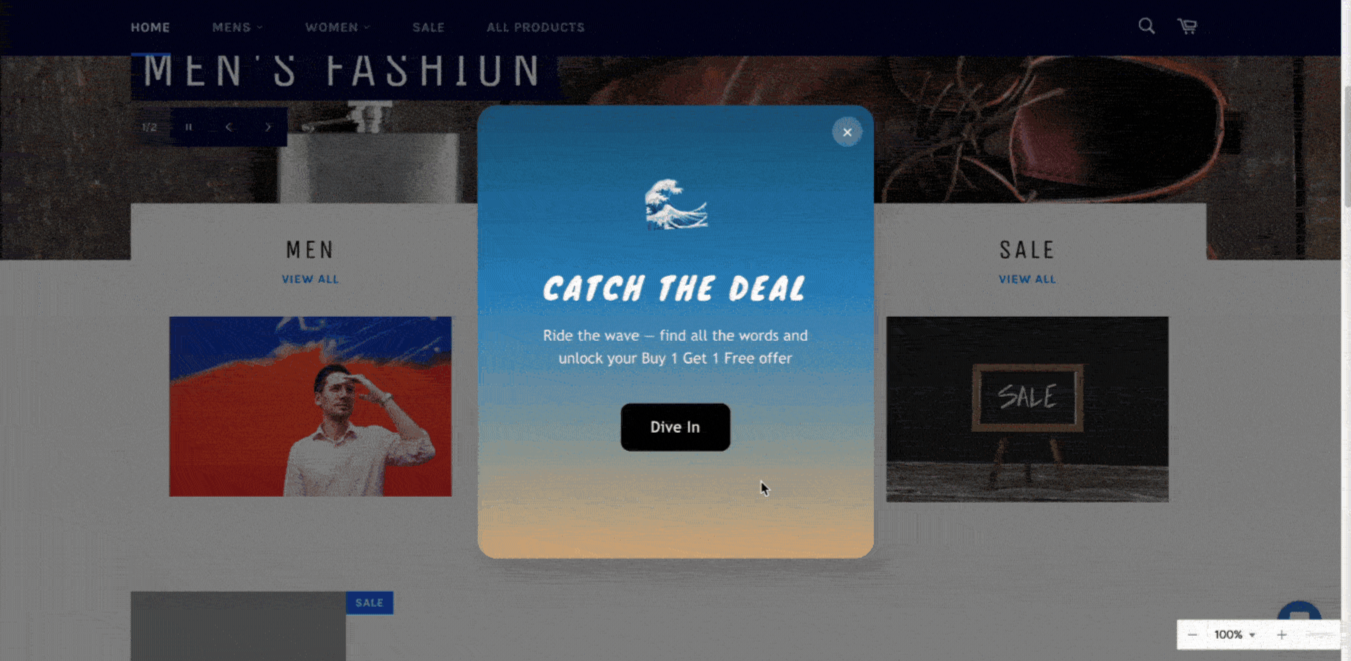
Design a premium Guess the Word game for a modern fashion brand with a summer BOGO promotion.
Start screen: Bold headline "Catch the Deal", supporting line "Ride the wave, find all the words and unlock your Buy 1 Get 1 Free offer", and a "Dive In" button. Coastal summer background, deep ocean blue fading into warm sand tones, evoking a sun-soaked shoreline.
Gameplay: Hidden words: OFFER, BUNDLE, DISCOUNT, SALE, SUMMER. Letter tiles inspired by sun-bleached driftwood, clean and typographic. Correct word: "Nice catch! Keep going". Wrong guess: shake animation.
Win screen: Bold headline "Shore Thing, Deal Unlocked!", message "Your Buy 1 Get 1 Free is ready. Make waves.", and a "Shop the Collection" button. Consistent spacing, no random gaps.
Brand tone: Warm and coastal
Add persistent page widgets
Floating back-to-top button
Goal: Improve navigation on long-scrolling pages with a quick return-to-top control.
When to use: Always on, for long product listing pages and content-heavy pages.
Prompt template:
Design a small rounded "[BUTTON_LABEL]" pop-up fixed to the bottom center of the page. When clicked, it smoothly scrolls the page to the top.

Compact rounded rectangle with upward arrow icon and "[BUTTON_LABEL]" label. Unobtrusive, visually clear, modern style. Subtle drop shadow, no decorative or script fonts.

Brand tone: [BRAND_TONE]
Template’s filled version:
Design a small, rounded "Back to Top" pop-up fixed to the bottom center of the page. When clicked, it smoothly scrolls the page to the top.
Compact rounded rectangle with upward arrow icon and "Back to Top" label. Unobtrusive, visually clear, modern style. Subtle drop shadow, no decorative or script fonts.
Brand tone: Minimal and premium
Social follow booster
Goal: Grow social media following through a persistent, non-intrusive side-tab prompt.
When to use: Always on, for engaged visitors, content pages, and post-purchase moments
Prompt template:
Design a premium sticky social follow button fixed to the right-center edge of the screen for a modern [INDUSTRY] brand.

Two states:

State 1 (default): [SOCIAL_ICON] icon in a pill-shaped tab, fully visible, positioned close to the right edge of the screen with a small margin, so the icon is not clipped. Subtle drop shadow.

State 2 (hover): Same button with a tooltip appearing to the left, rounded pill shape, "[TOOLTIP_TEXT]" in white, dark background, small arrow pointing right.

Modern sans-serif only, no decorative or script fonts.

Brand tone: [BRAND_TONE]
Template’s filled version
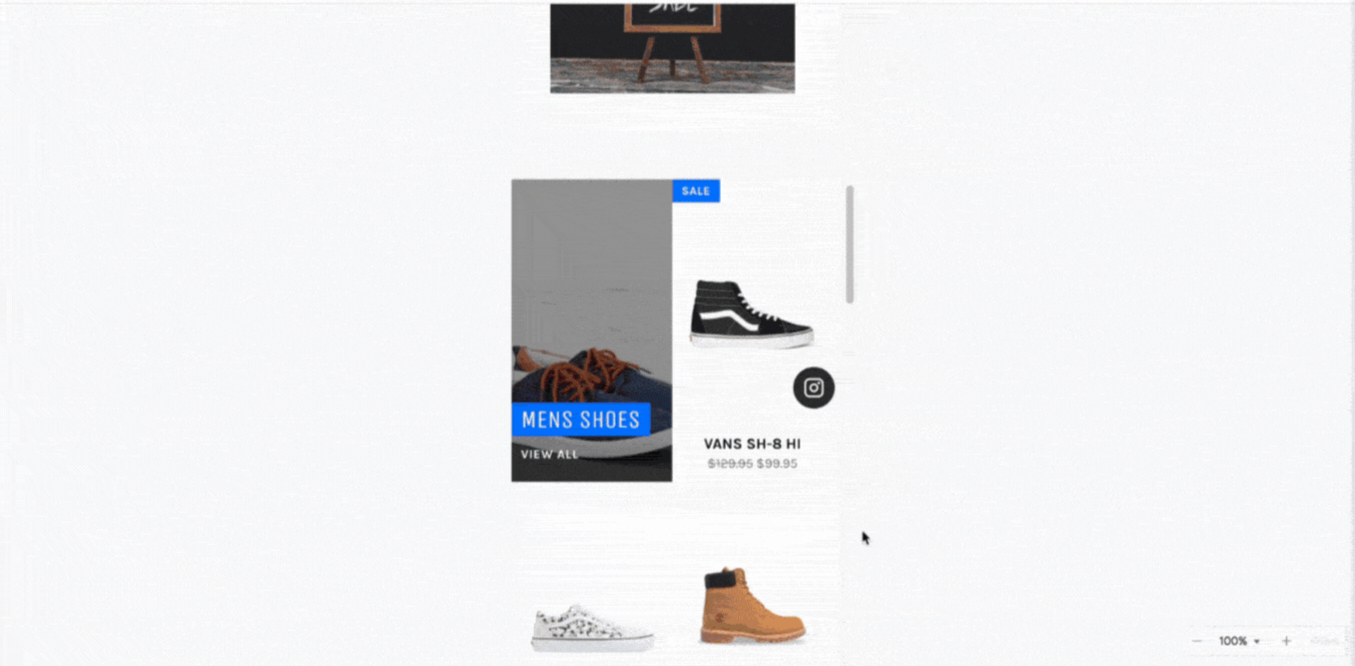
Design a premium sticky social follow button fixed to the right-center edge of the screen for a modern fashion brand.
Two states:
State 1 (default): Instagram icon in a pill-shaped tab, fully visible, positioned close to the right edge of the screen with a small margin, so the icon is not clipped. Subtle drop shadow.
State 2 (hover): Same button with a tooltip appearing to the left, rounded pill shape, "Follow us on Instagram!" in white, dark background, small arrow pointing right.
Modern sans-serif only, no decorative or script fonts.
Brand tone: Minimal and premium
Write your own prompts
Adapt any template above rather than starting from an empty prompt box. If Design Agent doesn’t understand a request, add details about the color scheme, layout, and purpose of the campaign. Then run the prompt again. For more on refining prompts and editing a design after generation, see the FAQ about Design Agent.