With the new design going into effect as of July 1st, 2025, you might see the monthly tracked users with or without a breakdown on your usage analytics. For further details, you can contact the Insider One team.
Monthly Tracked Users (MTUs), also known as the number of unique users Insider One counts as active each month, is the count of visitors who perform at least one qualifying activity within a given calendar month.
The MTU count resets at the start of each calendar month and directly affects your monthly consumption against your contracted allocation.
How does Insider One calculate MTUs?
Insider SDKs assign a unique user ID for all anonymous users who interact with a customer's website or application. Each month, Insider One calculates the number of unique user IDs that performed a qualifying activity to measure MTUs.
Refer to Data Points for further information about the activities that are counted to qualify a user as an MTU.
Even if your users perform multiple qualifying activities, each unique user ID can be counted as a single MTU.
Which users are included in MTU?
Although customers now see a single unified MTU card, MTUs are calculated using activities coming from three sources:
Website interactions (Web)
Mobile app interactions (App)
First-party data updates (API integrations, segment uploads)
These sources are not displayed separately on the dashboard. The MTU card displays the combined total unique users tracked within the selected month.
Calculation logic
Web interactions
Users who perform qualifying activities on the website, such as:
Visiting the website
Product view / add-to-cart
Browser push interactions
App interactions
Users who perform qualifying activities in the mobile application, such as:
App visits
Browsing products
If the Web SDK is integrated into the website, the webview counts as web. If the app sends web events via a bridge, it is counted as app.
First-party interactions
Users whose profiles are updated via:
Third-party integrations
Segment uploads and additions (including a User Profile, originated from Static Segment creation)
MTU for combined customers does not cumulatively increase. When you change the month, you can only see the change in the month section to see that specific month’s MTU usage, but the overall MTU will remain the same.
User deduplication across sources and devices
If you are using the Web SDK on your website, and/or sharing unique identifiers from your mobile application via Insider SDK, you can benefit from our advanced identity management system, which identifies interactions coming from the same user across multiple devices or platforms and deduplicates those users to a single user profile after they log in from those devices only once.
How can you track MTUs?
To track your MTUs and other usages, go to your InOne panel and navigate to Reports > Usage Analytics on the left sidebar.
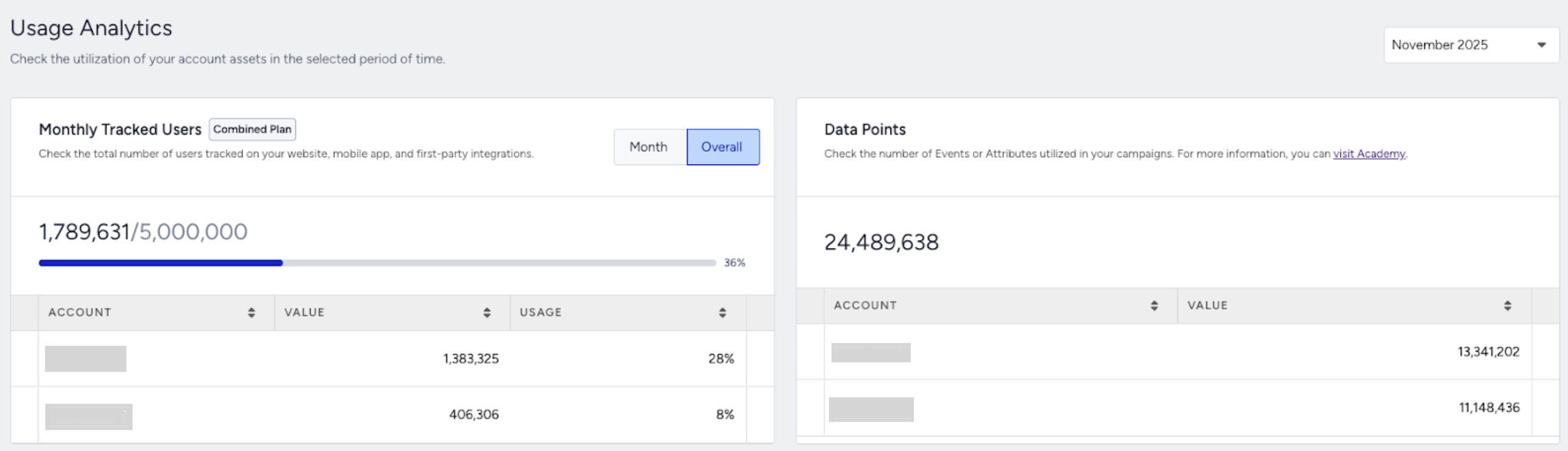
You can view your MTUs (monthly tracked users) and data points on Usage Analytics page. The dashboard is updated every day and it also provides historical data for the previous months in the last 1 year.