Call an API allows journeys to communicate with external systems in real time. This includes CRMs, loyalty platforms, internal backends, payment systems, and third-party vendors. As these integrations grow in number and complexity, authentication becomes a foundational requirement to ensure security, stability, and operational scalability.
Call an API integrations commonly use credentials such as API keys or predefined headers configured directly within journeys. This approach can require teams to manage credentials within individual journeys, which might increase operational effort around credential security, token rotation, and maintaining consistent authentication across multiple journeys.
With the OAuth 2.0 and Basic Authentication support, authentication can now also be centrally managed at the endpoint level through Architect Settings. This provides an additional option for teams who want more centralized control, making it easier to update or rotate credentials and apply consistent security practices across multiple journeys, without requiring changes to the live journeys.
Authentication is optional. The endpoints without authentication continue functioning as before.
This guide explains the following concepts:
Authentication models
OAuth 2.0
OAuth 2.0 is a token-based authentication mechanism widely adopted by modern and enterprise APIs. Instead of sending static credentials with every request, the system authenticates using short-lived access tokens issued by an authorization server.
In Architect:
Insider One retrieves access tokens from the customer’s authorization server.
Tokens are stored securely and reused until they expire. The Insider One system only refreshes the expiration duration/frequency and is not responsible for the token expiration duration.
When a token expires, Architect automatically refreshes it without user intervention.
Tokens are attached to outgoing API requests at runtime.
This approach eliminates the need to hardcode credentials in requests, significantly reduces security risk, and supports scalable, long-running integrations.
OAuth 2.0 is the recommended authentication method whenever supported by the external system.
Supported OAuth 2.0 flows are client credentials and password credentials.
Basic Authentication
Basic Authentication sends static credentials, such as username/password or API key pairs, with every API request, typically encoded in the request headers.
In Architect, Basic Authentication is intended for:
Legacy systems
Internal services
APIs that do not support OAuth 2.0
While simpler to configure, it does not provide token rotation or automatic expiry handling. For this reason, it should be used only when OAuth 2.0 is not available.
How does authentication work in Architect?
Authentication is configured through Settings > Inone Settings > Security and is tied directly to the endpoint definition.
Once authentication is set for an endpoint:
All Call an API elements using that endpoint automatically inherit the authentication.
Authentication cannot be selected, edited, or overridden inside the Call an API inner page.
Journey builders focus solely on business logic (payloads, conditions, flow), not credentials.
Credentials are never exposed inside journeys, templates, or canvas views.
If authentication details are updated at the endpoint level (e.g., rotating a secret or updating a token URL), all connected journeys immediately start using the new configuration. No republishing or manual intervention is required.
This design ensures consistency across journeys, reduces the risk of misconfiguration, and enables safer credential management and easier maintenance at scale.
How can you configure the authentication?
To configure authentication for Call an API, follow these steps:
Go to Settings > Inone Settings > Security. Click the Add Authentication button.
(2).png)
Enter the necessary information for the authentication type.
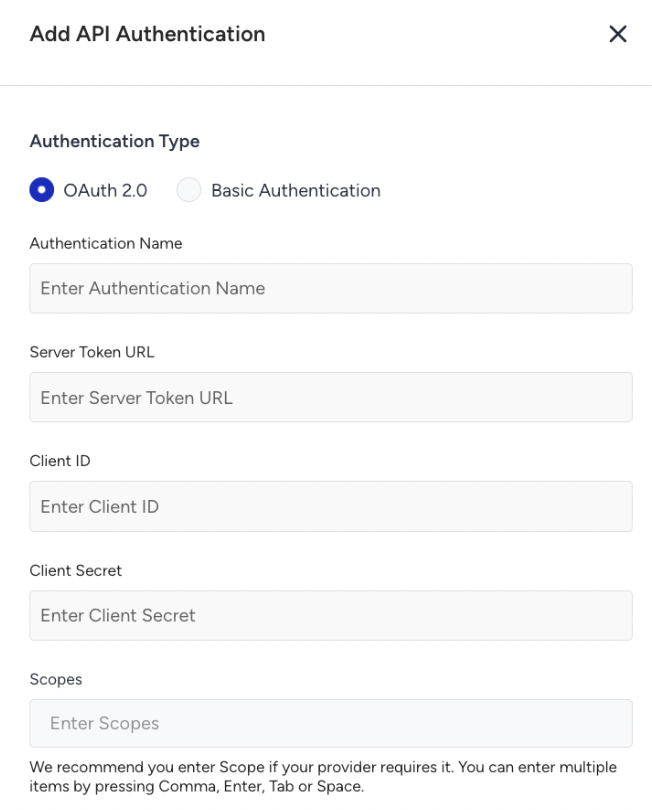
For OAuth 2.0, enter the following information:
Token URL
Client ID
Client Secret
Scope (if required by the authorization server)
For Basic Authentication, enter the following information:
Username
Password
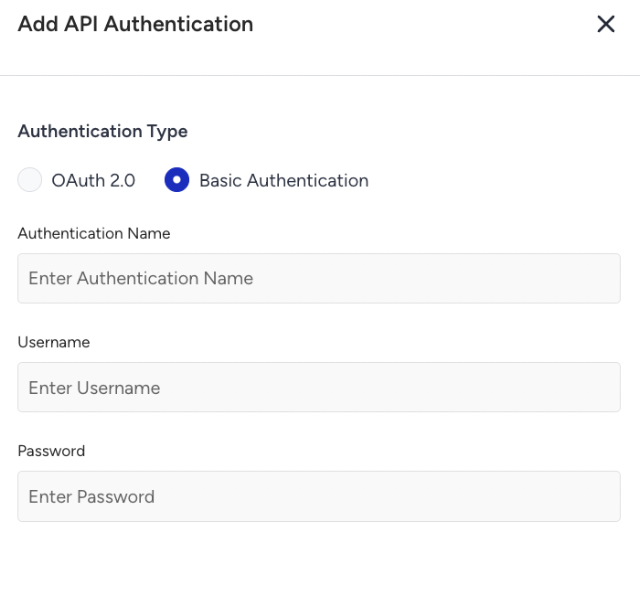
All sensitive values are encrypted at rest, masked in the UI, and never exposed inside the journeys or logs.
Once you create the authentication, you can assign it to your endpoint. You can choose No Authentication, Basic Authentication, or OAuth 2.0 for your endpoint.
When you assign the authentication:
The authentication is locked to the endpoint
The endpoint becomes available for selection inside the Call an API element.
No authentication fields appear inside the Call an API configuration page.
FAQ
Q: Can authentication be selected inside the Call an API element?
A: No, authentication is managed exclusively at the endpoint level to ensure security, consistency, and reusability.
Q: Is authentication mandatory?
A: No, endpoints without authentication continue to work exactly as before.
Q: Will this change affect existing journeys?
A: No, existing journeys remain unaffected unless authentication is explicitly added or modified at the endpoint level.
Q: Can different journeys use different authentication for the same endpoint?
A: No, authentication is endpoint-based. If different authentication is required, separate endpoints must be created.
Q: What happens if authentication fails during execution?
A: The API request is marked as failed in analytics, but the user continues to the next step in the journey.
Q: Which authentication method should be preferred?
A: OAuth 2.0 should be used whenever supported. Basic Authentication should be used only for systems that do not support OAuth.