WhatsApp introduces an optional username feature that allows users and businesses to create a unique handle (such as @YourBrand) instead of sharing their phone number publicly.
To support messaging when a phone number is unavailable, Meta also provides a unique identifier called BSUID (Business Scoped User ID). Insider One uses the BSUID to identify and message users when a phone number is not available.
Usernames and BSUIDs do not replace phone numbers. If a phone number is available, Insider One continues to use it for WhatsApp messaging. If a phone number is unavailable, Insider One uses the BSUID instead.
The
@usernameis only a user-facing handle and is never used in API calls. The BSUID is the identifier that flows through Insider One and is used for user recognition and message routing.
Area | What changes |
|---|---|
WhatsApp (Meta) | WhatsApp introduces optional usernames for users and businesses. Meta also includes the user's BSUID (Business Scoped User ID) in supported webhook events, allowing platforms to identify users even when a phone number is unavailable. End users can also choose to share their phone number through WhatsApp when needed. |
Insider One | Insider One stores the BSUID as a user attribute and supports it across WhatsApp messaging, chatbot journeys, opt-in management, and suppression processes. If a phone number is unavailable, Insider One can use the BSUID to route messages. |
Third-party WhatsApp chatbots | If you use a third-party WhatsApp chatbot integrated with Insider One, ensure that it supports BSUID-based user identification and messaging. To enable BSUID support for your chatbot integration, contact the Insider One team. |
Existing implementations | No action is required if your current setup relies on phone numbers. Phone number-based messaging continues to work as it does today for business-initiated template messages. BSUID support is available as an additional identifier when a phone number is unavailable. |
In this guide, you will learn:
Why is WhatsApp introducing usernames?
WhatsApp is introducing usernames as an alternative way for users and businesses to identify themselves without relying solely on phone numbers.
More privacy for users. Users can communicate with businesses and other users without publicly displaying their phone numbers.
Better discoverability for businesses. A username such as
@YourBrandis easier to recognize and share than a phone number.A familiar user experience. Usernames are already widely used across social and messaging platforms, making them an intuitive way for users to find and interact with accounts.
How do WhatsApp usernames affect Insider One?
The introduction of WhatsApp usernames changes how users are identified on WhatsApp and enables messaging platforms to continue recognizing users even when a phone number is unavailable.
For Insider One users, the introduction of usernames brings the following changes:
Usernames are optional. Users and businesses can choose whether to adopt a username.
Usernames might be displayed instead of phone numbers. WhatsApp can show a username in supported areas of the app when a user chooses to use one.
BSUID can be used when a phone number is unavailable. Insider One supports BSUID-based user recognition and message routing for WhatsApp users who choose not to share their phone number. The BSUID is used internally by Insider One and is not visible to users.
Phone number-based messaging continues to work. BSUID is an additional identifier and does not replace phone numbers.
No action is required for existing WhatsApp implementations. Phone number-based messaging continues to work as it does today for business-initiated template messages
Where do users see the username?
In chat headers, search results, contact lists, and ad entry points, wherever WhatsApp used to show a phone number, users who adopt a username are shown by their @handle. For users who adopt a username, the phone number is hidden by default unless it has been shared previously.
Usernames and BSUIDs: What's the difference?
Username | BSUID |
|---|---|
User-facing identifier displayed in WhatsApp. | Internal identifier provided by Meta. |
Example: | Example: |
Used by users to find and identify businesses. | Used by Insider One for user recognition and message routing. |
Appears in chat headers, search results, and contact lists. | Received through WhatsApp webhook events and stored in the UCD profile. |
Not used in API requests or message delivery. | Used when a phone number is unavailable. |
How Insider One uses BSUID
BSUID support is already available in Insider One. The platform automatically collects, stores, and uses BSUID values to support WhatsApp messaging when a phone number is unavailable.
Before usernames are adopted
Meta sends the BSUID in supported webhook events. Meta includes the user's BSUID in delivered and read events, allowing Insider One to receive and store the identifier before usernames are widely adopted.
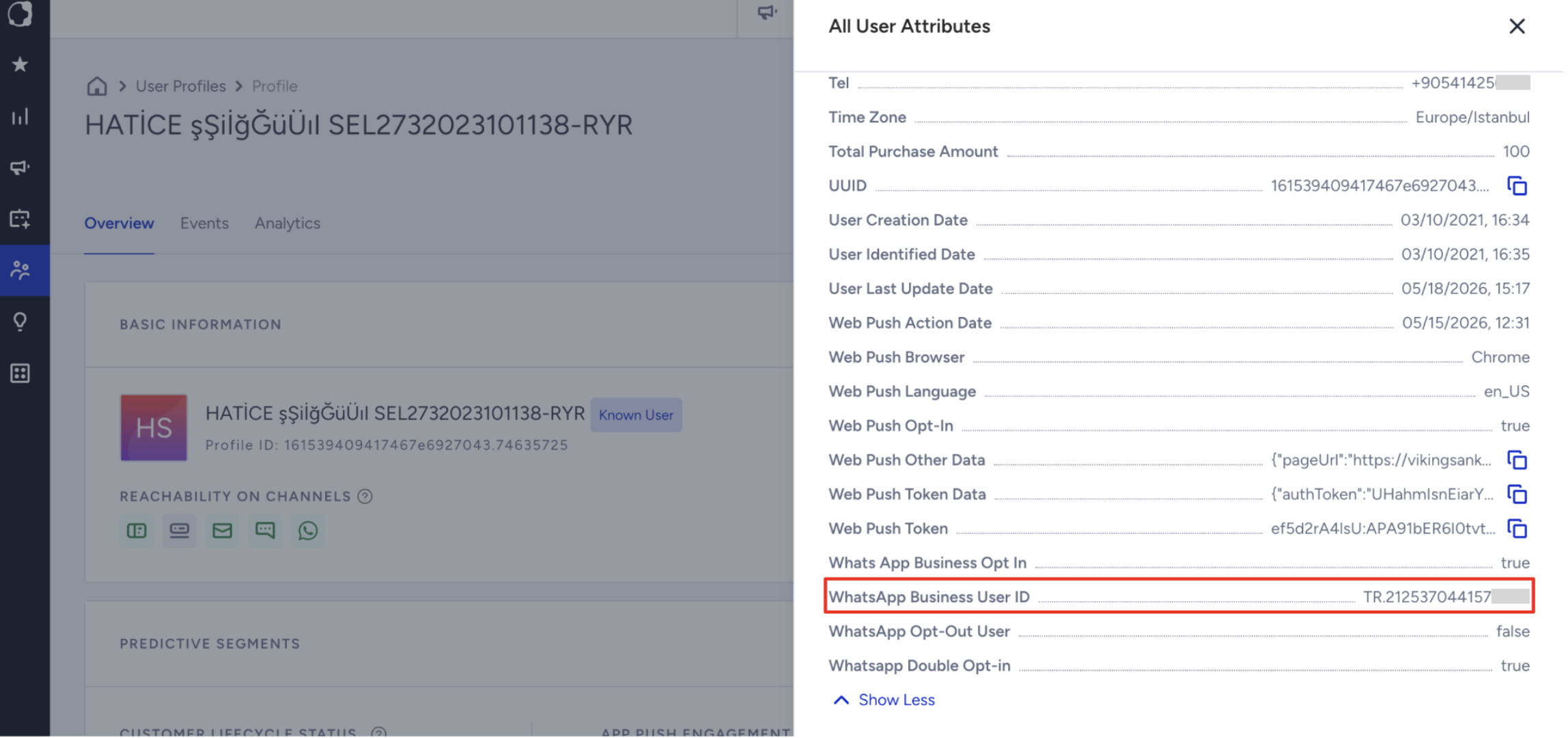
Insider One stores the BSUID. The BSUID is automatically stored in the Unified Customer Database (UCD) as the WhatsApp Business User ID attribute. This is a default attribute and cannot be removed.
Insider One associates the BSUID with the user's phone number. When both values are available, Insider One links the BSUID and phone number to the same user profile.
After a user adopts a username
Users can communicate without sharing their phone numbers. When a user adopts a username, their phone number is hidden by default on WhatsApp and remains visible only to businesses and contacts who already have access to it. Despite this change, WhatsApp conversations continue to include the user's BSUID, allowing Insider One to recognize and identify the user.
Message delivery continues without interruption. If a phone number is available, Insider One continues to use it. If a phone number is unavailable, Insider One can use the BSUID instead. Both template messages and user-initiated conversations continue to work.
BSUID in the UCD profile
The BSUID is available as a default UCD attribute in Insider One for WhatsApp. The value is populated automatically from Meta's webhook events, and no manual synchronization is required. If a profile does not yet contain a BSUID, the value is populated automatically when a supported event is received.
In the User Profiles page, you can view the BSUID value under the WhatsApp Business User ID attribute, as shown below.
When Meta sends it, the user's WhatsApp username is also stored in the
whatsapp_business_usernameattribute. You can use it in segmentation and dynamic content. It cannot be used to send messages.
Messaging scenarios after a user adopts a username
When a user adopts a username, how Insider One identifies and messages that user depends on whether a phone number is already available in the profile.
Scenario | Available identifier | Messaging behavior |
|---|---|---|
A. User adopts a username | Phone number remains linked to the profile | When a user adopts a username, their phone number is hidden by default in WhatsApp. No action is required in Insider One. |
B. User has interacted with the business before | Phone number and BSUID | If the user interacted with the business before adopting a username, their phone number is already stored in the profile. Insider One continues to use the phone number for WhatsApp messaging. |
C. User adopts a username without sharing a phone number | BSUID only | If a phone number is not available in the profile, Insider One uses the BSUID to identify the user and route WhatsApp messages. |
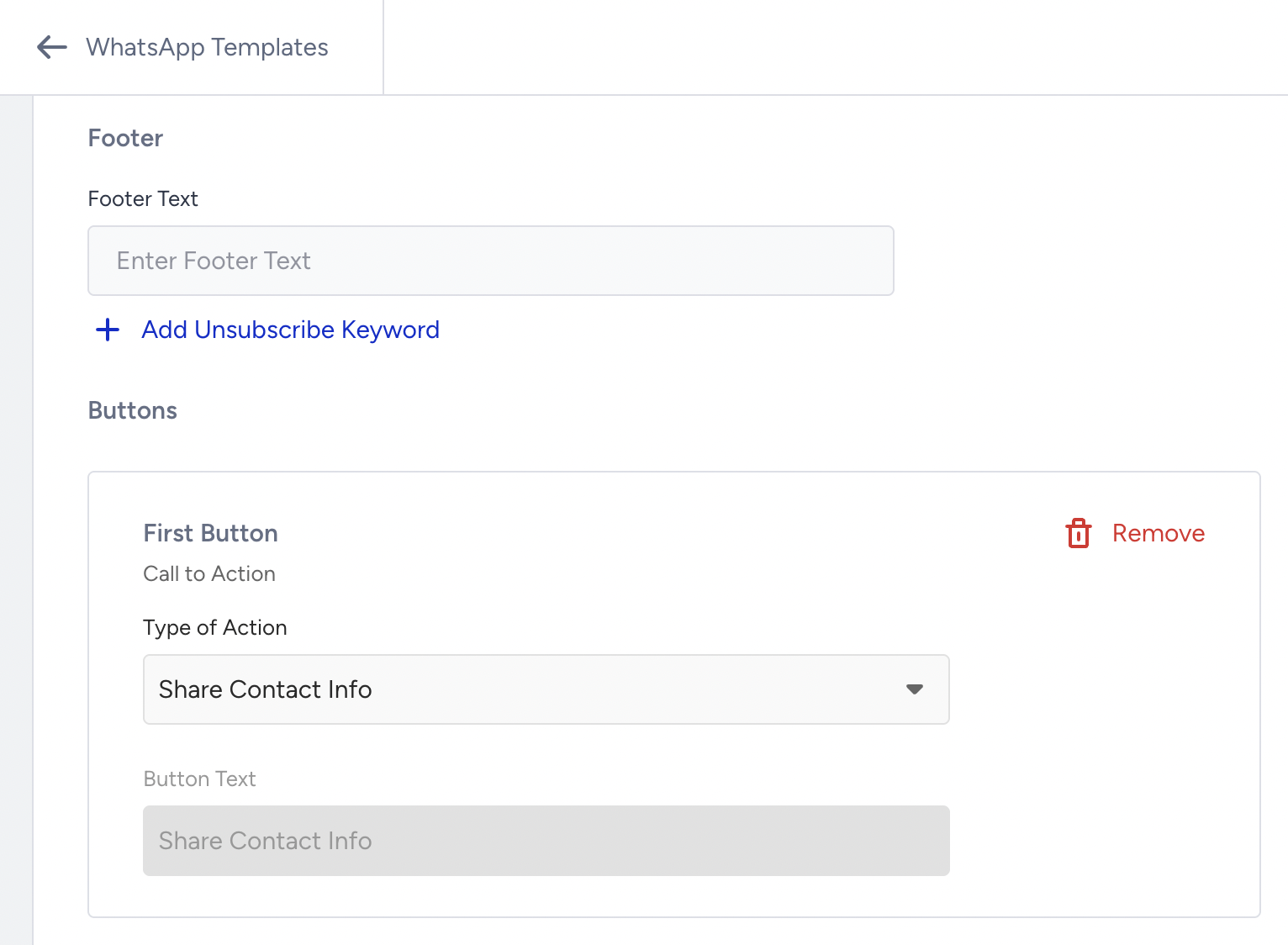
WhatsApp provides an in-app button that allows users to share their phone number with a business, even when the number is hidden by default. This can be useful when a phone number is required for processes such as authentication, order lookup, or CRM synchronization, eliminating the need for users to enter it manually.
When creating your WhatsApp message template in InOne, select Share Contact Info as the CTA button type to allow users to share their phone number with a single tap.
Where is BSUID supported in Insider One?
BSUID support is available across multiple areas of Insider One. The following features can recognize and use BSUID when a phone number is unavailable.
Area | BSUID support |
|---|---|
Standalone WhatsApp and Architect campaigns | WhatsApp messages can be sent using either a phone number or a BSUID. When both are available, the phone number is used. |
Agent One supports conversations where a BSUID is available instead of a phone number. | |
The BSUID is stored as a default user attribute and can be used for profile identification. | |
Opt-in and suppression management | Existing phone-number-based opt-in records remain valid and do not require migration. The suppression database supports both phone numbers and BSUIDs. |
If you use a third-party WhatsApp chatbot, ensure that it supports BSUID-based user identification and messaging. Chatbots that rely only on phone numbers might not be able to respond to Click-to-WhatsApp (CTWA) conversations or user-initiated messages from users who adopt a username and do not share their phone number.
If you need assistance enabling BSUID support for your chatbot integration, contact the Insider One team.
WhatsApp usernames rollout timeline
Phase | Expected timeline | What to expect |
|---|---|---|
Insider One readiness | Available now | BSUID support is already available in Insider One for WhatsApp. No action is required to enable the core platform capabilities. |
Meta beta rollout | Expected from June 2026 | Meta plans to begin rolling out WhatsApp usernames through regional testing and phased availability. |
General availability | Expected throughout 2026 | More users and businesses will be able to adopt usernames as Meta expands the rollout globally. |
Full rollout | Expected through 2027 | Availability is expected to expand gradually across regions until Meta completes the global rollout. |
WhatsApp usernames are being rolled out by Meta and might become available at different times depending on the region. Insider One is already prepared to support BSUID-based messaging as usernames become available. Refer to Meta’s guide for further information.
FAQ
Are WhatsApp usernames mandatory?
No. Usernames are optional for both businesses and end users. Users who do not adopt a username continue to be identified by their phone number, and existing WhatsApp messaging workflows continue to work as they do today.
Will phone number-based WhatsApp messaging continue to work?
Yes. No action is required if your current setup relies on phone numbers. Phone number-based messaging continues to work as it does today for business-initiated template messages. BSUID support is available as an additional identifier when a phone number is unavailable.
However, if your chatbot is not prepared to support BSUID-based messaging, it might not be able to respond to user-initiated conversations from users who adopt a username and choose not to share their phone number.
Will I need to update my existing WhatsApp campaigns and journeys?
No. Existing WhatsApp campaigns, journeys, and templates continue to work. BSUID support is additive and is used when a phone number is unavailable.
Do I need to collect usernames in my forms or lead collection flows?
No. Businesses can continue collecting phone numbers through their existing forms, integrations, and lead collection processes. Usernames are managed by WhatsApp and are not required for customer identification in Insider One.
Can businesses claim a WhatsApp username?
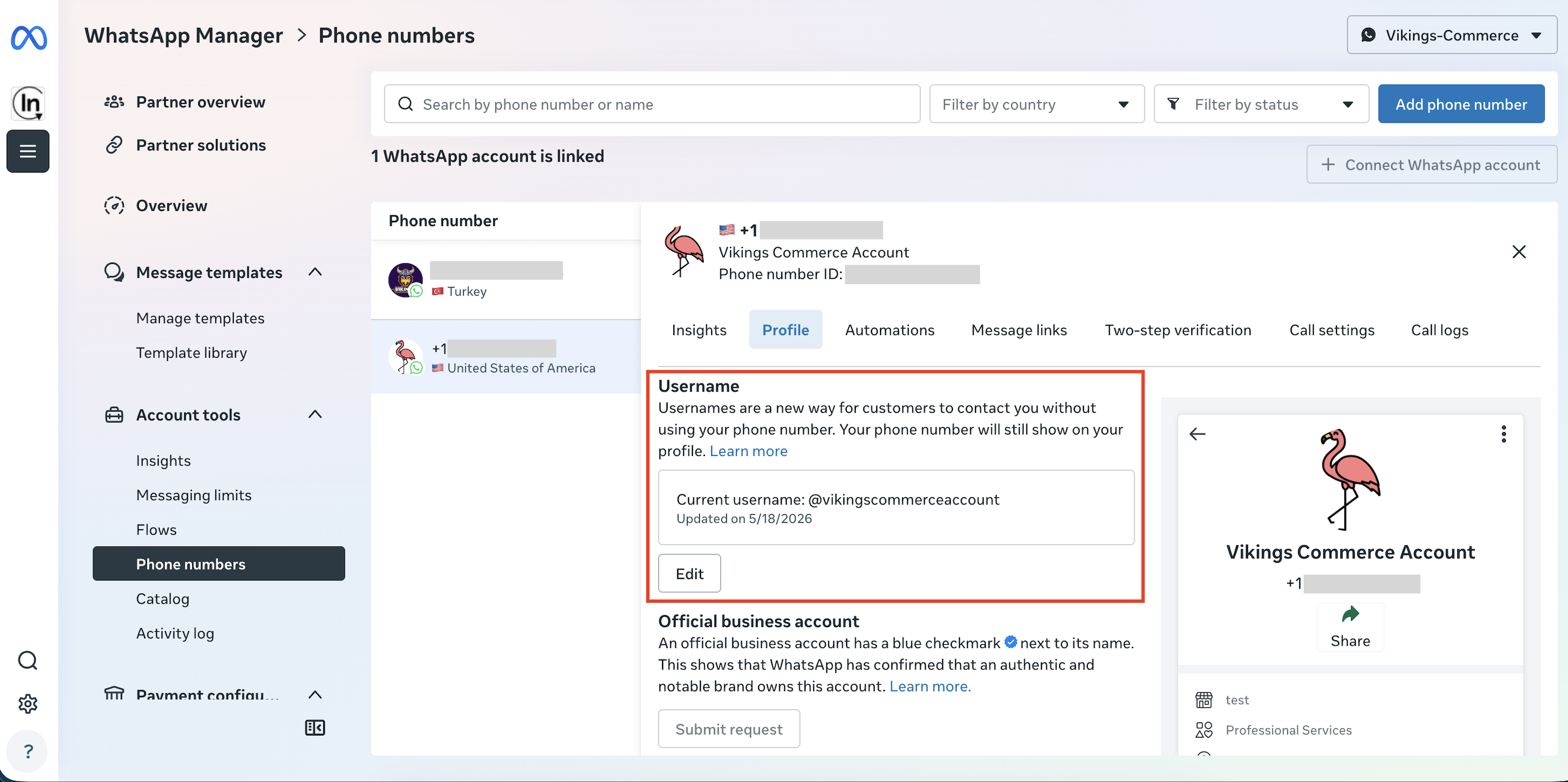
Yes. Businesses can claim usernames on the Meta Business Manager panel. Refer to the image below to see how it appears in the Meta Business Manager panel.
WhatsApp does not provide automatic brand protection for usernames. End users cannot claim a business username directly. A verified business account, indicated by a blue tick, is required to claim a username, and verified businesses receive priority over unverified accounts. If a dispute arises over a username, the dispute is resolved through a Meta support ticket.
Do existing WhatsApp opt-ins remain valid?
Yes. Existing WhatsApp opt-in records remain valid. Adopting a username does not invalidate previously collected consent.
Where can users see a username?
Usernames can appear in places where WhatsApp normally displays a phone number, such as chat headers, search results, contact lists, and ad entry points.
Is any action required before usernames are available?
If you use a third-party WhatsApp chatbot or custom integration, ensure that it supports BSUID-based user identification and messaging before usernames become widely available. If you need support, contact the Insider One team.
Is BSUID a unique identifier? Can two different users have the same BSUID?
No. BSUID is unique per user. If you use phone number as an identifier, BSUID also acts as an identifier.
Will test message sending support usernames?
No. Messages cannot be sent to a username, and users do not know their own BSUID. Test messages continue to be sent using phone number.
Can the Request CONTACT INFO button be combined with other buttons in a template?
No. Per Meta rules, the Request Contact Info button can only be used as a standalone template. It cannot be combined with other buttons.
When will BSUID appear as an identifier in IRM?
BSUID appears as an identifier in IRM if you have the WhatsApp product enabled and phone number set as an identifier. This applies whether you are new to Insider One or already using the platform.
What should a brand that collects phone numbers through its own channels do, and what must chatbot integrations handle?
Brands that collect phone numbers through their own channels can continue sending template messages to those numbers without any change. When a user adopts a username, the phone number is hidden, and Insider One recognizes the user by BSUID on inbound conversations.
Insider One chatbot products, including MindBehind and Agent One, already support number-only, number and BSUID, and BSUID-only flows. Third-party chatbot vendors must extract the user_id (BSUID) from the inbound webhook contacts block, use the Conversational API recipient (BSUID) field for outbound messages, and key sessions by both phone number and BSUID. At least one of recipient or phoneNumber is required. If you send both, Insider One validates the BSUID first. An invalid BSUID drops the message even when the phone number is valid. Insider One then passes both values to Meta. For a full walkthrough, see Handle BSUID-Only Users with the WhatsApp APIs.
What happens if I do not use WhatsApp natively (different BSP (Business Solution Provider) or call-an-API)?
Insider One populates the whatsapp_business_user_id attribute using Meta's read and delivered events. If you use a different BSP or connect through a call-an-API setup, these events do not flow through Insider One, so the attribute cannot be populated.
Template messages sent using a phone number continue to work as before. However, for user-initiated conversations where only a BSUID is available, your BSP must support BSUID for Insider One to identify and message the user.
If a user changes their WhatsApp phone number, does the BSUID change?
Yes. A new phone number results in a new BSUID. A BSUID can also change without a phone number change. Insider One updates the profile automatically in both cases. Third-party chatbots receive a system webhook message and should update their stored BSUID.