A simple mistake, such as a typo in your email copy or directing your audience to the wrong landing page, can significantly impact your ROI. To avoid losing the investment you've made in your email campaigns, most email marketers use a pre-send checklist to ensure everything is in order. However, some marketers still overlook critical steps during this process.
The overlooked yet mission-critical step is failing to thoroughly test their email campaign across multiple email clients and mobile devices to identify and fix rendering issues before sending it.
Many marketers do ad-hoc testing on just a couple of clients or devices. Maybe they run a quick test on their Outlook.com account and their iPhone and call it good. They blithely hit send, oblivious to the fact that their email had Unwanted Gaps in Outlook or that Gmail is clipping their email. That’s why testing email campaigns in various clients and devices before sending is crucial to the success of email campaigns.
Marketers, designers, and developers might wonder, "Why does the same HTML appear perfectly in one email client but look completely off in another?" Because every email client’s rendering machine is not created equal.
Almost every email client displays HTML differently because each client has its own unique way of interpreting your HTML. That is why your HTML code can get all jacked up in different email clients, even though that very same code looks pixel-perfect in another inbox. For example, your text could be left justified in Outlook but look beautiful in your Gmail client.
This article explains the following topics:
What happens if you don't test it?
If you don’t test to diagnose coding and deliverability issues before you send, your marketing ROI could take a significant hit. Let’s break down the repercussions of not testing in monetary terms.
Say you have a list of 50,000 subscribers and you just sent out your email campaign promoting your hottest, newest feature that was estimated to bring in $10,000 in new sales. Yesmail reported that 30% of consumers now read their email exclusively on mobile devices. If you sent an email that looks very bad on an iPhone, that means 15,000 people on your list are looking at a suboptimal email. If 15,000 people are looking at your broken email, wondering if you’re a credible company, you have the potential to lose $3,000 out of the $10,000 you predicted for revenue.
It's not just mobile that can jeopardize your ROI by messing up your code. Specific email clients, like Outlook, are notorious for bugs and glitches that can transform your carefully designed email into a visual mess. With Outlook holding a significant share of the email market, let's say 18% of your audience uses it. If you neglect to code your email with Outlook's quirks in mind—such as its tendency to create unwanted gaps—you could lose $1,800 of your expected ROI. This could result in $4,800 down the drain, all because you didn’t thoroughly test your email.
Here's a clear example showing that even industry giants like Google can slip up when it comes to thoroughly testing their emails, and the outcome can be far from pretty.
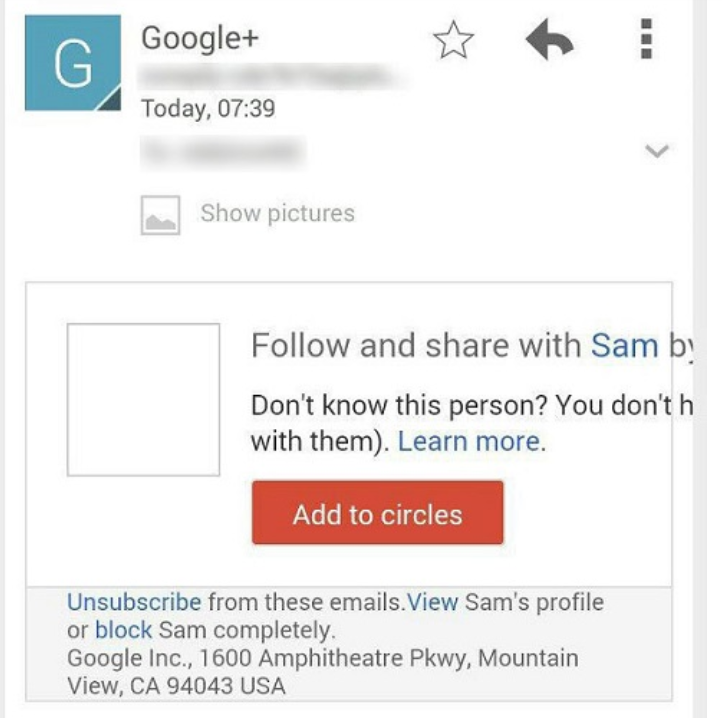
Manual testing
Creating your own email testing suite would be a monumental task, requiring weeks of setting up accounts across various email clients like Lotus Notes, Outlook, Gmail, and more. The process would be time-consuming, not to mention the cost of purchasing multiple devices for testing on platforms like Android and iOS.
This daunting task makes designing, developing, and testing HTML emails feel like a Herculean effort. However, with tools like Email on Acid, you can ensure your email campaigns look flawless across all clients and devices in just a matter of minutes
Spam test and inbox preview
With this feature, you can see precisely what your emails will look like in 70+ email clients and mobile devices so you can fix any rendering issues BEFORE you click send. Read more on Spam Test and Inbox Preview.
You can also use services like MailGenius to get a good sense of whether your email might be flagged as spam by running it through common filtering rules and scoring systems, and by sending it to test inboxes across providers such as Gmail, Yahoo, and AOL.
Before you hit send: your pre-send checklist
You do not need to build your own testing setup to cover the essentials. Insider ships the pre-send checks below. Run through them before launching any email campaign:
1. Send a test email. From the Drag & Drop Editor, open Preview and Test Message to preview your email as an anonymous or a specific user, then send a test to up to 15 recipients.
2. Run a spam test. Score your design against common spam filters and review your B2B, B2C, and overall deliverability scores before sending.
3. Preview rendering across clients and devices. Use Email Preview to check how your design renders across different email clients and devices, so unwanted gaps in Outlook or clipped content in Gmail never reach your subscribers.
4. A/B test what you are unsure about. Run a two-variant experiment on the subject line, preheader, From or Reply-to address, mail design, or UTM parameters, and let your chosen winner metric decide.
5. Time the send. If your campaign has no fixed send time, use Send Time Optimization to deliver at each subscriber's optimal engagement hour. Note that Send Time Optimization and A/B experiments cannot be combined on the same campaign.
6. Still tempted to skip testing? See what a single broken email can cost.