Ever Success is about more than metrics; it’s about growth, partnership, and continuous learning.
Your success doesn’t stop once a campaign launches. Insider One provides multiple ways for you to get help, share feedback, explore ideas, and keep improving results through the InOne ecosystem and Academy.
Use this guide to learn where to go for help, how to access learning materials, and how to stay ahead with Ever Success.
This guide explains the following concepts:
Get support
Ask Academy’s AI Assistant
Insider One’s AI-powered assistant retrieves answers from the Academy documentation, so the answers it provides are up-to-date, relevant, and fast.
You can ask how-to or strategic questions about:
How to set up a channel/campaign
Where to find a specific feature in InOne
What a low metric means
How to improve performance for a channel
(2).png)
Request technical support
If you experience a technical problem or require troubleshooting assistance:
Submit a ticket via the Insider One Help Center.
Submit a ticket that describes your issue and its impact.
The Insider One Support team will investigate and follow up with a resolution.
(2).png)
Find inspiration in the Use Case Library
Explore real-world strategies in the Use Case Library for all Insider One products to:
Identify new ideas for your objectives, industry, or goals.
Locate relevant product examples for every season.
Generate creative inspiration for your upcoming campaign.
(2).png)
Learn strategies in the Insider One Campus
Go from beginner to product expert one learning hub at a time. Each Hub includes 3 paths:
Essentials path
This is the foundational starting point, meticulously crafted for new users or those seeking to solidify their understanding of the core product functionality. This path covers:
Product fundamentals: A thorough introduction to the platform's interface, key components, and basic navigation.
Initial setup and configuration: Step-by-step guidance on getting the product up and running.
Core feature utilization: Practical lessons on the essential features needed to begin seeing value.
Deep dive path
Once the fundamentals are mastered, the Deep Dive Path provides the resources necessary to transition from basic usage to advanced proficiency. This path focuses on:
Detailed strategy development: Moving beyond how to use the features to why and when to use them for maximum impact.
Optimization techniques: Advanced methodologies for fine-tuning campaigns, flows, and settings to achieve peak performance.
Feature mastery: In-depth explorations of complex functionalities and integration capabilities.
Strategy hub
The Strategy Hub serves as the path for achieving sustained, long-term success and becoming a strategic master of the platform. It is dedicated to:
Long-term success: Best practices, case studies, and frameworks for developing and executing enduring marketing campaigns.
Analytics mastery: Comprehensive training on interpreting data, utilizing advanced reporting tools, and transforming insights into actionable strategies.
Strategic planning: Resources to align product usage with overarching business objectives and stay ahead of industry trends.
(2).png)
Share feedback and get support in the InOne panel
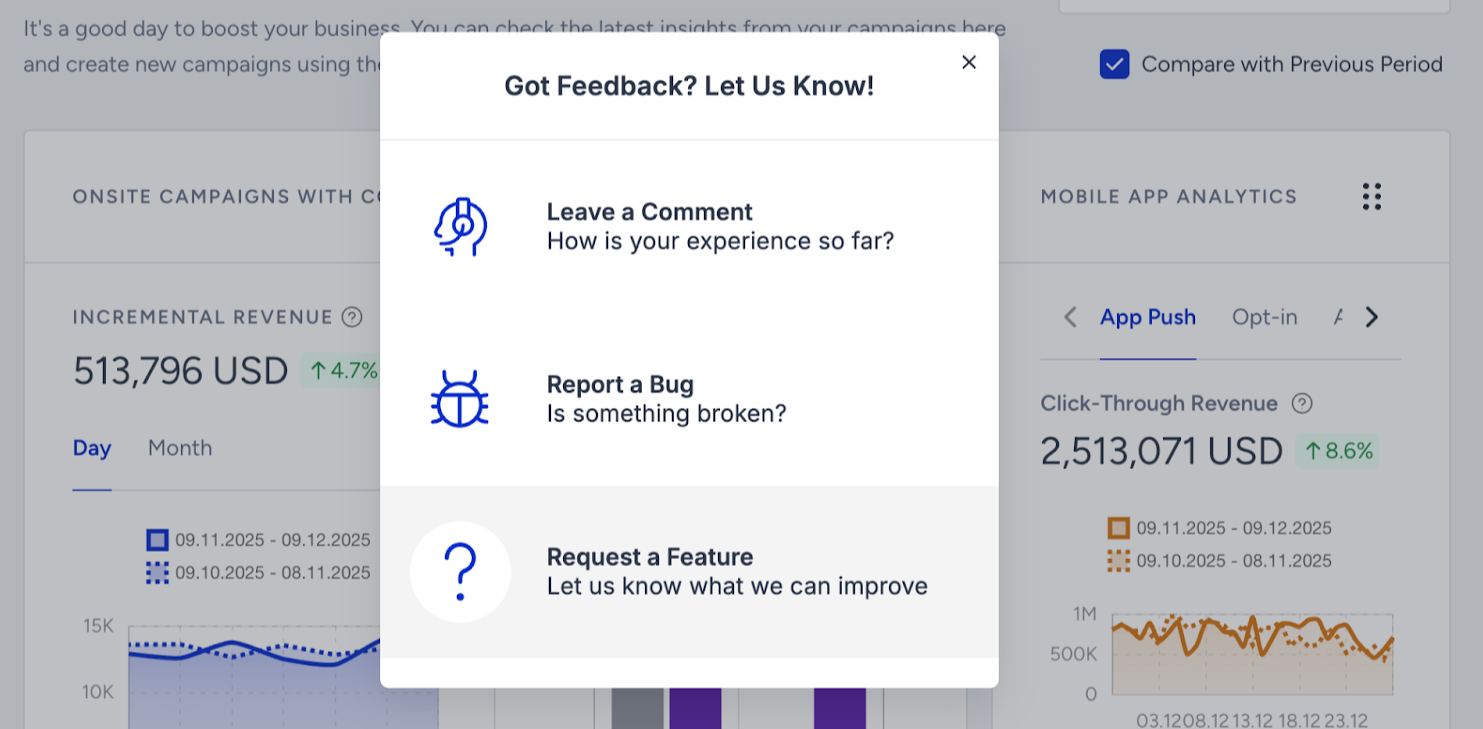
Your input is vital in shaping the user experience. The Insider One team carefully reviews all feedback to ensure the continuous improvement of the InOne experience.
Click on the Feedback icon in your InOne panel.
Suggest anything from product and platform improvements, or request new training resources.
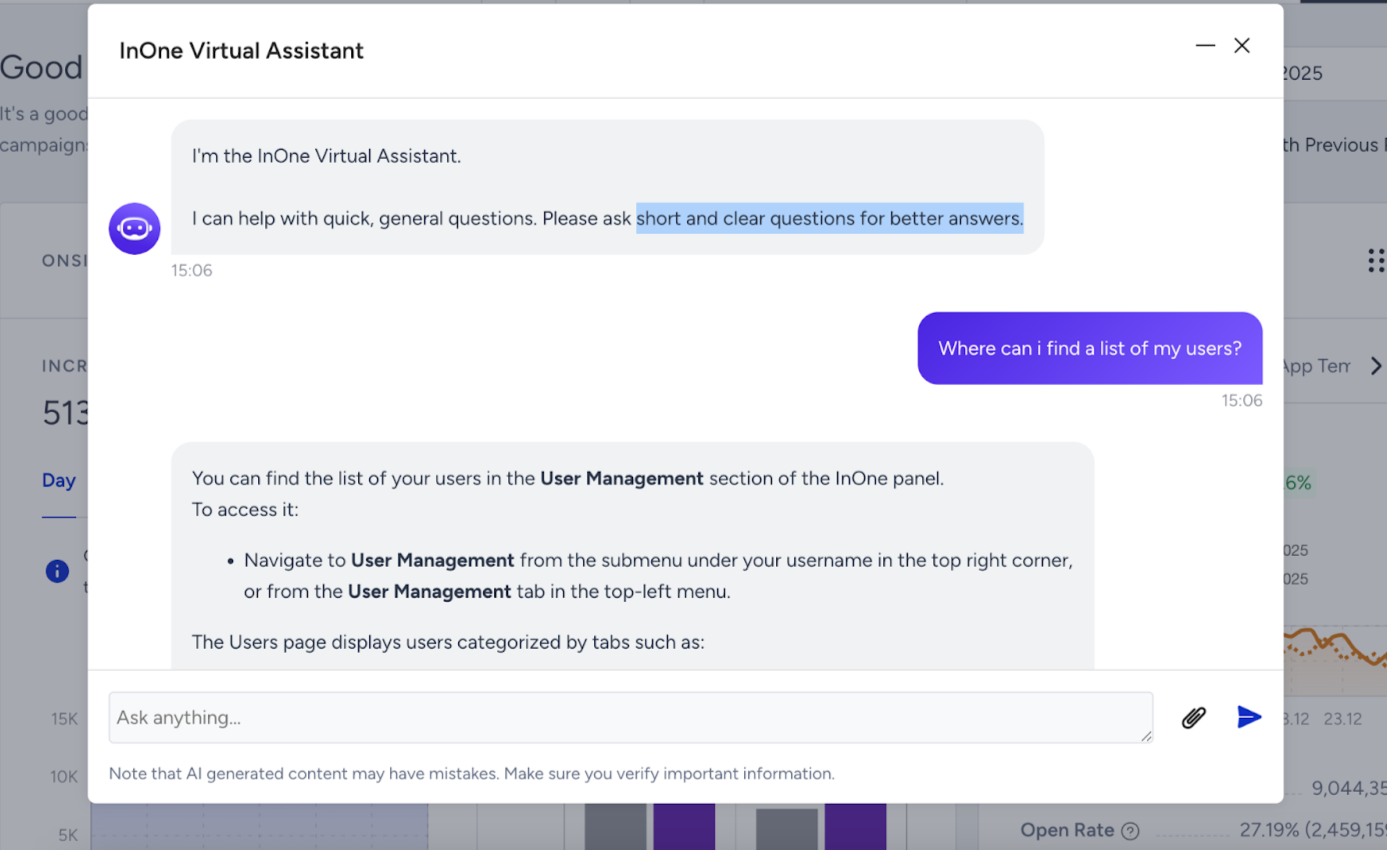
You can ask quick, general questions to the InOne Virtual Assistant. It will provide an answer and a list of resources for more information.
Click on Get Support.
Ask short and clear questions for better answers.
Tips to stay proactive
Ask Insider One’s AI assistant a question you’ve always wanted a faster answer to, like “How can I increase email engagement?”
Enroll in your first Insider One Campus learning path and encourage team learning, assign courses or paths that align with upcoming business goals.
Find inspiration in the Use Case Library before launching your next campaign.
Escalate early if you encounter blockers, because support works fastest when you report issues clearly.
Be specific in your support tickets, include screenshots, URLs, and a clear description for faster resolution.
Bookmark your favorite resources and save links to the Academy, Use Case Library, and Help Center for quick access.
FAQs
Q: How do we reach Insider One Support?
A: In your InOne panel, go to Help > Support Portal and submit a ticket.
Q: Where can we get quicker answers?
A: Use the Academy AI Assistant for answers to common how-to and strategic questions.
Q: How do we share feedback with Insider One?
A: Use the Feedback option in your InOne panel to suggest ideas or improvements.
Q: How can our team learn more?
A: Explore Insider One Campus for curated learning paths by role, industry, or product.
Q: Where can we find inspiration and best practices?
A: Browse the Use Case Library for over 300 examples with detailed steps and best practices.