WhatsApp Transactional API v2 is a REST API that allows your systems to send transactional messages through the WhatsApp Business Platform.
To send transactional WhatsApp messages using OAuth 2.0, you must first generate an OAuth 2.0 credential. For step-by-step instructions, refer to OAuth 2.0 Credentials.
Before sending Transactional WhatsApp template messages, make sure you create your template in InOne first. Refer to Create a WhatsApp Business Standard Template on InOne for step-by-step guidance.
Refer to the visual below for an example of how a transactional WhatsApp template message is displayed.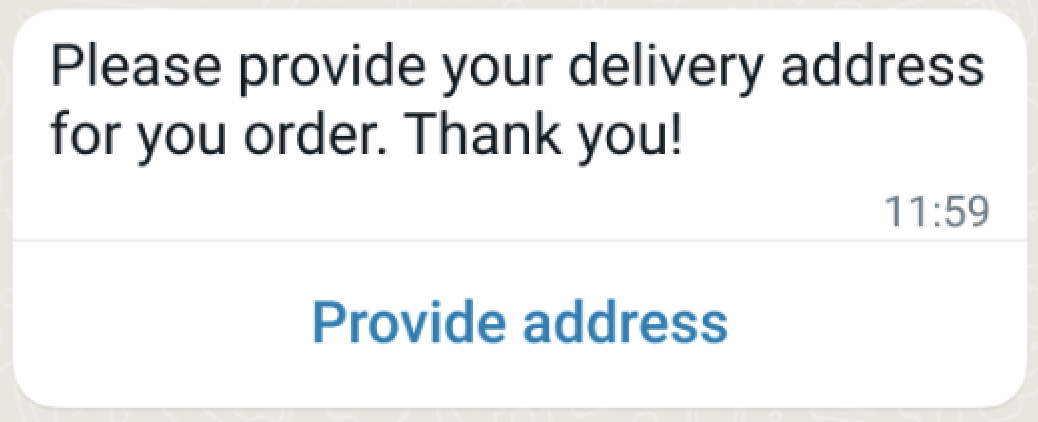
Endpoint and Headers
POST https://gw.useinsider.com/api/wa/v2/transactional/messages/send
Visit our Postman collection to test this request.
Body Parameters
Parameter | Description | Type | Required |
|---|---|---|---|
messages | List of messages to be sent (minimum 1 message) | array | Yes |
from | Optional | Specifies the sender phone number ID. Only required when multiple phone numbers are configured for the account. If not specified, the default phone number is used. This applies to both Transactional and Conversational WhatsApp APIs. | String |
url_shortener_config | URL shortening settings | object | No |
url_shortener_config.status | Enable/disable URL shortening | boolean | No |
url_shortener_config.domain | Domain name for shortening | string | No |
unique_args | Custom parameters (key–value map) | object | No |
remove_tracking_params | Remove tracking parameters | boolean | No |
bid_spec | Opt-in for dynamic pricing. Only valid for MARKETING templates. | Object | No |
Messages Array Parameters
Each element in the messages array contains:
Parameter | Type | Required | Description |
|---|---|---|---|
phoneNumber | string | Conditional. Required if recipient is not sent. | Phone number for the person you want to message.
|
recipient | string | Conditional. Required if phoneNumber is not provided. | Specifies the recipient’s WhatsApp Business-Scoped User ID (BSUID). For example, TR.2124566744990207. Use this identifier to send messages without providing the recipient’s phone number. Pass the complete BSUID, including its country prefix. |
user_id | string | No | A unique identifier for the user within the partner's system, used for cross-platform tracking. |
message | object | Yes | The core payload containing the message content (see Message Object details below). |
reply_type | string | No | Defines the automated response category. Values: |
unique_args | object | No | A key–value map for passing custom metadata specific to this individual message. |
Message Object Structure
Parameter | Type | Required | Description |
|---|---|---|---|
type | string | Yes | Message type: |
template | object | Conditional | Template message (required if |
text | object | Conditional | Text message (required if |
... | ... | ... | Other media types follow the same logic. |
context | object | No | Information about the message being replied to (reply-to message) |
Template Messages
Used to send template messages. Templates must be pre-created and approved in the Meta Business Manager.
Parameter | Type | Required | Description |
|---|---|---|---|
name | string | Yes | Template name (must be defined in Meta). |
language | object | Yes | Template language settings. |
language.code | string | Yes | Language code (ISO 639-1, e.g., |
language.policy | string | No | Language policy: |
components | array | No | Template components (for parameters) |
Sample Requests
{
  "from": "+1111111111",
  "messages": [
    {
      "phone_number": "+1234567890",
      "user_id": "user-uuid-123",
      "message": {
        "type": "template",
        "template": {
          "name": "welcome_message",
          "language": {
            "code": "tr"
          },
          "components": [
            {
              "type": "body",
              "parameters": [
                {
                  "type": "text",
                  "text": "Ahmet"
                }
              ]
            }
          ]
        }
      }
    }
  ]
}
Send a Marketing template with WhatsApp Dynamic Pricing (Max-Price)
To enable the WhatsApp Maximum Price (Max-Price) feature for a template, include the bid_spec object in the template request. The following example allows you to send a marketing template with Maximum Price bidding enabled.
Use per_message_bid_multiplier only with templates that have Maximum Price bidding enabled through the bid_spec object. The bid_amount is defined during template creation, and per_message_bid_multiplier can be used at send time to increase or decrease the effective maximum price for a specific message delivery.
Calculate bid_amount values
The bid_amount value represents your maximum price per 1,000 deliveries in the smallest unit of your WABA currency. To calculate the value:
Convert your desired per-delivery price to the smallest unit of your WABA currency.
Multiply the result by 1,000 to express the value per 1,000 deliveries.
For example, to set a maximum price of ₹0.87 per delivery:
Convert to paise: 0.87 rupees = 87 paise.
Multiply by 1,000: 87 × 1,000 = 87,000.
Set bid_amount to 87000.
For example, to set a maximum price of $0.05 USD per delivery:
Convert to cents: $0.05 = 5 cents.
Multiply by 1,000: 5 × 1,000 = 5,000.
Set bid_amount to 5000.
For more information about the feature, see WhatsApp Maximum Price Feature.
curl --location 'https://gw.useinsider.com/api/wa/v2/transactional/messages/send' \
--header 'Content-Type: application/json' \
--header 'x-ins-auth-key: 1a2b3c4d5e6f' \
--data '{
  "from": "+1111111111",
  "messages": [
    {
      "phone_number": "+1234567890",
      "user_id": "user-uuid-123",
      "message": {
        "type": "template",
        "template": {
          "name": "welcome_message",
          "language": {
            "code": "tr"
          },
          "components": [
            {
              "type": "body",
              "parameters": [
                {
                  "type": "text",
                  "text": "Ahmet"
                }
              ]
            }
          ],
          "bid_spec": {
            "per_message_bid_multiplier": 1.5
          }
        }
      }
    }
  ]
}'
Component Types
Templates can include the following component types:
Header Component
The header component corresponds to the template's header section.
{
  "type": "header",
  "parameters": [
    {
      "type": "text",
      "text": "Variable header value"
    }
  ]
}
To use a media header, you can use the request below.
{
  "type": "header",
  "parameters": [
    {
      "type": "image",
      "image": {
        "link": "https://example.com/image.jpg"
      }
    }
  ]
}
Header parameter types can be text, image, video and document.
Body Component
The Body component is the main text section of the template.
{
  "type": "body",
  "parameters": [
    {
      "type": "text",
      "text": "John Doe"
    },
    {
      "type": "text",
      "text": "12345"
    }
  ]
}
Button Component
The main text section of the template.
{
  "type": "button",
  "sub_type": "url",
  "index": "0",
  "parameters": [
    {
      "type": "text",
      "text": "PROMO2024"
    }
  ]
}
To add buttons to the template, use the request below.
{
  "type": "button",
  "sub_type": "url",
  "index": "0",
  "parameters": [
    {
      "type": "text",
      "text": "PROMO2024"
    }
  ]
}
To add CTA (Call-to-Action) links to your template, use the request below.
{
  "type": "button",
  "sub_type": "url",
  "index": "0",
  "parameters": [
    {
      "type": "text",
      "cta_link": "?code=SUMMER2024"
    }
  ]
}
Button sub_types are url and quick_reply.
Carousel Component
Carousel template (product catalog cards).
{
  "type": "carousel",
  "cards": [
    {
      "card_index": 0,
      "components": [
        {
          "type": "header",
          "parameters": [
            {
              "type": "image",
              "image": {
                "link": "https://example.com/product1.jpg"
              }
            }
          ]
        },
        {
          "type": "body",
          "parameters": [
            {
              "type": "text",
              "text": "Product 1 Name"
            },
            {
              "type": "text",
              "text": "999.99 TL"
            }
          ]
        },
        {
          "type": "button",
          "sub_type": "url",
          "index": "0",
          "parameters": [
            {
              "type": "text",
              "text": "product-1-slug"
            }
          ]
        }
      ]
    },
    {
      "card_index": 1,
      "components": [
        {
          "type": "header",
          "parameters": [
            {
              "type": "image",
              "image": {
                "link": "https://example.com/product2.jpg"
              }
            }
          ]
        },
        {
          "type": "body",
          "parameters": [
            {
              "type": "text",
              "text": "Product 2 Name"
            },
            {
              "type": "text",
              "text": "1299.99 TL"
            }
          ]
        }
      ]
    }
  ]
}
Carousel template can contain a maximum of 10 cards (card_index: 0-9).
Limited Time Offer (LTO) Component
{
  "type": "limited_time_offer",
  "parameters": [
    {
      "type": "limited_time_offer",
      "limited_time_offer": {
        "expiration_time_ms": 1640000000000
      }
    }
  ]
}
Coupon Code Component
When sending WhatsApp messages via OAuth 2.0, you can add a coupon code that recipients can copy directly from the message. To use this option, add the Copy Code button component to your WhatsApp Business template.
To send a message with a coupon code, your WhatsApp Business Account template must include a Copy Offer Code button. This button is configured at the template level in Meta's WhatsApp Business Manager and cannot be added after the template is created. To set this up, refer to Add Copy Coupon Codes to WhatsApp Business Templates on InOne.
When sending a message using a template that includes a Copy Code button, include the coupon code in the components array of your message payload:
"components": [
  {
    "type": "body",
    "parameters": [
      {
        "type": "text",
        "text": "{{1}}"
      }
    ]
  },
  {
    "type": "button",
    "sub_type": "COPY_CODE",
    "index": "0",
    "parameters": [
      {
        "type": "coupon_code",
        "coupon_code": "SUMMER2024"
      }
    ]
  }
]
Copy Code Button Parameters
Field | Type | Required | Description |
|---|---|---|---|
type | string | Yes | Must be |
sub_type | string | Yes | Must be |
index | string | Yes | The zero-based index of the button as defined in the template (e.g., |
parameters[].type | string | Yes | Must be |
parameters[].coupon_code | string | Yes | The coupon code value that will be shown and copied by the recipient. |
Below is a sample request to send a promotional WhatsApp message with a discount code.
curl --location 'https://gw.useinsider.com/api/wa/v2/transactional/messages/send' \
--header 'Content-Type: application/json' \
--header 'x-ins-auth-key: 1a2b3c4d5e6f' \
--data '{
  "messages": [
    {
      "phoneNumber": "+905XXXXXXXXX",
      "message": {
        "type": "template",
        "template": {
          "name": "promo_discount_template",
          "language": {
            "code": "en",
            "policy": "deterministic"
          },
          "components": [
            {
              "type": "body",
              "parameters": [
                {
                  "type": "text",
                  "text": "30%"
                }
              ]
            },
            {
              "type": "button",
              "sub_type": "COPY_CODE",
              "index": "0",
              "parameters": [
                {
                  "type": "coupon_code",
                  "coupon_code": "SUMMER30"
                }
              ]
            }
          ]
        }
      }
    }
  ]
}'
The recipient sees the message with a Copy Code button. Tapping it copies SUMMER30 to their clipboard.
Important: You are responsible for tracking whether
SUMMER30has been used or expired. Insider One's Coupon Manager doesn’t record this usage.
Limitations of API-sent Coupon Codes
Coupon codes sent via API are not connected to Insider One’s Coupon Manager. The add, reduce, and expire functionalities available in the Insider One platform do not apply to API-sent messages.
The API accepts any string value for the
coupon_codeparameter and doesn’t validate it against your Coupon Manager inventory.When messages are sent through the InOne, the coupon code field is populated automatically, and the full coupon lifecycle, including creation, usage tracking, and expiry management, is handled by Coupon Manager. This automatic management is unavailable for API-sent messages.
The Copy Code button must already exist in your WhatsApp Business Account template before sending the message. You cannot add a copy code button dynamically at send time.
Flow Button Component (For WhatsApp Flows)
{
  "type": "button",
  "sub_type": "flow",
  "index": "0",
  "parameters": [
    {
      "type": "action",
      "action": {
        "flow_token": "unique-flow-token",
        "flow_action_data": {
          "user_id": "12345",
          "product_id": "SKU-123"
        }
      }
    }
  ]
}
Text Message
You can use this request to send plain text messages (typically for conversational use).
Parameters
Parameter | Type | Required | Description |
|---|---|---|---|
body | string | Yes | Message text (maximum |
preview_url | boolean | No | Display URL preview (default: |
{
  "type": "text",
  "text": {
    "body": "Hello! Your order is being prepared.",
    "preview_url": false
  }
}
Image Message
You can use this request to send images in your message.
Image Object
Parameter | Type | Required | Description |
|---|---|---|---|
link | string | Conditional | Image URL ( |
id | string | Conditional | Uploaded media ID (mandatory if |
caption | string | No | Image caption (maximum |
Image Message with Link
{
  "type": "image",
  "image": {
    "link": "https://example.com/image.jpg",
    "caption": "Product Image"
  }
}
Image Message with Media ID
{
  "type": "image",
  "image": {
    "id": "1234567890",
    "caption": "Uploaded Image"
  }
}
Supported formats for image messages are JPEG, PNG. The maximum size is 5 MB.
Video Message
Used to send videos.
Parameter | Type | Required | Description |
|---|---|---|---|
link | string | Conditional | Video URL ( |
id | string | Conditional | Uploaded media ID (mandatory if |
caption | string | No | Video caption (maximum |
{
  "type": "video",
  "video": {
    "link": "https://example.com/video.mp4",
    "caption": "Product video"
  }
}
Supported formats for video messages are MP4 and 3GPP. The maximum size is 16 MB.
Document Message
You can use this request to send documents/files.
Parameter | Type | Required | Description |
|---|---|---|---|
link | string | Conditional | Document URL ( |
id | string | Conditional | Uploaded media ID (mandatory if |
filename | string | No | Filename (to be displayed). |
caption | string | No | Document caption (maximum |
{
  "type": "document",
  "document": {
    "link": "https://example.com/invoice.pdf",
    "filename": "Fatura-12345.pdf",
    "caption": "Sipariş faturanız"
  }
}
Supported formats for document messages are PDF, DOC, DOCX, XLS, XLSX, PPT, PPTX, TXT and CSV. The maximum size is 100 MB.
Audio Message
You can use this request to send audio files.
Parameter | Type | Required | Description |
|---|---|---|---|
link | string | Conditional | Audio URL ( |
id | string | Conditional | Uploaded media ID (mandatory if |
{
  "type": "audio",
  "audio": {
    "link": "https://example.com/audio.mp3"
  }
}
Supported formats for audio messages are AAC, M4A, AMR, MP3 and OGG OPUS. The maximum size is 16 MB.
Location Message
You can use this request to send location/map coordinates.
Location Object
Parameter | Type | Required | Description |
|---|---|---|---|
latitude | string | Yes | Latitude coordinate. |
longitude | string | Yes | Longitude coordinate. |
name | string | No | Location name. |
address | string | No | Location address. |
{
  "type": "location",
  "location": {
    "latitude": "41.0082",
    "longitude": "28.9784",
    "name": "İstanbul",
    "address": "İstanbul, Türkiye"
  }
}
Sticker Message
You can use this request to send stickers.
Parameter | Type | Required | Description |
|---|---|---|---|
| string | Conditional | Sticker URL ( |
| string | Conditional | Uploaded media ID (mandatory if |
{
  "type": "sticker",
  "sticker": {
    "link": "https://example.com/sticker.webp"
  }
}
Supported format for sticker messages is WebP (static or animated) The maximum size is 100 KB (static), 500 KB (animated).
Interactive Message
You can use this request to send interactive messages (buttons, lists, products, flows).
Parameter | Type | Required | Description |
|---|---|---|---|
type | string | Yes | Interactive type: |
header | object | No | Message header. |
body | object | Yes | Message main body. |
body.text | string | Yes | Message text (maximum |
footer | object | No | Message footer. |
footer.text | string | Yes | Footer text (maximum |
action | object | Yes | Interactive action definition. |
Interactive Header
{
  "header": {
    "type": "text",
    "text": "Header text"
  }
}
Media Header
{
  "header": {
    "type": "image",
    "image": {
      "link": "https://example.com/header.jpg"
    }
  }
}
Header types can be text, image, video, document.
Interactive Action Types
Button Action - Reply buttons (maximum 3 buttons)
{
  "action": {
    "buttons": [
      {
        "type": "reply",
        "reply": {
          "id": "btn_yes",
          "title": "Yes"
        }
      },
      {
        "type": "reply",
        "reply": {
          "id": "btn_no",
          "title": "No"
        }
      }
    ]
  }
}
Button title can be a maximum 20 characters.
List Action - Selection list (maximum 10 rows)
{
  "action": {
    "button": "View Options",
    "sections": [
      {
        "title": "Category 1",
        "rows": [
          {
            "id": "row_1",
            "title": "Option 1",
            "description": "Option description"
          },
          {
            "id": "row_2",
            "title": "Option 2",
            "description": "Other option"
          }
        ]
      }
    ]
  }
}
Product Action - Single product display
{
  "action": {
    "catalog_id": "123456789",
    "product_retailer_id": "SKU-12345"
  }
}
Product List Action - List of products
{
  "action": {
    "catalog_id": "123456789",
    "sections": [
      {
        "title": "Featured Products",
        "product_items": [
          {
            "product_retailer_id": "SKU-001"
          },
          {
            "product_retailer_id": "SKU-002"
          }
        ]
      }
    ]
  }
}
Flow Action - WhatsApp Flows
{
  "action": {
    "name": "flow",
    "parameters": {
      "flow_message_version": "3",
      "flow_token": "unique-token",
      "flow_id": "123456789",
      "flow_cta": "Fill Form",
      "flow_action": "navigate",
      "flow_action_payload": {
        "screen": "FORM_SCREEN",
        "data": {
          "user_id": "12345"
        }
      }
    }
  }
}
CTA URL Action - External link button
{
  "action": {
    "name": "cta_url",
    "parameters": {
      "display_text": "Visit Website",
      "url": "https://example.com"
    }
  }
}
Catalog Message Action - Full catalog display
{
  "action": {
    "name": "catalog_message",
    "parameters": {
      "thumbnail_product_retailer_id": "SKU-FEATURED"
    }
  }
}
Interactive Carousel - Product carousel (maximum 10 cards)
{
  "action": {
    "cards": [
      {
        "card_index": 0,
        "type": "carousel",
        "header": {
          "type": "image",
          "image": {
            "link": "https://example.com/product1.jpg"
          }
        },
        "body": {
          "text": "Product 1 - 999 TL"
        },
        "action": {
          "name": "cta_url",
          "parameters": {
            "display_text": "Buy Now",
            "url": "https://example.com/product/1"
          }
        }
      }
    ]
  }
}
Context Object
You can use this request to reply to a specific message.
Parameter | Type | Required | Description |
|---|---|---|---|
link | string | Conditional | Sticker URL ( |
id | string | Conditional | Uploaded media ID (mandatory if |
{
  "type": "text",
  "context": {
    "message_id": "wamid.HBgLOTA5NTU1MTIzNDU2NxUCABIYIDNBMzQwRjg2..."
  },
  "text": {
    "body": "Thank you!"
  }
}
Sample Responses
Response Parameters
Parameter | Type | Description |
|---|---|---|
keys | array | Unique keys generated for each message. Used in webhook callbacks. |
200 OK - Success Response
{
  "keys": [
    "whatsapp-550e8400-e29b-41d4-a716-446655440000"
  ]
}
400 Bad Request
{
  "message": "Failed to validate request.",
  "error": {
    "message": "Failed to validate request.",
    "code": "2001"
  }
}
400 Bad Request - Validation
{
  "message": "Failed to validate request.",
  "error": {
    "message": "Failed to validate request.",
    "code": "2002"
  }
}
400 Bad Request - Send Failed
{
  "message": "Message could not be sent.",
  "detail": "There is no active provider.",
  "error": {
    "message": "Message could not be sent.",
    "code": "2003"
  }
}
Error Codes
Code | HTTP Status | Description |
|---|---|---|
2001 | 400 | The request body could not be decoded. |
2002 | 400 | The request body failed validation. |
2003 | 400 | The message could not be sent due to a provider error or an internal system issue. |
Media Operation Errors
Code | HTTP Status | Description |
|---|---|---|
2017 | 400 | Provider not found or upload error |
2018 | 400 | Error retrieving media information |
2019 | 400 | Media download error |
INVALID_FILE | 400 | Invalid file or file could not be read |
System Errors
HTTP Status | Description |
|---|---|
503 Service Unavailable | The system is currently in maintenance mode |