Constant Starter Property Value lets you hold the value that started a journey constant and check it later in the same journey. When a user enters a journey, Insider One captures the parameter values of the starter event, or for product-catalog starters, the catalog attributes of the product that triggered entry, and keeps them fixed for that user for the whole journey. Then, you can compare those held values against events the user performs downstream, so a journey reacts to the exact product or detail that brought each user in, not to a generic event.
A constant starter property value:
Holds the value that started the journey constant for each user, from entry to the end of the journey, including after long waits, the starter event's parameter values, or, for product-catalog starters, the entry product's catalog attributes.
Lets you compare a downstream event's parameter against the held value with an operator such as is exactly.
Works across several journey surfaces: Check Conditions, Wait for Event, Exit Criteria, and Journey Goals.
Supports product-catalog starters. You hold the catalog attributes of the entry product, e.g., its product name, category, or brand, and check them in Check Conditions.
Supports cross-event matching, including matching one event's parameter to a differently named parameter on another event, e.g., matching a return flight's arrival airport to the outbound flight's departure airport.
Combines several held-value checks with AND in a single step.
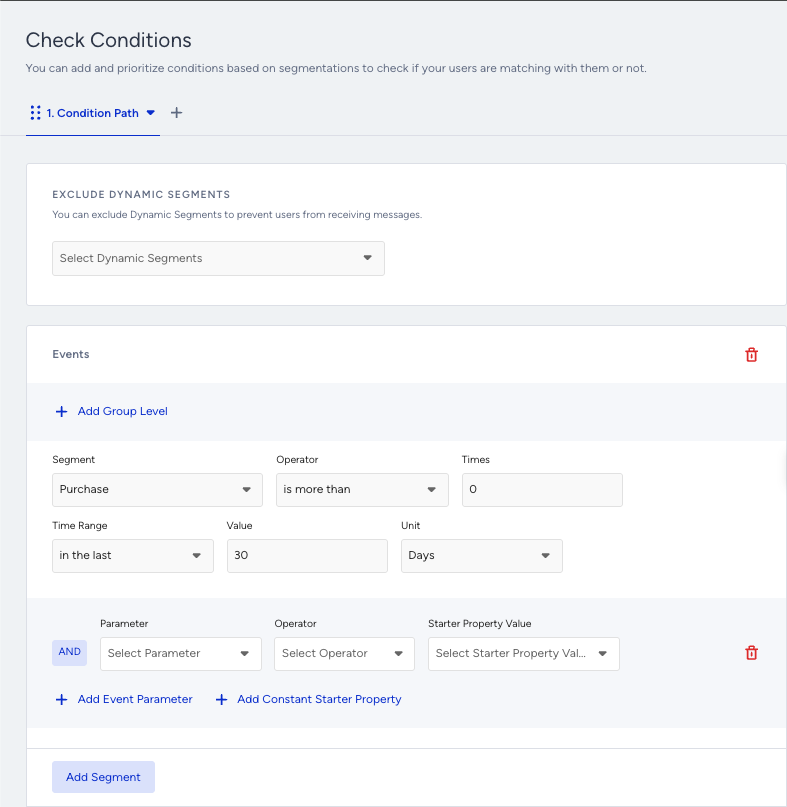
When a starter carries parameters, the condition editor for a supported surface shows a dedicated Add Constant Starter Property control alongside the regular Add Event Parameter control.
Adding one creates a row with three parts:
Parameter: The parameter on the downstream event you want to compare.
Operator: Defines how to compare, e.g., is exactly.
Starter Property Value: A dropdown of the values held from the starter, shown as <Starter Event> - <Parameter>.
At runtime, Insider One keeps the starter's value fixed for each user and compares the downstream event's parameter against it. You can add more than one row; the rows combine with AND, alongside any regular event-parameter conditions.
Cross-event matching
The parameter you compare and the held value can come from different events and can carry different names. For example, for a return-flight journey, you can check that a Flight Booking event's Departure Airport is exactly the held Arrival Airport, and its Arrival Airport is exactly the held Departure Airport.
Supporting elements
The starter you choose decides which values you can hold constant, and each journey surface supports a specific set of starters.
Starter | ||||
|---|---|---|---|---|
On Event, On Dynamic Date, On Business Event (hold the event's parameter values) | Yes | Yes | Yes | Yes |
On Price Drop, On Low in Stock, On Back in Stock (hold the entry product's catalog attributes) | Yes | No | No | No |
Prerequisites
The starter event carries the parameters you want to hold constant. Product-catalog starters (On Price Drop, On Low in Stock, On Back in Stock) require a product catalog feed.
Constant Starter Property Value is disabled by default. Contact the Insider One team for activation details.
Use cases
Price-drop precision (Retail)
A shopper adds a product to their wishlist, and its price drops, so the On Price Drop starter enters it and keeps that product constant. In Check Conditions, Architect checks whether the shopper has already purchased the same product. If they have, you route them out and send nothing. If they have not, you send the price-drop message with the live product details.
Category guard (Sports and Electronics)
When an item the shopper cares about runs low in stock, the On Low in Stock starter enters it and keeps the product's category constant. In Check Conditions, Architect checks whether the shopper has recently bought anything in the same category. If they have, you suppress the reminder. If they have not, you send a low-in-stock nudge.
Concert reminder (Ticketing)
An On Business Event starter adds users to a Concert Announcement event and keeps the artist name and event date constant. After a wait, Check Conditions checks whether the user already bought a ticket for the same artist and date. If they did, you suppress the reminder. If they did not, you send it.
Property status exit (Real estate)
An On Business Event starter adds users to a Property Status Change event and keeps the property ID constant. Exit Criteria removes a user from the nurture journey when the same property's status changes to "Sold", so you stop messaging users about a property that is already sold.