Campaign Change History, an audit trail and change log of every campaign edit, helps you track which campaign changes were made by which user and when.
Campaign Change History is available for Web Templates, InStory, and Onsite Experiment.
Users with the Administrator role can view the Campaign Change History.
View Campaign Change History
To view the Campaign Change History,
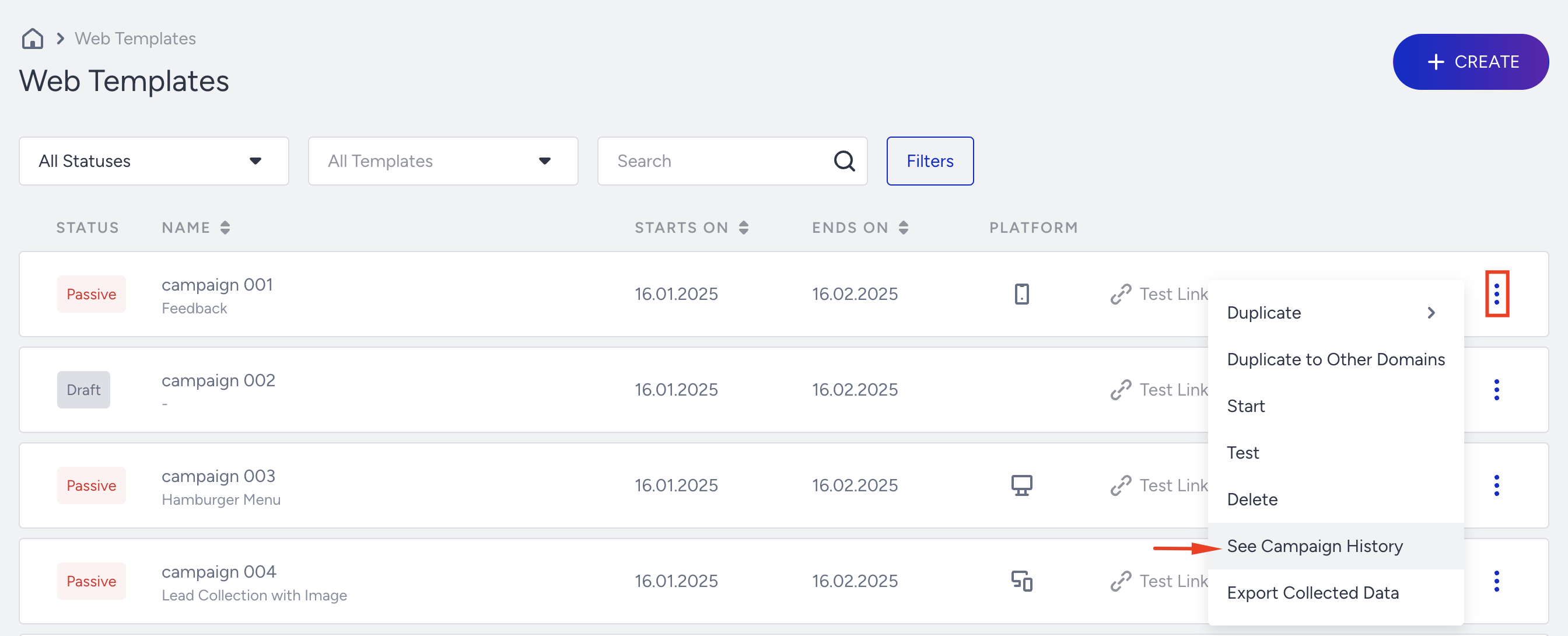
Find the campaign on the campaign listing page and click the three-dots icon.
Click on the See Campaign History option to access the campaign changes modal.
You can view campaign changes listed from newest to oldest, retained for one year, and scroll down to see older changes.
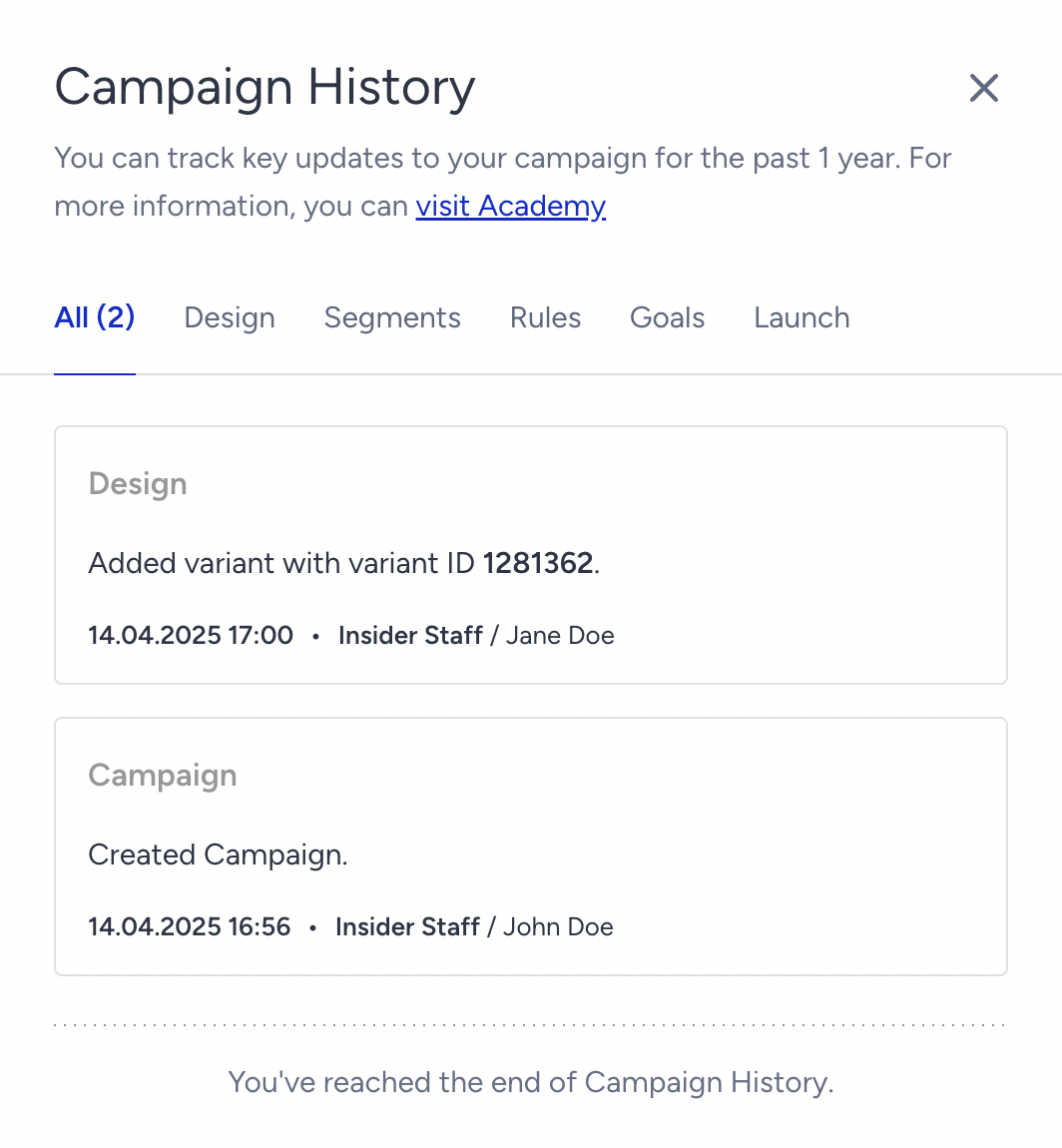
Eligible users with access to the Campaign Change History can view these logged changes in the Campaign Change History Modal:
Campaign Changes
Created Campaign: This is displayed when a campaign is newly created.
Created campaign via duplication from {CampaignID} campaign ID: This is displayed when a campaign is duplicated from another campaign.
Created campaign via duplication from {AccountName} account: This is displayed when a campaign is duplicated from another domain.
Changed Campaign Status from {OldValue} to {NewValue}: This is displayed when a user manually changes the campaign status on the campaign listing page or launch step. For example: “Changed Campaign Status from Active to Passive.”
Changed Campaign Status from {OldValue} to Passive since the Campaign reached its End Time: This is displayed when an active campaign is automatically deactivated because it has reached its end date. For example: “Changed Campaign Status from Active to Passive since the Campaign reached its End Time.”
Changed Campaign Status from {OldValue} to Passive due to updates in the campaign: This is displayed when an active campaign is deactivated due to a user-initiated change in an active campaign. For example: “Changed Campaign Status from Active to Passive due to updates in the campaign.”
Changed Campaign Status from {OldValue} to Passive since all coupons are used up or expired: This is displayed when an active campaign is deactivated because there are no more available coupon codes. For example: “Changed Campaign Status from Active to Passive since all coupons are used up or expired.”
Changed Campaign Status from Test to Passive since the campaign was left on Test status for more than 14 days: This is displayed when a test campaign is deactivated due to being left in the test status for 14 days.
Changed Campaign Status from {OldValue} to Passive since you didn’t take any actions in the last 60 days: This is displayed when there is no activity on a panel for the last 60 days in the panel; this panel is automatically deactivated. Therefore, the available products for this panel are disabled, and campaigns become passive.
Changed Campaign Status from {OldValue} to Passive since your access to Insider One was revoked. For more information, you can contact the Insider One team: This is displayed when a panel is deactivated. The available products for this panel are disabled, and campaigns become passive.
Changed Campaign Status from {OldValue} to Passive since the {Product} was not included in your plan. For more information, you can contact the Insider One team: This is displayed when a product is no longer included in the current plan.
Design Step
Added new variant with variant ID [VariantID]: This message is displayed when a new variant is added to the campaign, or a new variant is added with the option of “Choose an existing variant”, showing the associated Variant ID.
Duplicated variant with variant ID [VariantID]: This message is displayed when a new variant is duplicated from another variant, displaying the associated Variant ID.
Deleted variant with variant ID [VariantID]: This message is displayed when a variant is deleted from the campaign, showing the associated Variant ID.
Changed [VariantID] variant's traffic allocation from {OldValue} to {NewValue}: This message is displayed when a variant’s traffic allocation is changed, displaying the associated Variant ID.
Changed Control Group traffic allocation from {OldValue} to {NewValue}: This message is displayed when the control group traffic allocation is changed.
Edited the design of variant with variant ID [VariantID]: This message is displayed when the design of a variant is edited, showing the associated Variant ID.
Clicking the Save button in the Action Builder logs the action, even if no design changes are made.
Rules Step
Added {Category_Name}: {Rule_Name}: This is displayed when a new rule is added to the campaign, such as Added Page Rules: Cart Amount.
Removed {Category_Name}: {Rule_Name}: This is displayed when an existing rule is removed from the campaign, such as Removed Purchasing Behavior: Product Purchased by User.
Even if you remove an existing rule and add the same/identical rule, Added {Category_Name}:{Rule_Name} action will still be logged and visible.
Changed {Category_Name}: {Rule_Name} from {OldValue} to {NewValue}: This is displayed when a rule's configuration is updated, such as Changed Page Rules from Cart Amount to Page Type.
Changed {Category_Name}:{Rule_Name} including operator and/or key: This is displayed when a rule's conditions (such as operator or key) are modified, such as Changed Page Rules: Page Type including operator and/or key.
Changed rule order: This is displayed when the order of rules within a campaign is changed.
It doesn't matter how many times the order was changed before the save action— only one log will be visible.
Changed Display Time to show later: This is displayed when the display time is changed to show later.
Changed Display Time to show instantly: This is displayed when the display time is changed to show instantly.
Changed Hide After duration from {OldValue} seconds to {NewValue} seconds: This is displayed when the hide-after duration is updated.
Changed Show After duration from {OldValue} seconds to {NewValue} seconds: This is displayed when the show-after duration is updated.
Enabled Campaign Trigger: This is displayed when the campaign trigger is enabled.
Disabled Campaign Trigger: This is displayed when the campaign trigger is disabled.
Segments Step
Added {Category_Name}: {Segment_Name}: This is displayed when a new segment is added to the campaign, such as Added Predictive Segments: Likelihood to Purchase.
Removed {Category_Name}: {Segment_Name}: This is displayed when a segment is removed from the campaign, such as Removed Predictive Segments: Likelihood to Purchase.
Changed {Category_Name}: {Segment Name} from [Old Value] to [New Value]: This is displayed when an existing segment is modified, such as Changed Predictive Segment from Likelihood to Purchase to Likelihood to Churn.
Changed {Category_Name}: {Segment_Name} including operator and/or key: This is displayed when a new segment group is added, such as Changed Predictive Segments: Likelihood to Purchase including operator and/or key.
Goals Step
Added {Goal_Name}: This is displayed when a new goal is added to the campaign.
Deleted {Goal_Name}: This is displayed when an existing goal is deleted from the campaign.
Edited {Goal_Name}: This is displayed when an existing goal is modified.
Changed Primary Goal to {Goal_Name}: This is displayed when the primary goal of a campaign is changed.
Enabled Total Impressions: This is displayed when total impressions are enabled.
Disabled Total Impressions: This is displayed when total impressions are disabled.
Changed Re-Eligibility Duration from {OldValue} to {NewValue}: This is displayed when the re-eligibility duration is updated, such as Changed Re-Eligibility Duration from 14 Days to 10 Days or Changed Re-Eligibility Duration from 14 days to Session-Based.
Changed Conversion Duration from {OldValue} to {NewValue}: This is displayed when the conversion duration is updated, such as:
Changed Conversion Duration from 14 Days 0 Hours to 10 Days 0 Hours.
Changed Conversion Duration from 14 Days 0 Hours to 12 Days 5 Hours.
Changed Conversion Duration from 14 Days 0 Hours to Session-Based.
Changed Re-Eligibility Duration After Click from {OldValue} to {NewValue}: This is displayed when the re-eligibility duration after click is updated, such as:
Changed Re-Eligibility Duration After Click from 14 Days 0 Hours to 10 Days 0 Hours.
Changed Re-Eligibility Duration After Click from 14 Days 0 Hours to 12 Days 5 Hours.
Changed Re-Eligibility Duration After Click from 14 Days 0 Hours to Session-Based.
Changed Re-Eligibility Duration After Close from {OldValue} to {NewValue}: This is displayed when the re-eligibility duration after close is updated, such as:
Changed Re-Eligibility Duration After Close from 14 Days 0 Hours to 10 Days 0 Hours.
Changed Re-Eligibility Duration After Close from 14 Days 0 Hours to 12 Days 5 Hours.
Changed Re-Eligibility Duration After Close from 14 Days 0 Hours to Session-Based.
Enabled Make Them All Session-Based: This is displayed when the "Make Them All Session-Based" option is enabled.
Disabled Make Them All Session-Based: This is displayed when the "Make Them All Session-Based" option is disabled.
Launch Step
Changed the language: This is displayed when the campaign language is changed.
Changed Start Time from {OldValue} to {NewValue}: This is displayed when the start time of the campaign is changed, such as
Changed Start Time from 28.11.2024 13.00 to 28.11.2024 14.00.
Changed End Time from {OldValue} to {NewValue}: This is displayed when the end time of the campaign is updated, such as Changed End Time from 28.11.2024 13.00 to 28.11.2024 14.00.
Changed Display Days settings from {OldValue} to {NewValue}: This is displayed when the display days settings are updated, such as
Changed Display setting from "When active, display the campaign every day" to "When active, display the campaign only on selected days."
Changed Display Hours settings from {OldValue} to {NewValue}: This is displayed when the display hours settings are updated, such as Changed Display Hours setting from 00:00,23:59 to 04:20,19:00.
Changed Priority from {OldValue} to {NewValue}: This is displayed when the campaign priority is updated, such as Changed Priority from 0 to 1.
Enabled “Don’t change campaign status automatically” feature: This is displayed when the “Don’t change campaign status automatically” feature is enabled.
Disabled “Don’t change campaign status automatically” feature: This is displayed when the “Don’t change campaign status automatically” feature is disabled.
Changed Campaign Group Access settings: This is displayed when campaign group access settings are changed.
Your time zone is used to display the time and date in your local format. Therefore, in the Campaign Change History, users in different time zones will see the campaign changes reflected in their respective local time zones.
Campaign status changes made after December 22, 2024, are recorded in the Campaign Change History. However, logs from earlier dates are not accessible. The following changes have been logged since December 22, 2024:
Created campaign
Created campaign via duplication from campaign ID {CampaignID}
Created campaign via duplication from account {AccountName}
Changed campaign status from {OldValue} to {NewValue}
Changed campaign status from {OldValue} to Passive because the campaign reached its end time
Changed campaign status from {OldValue} to Passive due to campaign updates
Changed campaign status from {OldValue} to Passive because all coupon codes were used or expired
Additional campaign changes are also recorded starting from April 10, 2025. Logs before December 22, 2024, and changes not yet covered will remain inaccessible via Campaign Change History.