Campaign Alerts proactively notify users of important changes or issues in their active campaigns, helping you catch problems before they affect performance.
Campain Alerts feature is currently available for Web Templates, InStory and Onsite Experiment.
Alerts only apply to active campaigns. Campaigns in Test or Passive status will not generate alerts.
Alert types
Three alert types are available. All alerts are checked daily at 8:00 am UTC.
No Impression Received
The No Impression Received alert is a variant-level alert that triggers when at least one variant in an active campaign has gone 24 hours without receiving any impressions.
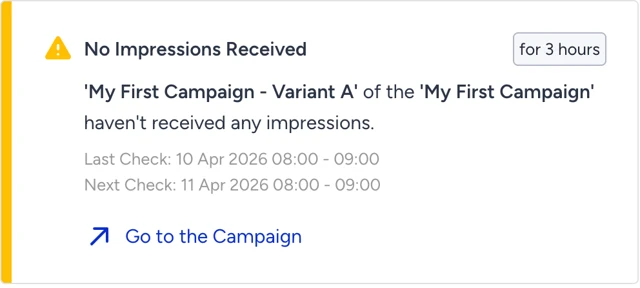
If the Control Group's traffic allocation is set to 0, the alert will not fire for that group.
The alert is removed under three conditions:
If the variant begins receiving impressions again (cleared on the next scheduled check).
If the variant or campaign is deleted (removed within 10 minutes).
If the campaign is moved to Test/Passive mode (also removed within 10 minutes).
No Impression Received
The No Impression Received alert is a variant-level alert that triggers when at least one variant in an active campaign has gone 24 hours without receiving any impressions.
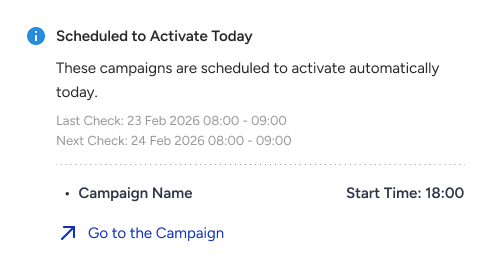
If the Control Group's traffic allocation is set to 0, the alert will not fire for that group.
The alert is removed under three conditions:
If the variant begins receiving impressions again (cleared on the next scheduled check).
If the variant or campaign is deleted (removed within 10 minutes).
If the campaign is moved to Test/Passive mode (also removed within 10 minutes).
Scheduled to Deactivate Today
The Scheduled to Deactivate Today alert is a campaign-level alert that triggers when an active campaign is set to deactivate on the current day and its scheduled deactivation time is after 8:00 am UTC.
The alert is removed under two conditions:
If the campaign actually deactivates (cleared on the next scheduled check).
If the campaign is deleted or moved to Test/Passive mode (removed within 10 minutes).
If a scheduled activation or deactivation is set for before 8:00 am UTC, no alert will be triggered for that campaign on that day.
How the check cycle works
Alerts are evaluated once daily at 8:00 am UTC across all panels.
The Last Check timestamp shows when an alert was most recently evaluated, while Next Check indicates when it will be evaluated again.
The "For x hours/days" badge displays how long the current alert has been active.
If a campaign is no longer active, its alerts are cleared within 10 minutes, so there is no need to wait for the next daily check cycle.
Email notification settings
You can opt in to receive alert emails. Email settings are managed independently per product (Web Templates, InStory, and Onsite Experiment).
To configure Email settings:
Go to your Campaign Alerts settings and enable "Send Campaign Alerts via Email".
Choose which alert types and campaigns you want email notifications for.
Email settings can only be enabled, disabled, or changed by users with the Admin or Editor role.
Access and permissions
If a panel user does not have access to a campaign due to Campaign Group Access restrictions, they will not see that campaign's alerts even if alerts are otherwise active.