You cannot make any changes to External Platform Integrations without having either an Administrator or an Editor with PII access in InOne. Refer to User Roles for further information.
This guide aims to explain how you can get the most out of Shopify Tags by utilizing Insider’s InOne Platform.
How does Insider collect Shopify Tags?
Shopify Tags allows you to tag your customers on your Shopify Store based on how you want to easily tag those users. Insider Shopify app automatically syncs your users' Shopify Tags into Insider as a custom attribute named Shopify Tags so that you can easily target your users according to their assigned tags.
Shopify Tags are synced as an array of strings into Insider so that you can easily utilize multiple tags for a user.
How can I segment Shopify Tags?
You can easily use the Attribute Box on Insider’s Segment module to segment Shopify Tags and use this segment group anywhere on Insider One's InOne panel. For example, let’s see how you can segment users from Dynamic Segment so you can utilize it through every channel, including the Architect.
Segment users with associated Shopify Tags
- Navigate to Audience > Segments > Saved Segments.
- Click the Create button on the listing page for a new Dynamic Segment.
- Use the Shopify Tags filter to create a new segment under Attributes.
.png)
- You can select multiple tags to include more than one Shopify Tags in your segment.
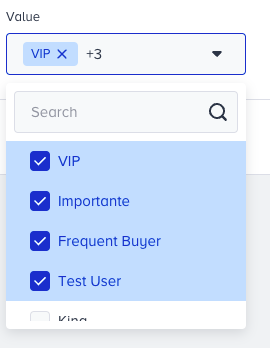
- Click Save. The segment, including the users associated with Shopify Tags, is ready to use in any channel.
Segment users without associated Shopify Tags
- Navigate to Audience > Segments > Saved Segments.
- Click the Create button on the listing page for a new Dynamic Segment.
- Use the Shopify Tags filter to create a new segment under Attributes.
- Select the operator Does Not Match to exclude users who are not associated with the selected Shopify Tags.
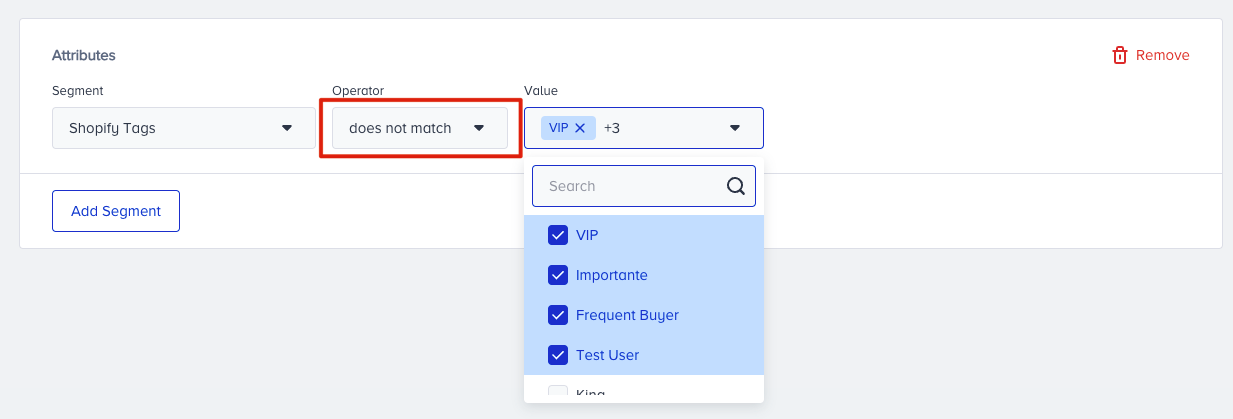
- You can select multiple tags to exclude more than one Shopify Tags into your segment.
- Click Save. The segment, including the users who are not associated with Shopify Tags, is ready to use in any channel.