Onboarding
How long would it take to fully integrate the Insider One app with Shopify?
The integration of Insider One with Shopify is a straightforward and effortless process. With just a few clicks, you can seamlessly connect the two platforms, enabling you to start collecting user data and events promptly.
Do I need an IT person on my team to integrate Shopify with Insider One?
No, having an IT person on your team is not necessary to start using the Insider One app on your Shopify store. You can follow our article and complete your integration easily. If you have any technical questions or need assistance, the Insider One team is here to help.
How can I test if Shopify data is collected accurately for Insider One?
To check whether your integration is successfully completed or not, you can:
Check the total number of purchases between Insider One and the Shopify Store.
Check the total number of users in the Shopify Customer base and Insider One user base.
Compare the number of products on Shopify and Insider One.
What Insider One products can I use after the integration?
All the products included in your Insider One plan are available for use with your Shopify store. This includes the creation of custom user journeys, marketing campaigns, smart product recommendations, web templates, and more.
How should I set up my integration if I have multiple stores?
If you have more than one Shopify store, it's necessary to create a separate Insider One panel for each store.
Is the synchronization between Insider One and Shopify one-way or two-way?
Insider One offers two-way synchronization to meet data transfer needs between Shopify and Insider One. While you can collect user, product, and event data from Shopify to Insider One, you can also send users' marketing consent data to Shopify, ensuring both platforms stay up-to-date in this regard.
User and Subscriber Data Synchronization
Does Insider One update users' marketing consents automatically as they change in Shopify?
Yes, Insider One continuously collects marketing consent data from users and updates it as changes occur. However, you need to enable the Subscription Updates toggle. By default, Insider One does not send this information to Shopify.
Can I update users' marketing consents manually?
Yes, you have the option to manually update your users' marketing consents. You can do this in two ways:
You can update your users' consents directly on Shopify. Once you modify the consent status, it will automatically be updated on Insider One. Ensure the User Sync feature is toggled on so these changes are reflected.
Alternatively, you can import your user data into Insider One with the updated consent attributes. This process will update the user data as per your changes.
What should I do if I want to collect user metafields from Shopify to Insider One?
Insider One can collect metafields assigned to your users on your Shopify Store. Before activating user sync, you need to create the corresponding attribute on Insider One's InOne panel. Ensure the attribute has the same name and data type as the metafield on your Shopify Store. For further details on creating a custom attribute on Insider One, refer to User Data Synchronization.
How frequently does my user data get updated?
Updates to user data and new user information on Shopify are promptly reflected in Insider One in near real-time. However, it's important to note that the initial synchronization of all existing users with Insider One may take some time, depending on the data size.
Why aren’t the potential customers collected through my lead collection campaign in Insider One syncing with Shopify, and how can I fix it?
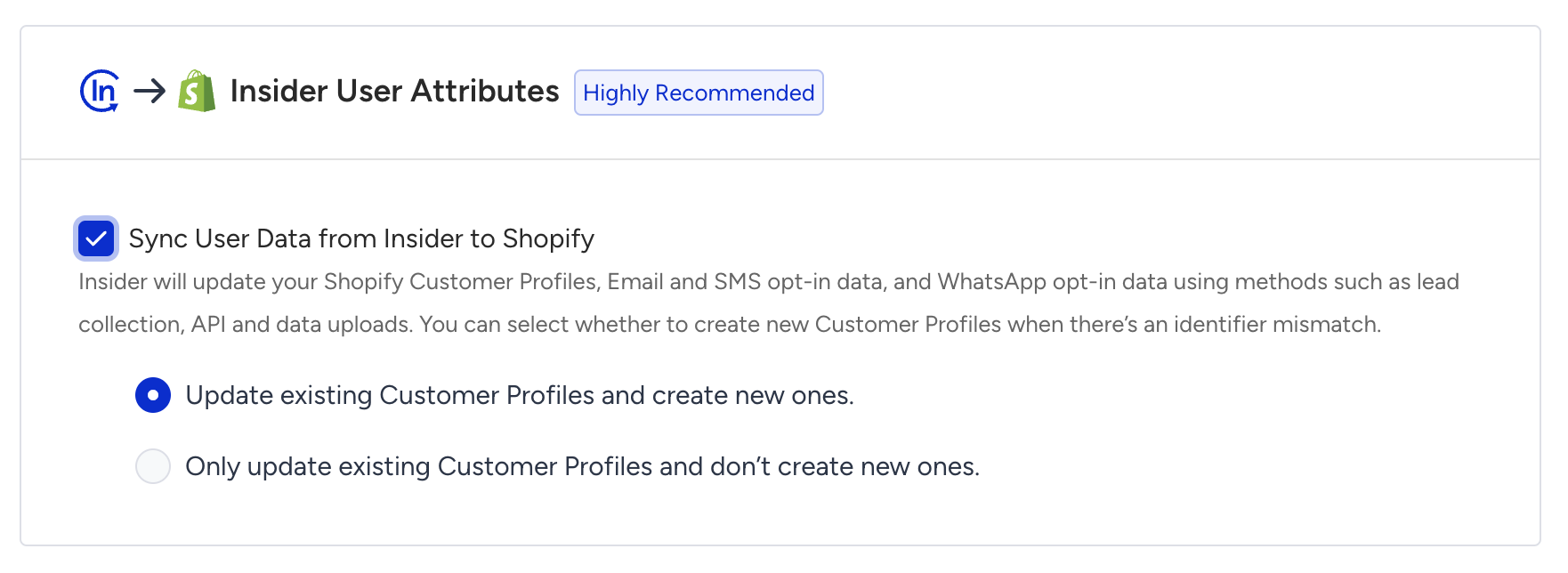
This issue may be caused by disabled synchronization settings. To resolve it, check the synchronization settings in the Insider One platform. Make sure both the “Shopify → Insider” and “Insider → Shopify” toggles are enabled and "Create New Ones" is selected to ensure complete data synchronization between the two platforms. Refer to the Integrate Insider One with Shopify Store guide for further information.
Events Synchronization
Can I send custom events and parameters to Insider One?
You can send various custom events and parameters to Insider One. To track specific user actions, please contact the Insider One team. They can assist you in setting up custom events through a development process. It's important to note that theme changes might impact these customizations, so we suggest you work closely with the Insider One team for a seamless experience.
Does Insider One collect historical checkout data?
No, it doesn't. Shopify doesn't allow the collection of historical checkout events. However, Insider One can collect historical purchase data.
How frequently does my purchase data get updated?
New purchase updates on Shopify are reflected in Insider One in near real-time. However, depending on the data size, the synchronization of all existing purchases may take some time during the initial connection to Insider One. For further information, refer to the Shopify Purchase Synchronization.
Product Catalog Synchronization
If I add a new metafield to a product, will Insider One also start collecting it?
Yes, Insider One is designed to collect product metafields. To ensure Insider One captures data from these new metafields, you can refer to the Shopify Product Catalog Synchronization.
How frequently does my product data get updated?
Any update that happens on your Shopify Store Product Catalog will be reflected in Insider One's InOne panel within 15 minutes.
I have a store that ships to multiple countries. Can I use different pricing for different countries?
Insider One does not currently integrate with Shopify Market features to enable different pricing based on countries. Please contact the Insider One team if this functionality is crucial for your store.
Shopify Market Feature - Product Catalog and Purchase Synchronization
What happens to future and historical purchase events if the "market" feature is NOT enabled?
Future and historical purchase events for stores without the "market" feature will be fine. If the feature is enabled and locales are correctly set, the product catalog will be automatically synced.
What steps do I need to take for stores with the "market" feature enabled?
For stores with the "market" feature enabled, you should navigate to Components > Product Catalog Management > Catalog Settings > Integration Settings and activate "Via Click Stream Web" to localize the product catalog on the front end.
Why is Click Stream used to get product data?
Click Stream is used to localize the product catalog on the front end. This ensures that the product data is displayed correctly for different markets.
What are the steps to set up the desired markets?
To ensure proper localization of the product catalog, you need to create the related locales for the markets you want to target.
Can historic purchase events be broken down by market after the integration?
No, historic purchase events will not be segmented according to separate markets, and users will not be able to see a breakdown of these events by market. Only new purchase events will reflect market-specific data.
Others
Can I create a campaign on the checkout page?
No, you can't. Insider One’s Shopify integration does not support direct campaigns on the checkout page due to security and user experience considerations of Shopify.
Can I create a back-in-stock campaign with Insider One?
Yes, you can create a back-in-stock campaign via Insider One’s Architect journeys. To create back-in-stock alerts for your customers, you can refer to the Back in Stock.
Can I create a coupon code for my Shopify campaigns through Insider One?
To utilize a coupon code created in Insider One on your Shopify store, it's essential to manually create the same coupon on Shopify. Please note that a coupon code generated in Insider One is not automatically mirrored in Shopify.
You can also create bulk coupons in Shopify via Bulk Discount Code Bot and then import them to Insider One for further use in your campaigns. Refer to Use Shopify Discount in Insider One for more details.
What happens if I change the theme of my store on Shopify?
If you change the theme of your store on Shopify, you need to activate the Insider One app on your theme. To do this, navigate to the Insider One app on Shopify and click on Integration Settings. In the settings, click the Activate Theme button to keep using Insider One actively.
Does Insider One integrate with all themes?
Compatibility might vary based on the specific themes and customizations present on your Shopify store. While Insider One endeavors to seamlessly integrate with a broad spectrum of themes, it is advisable to consult with Insider One's support for confirmation of compatibility with your specific theme or customization. In case of any challenges during the integration process, please do not hesitate to contact the Insider One team. We recommend that you notify the Insider One team for optimal assistance with custom use cases.
If I customize my theme, will Insider One still work?
If you customize your theme on Shopify, the Shopify-Insider One data flow might be affected depending on the degree of your customizations. As you customize your theme, you can test and ensure the expected functionality works. Additionally, if you encounter any challenges during this process, contact the Insider One team for assistance.
Why did I receive a Shopify Theme deactivation email?
It means that Insider's JS Tag and Insider Object (IO) are no longer active on your website. To fix this, you need to activate Insider One from your Shopify theme again so that both the JS Tag and IO can function properly. To reactivate your theme, refer to Integrate Insider One with Shopify Store.
Why do I see an "integration stopped" banner on InOne?
To resolve this, check the following:
Make sure the Shopify Web Pixel is active. If it’s not, you should reconnect it. Refer to Insider One's Shopify Web Pixel guide for further information.
Insider’s JS Tag and Insider Object (IO) might be inactive. To reactivate them, follow the steps in the Integrate Insider One with Shopify Store guide.
Why is the Insider One user count higher than my Shopify customer count?
Insider One can create anonymous profiles when visitors browse your website. Shopify customers represent users recorded in Shopify, while the Insider One user base can also include visitors who have not provided an identifier.
Therefore, the total profile counts might not match. For a more accurate comparison, filter Insider One profiles by the Shopify ID attribute and compare only identified Shopify users.
Why do purchase counts differ between Shopify and Insider One?
Differences in purchase counts don’t always indicate a tracking issue. Common causes include:
Profile unification: Insider One merges profiles that share an identifier. Purchases associated with merged profiles are displayed under a single profile, so purchase counts on an individual Insider One profile can be higher than the corresponding customer-level count in Shopify.
Shared identifiers: When multiple customers use the same email address or phone number, Insider One treats them as a single user. Refer to Identify and Unify User Data for further information.
Cookie consent: If you use Shopify's cookie consent, Shopify loads the Insider One pixel only after a visitor provides consent. Purchases from visitors who decline consent are not tracked by Insider One.
Pixel event subscriptions: Changes to the event subscriptions in the Custom Web Pixel code can affect purchase counts. For example, if Purchase is mapped to checkout_started, Insider One can record a purchase for an unfinished checkout, resulting in a higher purchase count.
To investigate the difference before contacting the Insider One team:
Check that the Shopify Web Pixel is active. If an integration stopped banner appears in InOne, reconnect the pixel.
Compare your pixel code with the code copied from Insider One and confirm that the event subscriptions have not been changed.
Complete a test purchase, reach the order status page, and confirm that a Purchase event with the correct order ID appears on the test user's profile.
Filter Insider One profiles by the Shopify ID attribute to compare only identified Shopify customers.
If the counts still differ, share the order IDs of the missing purchases with the Insider One team. For setup and testing instructions, refer to Insider One's Shopify Custom Web Pixel.
Why do my Shopify users get unsubscribed?
If your Shopify users are being marked as unsubscribed, it could be due to the active 'All Subscription Statuses' for subscriber sync. On the checkout page, the marketing consent checkbox is unchecked by default. If users don't re-check it, they might unintentionally be marked as unsubscribed. To prevent this, consider enabling the 'Only New Subscription Statuses' option in the subscriber sync section.
Another potential factor is data flowing into Shopify from an outdated source. To avoid discrepancies, ensure that all your data sources for Shopify are up-to-date.
Can Insider One integrate with Shopify Hydrogen?
Yes, Insider One is compatible with Shopify Hydrogen. You can integrate Insider One with your Hydrogen storefront to enable advanced tracking, personalized experiences, and full access to all Insider One products. To integrate Insider One with your Hydrogen storefront, you need to manually implement both Insider Object (IO) and ins.js.
Why can’t I make changes to External Platform Integrations in InOne?
To make any changes to External Platform Integrations, you must have either Administrator or Editor with PII access in InOne. Refer to User Roles for more information.
Why doesn’t the Insider One Tag load on my Shopify checkout page?
Shopify restricts third-party scripts from running directly on checkout pages. As a result, the standard Insider One Tag does not load there as it does on your storefront. This is expected behavior and does not indicate an issue with the integration.
Purchase tracking on Shopify checkout pages uses Insider One’s Shopify Custom Web Pixel. To verify that purchase tracking works correctly, complete a test purchase and reach the order status page. Then, check the test user’s profile and confirm that a Purchase event appears with the correct order ID and purchase details.
For setup and testing instructions, refer to Insider One’s Shopify Custom Web Pixel.