Once you define the Array of Objects attribute, data is synchronized using the Upsert API. Rather than overwriting the entire array during every update, the system supports patch-based actions. This allows for targeted modifications, adding, updating, or removing specific records, while maintaining the integrity of the rest of the data set.
Patch actions provide granular control over multi-record data. Each operation requires specific keys to identify the target record and ensure predictable behavior within the user profile.
These patch-style actions (add, merge, replace, and remove) don't use the HTTP PATCH method or a separate endpoint. You send them as a POST request to the same endpoint as the Upsert User Data API: https://unification.useinsider.com/api/user/v1/upsert. The action field inside each array item tells Insider One which operation to run.
This article covers only the fields specific to Array of Objects attributes (action, match, value, append). For the base request structure, authentication headers, and account-wide limitations that apply to every Upsert API call, see Upsert User Data API.
The following table defines the behavior and requirements for each update type:
Action | Required Fields | Behavior |
|---|---|---|
Add | Value | Adds a new object (or multiple objects) to the array. The maximum object limit is enforced. |
Merge | Match, Value | When using merge, the system finds objects that match the provided key/value pairs and updates only the specified fields. If append=true, array-type fields are appended and de-duplicated. Otherwise, array fields are replaced. |
Replace | Match, Value | Replaces the entire matched object with the new object. Only predefined keys are allowed. |
Remove | Match | Removes the matched object(s) from the array. |
Remove | None | Removes all objects from the array for the specified user. The array becomes empty. No match is required. |
Send all changes for a user in one request
When you change the same Array of Objects attribute for a user more than once, send all of the actions in one request, inside the same user entry. Insider One applies the actions in one request in a fixed order, so the stored result is the same whatever order your code writes them in.
Separate requests don't have this guarantee. If you send an add in one request and a merge for the same object in another, Insider One can't guarantee which one is processed first. If the merge is processed first, it finds no object to update and its fields are not stored. The same applies when one request lists the same user more than once in the users array: each entry is processed on its own, in any order.
The order Insider One applies
For one Array of Objects attribute of one user in one request, the actions are applied in this order:
add and remove, in the order you write them
replace
merge
Actions of the same type keep the order you write them in. Two add actions append their objects one after the other, and two merge actions on the same object are applied in turn, so the last one wins.
add and remove keep your written order because a remove followed by an add is how you swap an object, or with "match": "*", the whole array. replace and merge run after them, so they can update an object that the same request has just added.
What this means for common combinations
X and X' are objects with the same match key.
Written in one request | Stored result |
|---|---|
add X, then merge X | X is stored with the merged fields |
merge X, then add X | X is stored with the merged fields. The merge runs after the add. |
remove X, then add X' | X is replaced by X' |
add X, then remove X | X is removed |
remove "*", then add X and add Y | The array contains only X and Y |
add X, then remove "*" | The array is empty |
merge X, then replace X | X is replaced, then the merged fields are applied on top |
remove X, then merge X | X is removed. The merge finds no object to update. |
Note: The order applies to each Array of Objects attribute separately. If one user entry changes two attributes, each attribute's actions are ordered on their own.
Example: several actions for one user
In this request, the merge is written first, but Insider One applies it last. The old subscription is removed, the new one is added, and then the merge updates the new subscription.
curl --location --request POST 'https://unification.useinsider.com/api/user/v1/upsert' \
--header 'X-PARTNER-NAME: PARTNER_NAME_GOES_HERE' \
--header 'X-REQUEST-TOKEN: TOKEN_GOES_HERE' \
--header 'Content-Type: application/json' \
--data-raw '{
  "append": true,
  "users": [
    {
      "insider_id": "iid-12345",
      "object_attributes": {
        "custom": {
          "subscriptions": [
            {
              "action": "merge",
              "match": { "subscription_id": "sub-9200" },
              "value": {
                "status": "active",
                "tags": ["loyal"]
              }
            },
            {
              "action": "remove",
              "match": { "subscription_id": "sub-9001" }
            },
            {
              "action": "add",
              "value": [
                {
                  "subscription_id": "sub-9200",
                  "plan_name": "Premium Plus",
                  "start_date": "2026-11-01T10:00:00Z",
                  "renewal_date": "2026-12-01T10:00:00Z",
                  "status": "pending",
                  "monthly_price": 29.99,
                  "tags": ["premium_plus"]
                }
              ]
            }
          ]
        }
      }
    }
  ]
}'
Applied as: remove sub-9001, add sub-9200, merge sub-9200.
Result: sub-9001 is gone. sub-9200 is stored with "status": "active" and "tags": ["premium_plus", "loyal"].
Are separate requests for the same user processed in the order I send them?
No. Insider One can't guarantee that separate requests are processed in the order they are sent or received. This also applies to the same user listed more than once in one request. If one request adds an object and a later request merges into it, the merge can be processed first, find no object, and its fields are not stored. The response is still a success.
Include all updates for a user in one request, in one user entry. Inside one request the actions are applied in the fixed order above, so the result doesn't depend on timing.
Add a new object
The sample request below shows how to add a new object via the Upsert API:
curl --location --request POST 'https://unification.useinsider.com/api/user/v1/upsert' \
--header 'X-PARTNER-NAME: PARTNER_NAME_GOES_HERE' \
--header 'X-REQUEST-TOKEN: TOKEN_GOES_HERE' \
--header 'Content-Type: application/json' \
--data-raw '{
  "users": [
    {
      "insider_id": "iid-12345",
      "object_attributes": {
        "custom": {
          "subscriptions": [
            {
              "action": "add",
              "value": [
                {
                  "subscription_id": "sub-9001",
                  "plan_name": "Premium",
                  "status": "active",
                  "monthly_price": 19.99,
                  "renewal_date": "2026-03-15T10:00:00Z",
                  "tags": ["premium", "loyal"]
                }
              ]
            }
          ]
        }
      }
    }
  ]
}'
Sample Response:
{
    "data": {
        "successful": {
            "count": 1
        },
        "fail": {}
    }
}
View an Array of Objects in the User Profile
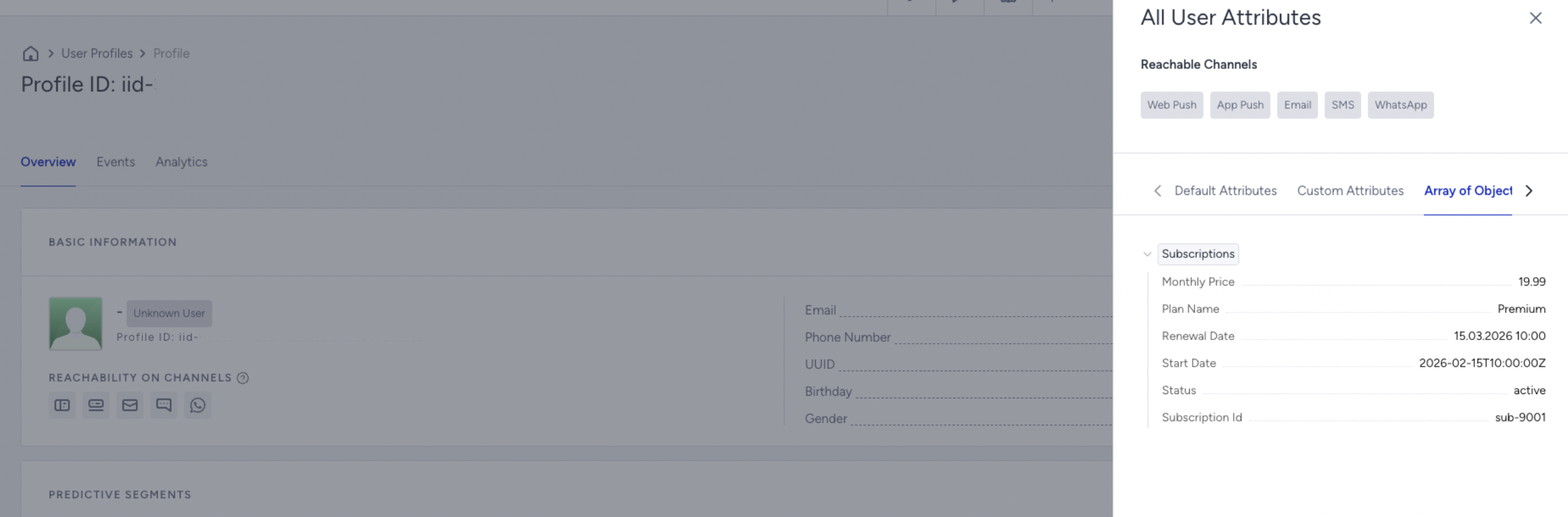
After sending the Add Subscription request for your use case, you can confirm that the object is stored correctly directly from the Insider One’s InOne panel.
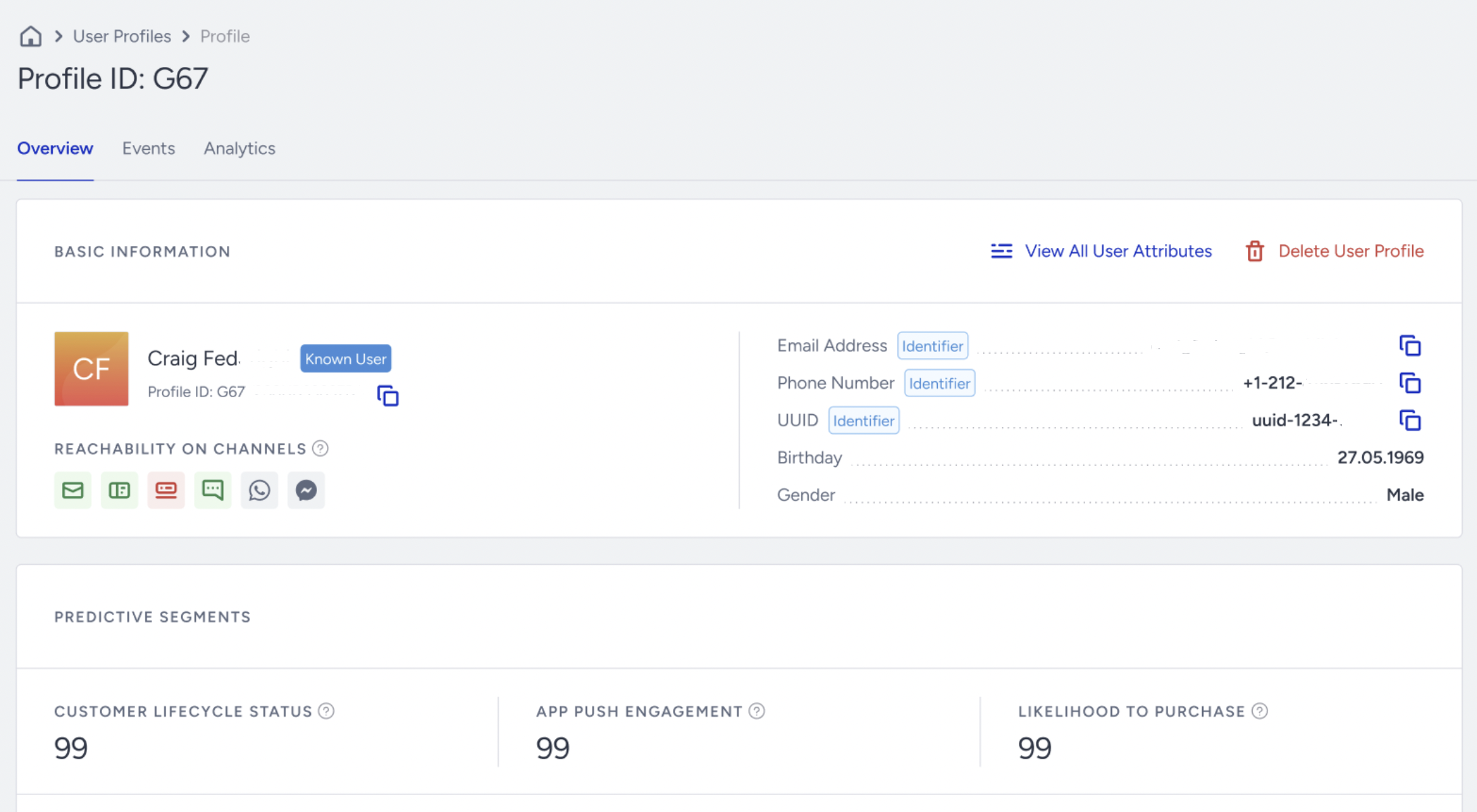
You can view all the Array of Objects attributes a user has directly from the View All User Attributes modal inside the User Profile.
You can see the Array of Objects attributes under the Array of Objects Attributes tab. This view allows you to quickly explore the structure and details of all the Array of Objects attributes the user has.
Merge: Update an existing object
curl --location --request POST 'https://unification.useinsider.com/api/user/v1/upsert' \
--header 'X-PARTNER-NAME: PARTNER_NAME_GOES_HERE' \
--header 'X-REQUEST-TOKEN: TOKEN_GOES_HERE' \
--header 'Content-Type: application/json' \
--data-raw '{
  "append": true,
  "users": [
    {
      "insider_id": "iid-12345",
      "object_attributes": {
        "custom": {
          "subscriptions": [
            {
              "action": "merge",
              "match": { "subscription_id": "sub-9001" },
              "value": {
                "monthly_price": 24.99,
                "tags": ["loyal", "vip"]
              }
            }
          ]
        }
      }
    }
  ]
}'
Before: tags: ["premium", "loyal"], monthly_price: 19.99
After (append: true): tags: ["premium", "loyal", "vip"] (loyal kept once), monthly_price: 24.99
curl --location --request POST 'https://unification.useinsider.com/api/user/v1/upsert' \
--header 'X-PARTNER-NAME: PARTNER_NAME_GOES_HERE' \
--header 'X-REQUEST-TOKEN: TOKEN_GOES_HERE' \
--header 'Content-Type: application/json' \
--data-raw '{
  "append": false,
  "users": [
    {
      "insider_id": "iid-12345",
      "object_attributes": {
        "custom": {
          "subscriptions": [
            {
              "action": "merge",
              "match": { "subscription_id": "sub-9001" },
              "value": {
                "monthly_price": 24.99,
                "tags": ["loyal", "vip"]
              }
            }
          ]
        }
      }
    }
  ]
}'
Before: tags: ["premium", "loyal"], monthly_price: 19.99
After (append: false / omitted): tags: ["loyal", "vip"] (replaced), monthly_price: 24.99
Replace: Full overwrite of the matched object
curl --location --request POST 'https://unification.useinsider.com/api/user/v1/upsert' \
--header 'X-PARTNER-NAME: PARTNER_NAME_GOES_HERE' \
--header 'X-REQUEST-TOKEN: TOKEN_GOES_HERE' \
--header 'Content-Type: application/json' \
--data-raw '{
  "append": true,
  "users": [
    {
      "insider_id": "iid-12345",
      "object_attributes": {
        "custom": {
          "subscriptions": [
            {
              "action": "replace",
              "match": { "subscription_id": "sub-9001" },
              "value": {
                "subscription_id": "sub-9001",
                "plan_name": "Premium Plus",
                "start_date": "2026-02-15T10:00:00Z",
                "renewal_date": "2026-05-15T10:00:00Z",
                "status": "active",
                "monthly_price": 29.99
              }
            }
          ]
        }
      }
    }
  ]
}'
Remove: Delete a matched object
curl --location --request POST 'https://unification.useinsider.com/api/user/v1/upsert' \
--header 'X-PARTNER-NAME: PARTNER_NAME_GOES_HERE' \
--header 'X-REQUEST-TOKEN: TOKEN_GOES_HERE' \
--header 'Content-Type: application/json' \
--data-raw '{
  "users": [
    {
      "insider_id": "iid-12345",
      "object_attributes": {
        "custom": {
          "subscriptions": [
            {
              "action": "remove",
              "match": { "subscription_id": "sub-9001" }
            }
          ]
        }
      }
    }
  ]
}'
Remove: All Object Value
curl --location --request POST 'https://unification.useinsider.com/api/user/v1/upsert' \
--header 'X-PARTNER-NAME: PARTNER_NAME_GOES_HERE' \
--header 'X-REQUEST-TOKEN: TOKEN_GOES_HERE' \
--header 'Content-Type: application/json' \
--data-raw {
  "users": [
    {
      "insider_id": "iid-12345",
      "object_attributes": {
        "custom": {
          "subscriptions": [
            {
              "action": "remove",
              "match": "*"
            }
          ]
        }
      }
    }
  ]
}'
The example below removes all existing subscription objects and adds a new subscription in the same request. Because add and remove keep the order you write them in, write the remove first. If you write the add first, the remove also clears the object you just added.
curl --location --request POST 'https://unification.useinsider.com/api/user/v1/upsert' \
--header 'X-PARTNER-NAME: PARTNER_NAME_GOES_HERE' \
--header 'X-REQUEST-TOKEN: TOKEN_GOES_HERE' \
--header 'Content-Type: application/json' \
--data-raw {
  "users": [
    {
      "insider_id": "iid-12345",
      "object_attributes": {
        "custom": {
          "subscriptions": [
            {
              "action": "remove",
              "match": "*"
            },
            {
              "action": "add",
              "value": [
                {
                  "subscription_id": "sub-9100",
                  "plan_name": "Premium Plus",
                  "start_date": "2026-02-20T10:00:00Z",
                  "renewal_date": "2026-03-20T10:00:00Z",
                  "status": "active",
                  "monthly_price": 29.99,
                  "auto_renew": true,
                  "tags": ["premium_plus"]
                }
              ]
            }
          ]
        }
      }
    }
  ]
}'
Important notes
Match rules
Match only works with keys that are defined in the Array of Objects metadata.
If the provided match condition matches more than one object in the array, the action is applied to every object that satisfies the match criteria.
If you send match keys that are not defined in metadata, only the predefined keys are evaluated, and the others are ignored.
If all match keys are dropped, the action becomes a no-op. It is not an error.
Extra keys
If you send object keys that are not defined in metadata, only the keys defined in metadata are stored. Any undefined keys are ignored.
This applies to both value and match.
Append behavior
append=true affects how array-type fields inside an object behave during merge.
With append=true, array fields are appended and de-duplicated.
Without append=true, array fields are replaced.
Example for the append function:
{
  "subscription_id": "sub-9001",
  "tags": ["premium", "loyal"]
}
If you want to send a merge request:
"value": {
  "tags": ["vip"]
}
Case 1: append=true
Result:
"tags": ["premium", "loyal", "vip"]The new value is added.
Case 2: append=false
"tags": ["vip"]The old array is replaced completely.
Error Message Examples
Exceed String Length Limit (More Than 500 Characters)
Request Example:
{
    "data": {
        "successful": {},
        "fail": {
            "count": 1,
            "errors": {
                "users.0.object_attributes.custom.subscriptions[0].value[0].plan_name": [
                    "string value must be at most 500 characters"
                ]
            }
        }
    }
}
The error path identifies the string value that exceeds the limit, for example, subscriptions[0].value[0].plan_name. Shorten that value to 500 characters or fewer, then resend the failed user’s data. If you need to preserve longer text, store it externally and send a URL of 500 characters or fewer instead.
Limitations
Each account can have a maximum of 20 Array of Objects attributes.
Each Array of Objects attribute supports up to 50 objects per profile.
Each object can contain up to 20 keys.
A maximum of 2 nesting levels is supported (keys and sub-keys).
Nested Array of Objects is not supported. Object-type keys are allowed, but another Array of Objects cannot be nested.
Objects in the stored array may be listed in a different order than you sent them.
String values cannot exceed 500 characters.
Payload size is limited to 5 MB per request (Upsert API).
The Array of Objects attributes must be registered via metadata before ingestion.
Key and sub-key names and data types cannot be renamed or deleted after creation. Structural changes require deleting and recreating the attribute.
You can update Array of Objects data via the Upsert API or by importing it from Amazon S3, Snowflake, Databricks, or Google BigQuery. Refer to each integration's import guide for the supported column types.
The Array of Objects attributes cannot be included in InOne panel-based user data exports.