The Architect overall analytics endpoint, also known as the campaign/journey performance analytics API, provides comprehensive analytics data for all user journeys. This data includes key user metrics, journey statuses, and performance insights broken down by channels and journeys, offering a high-level overview of campaign effectiveness and user interactions.
Endpoint and Headers
GET https://architect-analytics.api.useinsider.com/v1/overall
Visit our Postman collection to test this request.
Header | Sample Value | Description |
|---|---|---|
Authorization | Bearer 1a2b3c4d5e6f | This key is required to authorize your request. Refer to API Authentication Tokens to generate your token. Enter the word Bearer followed by the API key you generated. |
Accept | application/json | You should enter it as application/json at all times. |
Query Parameters
Parameter | Data Type | Description | Sample Value | Required |
|---|---|---|---|---|
statDate | String | Defines the date range for statistics. Format: DD/MM/YYYY - DD/MM/YYYY | statDate=01/08/2024 - 30/08/2024 | Yes |
statuses | Array of Strings | Array filter for journey statuses. Default is active if not provided. | statuses[]=active&statuses[]=passive | No |
channels | Array of Strings | Array filter specifying which channels' analytics data to return. If not provided, all channels are included. Allowed values are web-push, app-push, email, sms, whatsapp, in-app, journey-web, call-api | channels[]=email&channels[]=sms | No |
ids | Array of Integers | Array of journey IDs for filtering | ids[]=89&ids[]=90 | No |
conversionGoal | Integer | A number representing the conversion goal ID filter. Default is 0 which is the Purchase goal. | conversionGoal=123 | No |
goalType | Integer | Attribution type for reporting. 0 for Click-Through attribution (default). 1 for View-Through attribution. | 0 | No |
removeNoDataJourneys | Integer | Filter for excluding journeys that don’t have any positive data. | 1 | No |
The statDate parameter is essential for defining the time range for analytics. The start date must be earlier than the end date. You can select any time range, including those longer than one year or before the past year. However, if you encounter a timeout when exporting a range longer than one year, try selecting a shorter range.
Use statuses, channels, ids, and conversionGoal filters to tailor your analytics queries to specific requirements.
For overall analytics, you can only get the conversion metrics for one goal at a time. You can enter the goal id as a parameter to select which conversion goal you want to see the metrics. You can obtain the Goal ID either from the goal dropdown in the InOne panel or by using the conversion goals information endpoint.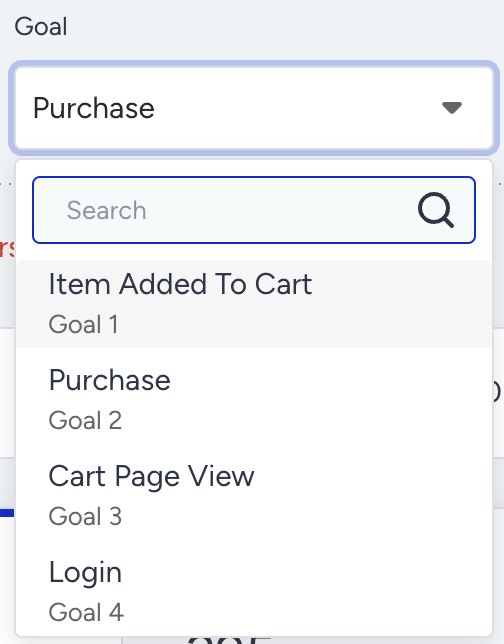
Do not add revenue across conversion goals. Insider One tracks each conversion goal independently and reports its conversions and revenue separately. When the same event, such as a purchase, matches more than one goal, the conversion and its revenue count toward each of those goals. If you add the goal revenues together, you count the same revenue more than once, and the total will not match the panel. To get revenue for one set of conversions, request a single goal with the conversion goal filter.
Sample Example
Sample Query
Before sending the request, make sure:
To replace the authorization value with your own API key.
To replace the sample values in parameters with your own values in the required data type.
curl -X GET "https://architect-analytics.api.useinsider.com/v1/overall?statDate=01/08/2024%20-%2030/08/2024&statuses[]=active&channels[]=email&channels[]=sms" \
-H "Authorization: Bearer 1a2b3c4d5e6f" \
-H "Accept: application/json"
Sample Responses
200 OK
Refer to Architect Analytics Metrics for further explanations on the metrics in the response.
{
    "filterDate": "01/08/2024 - 30/08/2024",
    "attributionType": "Click-Through",
    "goal": "confirmation_page_view",
    "partner": {
        "exportTime": "11/11/2024 11:29",
        "accountName": "shopbagg"
    },
    "statuses": [],
    "journeysCount": {
        "active": 1,
        "passive": 1,
        "sunset": 0,
        "test": 0
    },
    "journeyTags": [
        "Survey",
        "Tag1"
    ],
    "journeyIds": [
        89,
        90
    ],
    "userMetrics": {
        "dropped": 282138,
        "exited": 109647,
        "completed": 2391841,
        "entered": 2805589,
        "sent": 6250485,
        "delivered": 6022681,
        "dropRate": 10.06,
        "completeRate": 85.25,
        "deliveryRate": 96.36
    },
    "exitCriteria": {
        "112": {
            "type": "Event",
            "name": "email_click",
            "parameters": [],
            "exited": 58,
            "journeys": [
                {
                    "id": 89,
                    "name": "Journey Name 1"
                }
            ]
        },
        "255": {
            "type": "Event",
            "name": "payment_successful",
            "parameters": [],
            "exited": 14022,
            "journeys": [
                {
                    "id": 90,
                    "name": "Journey Name 2"
                }
            ]
        }
    },
    "performanceMetrics": {
        "totalClicks": 123137,
        "totalConversions": 0,
        "revenue": 0,
        "conversionRate": 0,
        "clickThroughRate": 2.04,
        "averageOrderValue": 0
    },
    "performanceOfChannels": {
        "email": {
            "conversions": 0,
            "drops": 15120,
            "delivered": 3945177,
            "totalClicks": 37067,
            "totalOpens": 544420,
            "revenue": 0,
            "uniqueClicks": 13395,
            "sent": 3975505,
            "uniqueOpens": 452539,
            "unsubscribes": 2392,
            "numberOfChannels": 697,
            "averageOrderValue": 0,
            "clickThroughRate": 0.34,
            "dropRate": 0.38,
            "conversionRate": 0,
            "openRate": 11.47,
            "deliveryRate": 99.24,
            "unsubscribeRate": 0.06
        },
        "app-push": {
            "conversions": 0,
            "drops": 0,
            "delivered": 0,
            "totalClicks": 63,
            "revenue": 0,
            "sent": 0,
            "numberOfChannels": 106,
            "averageOrderValue": 0,
            "clickThroughRate": 0,
            "dropRate": 0,
            "conversionRate": 0,
            "deliveryRate": 0
        },
        "sms": {
            "conversions": 0,
            "drops": 252852,
            "delivered": 2041121,
            "totalClicks": 53552,
            "revenue": 0,
            "sent": 2274980,
            "smsMessageParts": 3049175,
            "unsubscribes": 36745,
            "numberOfChannels": 318,
            "averageOrderValue": 0,
            "clickThroughRate": 2.62,
            "dropRate": 9.93,
            "conversionRate": 0,
            "deliveryRate": 89.72,
            "unsubscribeRate": 1.8
        },
        "in-app": {
            "conversions": 0,
            "drops": 181,
            "delivered": 36383,
            "totalClicks": 32455,
            "revenue": 0,
            "sent": 0,
            "numberOfChannels": 15,
            "averageOrderValue": 0,
            "clickThroughRate": 89.2,
            "dropRate": 0.06,
            "conversionRate": 0,
            "deliveryRate": 0
        }
    },
    "performanceOfJourneys": {
        "89": {
            "journeyId": 89,
            "journeyName": "Journey Name 1",
            "status": "passive",
            "starterName": "on-site-trigger",
            "tags": ["welcome","discount"],
            "averageOrderValue": 0,
            "conversions": 0,
            "delivered": 0,
            "totalClicks": 11,
            "totalOpens": 437,
            "revenue": 0,
            "uniqueClicks": 11,
            "sent": 0,
            "drops": 0,
            "uniqueOpens": 372,
            "smsMessageParts": 0,
            "unsubscribes": 1,
            "clickThroughRate": 0,
            "dropRate": 0,
            "conversionRate": 0,
            "openRate": 0,
            "deliveryRate": 0,
            "unsubscribeRate": 0
        },
        "90": {
            "journeyId": 90,
            "journeyName": "Journey Name 2",
            "status": "active",
            "starterName": "on-site-trigger",
            "tags": ["vip"],
            "averageOrderValue": 0,
            "conversions": 0,
            "delivered": 0,
            "totalClicks": 9,
            "totalOpens": 300,
            "revenue": 0,
            "uniqueClicks": 7,
            "sent": 0,
            "drops": 0,
            "uniqueOpens": 125,
            "smsMessageParts": 0,
            "unsubscribes": 0,
            "clickThroughRate": 0,
            "dropRate": 0,
            "conversionRate": 0,
            "openRate": 0,
            "deliveryRate": 0,
            "unsubscribeRate": 0
        }
    }
}
401 Unauthorized
{
    "error": "Invalid API key"
}
422 Bad Request
{
    "message": "The stat date field is required.",
    "errors": {
        "statDate": [
            "The stat date field is required."
        ]
    }
}
Response Details
id: The unique ID of the conversion goal.
name: The name of the conversion goal.
type: The type of conversion goal (e.g., on-event, on-attribute).
parameters: An array detailing the conditions for the goal, such as key-value pairs with operators and value types.
journeys: A list of journeys where the conversion goal is used, including journey IDs and names.
Limitations
The request must be executed with an HTTPS GET request.
The API Key should be provided as the authorization key in the request header. If the key is incorrect, the operation will not be executed, and an authorization error will return in the response.
You can send 200 requests per minute with the same API Key. If you exceed the rate limit, you will receive a 429 error.
The default limit shown here is a standard baseline. If your use case requires higher capacity, feel free to reach out to the Insider One team. We can adjust it to fit your needs.