You cannot make any changes to External Platform Integrations without having either an Administrator or an Editor with PII access in InOne. Refer to User Roles for further information.
User Synchronization lets you easily sync Email, SMS, and WhatsApp subscriber information between your Shopify Store and Insider One’s user database. The integration syncs users who accepted marketing consent for both Email and SMS channels on the checkout page and saved their contact information; users who signed up for your Shopify forms or any other way that your Shopify Store accepts a user's email, SMS, or WhatsApp marketing consent.
How does Shopify User Synchronization work?
With the Users Synchronization feature, you can:
Historically sync your SMS, Email, and WhatsApp subscribers from Shopify Store to Insider One.
Active synchronization of Email, SMS, and WhatsApp subscribers between Shopify and Insider One.
Synchronize customer metafields with Insider One’s custom attributes.
Insider One uses email address, phone number, and Shopify ID as an identifier by default. To manage your identifiers, refer to Identity Resolution Management Settings.
Insider One does not sync anonymous user data—users who do not have an email address or phone number—between the Shopify store and Insider.
Integrate Users Synchronization
Refer to the Shopify Integration article to understand how to configure settings.
User Data Collection from Shopify to Insider One
Below is a list of user information shared between the platforms. When you turn on User Synchronization between Shopify and Insider One, Insider One collects the following information from Shopify:
Attribute collected when syncing email subscribers | Attribute name on Insider One |
|---|---|
first_name | Name |
last_name | Surname |
Email Address | |
city | City |
country | Country |
LanguageCode | Language (collecting from Insider object, not from Shopify APIs |
email_marketing_consent | Email Optin |
email_marketing_consent* | Email Double Optin |
phone_number | Phone Number |
sms_marketing_consent* | SMS Optin |
WhatsApp Optin* | |
tags | Shopify Tags |
shopify_id | Shopify ID |
state | Shopify State |
Insider One can populate the WhatsApp opt-in status using Shopify’s sms_marketing_consent field once.
If there is existing data on the Insider One side, it will be overwritten by the data from Shopify.
Insider One collects users' email addresses when syncing SMS subscribers since Shopify's main identifier is the Email Address.
Shopify State is used to differentiate whether a customer in your store has signed up or made a purchase without signing up. This parameter can have one of the following values:
Enabled: The customer has signed up.
Invited: The customer has been invited to sign up, but has not yet completed the process.
Disabled: The customer has made a purchase without signing up.
Declined: The customer was invited to sign up but declined the invitation.
Insider One Optin Collection
Shopify Email & SMS Accept Marketing State | Email Optin Reachable Status | SMS Optin Reachable Status |
|---|---|---|
not_subscribed | Unreachable (Not subscribed for Email) | Unreachable (Not subscribed for SMS) |
subscribed | Reachable (Subscribed for Email) | Reachable (Subscribed for SMS) |
unsubscribed | Unreachable (Unsubscribed from Email) | Unreachable (Unsubscribed from SMS) |
If Double Optin is activated for your Shopify Store, Insider One adjusts all the opt-in information based on the user's double opt-in status. You can find your users' double opt-in status with the Email Double Optin attribute in Insider One.
Exclude a User from Being Synced from Shopify to Insider One
To prevent a user from syncing from Shopify to Insider One, assign the tag insider_exclude_user when creating the user in Shopify. If Insider One detects this tag, it will not create the user.
To stop an existing user from being updated in future Shopify syncs, simply add this tag to their profile.
If the tag is added after the user is created in Shopify, Insider One will still create the user, but will not apply any further updates from Shopify.
Shopify Customer Metafields Collection
Insider One can collect customer metafields from your Shopify Store. You can add metafields to be sent to Insider One during or after onboarding. These metafields allow you to personalize your campaigns more effectively.
Whenever you add a new metafield, Insider One automatically syncs all users and updates their profiles with the new value.
Mapped Shopify customer metafields are synced in real time (within 5 minutes).
To enable metafield mapping, select the Sync Shopify Customer Metafields checkbox. Once enabled, you can choose the metafields you want to map and add additional ones if needed.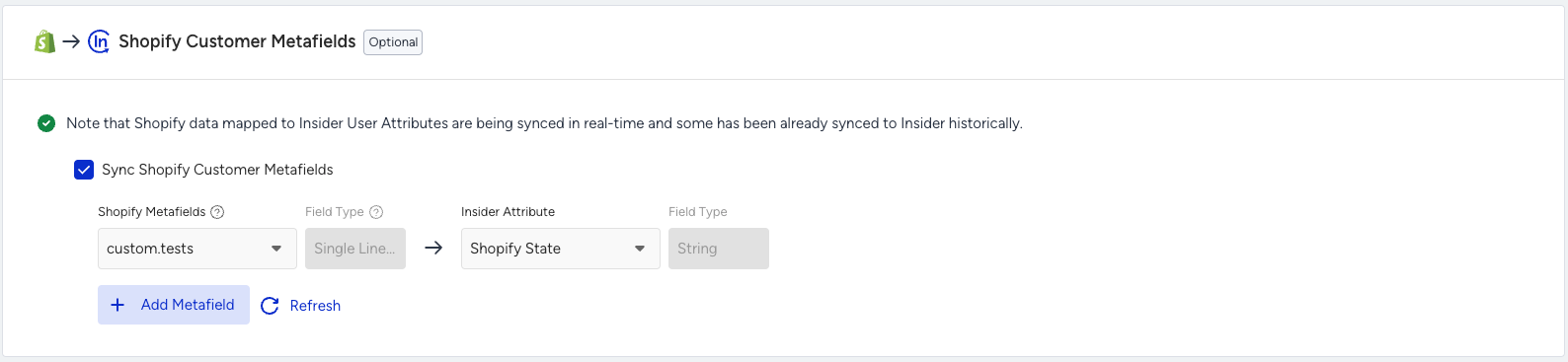
If you do not see the metafield or attribute you created, click the Refresh button to update the dropdown list and fetch the latest changes.
To better understand how to create a custom attribute on Insider One, refer to Create and Edit Custom Attributes and Events.
You can collect age, birthday, and gender attributes from your Shopify Store. To do this, set up these attributes as customer metafields in your Shopify settings and then map those metafields to the corresponding attributes in Insider One.
Supported Shopify Metafield Data Types
The table below provides an overview of Shopify metafield data types, indicating whether they are supported by Insider One and their corresponding data types within Insider One:
Shopify Data Type | Supported by Insider One | Mapped to (Insider One Data Type) |
|---|---|---|
single_line_text_field | Yes | string |
boolean | Yes | boolean |
color | Yes | string |
date | Yes | datetime |
date_time | Yes | datetime |
decimal | Yes | number |
dimension | No | — |
id | Yes | number |
json | Yes | string |
link | Yes | string |
money | No | — |
multi_line_text_field | Yes | string |
number_integer | Yes | number |
rating | Yes | string |
rich_text_field | Yes | string |
url | Yes | url |
volume | No | — |
weight | No | — |
collection_reference | No | — |
file_reference | No | — |
metaobject_reference | No | — |
mixed_reference | No | — |
page_reference | No | — |
product_reference | No | — |
variant_reference | No | — |
product_taxonomy_value_reference | No | — |
list.collection_reference | No | — |
list.color | Yes | strings |
list.date | Yes | string array |
list.date_time | Yes | string array |
list.dimension | No | — |
list.file_reference | No | — |
list.link | Yes | string array |
list.metaobject_reference | No | — |
list.mixed_reference | No | — |
list.number_integer | Yes | numbers |
list.number_decimal | No | — |
list.page_reference | No | — |
list.product_reference | No | — |
list.rating | Yes | string array |
list.single_line_text_field | Yes | strings |
list.url | Yes | strings |
list.variant_reference | No | — |
list.volume | No | — |
list.weight | No | — |
list.product_taxonomy_value_reference | No | — |
Shopify Customer Deletion
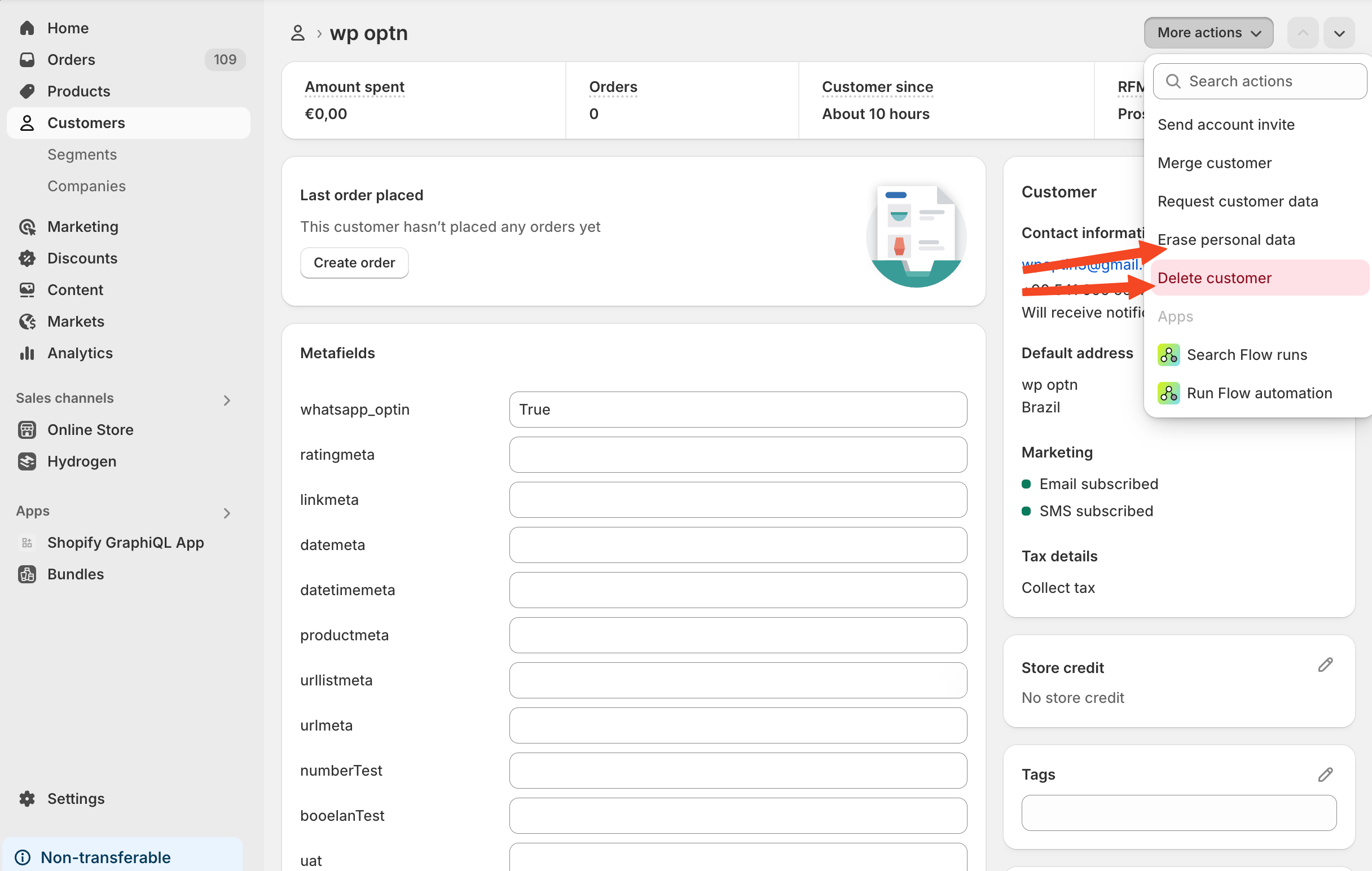
If a store owner requests to delete customer data, Insider One also deletes that customer's data from the Unified Customer Database.
Send User Data from Insider One to Shopify
Only the following user data is sent from Insider One to Shopify:
Email
SMS opt-in status changes
The email or phone number is sent only if these fields are empty in Shopify; existing data remains unchanged.
New users are created only if the "Create New Users" option is enabled.
Notes on User Uploads and Rate Limits:
Uploading a large number of users directly into Insider One might be limited by Shopify’s throttling limits, causing synchronization issues between Shopify and Insider One. To avoid this, upload users to Shopify. Shopify will then forward those users to Insider One in a controlled, rate‑limited manner.
You can use the limits below while uploading or sending users to Insider One, according to your plan:
Limit for Shopify Standard = 5000 users per hour
Limit for Shopify Advanced = 10000 users per hour
Limit for Shopify Plus = 60000 users per hour
You can view the Shopify’s specific rate limits that apply to your store and plan.