The Export Raw User Data API prepares raw data for events and attributes and allows you to export App Template results for multiple requested events and attributes of a user (e.g., name, phone number, age, city, etc.) to Insider's AWS S3 bucket. The request returns a link to your webhook endpoint, which enables you to access the raw user data and transfer it to your end.
When a user sees an app template, this action triggers the inapp_seen event along with its timestamp, inapp ID, variant type, and dismiss type event parameters. These events and their parameters are listed on the respective user's User Profile.
Suggested Reading: Understanding Events and Attributes
You should provide a webhook endpoint in the request to be notified when the export link is ready. After sending a request, your webhook endpoint receives an export link as follows to access the raw user data.
https://insider-data-export.useinsider.com/{partner name}/p/{file name}
You can export raw user data in the following use cases:
Analyze user information using a business intelligence tool.
Sync the data that you want via daily jobs.
Endpoint and Headers
Visit our Postman collection to test this request.
Header | Sample Value | Description |
|---|---|---|
X-PARTNER-NAME | mybrand | This is your partner name. Navigate to Inone > Inone Settings > Account Settings to copy your partner name. The partner name should be lowercase. |
X-REQUEST-TOKEN | 1a2b3c4e5d6f | This key is required to authorize your request. Refer to API Authentication Tokens to generate your token. |
Content-Type | application/json | This header specifies the media type of the resource. |
Body Parameters
Before starting the implementation, make sure to share the following information with the Insider One team:
A webhook endpoint that will be notified when the export link is ready
A preferred format: CSV or Parquet
A list of attributes, events, and event parameters that you want to export
A dynamic segment that you want to export
You can consult the Insider One team on which parameters to add to the request.
Parameter | Description | Data Type | Required |
|---|---|---|---|
segment | Segment ID of the user filter. To find your Dynamic Segment ID, navigate to Audience > Segments > Dynamic Segments. Click on the Segment whose ID you want to get. You can see it in the top right corner of the summary page. | Object | Yes |
attributes | Array of attributes | Array (of string) | No |
events | Array of events | Object | Yes |
start_date | Beginning of the date range for the wanted events | Number | Yes |
end_date | End of the date range for the wanted events | Number | Yes |
wanted | Object of the wanted events | Array | Yes |
event_name | Name of the event | String | Yes |
params | Event parameters of the event | Array (of string) | Yes |
format | The export format | String | Yes |
hook | Your webhook endpoint | String | Yes |
Sample Request
The sample below displays a request to get the app template results along with raw user data (e.g., insider ID (iid), unique device ID (udid), phone number (pn), unique user ID (uuid), email (em), app version, model (mo), device software version (ov)).
curl --location --request POST 'https://unification.useinsider.com/api/raw/v1/export' \
--header 'X-PARTNER-NAME: mybrand' \
--header 'X-REQUEST-TOKEN: 1a2b3c4d5e6f' \
--header 'Content-Type: application/json' \
--header 'Cookie: __cfduid=d1a0bc0c8335c7fecbd3485839787329b1615112066' \
--data-raw '{
    "segment": {
        "segment_id": 123456789
    },
    "attributes": [
        "iid",
        "udid",
        "pn",
        "uuid",
        "em",
        "app_version",
        "mo",
        "ov"
    ],
    "events": {
        "start_date": 1693907940,
        "end_date": 1693994340,
        "wanted": [
            {
                "event_name": "inapp_seen",
                "params": [
                    "timestamp",
                    "inapp_id",
                    "variant_id",
                    "dismiss_type"
                ]
            }
        ]
    },
    "format": "csv",
    "hook": "xyz.test.com"
}'
As for the segment ID, you can get the ID of an existing dynamic segment following the instructions in Body Parameters, or you can create a new Dynamic Segment to get its ID.
To create your new dynamic segment:
1. Go to Audience > Segments > Saved Segments and click the Create button.
2. Select Standard > Events to find the InApp View event. You can set the Operator to "is more than or equal to" to cover the users who have seen your app template. Depending on the duration of the results, you can set your time range.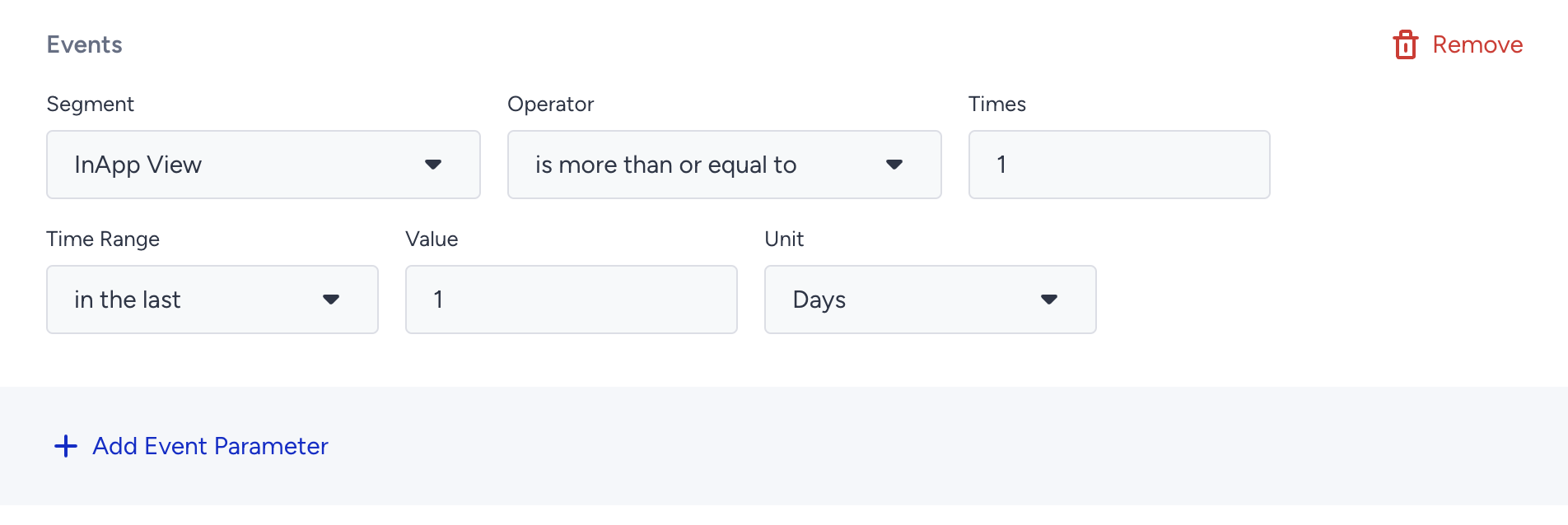
Sample Responses
200 OK
When the data is ready to download, you will receive the export link on your webhook URL as displayed below.
{"url":"https://insider-data-export.useinsider.com/{partner name}/p/{file name}"}If a user has performed the requested event(s) N times, that user will be displayed in N rows in the exported file. However, since attributes always display the latest information of the user, the attributes on N rows will be the same.
429 Too Many Requests
If you exceed the rate limits, you receive an error shown below:
{
    "error": "rejected: too many requests"
}
400 Empty Partner
400 Empty Token
403 Authentication Failed
Limitations
All functions must be executed with a simple HTTPS POST request.
Only a response that states if the request is successful or failed can be received via this API. No data can be inserted.
The request token should be provided in the request header. If the token is incorrect, the operation will not be executed.
The exported data can be in CSV, Parquet, or JSON formats.
The export link expires 24 hours after it is ready.
The rate limit is 1 request per day. The API can be called only once every 24 hours according to the UTC time zone. The limitation timeline resets at UTC 00:00.
The value of X-PARTNER-NAME header should be lowercase.
The default limit shown here is a standard baseline. If your use case requires higher capacity, feel free to reach out to the Insider One team. We can adjust it to fit your needs.