Conversation Starters and Follow Up Chips suggest questions that shoppers can tap instead of typing. Conversation Starters open the conversation on a product page, and Follow Up Chips keep it going after each answer from your Shopping Agent.
AI generates both for the product the shopper is viewing. A jacket gets questions about waterproofing and fit, while a ring gets questions about sizing and customization. Shoppers reach a useful answer in one tap, and your Shopping Agent starts more conversations.
Conversation Starters and Follow Up Chips are turned on automatically for all customers, so you do not need to set anything up. They are available on web only and are not available on WhatsApp and Instagram.
How do Conversation Starters work?
Conversation Starters are questions shown before the first message, such as "Is it waterproof?" for a jacket or "Is the ring customizable?" for a ring.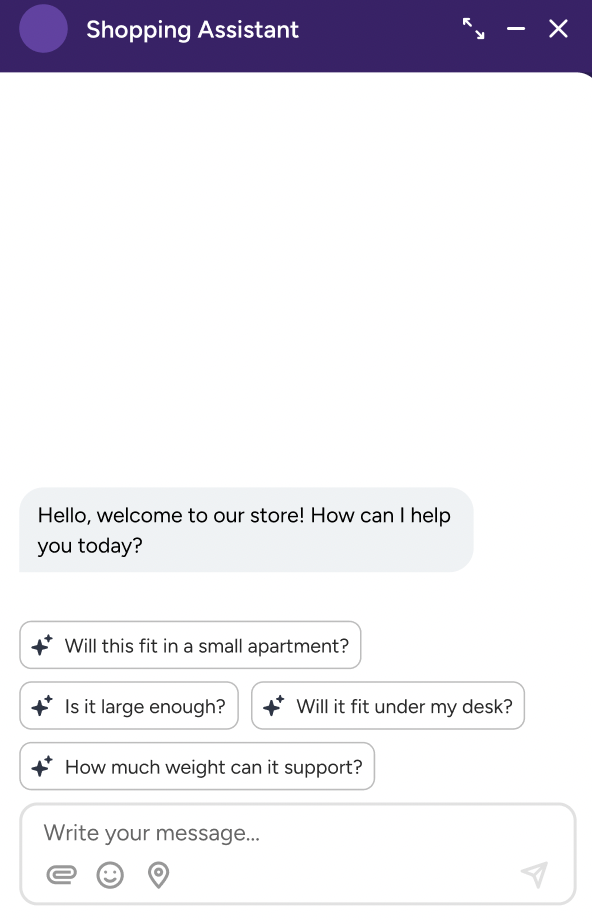
AI generates the questions for each product from your product catalog, so every product gets its own questions.
The questions appear in the shopper's language.
When a shopper taps a question, it is sent as the shopper's message and your Shopping Agent answers it. Questions the shopper has not asked yet stay available.
In Web Messenger, Conversation Starters appear when the shopper opens the messenger on a product page.
How do Follow Up Chips work?
Follow Up Chips are questions suggested after an answer from your Shopping Agent, based on the product and the conversation so far. For example, after an answer about sizing, the chips can offer questions about fit or materials.
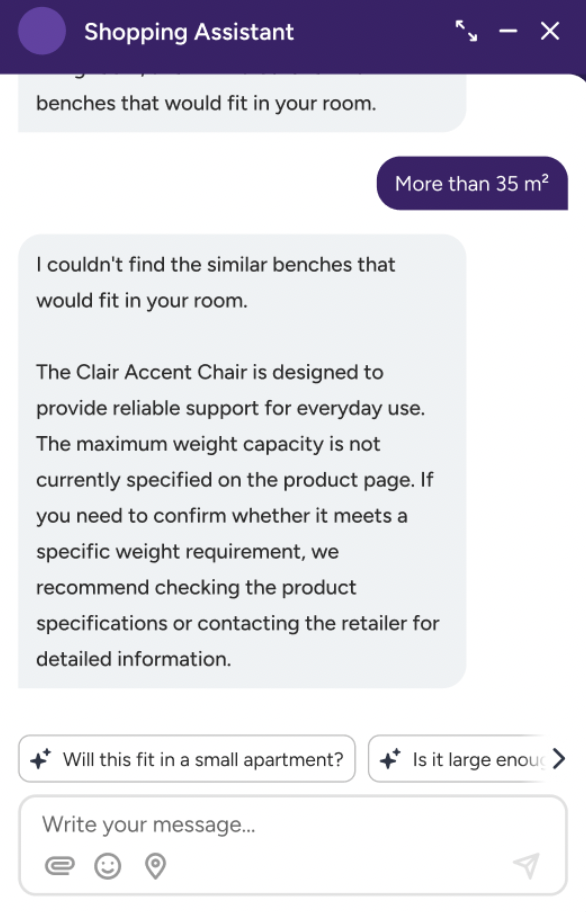
When a shopper taps a chip, it is sent as the shopper's message and the conversation continues.
Only the latest set of chips stays on screen. When the shopper taps a chip or types a message, the previous chips are removed and the agent's answer stays.
Follow Up Chips cover shopping questions. They do not suggest support topics such as returns, order status, or account questions.
How Conversation Starters and Follow Up Chips work with Quick Replies
Quick Replies are answer options your Shopping Agent offers when it asks the shopper a question, for example "Which size is your living room?" with options such as "12 to 18 m²" and "15 to 20 m²". Tapping a Quick Reply answers the agent's question and continues the same flow. Tapping a Conversation Starter or a Follow Up Chip asks a new question.
Conversation Starters | Follow Up Chips | Quick Replies | |
|---|---|---|---|
What it is | A question to open the conversation | A question to continue the conversation | An answer to a question the agent asked |
When it appears | Before the first message, on a product page | After an agent answer, when the agent offers no Quick Replies | When the agent asks the shopper a question |
What happens on tap | Sent as a new shopper question | Sent as a new shopper question | Sent as the shopper's answer, and the flow continues |
Channels | Web Messenger | Web Messenger | Web Messenger, WhatsApp |
The three never compete with each other:
A shopper sees one set of options per agent answer: either Quick Replies or Follow Up Chips, never both.
When the agent offers Quick Replies, they are shown and Follow Up Chips are not. Follow Up Chips appear only when the agent offers no Quick Replies.
On WhatsApp, Quick Replies appear as reply buttons. Each message can have up to 3 buttons, and each button shows up to 20 characters of its text.
Things to know
Conversation Starters need a product, so they appear only when the shopper is on a product page.
The quality of the questions depends on your product catalog and product page content. Products with complete attributes, such as size, material, and compatibility, get more specific questions.