The Content API lets you create, update, duplicate, and delete email templates in the InOne template library, and manage them from your backend.
You can use the Content API to:
Authentication
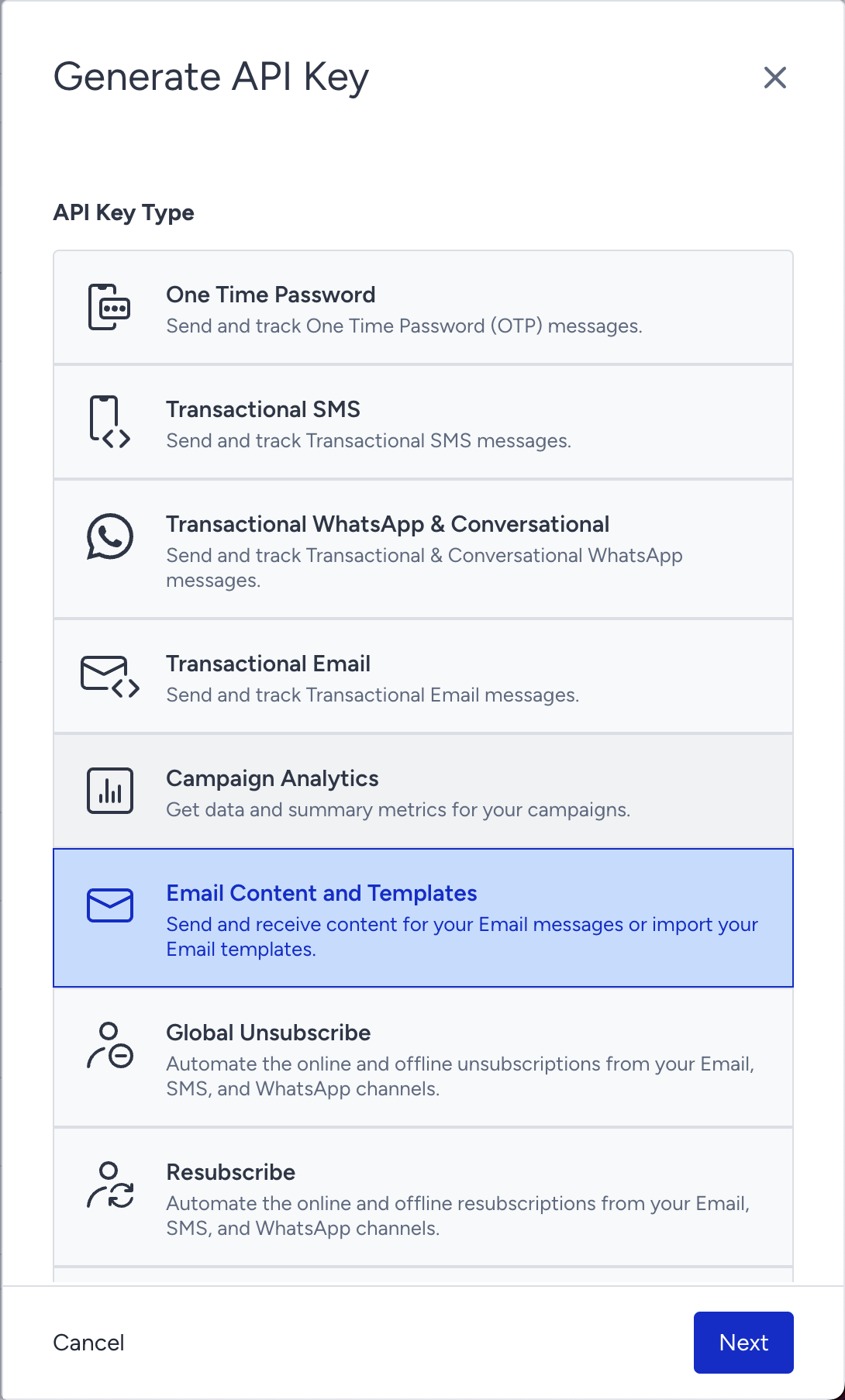
Authentication is required for all endpoints listed in this guide. Go to Inone Settings > Integration Settings > API Keys to create the Email Content and Templates key.
Create templates
This endpoint enables you to create a new email template.
Endpoint and Headers
POST https://email.api.useinsider.com/content/template/v1/create
Header | Sample Value | Description |
|---|---|---|
X-INS-AUTH-KEY | 1a2b3c4d5e6f | This key is required to authorize your request. Go to Inone Settings > Integration Settings > API Keys to create Email Content and Templates key. |
Content-Type | application/json | This header specifies the media type of the resource. |
Body Parameters
Below is a table explaining the body parameters required for the payload.
Parameter | Description | Data Type | Required |
|---|---|---|---|
name | Name of the template | String | Yes |
html | Base64 encoded HTML content of the template | String | Yes |
amp_html | Base64 encoded AMP HTML content for AMP email support | String | No |
categories | Array of category IDs to associate with the template | Array | No |
is_transactional | Flag indicating if the template is for transactional emails. The value cannot be true if is_architect_template is true. | Boolean | Yes |
is_architect_template | Flag indicating if the template is for Architect. The value cannot be true if is_transactional is true. | Boolean | Yes |
mark_favorite | Flag indicating if the template should be marked as favorite | Boolean | No |
Sample Request
Every request to the request endpoint must include a JSON-formatted request body.
Make sure to replace the sample values in the request header(s) and body where required before sending your request.
The sample request below shows an email template with a name, HTML and AMP HTML content, assigned categories, and flags indicating whether it is transactional, an architect template, or marked as a favorite.
curl --location --request POST 'https://email.api.useinsider.com/content/template/v1/create' \
--header 'X-INS-AUTH-KEY: a1b2c3d4e5' \
--header 'Content-Type: application/json' \
--data-raw '{
  "name": "template name",
  "html": "PHA+SFRNTCBkYXRhPC9wPg==",
  "amp_html": "PHA+SFRNTCBkYXRhPC9wPg==",
  "categories": [612],
  "is_transactional": true,
  "is_architect_template": false,
  "mark_favorite": false
}'
When creating a template, you can specify one of three distinct template types with the following configurations:
Template Type | is_transactional | is_architect_template |
|---|---|---|
Promotional template | false | false |
Transactional template | true | false |
Architect template | false | true |
If is_transactional and is_architect_template are set to true simultaneously, the API will return a 400 error.
Sample Responses
The following are some responses you might receive to your request.
200 Template created
{
  "message": "Template created",
  "id": 43119
}
400: Invalid request format or when Architect and transactional options are both set to true
401: Unauthorized - invalid or missing API key
404: Resource not found
500: Internal server error
Update templates
This endpoint enables you to update an existing template.
Endpoint and Headers
PATCH https://email.api.useinsider.com/content/template/v1/{template_id}
Header | Sample Value | Description |
|---|---|---|
X-INS-AUTH-KEY | 1a2b3c4d5e6f | This key is required to authorize your request. Go to Inone Settings > Integration Settings > API Keys to create Email Content and Templates key. |
Content-Type | application/json | This header specifies the media type of the resource. |
Body Parameters
Below is a table explaining the body parameters required for the payload.
Parameter | Description | Data Type | Required |
|---|---|---|---|
name | Name of the template | String | Yes |
html | Base64 encoded HTML content | String | Yes |
amp_html | Base64 encoded AMP HTML content | String | No |
categories | Array of category IDs | Array | No |
is_transactional | Flag for transactional emails. The value cannot be true if is_architect_template is true. | Boolean | Yes |
is_architect_template | Flag for Architect templates. The value cannot be true if is_transactional is true. | Boolean | Yes |
mark_favorite | Flag indicating if the template should be marked as favorite | Boolean | No |
Template category IDs can be assigned or changed when updating a template using the categories field (an array of category IDs). However, category names cannot be modified via the API.
To rename or update a category, contact the Insider One team or use the Inone interface manually. To create new categories, refer to the Create Categories section.
Sample Request
Every request to the request endpoint must include a JSON-formatted request body.
Make sure to replace the sample values in the request header(s) and body where required before sending your request.
The sample request below updates a template.
curl --location --request PATCH 'https://email.api.useinsider.com/content/template/v1/43119' \
--header 'X-INS-AUTH-KEY: a1b2c3d4e5' \
--header 'Content-Type: application/json' \
--data-raw '{
    "name": "rename",
    "html": "bmV3IGh0bWwgY29udGVudA=="
}'
Sample Responses
The following are some of the responses you might receive for your request.
200 Template updated successfully
{
  "code": 200,
  "message": "Template updated successfully"
}
400: Invalid request format or when Architect and transactional options are both set to true
401: Unauthorized - invalid or missing API key
404: Resource not found
500: Internal server error
Delete templates
This endpoint enables you to delete a specific template.
Endpoint and Headers
DELETE https://email.api.useinsider.com/content/template/v1/{template_id}
Header | Sample Value | Description |
|---|---|---|
X-INS-AUTH-KEY | 1a2b3c4d5e6f | This key is required to authorize your request. Go to Inone Settings > Integration Settings > API Keys to create Email Content and Templates key. |
Sample Request
The following is a sample request to delete a template by its ID.
DELETE https://email.api.useinsider.com/content/template/v1/614
Sample Responses
The following are some of the responses you might receive for your request.
200 Template deleted successfully
{
  "code": 200,
  "message": "Template deleted successfully"
}
401: Unauthorized - invalid or missing API key
404: Resource not found
500: Internal server error
Duplicate templates
This endpoint enables you to create a duplicate of an existing template.
Endpoint and Headers
POST https://email.api.useinsider.com/content/template/v1/duplicate/{template_id}
Header | Sample Value | Description |
|---|---|---|
X-INS-AUTH-KEY | 1a2b3c4d5e6f | This key is required to authorize your request. Go to Inone Settings > Integration Settings > API Keys to create Email Content and Templates key. |
Content-Type | application/json | This header specifies the media type of the resource. |
Sample Request
The following is a sample request to duplicate an existing template by its ID.
POST https://email.api.useinsider.com/content/template/v1/duplicate/43119
Sample Responses
The following are some responses you might receive to your request.
200 Template duplicated successfully
{
  "message": "Template duplicated",
  "id": 43120
}
401: Unauthorized - invalid or missing API key
404: Resource not found
500: Internal server error
Duplication behavior and limitations
When a template is duplicated via the POST /content/template/v1/duplicate/{template_id} endpoint, the API creates a new independent template based on the source. Key behaviors include the following:
A new, unique template ID is automatically generated for the duplicate, ensuring no conflicts with the original.
To maintain consistency, category assignments (categories), favorite status (mark_favorite), and template type flags (is_transactional, is_architect_template) are copied from the source template.
Creation timestamps are not copied; the duplicated template receives a new timestamp reflecting the duplication time.
Template names are not copied verbatim; instead, the duplicated template receives a copy-prefixed name (e.g., "Copy of [original name]") to avoid naming conflicts and indicate its origin.
Duplicating a template does not overwrite or modify any existing template, including the source.
Example response showing new ID and copied properties

The full response may include copied details like categories and flags when retrieved via GET /content/template/v1/{new_id}.
Limitations for duplication
Currently, template duplication cannot be performed recursively (i.e., you cannot duplicate a duplicate template without first saving or retrieving it via the GET endpoint). This prevents potential integration loops or errors.
For templates with Base64-encoded HTML or AMP HTML content, ensure proper encoding in the source before duplication, as it will be preserved in the copy.
Get templates
This endpoint enables you to retrieve a specific template by its ID.
Endpoint and Headers
GET https://email.api.useinsider.com/content/template/v1/{template_id}
Header | Sample Value | Description |
|---|---|---|
X-INS-AUTH-KEY | 1a2b3c4d5e6f | This key is required to authorize your request. Go to Inone Settings > Integration Settings > API Keys to create Email Content and Templates key. |
Sample Request
The following is a sample request to get a template by its ID.
GET https://email.api.useinsider.com/content/template/v1/43119
Sample Responses
The following are some responses you might receive to your request.
200 Template retrieved successfully
{
    "id": 43427,
    "name": "template name",
    "is_favorite": false,
    "is_architect_template": false,
    "is_transactional": false,
    "html": "PHA+SFRNTCBkYXRhPC9wPg==",
    "amp_html": "PHA+SFRNTCBkYXRhPC9wPg=="
}
401: Unauthorized - invalid or missing API key
404: Resource not found
500: Internal server error
Search templates
This endpoint enables you to search for templates based on various criteria.
Endpoint and Headers
GET https://email.api.useinsider.com/content/template/v1/search
Header | Sample Value | Description |
|---|---|---|
X-INS-AUTH-KEY | 1a2b3c4d5e6f | This key is required to authorize your request. Go to Inone Settings > Integration Settings > API Keys to create Email Content and Templates key. |
Query Parameters
The following are the parameters to search for a template.
Parameter | Description | Required |
|---|---|---|
term | Filter by template name (partial match) | No |
categories | Array of category IDs to filter by | No |
page | Page number for pagination, 1 by default | No |
size | Number of results per page, 10 by default | No |
favorite | Filter by favorite status, false by default | No |
architect | Filter by architect template status, false by default | No |
transactional | Filter by transactional status, false by default | No |
Sample Request
The following is a sample request to search for templates.
GET https://email.api.useinsider.com/content/template/v1/search?term=template&categories=612&transactional=true&favorite=false&architect=false&page=1&size=10
Sample Responses
The following are some responses you might receive to your request.
200 Search completed successfully
{
    "templates": [
        {
            "id": 43437,
            "name": "template 1",
            "is_favorite": false,
            "is_architect_template": false,
            "is_transactional": false,
        },
        {
            "id": 43226,
            "name": "template 2",
            "is_favorite": false,
            "is_architect_template": false,
            "is_transactional": false,
        }
    ],
    "total_records": 2,
    "total_pages": 1,
    "next_page": 2,
    "prev_page": 0,
    "current_page": 1,
    "page_size": 10
}
401: Unauthorized - invalid or missing API key
404: Resource not found - "Resource not found"
500: Internal server error - "Something went wrong"
Create categories
This endpoint enables you to create a new template category. Categories cannot be updated via this request.
Endpoint and Headers
POST https://email.api.useinsider.com/content/template/v1/category/create
Header | Sample Value | Description |
|---|---|---|
X-INS-AUTH-KEY | 1a2b3c4d5e6f | This key is required to authorize your request. Go to Inone Settings > Integration Settings > API Keys to create Email Content and Templates key. |
Content-Type | application/json | This header specifies the media type of the resource. |
Body Parameters
Below is a table explaining the body parameter required for the payload.
Parameter | Description | Data Type | Required |
|---|---|---|---|
name | Name of the category to create | String | Yes |
Sample Request
Every request to the request endpoint must include a JSON-formatted request body.
Make sure to replace the sample values in the request header(s) and body where required before sending your request.
The sample request below creates a category.
curl --location --request POST 'https://email.api.useinsider.com/content/template/v1/category/create' \
--header 'X-INS-AUTH-KEY: a1b2c3d4e5' \
--header 'Content-Type: application/json' \
--data-raw '{
  "name": "category - 1"
}'
Sample Responses
The following are some responses you might receive to your request.
200 Category created successfully
{
  "message": "Category created",
  "id": 612
}
400: Invalid request format or validation error
401: Unauthorized - invalid or missing API key
500: Internal server error
Get categories
This endpoint returns a list of all available template categories.
Endpoint and Headers
GET https://email.api.useinsider.com/content/template/v1/category/list
Header | Sample Value | Description |
|---|---|---|
X-INS-AUTH-KEY | 1a2b3c4d5e6f | This key is required to authorize your request. Go to Inone Settings > Integration Settings > API Keys to create Email Content and Templates key. |
Sample Request
The following is a sample request to get the list of categories.
GET https://email.api.useinsider.com/content/template/v1/category/list
Sample Responses
The following are some responses you might receive to your request.
200 Categories retrieved successfully
{
    "id": 612,
    "name": "category - 1"
  },
  {
    "id": 613,
    "name": "promotions"
  }
401: Unauthorized - invalid or missing API key
404: Resource not found - "Resource not found"
500: Internal server error
Limitations
The X-INS-AUTH-KEY should be provided as the authorization key in the request header. If the key is incorrect, the operation will not be executed and an authorization error will return in the response.
For base64-encoded content, make sure to properly encode the HTML content before sending.
When creating or updating templates, you must select exactly one template type and set the appropriate flag values.
Additional API Constraints
Template categories cannot be renamed or deleted using the Content API. Only creation (via POST /content/template/v1/category/create) and retrieval (via GET /content/template/v1/category/list) are supported. For modifications, use the InOne interface or contact the Insider One team.
Duplication behavior follows a "copy and create new ID" logic and does not maintain historical references to the original template (e.g., no "parent_id" field is included). This ensures the duplicate is fully standalone for independent use in campaigns or Architect emails.
Parameters such as is_transactional and is_architect_template are mutually exclusive. Setting both to true will trigger a 400 Bad Request error. They must be set so that only one can be true (or both can be false for promotional templates).
We recommend specifying these flags explicitly, even when their values are false, to ensure consistency across integrations. This avoids reliance on defaults and reduces the risk of errors in partial payloads during create or update operations.