Content API enables you to send email body and subject from your back-end to create email campaigns on the Insider One's InOne panel. With this API request, you can specify the account name, campaign name, and campaign type.
You can use the Content API to:
Send your already created email HTML body and other input parameters to the InOne panel so you do not waste time adding them again.
Send the values of the input parameters to the InOne panel directly if you have multiple accounts in InOne and have the same/similar values for these parameters.
Endpoint and Headers
Visit our Postman collection to test this request.
Header | Sample Value | Description |
|---|---|---|
X-INS-AUTH-KEY | 1a2b3c4d5e6f | This key is required to authorize your request. Refer to API Authentication Tokens to generate your token. |
Content-Type | application/json | This header specifies the media type of the resource. |
Body Parameters
Before sending your request, make sure you create it within the following criteria:
The type value must be exactly single, experiment, or recurring, in lowercase. Otherwise, you will receive a validation error.
If the campaign type is Experiment, you should have 2 variations. Otherwise, your request will not be validated, and you will receive a validation error.
If the campaign type is Single, you should have 1 variation. Otherwise, your request will not be validated, and you will receive a validation error.
If the campaign type is Recurring, you should have 1 variation. Otherwise, your request will not be validated, and you will receive a validation error.
The subject is required with a maximum of 200 characters.
The pre-header is optional with a maximum of 150 characters.
Source, medium, and campaign parameters are required for UTM parameters.
UTM keys can only be alphanumeric with _.
UTM values can have a maximum of 40 characters.
UTM values can only be alphanumeric with _-.
The campaign you create will automatically be tagged with the email-content-api tag.
Campaign creation on the Insider platform is real-time once you send the request.
The default status for the campaign you create is Draft. You can schedule your campaigns on the panel.
The email content is not saved as a template.
Parameter | Description | Data Type | Required |
|---|---|---|---|
name | Name of the campaign that you want to create on the Insider platform. It should be alphanumeric with -_{space}, max. 255 and min. 5 characters. | String | Yes |
tags | Tag of the campaign that you want to create on the Insider platform. It should be alphanumeric with -_{space}, max. 5 tags, max. 15 characters long each. | Array of strings | No |
type | Type of the campaign that you want to create on the Insider platform (single, experiment, recurring) | String | Yes |
variations | An array that contains email subject, preheader, email HTML, and UTM parameters. | Array of object | Yes |
subject | The subject of your email campaign up to 200 characters. | String | Yes |
pre_header | The summary of your email message up to 150 characters. | String | No |
html | The HTML of your email campaign in base64 format. | String | Yes |
utm | The source, campaign, medium, and extra UTM parameters of your email campaign. The value for each can have 40 characters max. | Object | No |
Sample Request
Every request to the request endpoint requires a JSON-formatted request body containing your email's content as variations.
Make sure to replace the sample values in the request header(s) and body where required before sending your request.
Only base64 format is supported for HTML.
The sample request below is a single email campaign containing one variation that defines a personalized subject line, a pre-header, an HTML body, and UTM tracking parameters for source, campaign, and medium.
curl --location --request POST 'http://mail.useinsider.com/content/v1/campaign/create' \
--header 'x-ins-auth-key: INS.1234' \
--header 'Content-Type: application/json' \
--data-raw '{
    "name": "my single campaign",
    "tags": [
        "v",
        "tag1 789dfs44"
    ],
    "type": "single",
    "variations": [
        {
            "subject": "Hello {{name}} {{email}} {{custom3|fallback}}",
            "pre_header": "apre {{surname|there}}",
            "html": "PHRkIGNsYXNzPSJlc2Qtc3RydWN0dXJlIGVzLXAyMCIgYWxpZ249ImxlZnQiIGJkeT4NCiAgICAgICAgICAgICAgICAgICAgPC90YWJsZT4NCiAgICAgICAgICAgICAgICA8L3RkPg0KICAgICAgICAgICAgPC90cj4NCiAgICAgICAgPC90Ym9keT4NCiAgICA8L3RhYmxlPg0KPC90ZD4=",
    "utm": {
                "source": "thisis_source",
                "campaign": "thisis_campaign",
                "medium": "thisis_medium",
                "extra": "thisis_extra"
            }
        }
    ]
}'
The sample request below shows and Experiment (A/B) campaign containing two variations—each with its own subject line, pre-header, and HTML body, while one variation also includes UTM tracking parameters for source, campaign, and medium.
curl --location --request POST 'mail.useinsider.com/content/v1/campaign/create' \
--header 'x-ins-auth-key: INS.jQIja9pXwuNC2Pkoy....vgjiHHoMgBkkYtDsrb6Gz9K0nAIi4NMLkkWClfU' \
--header 'Content-Type: application/json' \
--data-raw '{
    "name": "Campaign Name",
    "tags": ["campaign-tag"],
    "type": "experiment",
    "variations": [
        {
            "subject": "Variation A subject {{custom}}",
            "html": "PHA+TXkgZW1haWwgYm9keSBBPC9wPg==",
            "pre_header": "Variation A preheader"
        },
        {
            "subject": "Variation B subject {{custom}}",
            "html": "PHA+TXkgZW1haWwgYm9keSBBPC9wPg==",
            "pre_header": "Variation B preheader",
            "utm": {
                "source": "my_source",
                "campaign": "my_campaign",
                "medium": "email",
                "extra": "value"
            }
        }
    ]
}'
The subject and pre_header will be placed in the following sections in your inbox:

The subject and html will look as follows:
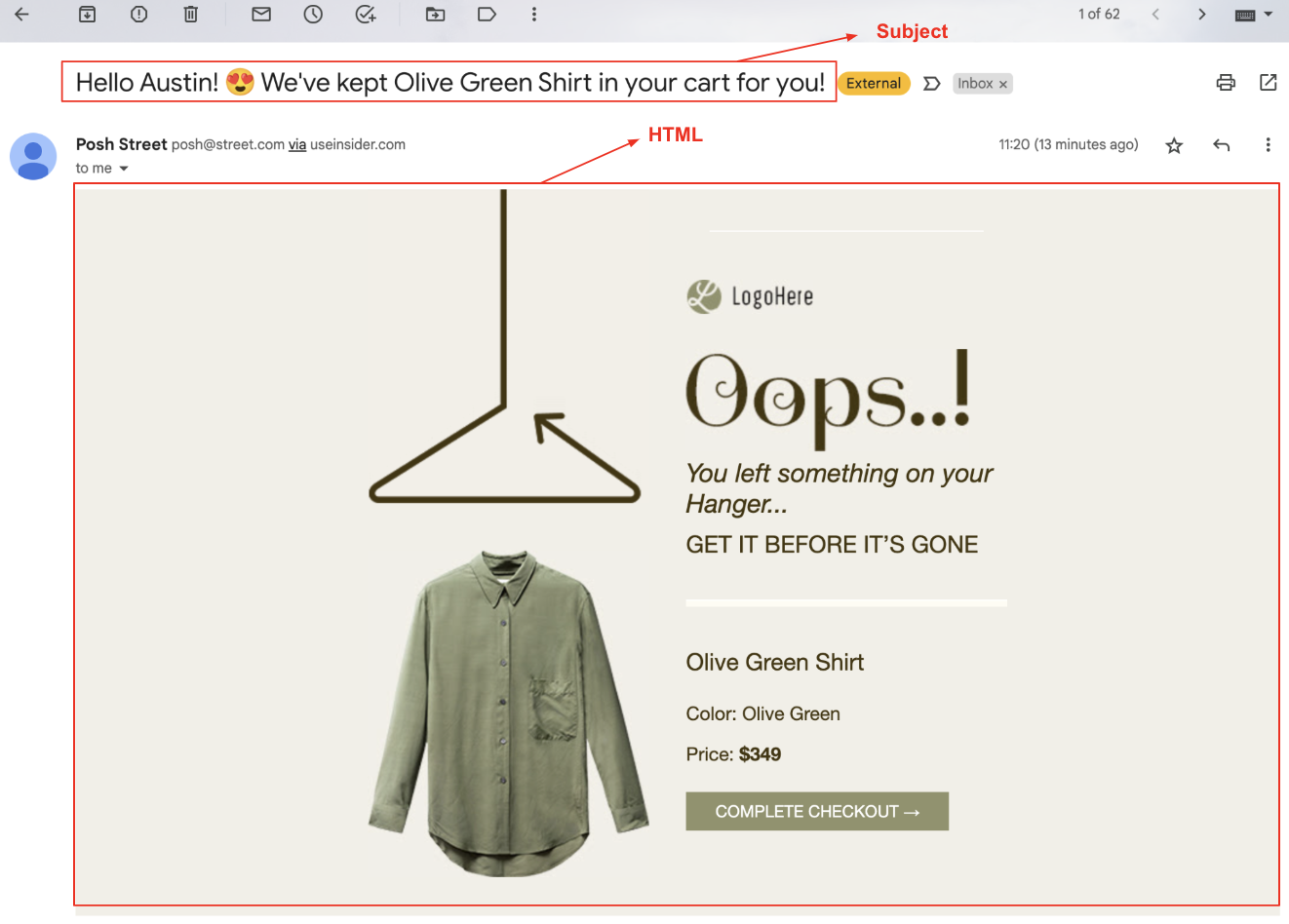
The UTM parameters will be added to the URL(s) as follows:

Sample Responses
The following are some of the responses you might receive for your request.
Created Success Message 201
{
   "message":"created",
   "id":"builderID"
}
Validation Error Message 400
{
   "error":"$message"
}
Unauthorized Error Message 401
{
   "error":"unauthorized"
}
Limitations
All functions must be executed with a simple HTTPS POST request.
Only new email campaigns can be created via this API. No data can be retrieved.
The API Key should be provided as the authorization key in the request header. If the key is incorrect, the operation will not be executed and an authorization error will return in the response.
The rate limit is 1 request per second. Each request might take approximately 1 second.
The default limit shown here is a standard baseline. If your use case requires higher capacity, feel free to reach out to the Insider One team. We can adjust it to fit your needs.
Suggested Next
The API creates the campaign as a draft with its name, type, tags, and content. It does not select recipients or schedule or launch the campaign. Each variation uses your default sender.
See Anatomy of an Email Campaign to open the draft in InOne, select the recipients, review the content and sender, and configure the launch settings.
Important: If you launch the draft without selecting a recipient list or segment, the campaign targets all reachable contacts by default. Always review the Recipients step before you launch the campaign.