This guide aims to explain the steps to complete the Cocoapods installation.
Requirements
If you do not have CocoaPods on your system, follow these steps to set them up:
1. Import Insider into your Xcode project.
2. Make sure your current Xcode project is closed.
3. Run pod init from the terminal in your project director if you do not already have the Podfile.
4. Open the Podfile with any code editor.
5. Add InsiderMobile dependency under your project target.
6. Add InsiderGeofence and Insider WebView if you would like to use the Geofence and WebView feature.
if you don’t include necessary location permission description values in your plist file; adding InsiderGeofence along with InsiderMobile may get your app rejected during the App Store review process.
If you use the Geofence feature; you should add the “NSLocationWhenInUseUsageDescription” and “NSLocationAlwaysUsageDescription” keys to your app’s Info.plist file. The value for these keys should be a string describing why your app requests access to the user’s location, for example, “This app needs your location to find nearby stores.
Additionally, you’ll also want to include “NSLocationAlwaysAndWhenInUseUsageDescription”, which is the key used to prompt the “allow while in use” and “allow always” permission dialog to the user.
7. Add InsiderMobileAdvancedNotification under InsiderNotificationService and InsiderNotificationContent targets.
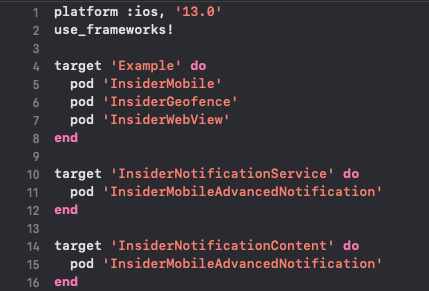
The following is the Podfile:
platform :ios, '13.0'
use_frameworks!
target 'Example' do
  pod 'InsiderMobile'
  pod 'InsiderGeofence'
  pod 'InsiderWebView'
end
target 'InsiderNotificationService' do
  pod 'InsiderMobileAdvancedNotification'
end
target 'InsiderNotificationContent' do
  pod 'InsiderMobileAdvancedNotification'
end
Your
pod --versionhas to be equal to or higher than 1.16.2.Make sure that you have implemented
use_frameworks.Make sure that your project deployment targets are equal to or higher than iOS 13.0.
8. Run the pod repo update and pod install from the terminal in your project directory. (If you already have the PodFile in your project, you can skip this step.) Always open the .xcworkspace file from now on.
.png)
Configure Targets
You need to get Notification Service and paste it into your Notification Service. You can find the Notification Service detail below:
#import "NotificationService.h"
#import <InsiderMobileAdvancedNotification/InsiderMobileAdvancedNotification.h>

@interface NotificationService ()
@property (nonatomic, copy) void (^contentHandler)(UNNotificationContent *contentToDeliver);
@property (nonatomic, strong) UNMutableNotificationContent *bestAttemptContent;
@end

@implementation NotificationService

static NSString * const kAppGroup = @"group.com.your-company.your-app";

- (void)didReceiveNotificationRequest:(UNNotificationRequest *)request
                   withContentHandler:(void (^)(UNNotificationContent * _Nonnull))contentHandler {
    self.contentHandler = contentHandler;
    self.bestAttemptContent = [request.content mutableCopy];

    NSString *source = self.bestAttemptContent.userInfo[@"source"];
    if ([source isEqualToString:@"Insider"]) {
        [InsiderPushNotification showInsiderRichPush:self.bestAttemptContent
                                            appGroup:kAppGroup
                                      nextButtonText:@"Next"
                                         goToAppText:@"Go to App"
                                             success:^(UNNotificationAttachment *attachment) {
            if (attachment) {
                self.bestAttemptContent.attachments = @[attachment];
            }
            contentHandler(self.bestAttemptContent);
        }];
    } else {
        contentHandler(self.bestAttemptContent);
    }
}

- (void)serviceExtensionTimeWillExpire {
    if (self.contentHandler && self.bestAttemptContent) {
        self.contentHandler(self.bestAttemptContent);
    }
}

@end
//
//  NotificationService.swift
//  Example
//
//  Created by Insider on 7.11.2025.
//

import InsiderMobileAdvancedNotification
@preconcurrency import UserNotifications

/// A notification service extension that intercepts and modifies incoming push notifications
/// to support Insider rich push content such as images, carousels, and interactive elements.
///
/// This extension runs in a separate process with a limited execution time. It downloads
/// rich media attachments via the Insider SDK and attaches them to the notification content
/// before displaying it to the user.
///
/// - Important: The `appGroup` must match the App Group identifier configured in both
///   the main app target and this extension target for shared data access.
public final class NotificationService: UNNotificationServiceExtension {

    /// The completion handler provided by the system to deliver the modified notification content.
    nonisolated(unsafe) private var contentHandler: ((UNNotificationContent) -> Void)?

    /// A mutable copy of the original notification content that can be modified before delivery.
    nonisolated(unsafe) private var bestAttemptContent: UNMutableNotificationContent?

    /// The App Group identifier used for sharing data between the main app and this extension.
    private let appGroup = "group.com.useinsider.mobile-ios"

    /// Called when a push notification is received, allowing modification of its content before display.
    ///
    /// This method delegates to the Insider SDK to download and attach rich push media (images, videos, etc.)
    /// to the notification. If the attachment download succeeds, it is added to the notification content.
    ///
    /// - Parameters:
    ///   - request: The original notification request containing the payload.
    ///   - contentHandler: A completion handler to call with the modified notification content.
    public override func didReceive(
        _ request: UNNotificationRequest,
        withContentHandler contentHandler: @escaping @Sendable (UNNotificationContent) -> Void
    ) {
        guard
            let bestAttemptContent = request.content.mutableCopy() as? UNMutableNotificationContent
        else { return }
        defer {
            self.contentHandler = contentHandler
            self.bestAttemptContent = bestAttemptContent
        }
        if let source = bestAttemptContent.userInfo["source"] as? String,
           source == "Insider" {
            InsiderPushNotification.showInsiderRichPush(
                bestAttemptContent,
                appGroup: appGroup,
                nextButtonText: "Next",
                goToAppText: "Go to App",
                success: { attachment in
                    if let attachment {
                        bestAttemptContent.attachments = [attachment]
                    }
                    contentHandler(bestAttemptContent)
                }
            )
        } else {
            // Handle other rich push providers in here.
        }
    }

    /// Called just before the extension is terminated by the system due to time expiration.
    ///
    /// Delivers the best attempt content as-is (potentially without rich media attachments)
    /// to ensure the user still receives the notification even if the download did not complete in time.
    public override func serviceExtensionTimeWillExpire() {
        if let contentHandler, let bestAttemptContent {
            contentHandler(bestAttemptContent)
        }
    }
}
Notification Content Extension
1. You need to get Notification View Controller and paste it to your own Notification View Controller. The following is the NotificationViewController:
#import "NotificationViewController.h"
#import <InsiderMobileAdvancedNotification/InsiderMobileAdvancedNotification.h>
#import <UserNotifications/UserNotifications.h>
#import <UserNotificationsUI/UserNotificationsUI.h>

@interface NotificationViewController () <UNNotificationContentExtension, iCarouselDelegate, iCarouselDataSource>
@property (nonatomic, weak) IBOutlet iCarousel *carousel;
@end

@implementation NotificationViewController

static NSString * const kAppGroup = @"group.com.your-company.your-app";

- (void)viewDidLoad {
    [super viewDidLoad];
    self.carousel.delegate = self;
    self.carousel.dataSource = self;
}

- (void)didReceiveNotification:(UNNotification *)notification {
    [InsiderPushNotification interactivePushLoad:kAppGroup
                                       superView:self.view
                                    notification:notification];
    self.carousel.type = iCarouselTypeRotary;
    [self.carousel reloadData];
    [InsiderPushNotification interactivePushDidReceiveNotification];
}

- (void)didReceiveNotificationResponse:(UNNotificationResponse *)response
                     completionHandler:(void (^)(UNNotificationContentExtensionResponseOption))completion {
    if ([response.actionIdentifier isEqualToString:@"insider_int_push_next"]) {
        NSInteger nextIndex = [InsiderPushNotification didReceiveNotificationResponse:self.carousel.currentItemIndex];
        [self.carousel scrollToItemAtIndex:nextIndex animated:YES];
        completion(UNNotificationContentExtensionResponseOptionDoNotDismiss);
    } else {
        [InsiderPushNotification logPlaceholderClick:response];
        completion(UNNotificationContentExtensionResponseOptionDismissAndForwardAction);
    }
}

#pragma mark - iCarousel

- (NSInteger)numberOfItemsInCarousel:(iCarousel *)carousel {
    return [InsiderPushNotification getNumberOfSlide];
}

- (UIView *)carousel:(iCarousel *)carousel viewForItemAtIndex:(NSInteger)index reusingView:(UIView *)view {
    return [InsiderPushNotification getSlide:index reusingView:view superView:self.view];
}

- (CGFloat)carouselItemWidth:(iCarousel *)carousel {
    return [InsiderPushNotification getItemWidth];
}

@end
//
//  NotificationViewController.swift
//  Example
//
//  Created by Insider on 16.03.2026.
//

import InsiderMobileAdvancedNotification
import UIKit
import UserNotifications
import UserNotificationsUI

/// A notification content extension view controller that displays Insider interactive push
/// notifications with a carousel interface.
///
/// This controller implements `UNNotificationContentExtension` to provide a custom UI
/// for expanded push notifications. It uses an `iCarousel` component to display multiple
/// slides (images or content) that users can navigate through using action buttons.
///
/// - Important: The `appGroup` must match the App Group identifier configured in both
///   the main app target and this extension target for shared data access.
/// - Note: This controller requires an `iCarousel` outlet to be connected in the storyboard.
@MainActor public final class NotificationViewController: UIViewController, UNNotificationContentExtension, iCarouselDelegate, iCarouselDataSource {

    /// The carousel view used to display interactive push notification slides.
    ///
    /// This outlet must be connected in the storyboard. The carousel displays rich media
    /// content (images, promotional banners, etc.) provided by the Insider SDK.
    @IBOutlet public var carousel: iCarousel!

    /// The App Group identifier used for sharing data between the main app and this extension.
    private let appGroup = "group.com.useinsider.mobile-ios"

    /// Returns the view for a specific item in the carousel.
    ///
    /// Delegates to the Insider SDK to create or reuse a slide view for the given index.
    ///
    /// - Parameters:
    ///   - carousel: The carousel requesting the view.
    ///   - index: The index of the item to display.
    ///   - view: An optional previously used view that can be recycled.
    /// - Returns: A configured `UIView` representing the carousel slide at the given index.
    public func carousel(_ carousel: iCarousel, viewForItemAt index: Int, reusing view: UIView?) -> UIView {
        return InsiderPushNotification.getSlide(index, reusing: view, superView: self.view)
    }

    /// Returns the total number of slides in the carousel.
    ///
    /// - Parameter carousel: The carousel requesting the item count.
    /// - Returns: The number of slides available in the current interactive push notification.
    public func numberOfItems(in carousel: iCarousel) -> Int {
        return InsiderPushNotification.getNumberOfSlide()
    }

    /// Returns the width of each item in the carousel.
    ///
    /// - Parameter carousel: The carousel requesting the item width.
    /// - Returns: The width in points for each carousel slide.
    public func carouselItemWidth(_ carousel: iCarousel) -> CGFloat {
        return InsiderPushNotification.getItemWidth()
    }

    /// Called after the view controller's view has been loaded into memory.
    ///
    /// Sets up the carousel by assigning its delegate and data source to this controller.
    public override func viewDidLoad() {
        super.viewDidLoad()
        carousel.delegate = self
        carousel.dataSource = self
    }

    /// Called when the notification content extension receives a notification to display.
    ///
    /// Initializes the Insider interactive push content, configures the carousel with a
    /// rotary animation style, reloads the slide data, and notifies the SDK that the
    /// interactive push has been received.
    ///
    /// - Parameter notification: The notification containing the push payload to display.
    public func didReceive(_ notification: UNNotification) {
        InsiderPushNotification.interactivePushLoad(appGroup, superView: view, notification: notification)

        carousel.type = .rotary
        carousel.reloadData()

        InsiderPushNotification.interactivePushDidReceive()
    }

    /// Called when the user interacts with a notification action button.
    ///
    /// If the user taps the "Next" button (`insider_int_push_next`), the carousel scrolls
    /// to the next slide and the notification remains visible. For any other action, the
    /// SDK logs the interaction and the notification is dismissed, forwarding the action
    /// to the main app.
    ///
    /// - Parameters:
    ///   - response: The user's response to the notification, including the action identifier.
    ///   - completion: A completion handler to call with the desired response option
    ///     (`.doNotDismiss` to keep the notification, `.dismissAndForwardAction` to dismiss it).
    public func didReceive(
        _ response: UNNotificationResponse,
        completionHandler completion: @escaping (UNNotificationContentExtensionResponseOption) -> Void
    ) {
        if response.actionIdentifier == "insider_int_push_next" {
            carousel.scrollToItem(
                at: InsiderPushNotification.didReceiveResponse(carousel.currentItemIndex),
                animated: true
            )
            completion(.doNotDismiss)
        }
        else {
            InsiderPushNotification.logPlaceholderClick(response)
            completion(.dismissAndForwardAction)
        }
    }
}
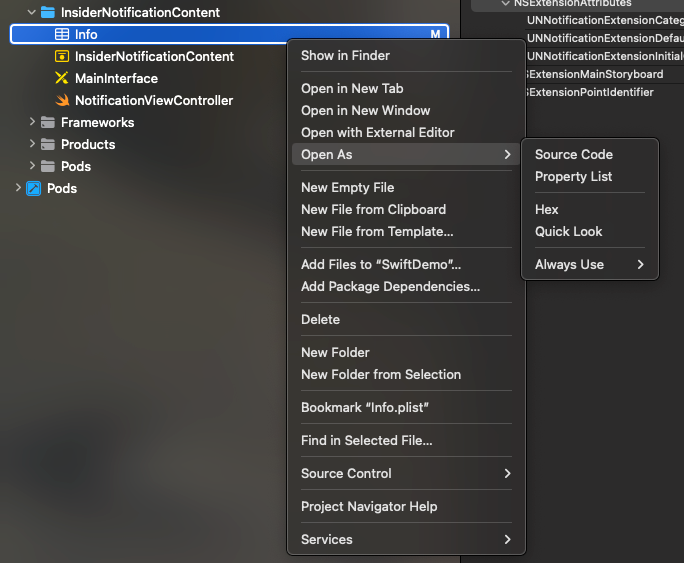
2. Navigate to InsiderNotificationContent>Info.plist and open it as source code.
3. Edit the key NSExtension. You can copy and paste the code below.
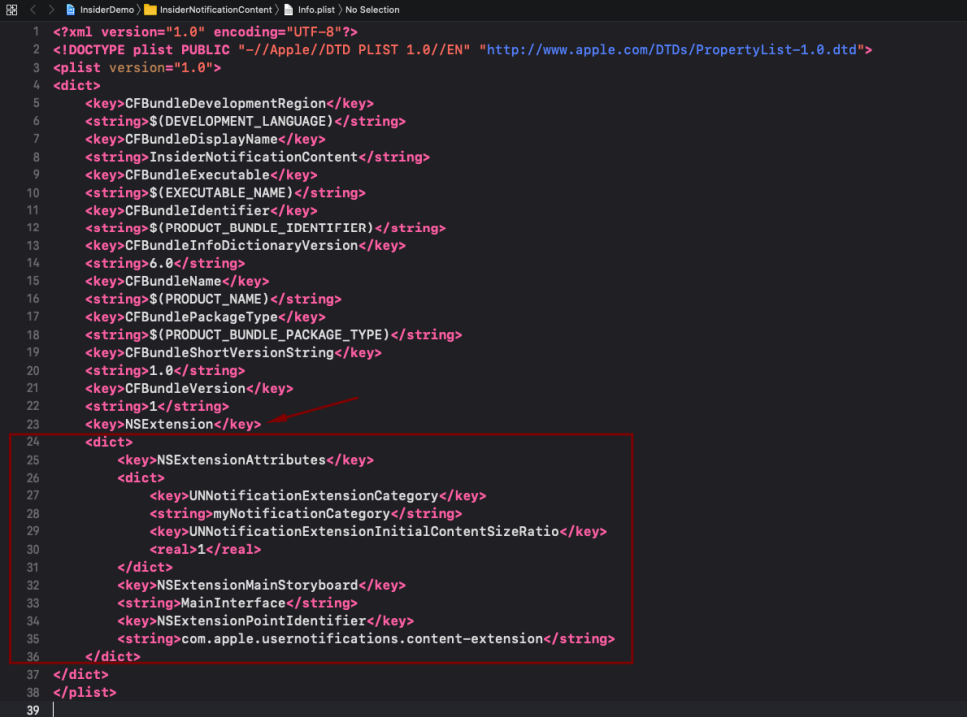
The following is the Info.plist:
<key>NSExtension</key>
<dict>
    <key>NSExtensionAttributes</key>
    <dict>
        <key>UNNotificationExtensionCategory</key>
        <string>insider_int_push</string>
        <key>UNNotificationExtensionDefaultContentHidden</key>
        <false/>
        <key>UNNotificationExtensionInitialContentSizeRatio</key>
        <real>0.5</real>
    </dict>
    <key>NSExtensionMainStoryboard</key>
    <string>InsiderInterface</string>
    <key>NSExtensionPointIdentifier</key>
    <string>com.apple.usernotifications.content-extension</string>
</dict>
Your Info.plist should look like as follows:


Now that you have completed configuring your Cocoapods installation, you can proceed with the next steps of the SDK setup.