SMS message usage is calculated per SMS part that a message includes, and SMS parts are calculated from the encoding of the message and the number of characters. The character limit for a stand-alone SMS part is 160 characters for GSM-7 encoding and 70 characters for UCS-2 encoding. Most handsets and networks support concatenation, which enables you to send SMS messages up to 1530 characters.
This guide provides details about:
GSM-7 Encoding
GSM-7 is the standard alphabet for SMS messages. GSM networks always support it. With more than 128 commonly used symbols in languages, GSM-7 is the standard.
For some characters, such as '{' and ']', an escape code is required, so even in a GSM-7 encoded message, these characters will be encoded using two characters.
Character Limits for SMS Parts According to GSM-7 Encoding
Number of Characters | Number of Billable Parts |
|---|---|
0 - 160 characters | 1 billable part |
161 - 306 characters | 2 billable parts |
307 - 459 characters | 3 billable parts |
460 - 612 characters | 4 billable parts |
613 - 765 characters | 5 billable parts |
766 - 918 characters | 6 billable parts |
919 - 1071 characters | 7 billable parts |
1072 - 1224 characters | 8 billable parts |
1225 - 1377 characters | 9 billable parts |
1378 - 1530 characters | 10 billable parts |
UCS-2 Encoding
If non-GSM characters such as Emojis, Chinese, Korean, or Japanese scripts are included in the message body, those messages will be sent via UCS-2 encoding. A stand-alone SMS part’s character limit is 70.
Character Limits for SMS Parts According to UCS-2 Encoding
Number of Characters | Number of Billable Parts |
|---|---|
0-70 characters | 1 billable part |
71 - 134 characters | 2 billable parts |
135 - 201 characters | 3 billable parts |
202 - 268 characters | 4 billable parts |
269 - 335 characters | 5 billable parts |
336 - 402 characters | 6 billable parts |
403 - 469 characters | 7 billable parts |
470 - 536 characters | 8 billable parts |
537 - 603 characters | 9 billable parts |
604 - 670 characters | 10 billable parts |
SMS messages cannot consist of more than 10 billable parts.
Character Count and SMS Part Details
While creating an SMS message, it is possible to use:
Dynamic attributes
UTM Parameters
Non-GSM characters
Therefore, you should be aware of the factors that can increase SMS part count since it will affect your usage. It is possible to use Message Details to see the minimum SMS parts that your message can use and see the factors affecting it. In the Design step of your campaign, click on "Check Message Details" in the information box. 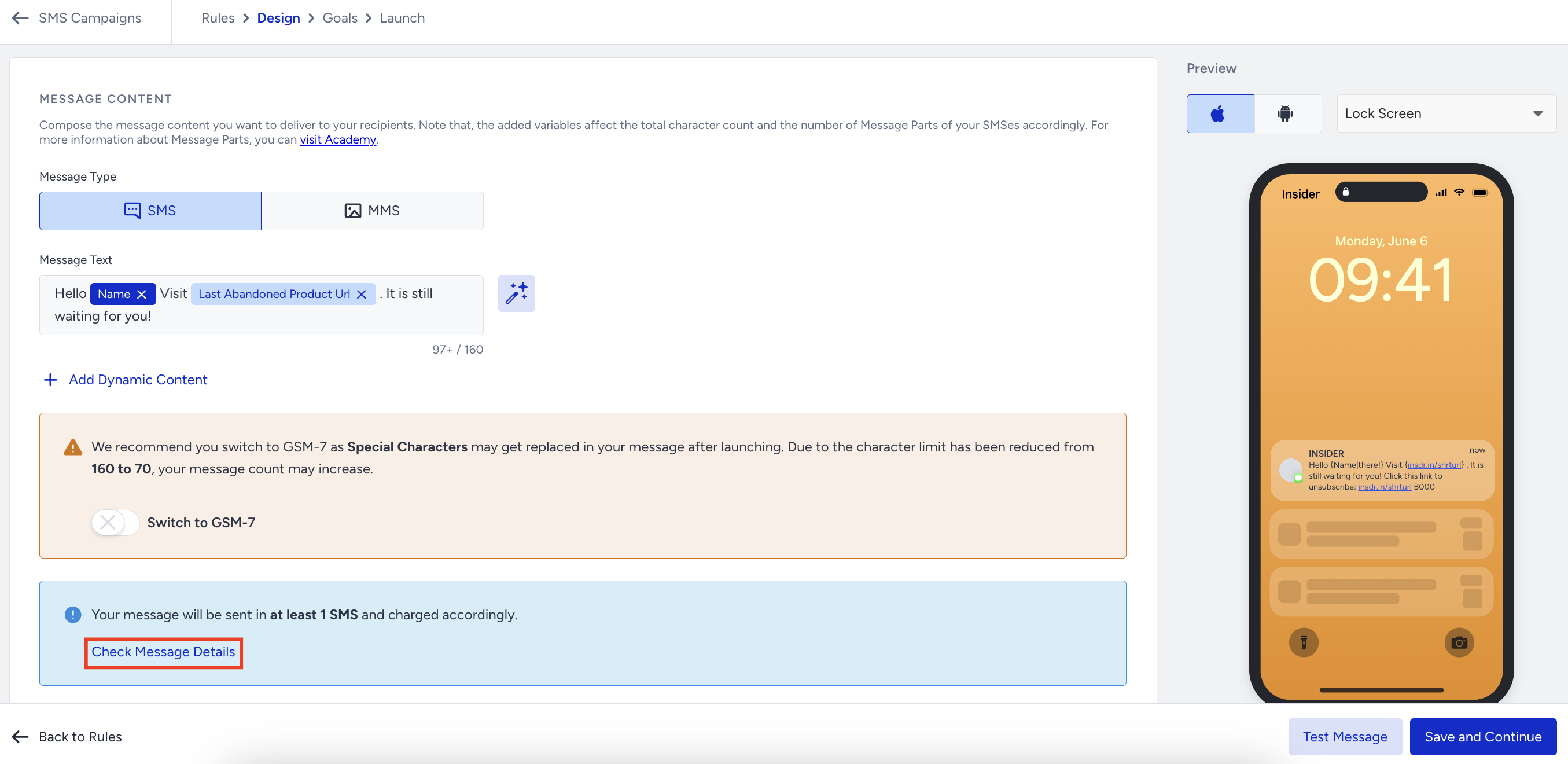 On the right side of the screen, the Message Details modal will appear right after.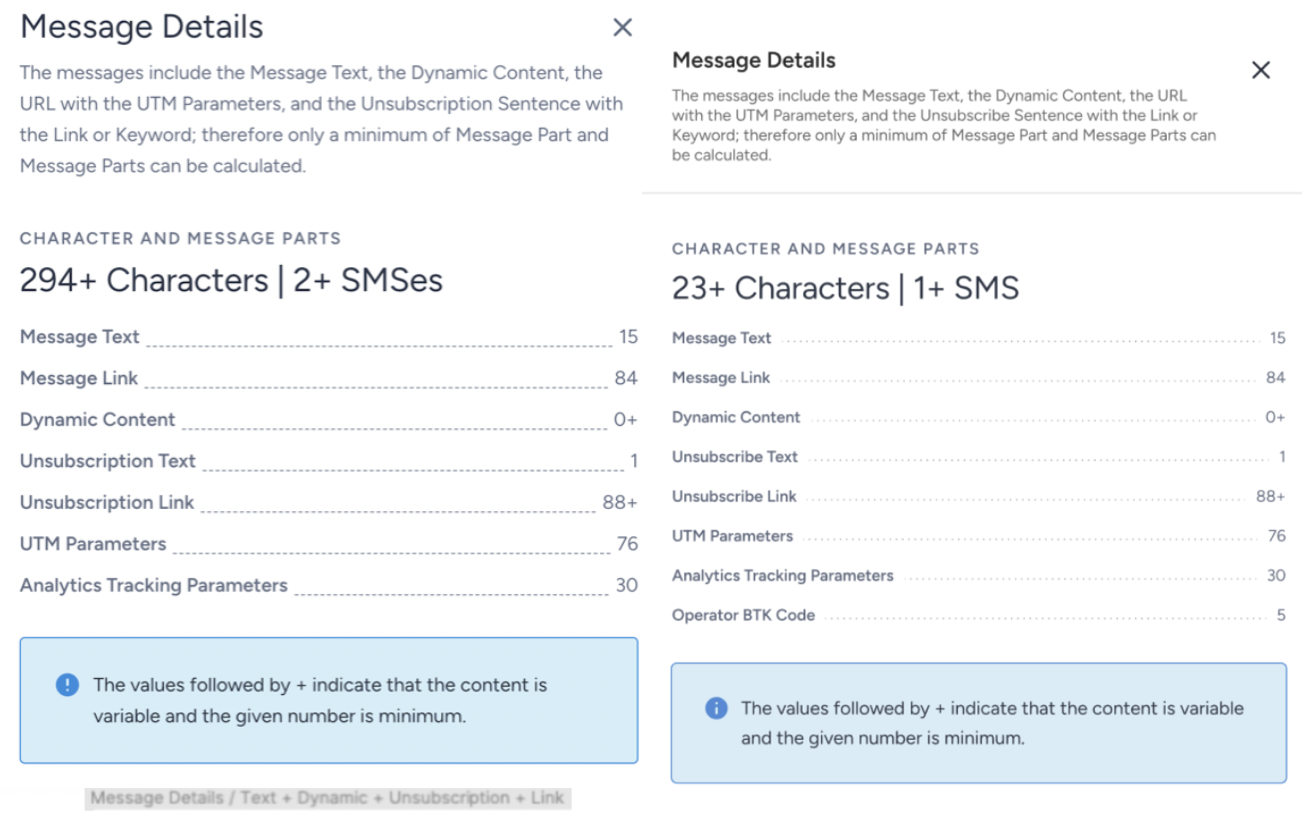
This modal will give detailed information about what the message includes and which factors can change the usage.
Message Text: The count of the characters in the message body, except for dynamic attributes and URLs. It also includes spaces and new lines.
Message Link: The count of characters in the links that you entered in the message body.
Dynamic Content: The count of the characters in the dynamic content’s fallback value. If there is no fallback, you will see "0+" as a count.
Unsubscription Text: The count of the characters in the unsubscription sentence, except for dynamic URLs. It also includes spaces and new lines.
Unsubscription Link: The count of the characters in the link that is in the unsubscribe sentence. If you are using the Unsubscription with Default Link method, you will see the +(plus) sign next to the count. It means that the unsubscribe link will be changed for each recipient.
UTM Parameters: If you enable UTM parameters, you will see an additional character count for each UTM parameter that is added at the end of the link.
Analytics Tracking Parameters: The count of characters that Insider One has added at the end of the link to track conversions and clicks.
Shortened Message Link: The count of characters in all shortened links except the link in the unsubscription sentence. If you check the Enable Short URLs checkbox, you will see this in the list instead of the Message Link. This count also includes the count of UTM Parameters and Analytics Tracking Parameters due to shortening all the links together.
Shortened Unsubscription Link: The count of characters in the link in the unsubscription sentence. If you check the Enable Short URLs checkbox, you will see this in the list instead of the Message Link.
Operator BTK Code: Due to legal obligations in Turkey, mobile operators automatically append a 5-character code (e.g., “BXXX”) with a space at the end of all SMS messages. This can affect message length.
The values followed by + (plus) indicate that the content is variable and the given number is a minimum.
Refer to the video below to understand how SMS Part works.
If this video does not load in your region, you can watch it on our YouTube Channel.