You cannot make any changes to External Platform Integrations without having either an Administrator or an Editor with PII access in InOne. Refer to User Roles for further information.
You can establish Insider One as a destination in Segment’s ecosystem and send data from your website and apps to Insider One. With this integration, you can enable Insider One to collect Segment’s Page and identify and Track specs.
Read more on the Insider One Destination on Segment.
According to Segment, a spec provides guidance on meaningful data to capture and the best format for it across all of Segment’s libraries and APIs. Read more on Segment Spec.
The Page, Identify, and Track specs answer the following questions, respectively: What web page are they on?, Who is the customer?, What are they doing? While the Identify spec collects user attributes and identifies users, the Page and Track specs collect user events.
This integration guide provides a complete framework for:
Use Cases
Sending your website and app data from Segment to Insider One helps you leverage a range of use cases as follows:
Triggering journeys
Personalizing user experience
Triggering Journeys
You can track user behavior (e.g., cart abandonment, purchase, etc.) to trigger journeys with Insider One’s Architect product, and target users across channels (e.g., website, web push, email, etc.).
Personalizing User Experience
You can leverage the comprehensive user information (e.g., name, age, viewed products, items added to cart, interest categories, etc.) passed from Segment to deliver personalized user experiences and messaging.
Configuring Insider One As a Destination
Follow these steps to configure Insider One as a destination in your Segment account.
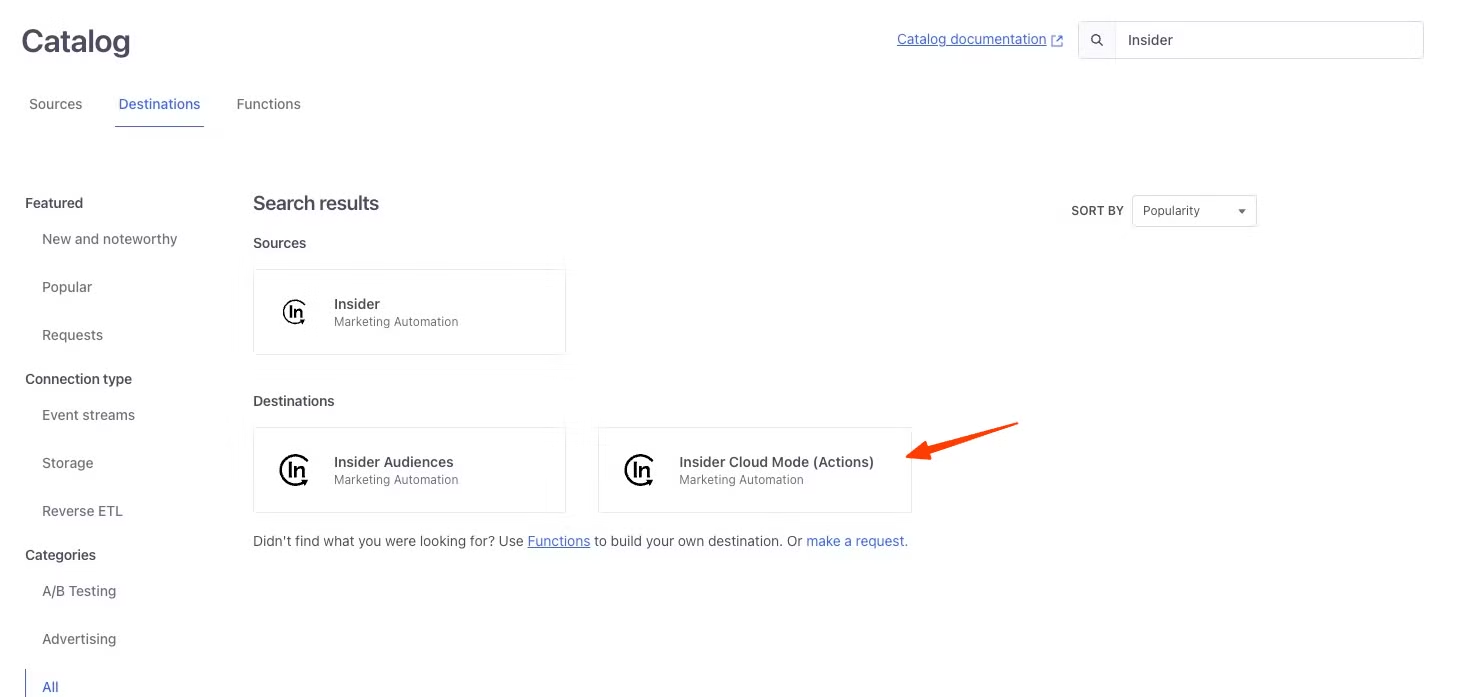
Log in to your Segment account to find Insider Cloud (Actions) in the destination catalog.
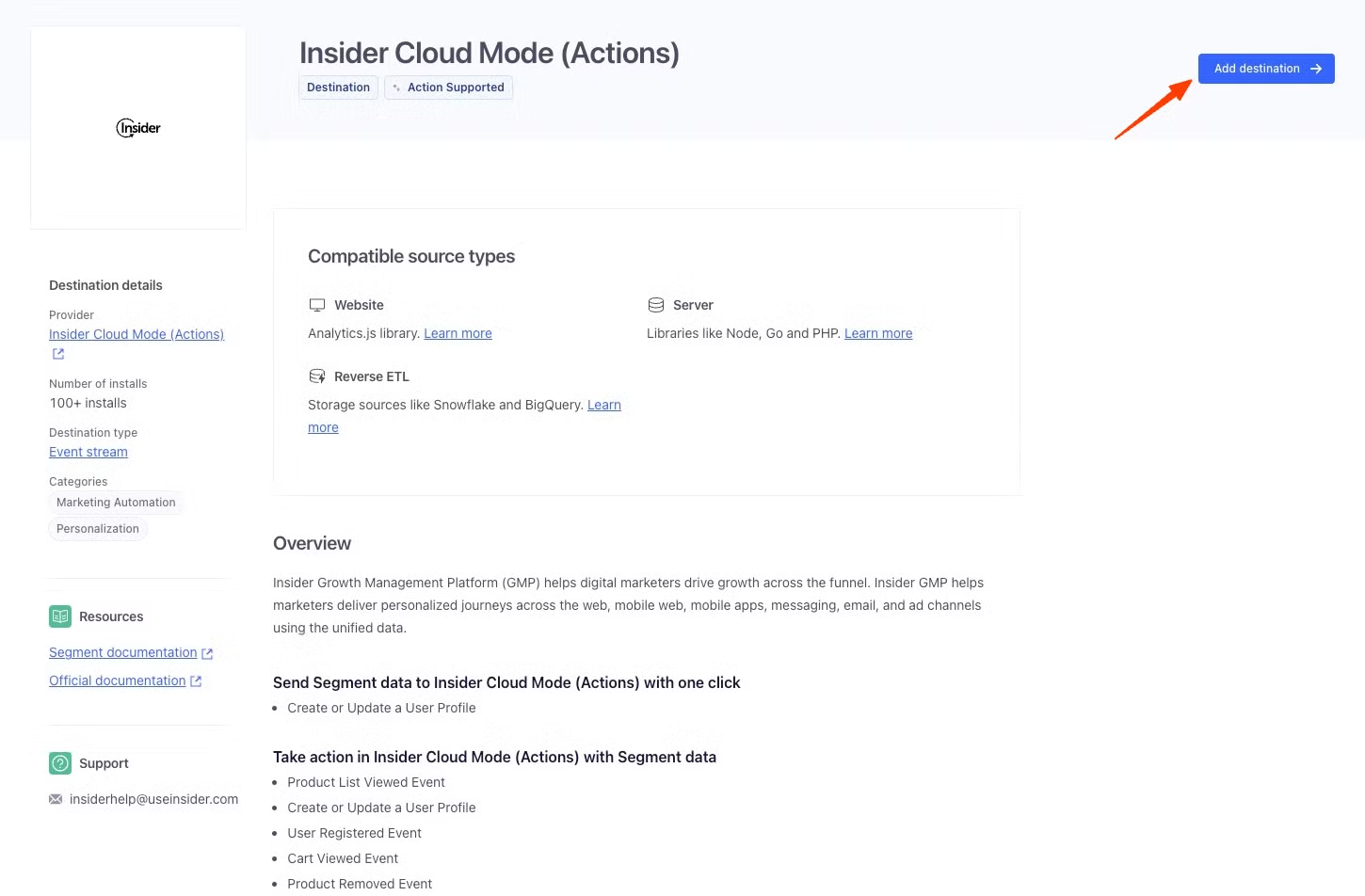
Click on the Add destination to add Insider Cloud Mode as the destination to Segment.
Select the data source you want to send data to Insider One.
Give a name to the destination and click the Create Destination button.
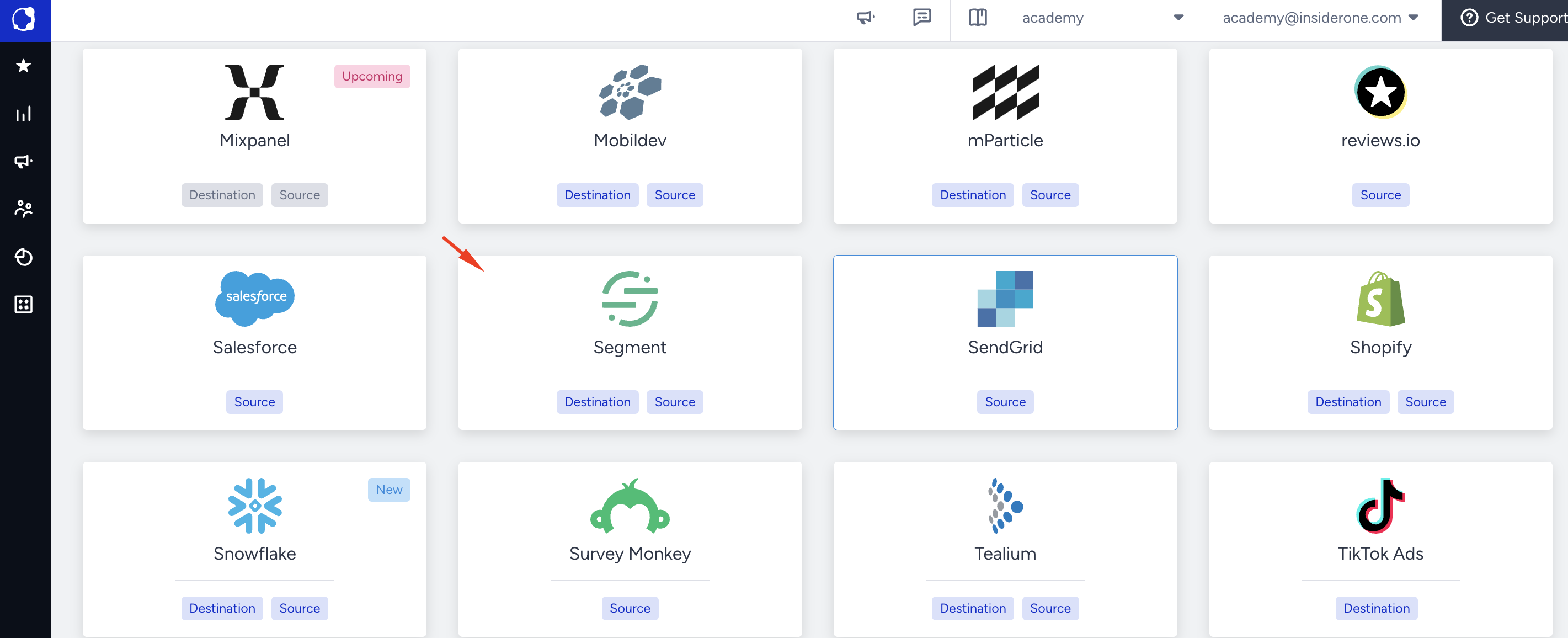
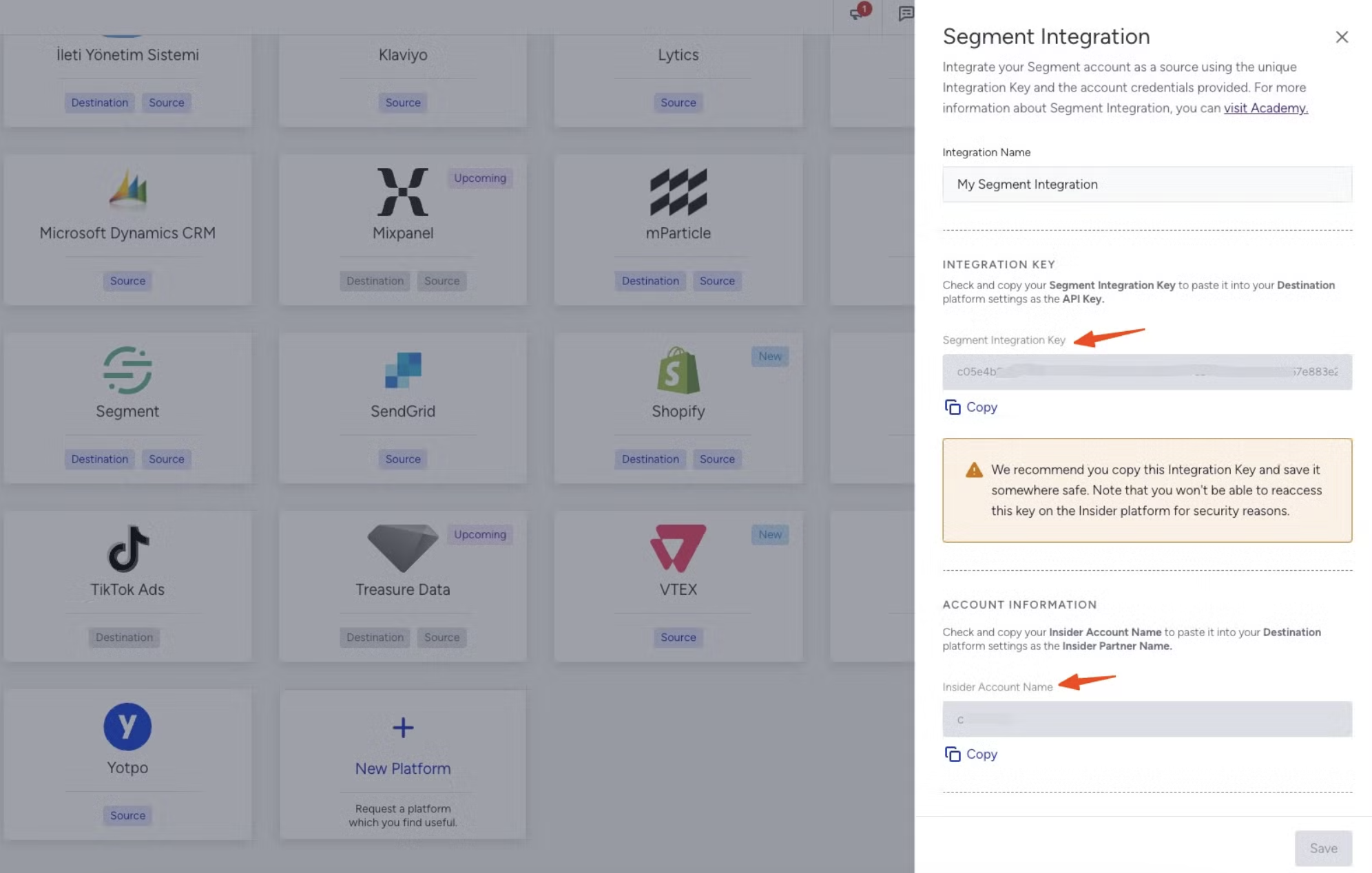
On the Insider One's InOne panel, navigate to Components > Integrations > External Integrations and select Segment.
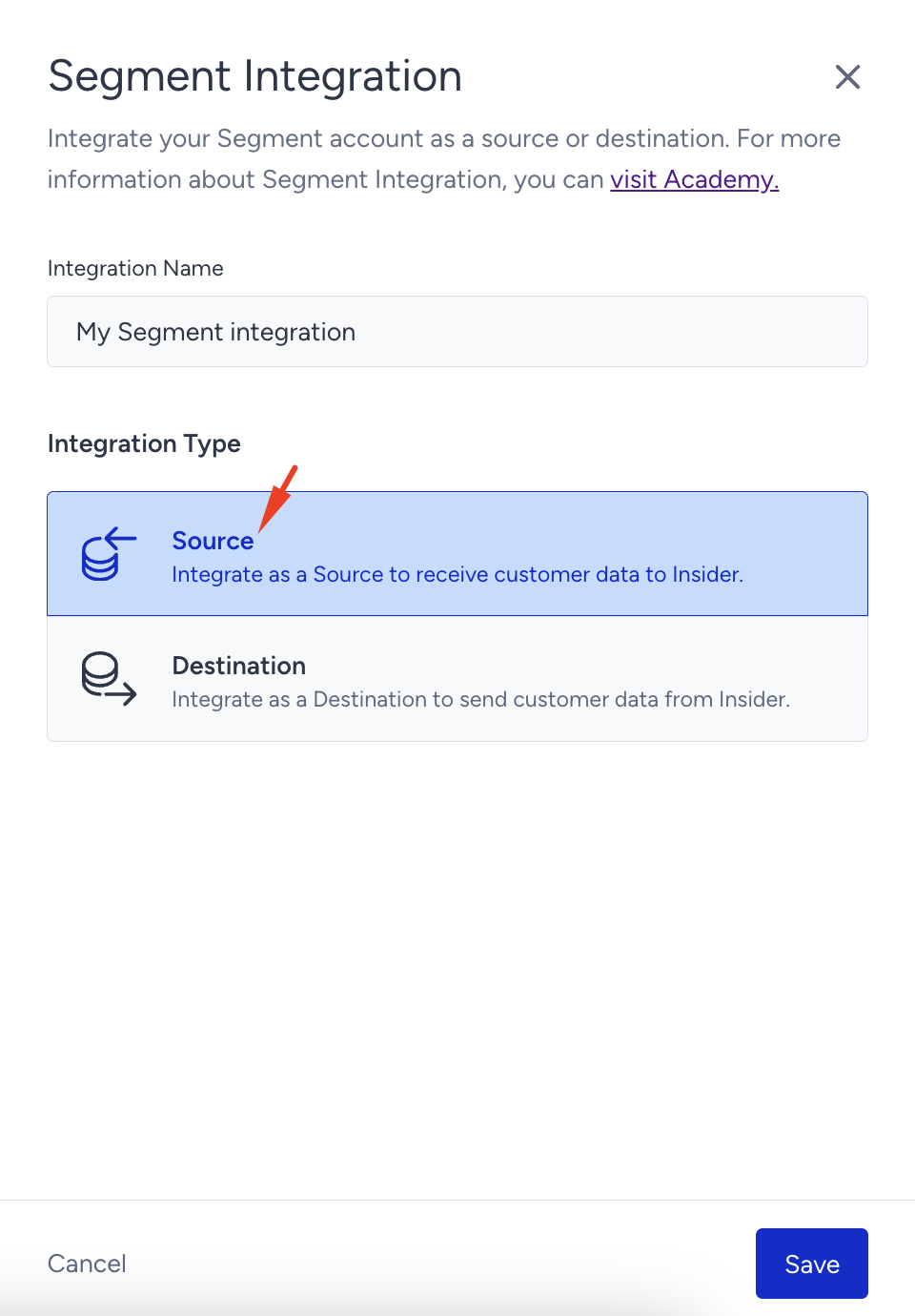
Enter the Integration Name, and select Source as the Integration Type.
Copy the Segment Integration Key and Insider One Account Name, and click the Save button.
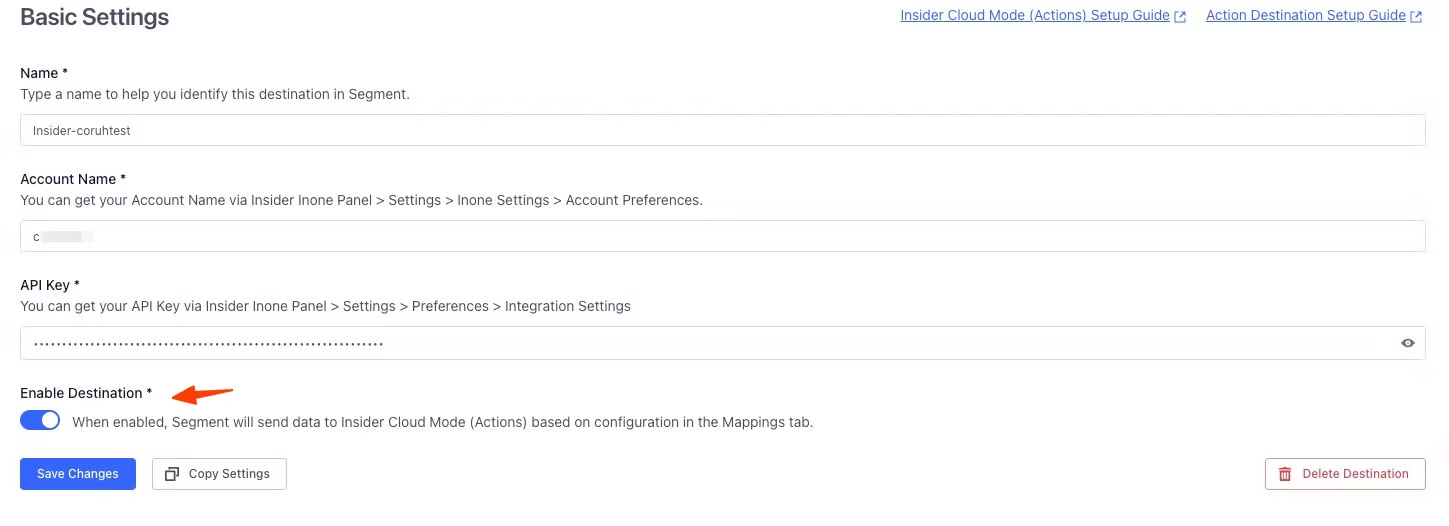
In the Segment Settings, enter your Segment Integration Key and Account Name, open the Enable Destination toggle, and click the Save Changes button.
Account Name must be your Insider One account name exactly as shown on the Insider One panel. Refer to Account Settings to learn how to access your account name.
Create or update a User Profile
Understanding the Identify Spec
Segment calls the Identify spec to collect user attributes. This spec connects users to their actions and records this information with a unique user ID and other optional user data (e.g., name, email, etc.). Insider One uses this spec to identify users and register their attributes.
Identification
Insider One uses the following Segment attributes and maps them in the database as displayed in the following table:
Segment attribute | Mapping on Insider One | Additional Information |
|---|---|---|
userID | uuid | |
(Optional) The “Treat Email as Identifier” field can be selected as an identifier. | ||
phone | phone number | (Optional) The “Treat Phone Number as Identifier” field can be selected as an identifier. |
anonymousId | segment_anonymous_Id | |
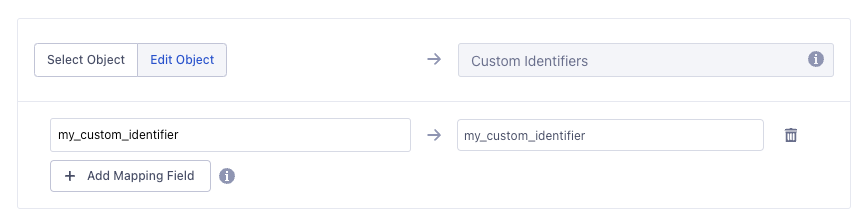
your custom attribute | your custom identifier | You can select your custom identifier and map it to your custom identifier set on the Identity Resolution Management page. |
If you want to send email or SMS campaigns to your users, you must pass the respective opt-in information of the user to Insider One as email opt-in and sms opt-in, along with GDPR opt-in, email, and phone number (in E.164 format). You can pass the email opt-in, SMS opt-in, WhatsApp opt-in, and GDPR opt-in information as Boolean.
Insider One also maps the mutually predefined attributes from Segment in the following mappings (can be changed while configuration):
Attribute on Segment | Mapping on Insider One |
|---|---|
Age | Age |
Birthday | Birthday |
firstName | Name |
lastName | Surname |
Gender | Gender |
address.country | Country |
address.city | City |
Any other attribute is registered as a custom attribute and is not mapped as a predefined (default) attribute on Insider One. You need to map custom attributes under other properties so that custom user attributes that you have on the Segment platform can be synced to Insider One's InOne platform. 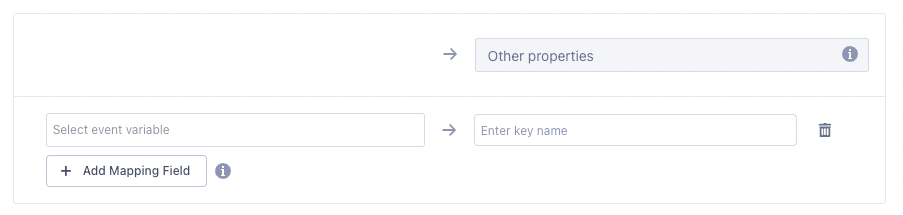
Read more on Segment’s Identify spec.
Event Actions for Insider One Cloud Destination
To easily map any events on your Segment platform to Insider One, click new mapping and use the actions modal to create an event mapping for the following events in the table.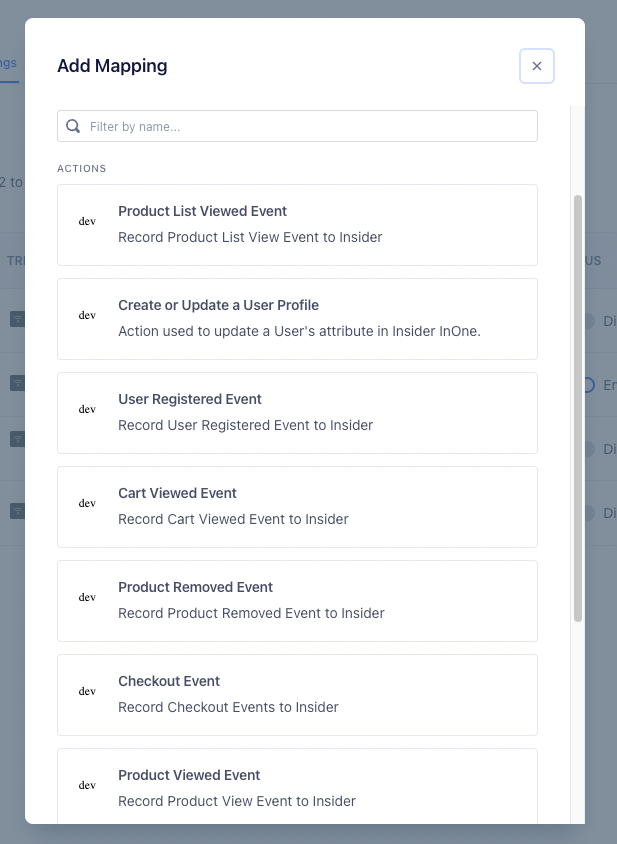
Event Name | Description |
|---|---|
Product List Viewed | Record Product List View Event to Insider One |
User Registered | Record User Registered Event to Insider One |
Cart Viewed | Record Cart Viewed Event to Insider One |
Product Removed | Record Product Removed Event to Insider One |
Checkout | Record Checkout Events to Insider One |
Product Viewed | Record Product View Event to Insider One |
Product Added | Record Product Added Event to Insider One |
Order Completed | Record Order Completed Event to Insider One |
Track Event | Record custom event to Insider One |
Identification
Insider One uses the following Segment attributes and maps them in the database, as displayed in the following table:
Segment attribute | Mapping on Insider One | Additional Information |
|---|---|---|
userID | uuid | |
(Optional) The “Treat Email as Identifier” field can be selected as an identifier. | ||
phone | phone number | (Optional) The “Treat Phone Number as Identifier” field can be selected as an identifier. |
anonymousId | segment_anonymous_Id | |
your custom attribute | your custom identifier | You can select your custom identifier and map it to your custom identifier set on the Identity Resolution Management page. |
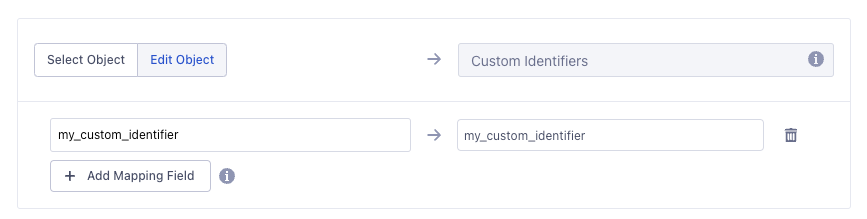
Identifier best practices: Either userId (mapped to UUID) or anonymousId must be present in every payload; a UUID is required if anonymousId is empty. Custom identifiers are only treated as identifiers if they are defined and enabled on the Identity Resolution Management page; otherwise, they are ignored. If an incoming payload contains multiple identifiers that already belong to different existing users in Insider, the request results in an identifier conflict, and the data may not be written. To avoid conflicts, keep the identifier set minimal and consistent across all your Segment sources (for example, always send the same userId for the same person), and avoid re-sending stale identifier combinations from warehouse rows.
Understanding the Track Spec
Segment calls the Track spec to record user actions along with their details. Insider One receives the Track spec from Segment and registers the events based on this spec’s data.
The name and other parameter attributes become the event name and event parameters of this event, respectively.
You can easily insert any custom event kept on your Segment Account but selecting Track Event and completing the mapping flow. After you launch the actions, data will start to flow to Insider One.
Segment uses the ecommerce events spec to provide a common ground for the mutual events.
Read more on Segment’s Track spec.
Event names: Event names must match the following format:
^[a-z0-9][a-z0-9_-]*$. Use only lowercase letters, numbers, underscores (_), and hyphens (-). Event names must start with a letter or a number. For detailed validation requirements, refer to the Event Integration page.Timestamps: Timestamps must be provided in RFC3339 format, such as
2026-06-11T10:30:00Z. Other formats, including Unix epoch timestamps, are not supported and result in aninvalid timestamperror.
Understanding the Ecommerce Spec
Insider One uses the Ecommerce spec to map the following events:
Event on Segment | Mapping on Insider One |
|---|---|
Product Viewed | Product Detail Page View |
Product List Viewed | Listing Page View |
Product Added | Add to Cart |
Cart Reviewed | Cart Page View |
Order Completed | Purchase (Confirmation Page View) |
Checkout Started or Checkout Step Viewed | Checkout Page Viewed |
Product Viewed/Product Detail Page View
Insider One receives the track event named Product Viewed in the Ecommerce spec and registers it as Product Detail Page View.
Insider One also maps the mutual properties as the following event parameters:
Property on Segment | Mapping on Insider One |
|---|---|
product_id | product ID |
category | taxonomy |
name | name (Product Name) |
price | unit price, unit sale price |
currency | currency |
image_url | product image url |
url | url |
You can find all available default fields within the framework of the actions; any other property within this event is registered as a custom event parameter on Insider One, which you can configure under the event parameters mapping section.
Product List Viewed/Listing Page View
Insider One receives the track event named Product List Viewed in the Ecommerce spec and registers this event as Listing Page View.
Insider One also registers the category as a taxonomy within the event parameters.
You can find all available default fields within the framework of the actions; any other property within this event is registered as a custom event parameter on Insider One, which you can configure under the event parameters mapping section.
Cart Viewed/Cart Page View
Insider One receives the track event named Cart Viewed in the Ecommerce spec, divides the products into events, and registers each product within the spec as a separate event by the Cart Page View event name. Within these events, Insider One also maps the properties into the event parameters as follows:
Parameter on Segment | Mapping on Insider One |
|---|---|
product_id | product ID |
product.category | taxonomy |
product.name | name (Product Name) |
product.price | unit price, unit sale price |
product.image_url | product image url |
product.url | url |
currency | currency |
cart_id | event group ID |
You can find all available default fields within the framework of the actions; any other property within this event is registered as a custom event parameter on Insider One, which you can configure under the event parameters mapping section.
Order Completed/Purchase
Insider One receives the track event named Order Completed in the Ecommerce spec, divides the products into events, and registers each product within the spec as a separate event by the Purchase (confirmation page view) event name. This tracks event parameters such as tax, affiliation, revenue, shipping, discount, coupon, currency, and checkout_id. Within these events, Insider One also maps the properties into the event parameters as follows:
Parameter on Segment | Mapping on Insider One |
|---|---|
product_id | product ID |
product.category | taxonomy |
product.name | name (Product Name) |
product.price | unit price, unit sale price |
product.image_url | product image url |
product.url | url |
currency | currency |
order_id | event group ID |
You can find all available default fields within the framework of the actions; any other property within this event is registered as a custom event parameter on Insider One, which you can configure under the event parameters mapping section.
Read more on Segment’s Ecommerce spec.
That's it! You can now send data from Segment to Insider One and start automating journeys and personalizations.