Before you start using the Live Activities API, your account must satisfy all of the conditions below. Any missing prerequisite will cause your API calls to fail with authorization or validation errors.
API key renewal
Your existing Insider API key is not automatically authorized for Live Activities endpoints. You need to renew your key to use Live Activities. After renewal, the key comes pre-authorized for Live Activities.
Action: Contact the Insider One team to request a key renewal.
All calls made with an unrenewed key are rejected with the following response:
HTTP/1.1 401 Unauthorized
(no body)
Product activation
To use the Live Activities product, it must be activated on your account for the target application (customer app).
Action: Contact the Insider One team for activation.
Behavior of Live Activities calls for an inactive application:
Endpoint class | Behavior |
|---|---|
Customer endpoints (/register, /start, /update, /end, /add-users, /remove-users) | 403 LIVE_ACTIVITY_DISABLED |
SDK endpoints (called automatically from the device) | Silently dropped |
AOO (Active orchestration) limit
Every Insider One account has a fixed AOO budget (default 20). Activating the Live Activities product consumes 1 unit from this budget.
This consumption is permanent. Even if you disable the product later, your AOO counter does not go back up. Disabling only stops the SDK token collection flow; the consumed budget is not refunded.
Check before activation:
Currently used AOO: 19/20
Will Live Activities be activated? → +1 → 20/20 (limit reached)
Contact the Insider One team for AOO management.
Post-activation verification: lap attribute
After the product becomes active, the custom attribute consumed from the AOO budget becomes visible in your Insider One account. To verify it:
1. Go to the Components > Attributes & Events in your Insider One account panel.
2. Filter by lap. If lap appears in the list as a custom attribute, AOO activation has succeeded.
This is not a functional requirement, but a post-activation verification step. If lap does not appear, contact the Insider One team.
.png)
APNS Certificate
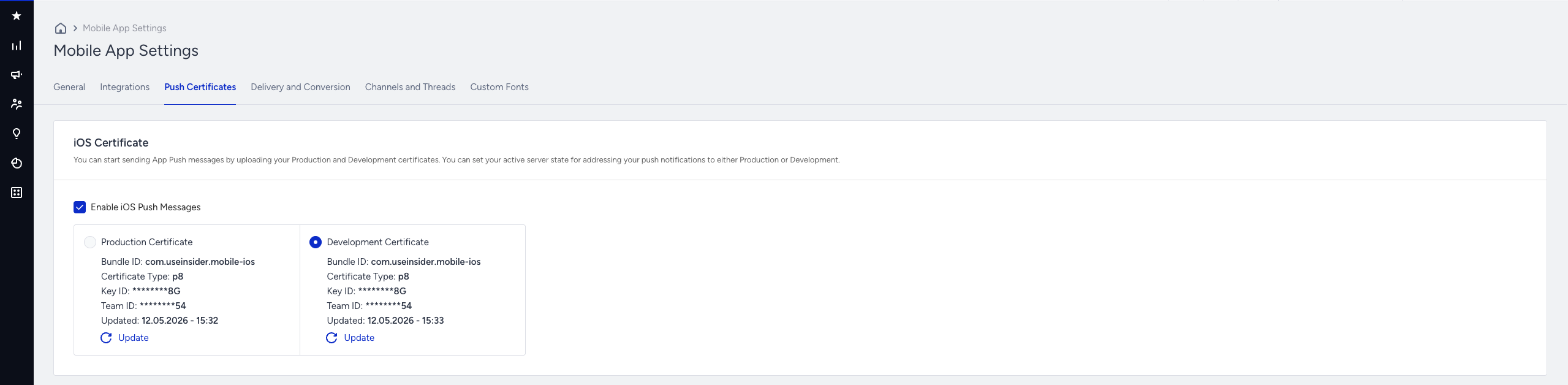
For Insider One to send push notifications to devices, the customer must have uploaded the .p8 APNS certificate to Insider One.
The accepted format is .p8 (Apple sign-in key).
Certificate upload
Upload your certificates following these instructions.
Select the correct environment for your build target and upload:
Development: Xcode local build / TestFlight Internal Testing (development scheme)
Production: App Store distribution / TestFlight External Testing / live users
A certificate uploaded under the wrong environment is rejected by Apple; pushes do not reach the device.
Required conditions
The .p8 certificate must be uploaded to Insider One.
iOS push must be enabled for the app.
If you are developing with Xcode (debug build), to see live activities on your test device, you must produce the build with an Apple development certificate. For Production / TestFlight External / App Store distributions, use the production certificate. In the wrong environment, Apple will not deliver push notifications to the device.
Certificates you upload to Insider One are not stored in plain form, they are kept securely with the necessary encryption applied on the server side. They are decrypted only at push send time for immediate use.
Missing/wrong certificate
Error | Cause |
|---|---|
412 APNS_CERT_MISSING | Certificate not uploaded or iOS push not enabled |
412 APNS_CERT_TYPE_UNSUPPORTED | Uploaded certificate is not .p8 (e.g. .p12) |
These errors can surface on all customer endpoints.
SDK integration and iOS version matrix
Integration of Insider One’s iOS SDK into your application is mandatory for Live Activities. The minimum iOS version depends on which flow you use:
Flow | Minimum iOS | Description |
|---|---|---|
Push-to-Start (API-driven) | 17.2+ | Customer calls /register → /start → /update* → /end. Insider One collects push-to-start tokens from devices and starts the activity from the server. |
SDK-First (device-started) | 16.1+ | The device application starts the Live Activities itself. The Insider One’s Mobile SDK collects the token; the customer can manage the activity via the API using /update and /end. |
What the SDK does in both flows:
Collects the required tokens at app launch or when an activity is started.
Synchronizes the new token to Insider One when Apple rotates it.
The customer does not code these operations; the SDK handles them automatically.
Validity period in the SDK-first flow
The validity period of a device-collected live activities on Insider One's side is 1 week. If /end is not called within this period, Insider One does not retain additional data for that activity.
Devices whose token collection has not yet been completed by the SDK are seen as ineligible devices by customer endpoints and are filtered out. On newly installed applications, this may take a few seconds.
In-App Live Activities token collection setting
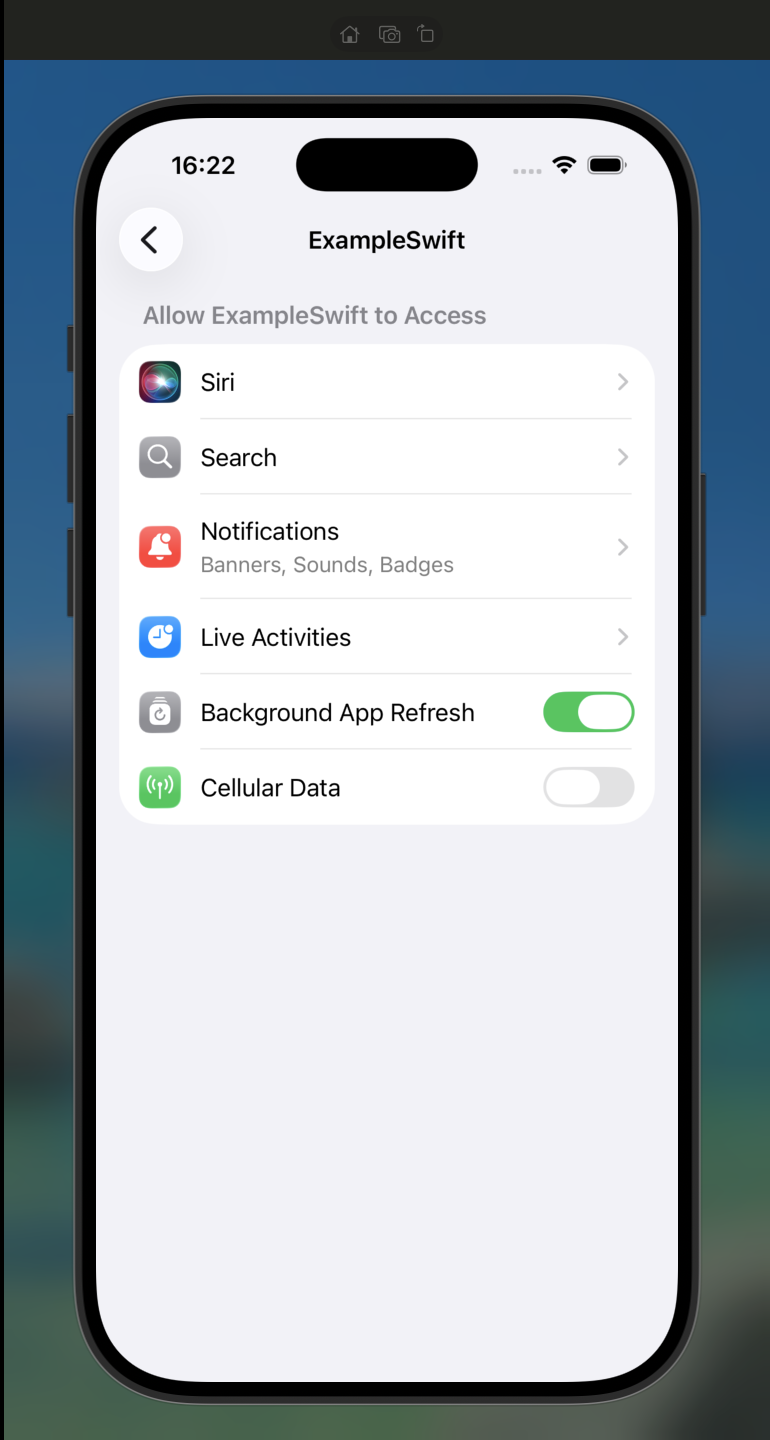
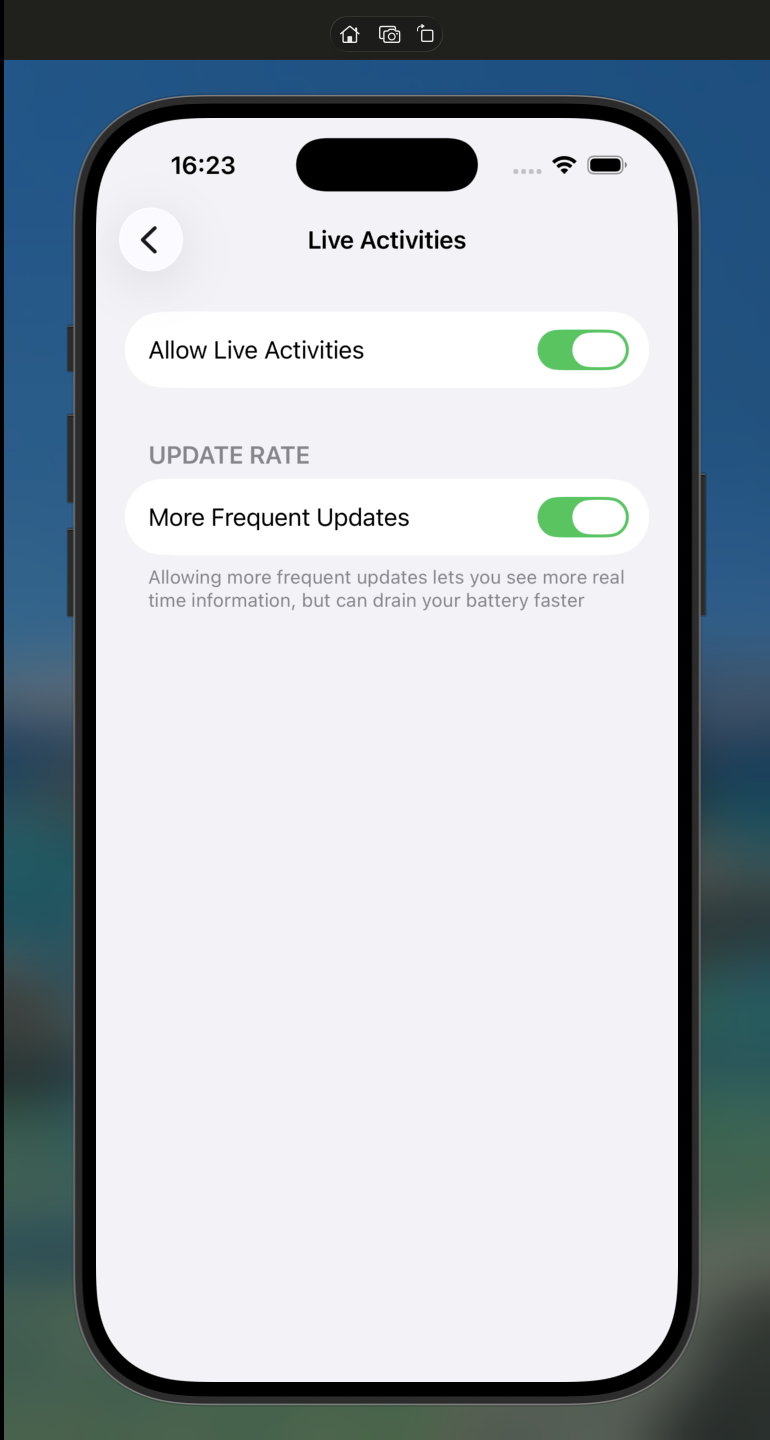
For the Insider One’s Mobile SDK to collect tokens from the device, the Live Activities feature must be enabled in your application. In the SDK demo app, this is done as follows. In your own application, you would enable the feature with a similar configuration (e.g., an in-app settings screen or directly via an SDK init parameter):
This setting opens Live Activities at the user level in the SDK demo app; in a real integration, the customer may surface a toggle to the user based on their application's needs, or enable the feature directly. When the toggle is off, the SDK does not collect tokens; customer endpoints do not consider these devices eligible.
activity_type matching
The activity_type value you send in API calls must be exactly the same (case-sensitive) as the ActivityAttributes Swift class name defined in your iOS application.
iOS example
struct OrderTrackingAttributes: ActivityAttributes {
    public struct ContentState: Codable, Hashable {
        var status: String
        var eta: Date
    }
    var orderId: String
}
In the API call
{
  "activity_type": "OrderTrackingAttributes",
  ...
}
If the type name does not match, Apple fails silently on the device. The push is sent but the Live Activities is not rendered. Insider One cannot detect this mismatch.
Prerequisite checklist
Before going to production, verify that all of the following items are completed:
API key has been renewed (authorized for Live Activities).
The Live Activities product is active on your account.
You had at least 1 unit of free AOO budget (activation completed).
.p8 APNS certificate has been uploaded to Insider One, iOS push has been enabled.
The iOS application has integrated Insider One’s Mobile SDK (17.2+ for Push-to-Start / 16.1+ for SDK-First).
activity_type values match the iOS ActivityAttributes class names exactly.
OAuth 2.0 credential
Create the credential in InOne Settings > Integration Settings > OAuth 2.0 Credentials, then use it to retrieve bearer tokens from POST https://gw.useinsider.com/auth/token. For full instructions, refer to OAuth 2.0 Credentials. The client secret is shown only once; copy it before closing the prompt.
Scopes
One scope authorizes exactly one endpoint. Grant only what your backend calls.
Scope | Authorizes |
|---|---|
mob-la-register | POST /api/mob/v2/live-activity/register |
mob-la-add-users | POST /api/mob/v2/live-activity/add-users |
mob-la-remove-users | POST /api/mob/v2/live-activity/remove-users |
mob-la-start | POST /api/mob/v2/live-activity/start |
mob-la-update | POST /api/mob/v2/live-activity/update |
mob-la-end | POST /api/mob/v2/live-activity/end |
A token that lacks the scope of the endpoint it calls is rejected with 403, not 401. The token is valid; it simply carries no authority for that action.
IP restriction
Authorize your backend's public egress addresses. List both IPv4 and IPv6 ranges. If your infrastructure can reach Insider One over IPv6 and only IPv4 is allowlisted, those requests are rejected as IP-restricted, which looks identical to a bad credential.
Legacy API key (v1 path only)
The API key applies only to https://live-activity.api.useinsider.com/api/v1/live-activity/…. It plays no role on the gateway path: do not send X-Api-Key to gw.useinsider.com, and do not send a bearer token to the legacy host.