In this step, you review the full SMS setup flow before you begin.
The page explains every step of the registration process and shows use case examples. Click a use case to open it.
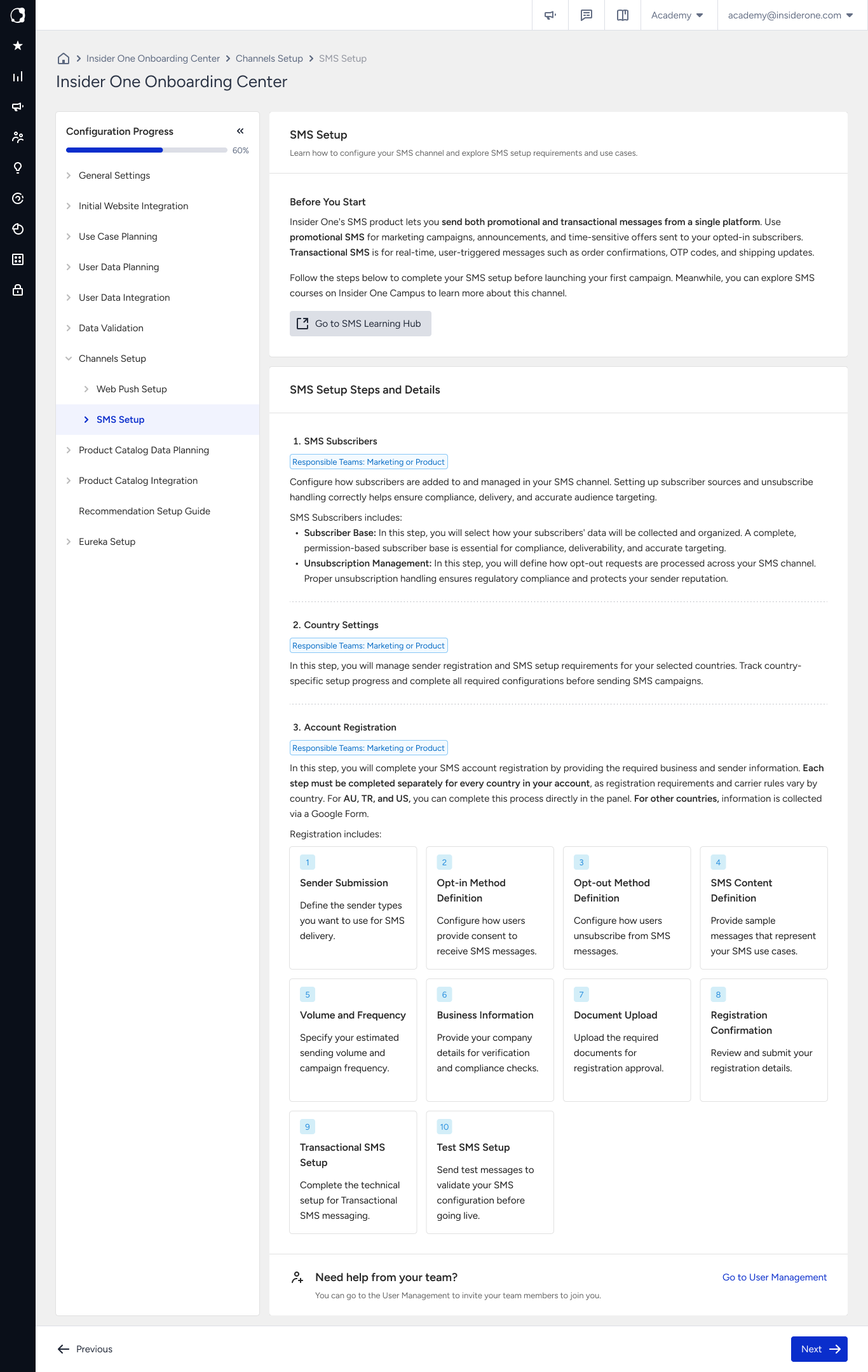
After you complete the onboarding process, each country you set up has a registered and tested SMS sender that is ready to use. SMS becomes available as a channel for your campaigns and Architect journeys, and the country status on Country Settings changes to Completed.
Who does what
SMS registration involves you, Insider One, and the mobile operator or provider. Each party has different responsibilities throughout the registration process.
Party | What they do | What this means for you |
|---|---|---|
You | Provide your senders, consent methods, sample content, business details, and required documents. | Preparing and providing the required information on time helps the registration process move forward without unnecessary delays. |
Insider One | Reviews your submission, sets up your senders and provider credentials, and tracks your registration status. | You receive an email notification at each milestone. |
Mobile operator or provider | Approves your sender and registers it on the network. | Review times depend on the mobile operator or provider and are outside Insider One's control. |
How long it takes
Completing the wizard typically takes 30 to 60 minutes when you have the required information and documents ready. The overall onboarding duration also depends on document preparation and the provider review and sender registration process.
Phase | Typical duration | Responsible party |
|---|---|---|
Filling in the registration steps | 30 to 60 minutes | You, if your documents are ready |
Collecting your documents | 1 week | You and your legal team |
Provider review and sender registration | 2 to 12 weeks | The provider, per sender |
Test and go live | Same day | You |
Why can sender registration take 2 to 12 weeks? Each sender is registered separately with the mobile operators of the respective country, and each operator performs its own compliance review. For example, adding three senders requires three parallel reviews. The registration duration depends on the country and sender type, and Insider One cannot shorten the operator review period.
What to prepare before you continue
The required documents depend on the country you are registering. You can find the country-specific requirements on the Document Upload page. To help avoid delays later in the registration process, you can start collecting these documents while completing the other onboarding steps.
Regardless of the country, prepare the following information:
The sender name or number you want to use for each message type
How users opt in and the exact confirmation message they receive
How users opt out and the exact wording you append to your messages
A realistic sample of the messages you plan to send
Your expected sending volume and peak periods
Who should complete the wizard? The person responsible for your CRM or marketing operations typically completes the wizard. You might also need information from your legal and finance teams, and from a developer if your setup includes transactional messaging. Involving the relevant teams before starting the setup can help you complete the onboarding process without interruptions.
Which flow applies to your country
All countries follow the same SMS registration process, but where you provide the required information depends on the country.
Flow | Countries | What you see |
|---|---|---|
In-product registration | Türkiye, the United States, Australia | Each registration step appears as a separate page in the Insider One Onboarding Center. |
Form-based registration | All other countries | The individual registration pages do not appear. You complete the registration form provided by Insider One, while the Insider One Onboarding Center displays and tracks your registration status. |
Both flows collect the same registration information in the same order. They also use the same country statuses, allowing you to track the progress of your application from the Insider One Onboarding Center.
Good to know before you start
Your progress is saved. You can leave the wizard at any point and continue later from where you stopped. Progress is stored separately for each country. Auto-save is not available on every page. Check the footer of each page to see whether auto-save is active.
Each country is registered separately. When you add another country, you complete the registration steps again for that country. Your consent type is the only setting that applies across your entire panel.
Registration becomes read-only after approval. You can edit your registration until you submit it on the Registration Confirmation page, including making the required changes after a rejection. After a country is approved, you can no longer edit its registration or add senders. Make sure your complete sender list is included before you submit the registration.
Set your consent type first. Configure Single Opt-in or Double Opt-in in General Settings before completing the SMS onboarding wizard. The selected consent type applies to every country on your panel and determines which opt-in methods you can configure later. If you select Double Opt-in, activation can take up to 3 working days.
Next step
Click Next to open SMS Country Settings, where you can view your countries and start the registration process for your first country.
If you have not selected your consent type yet, configure it before continuing. Refer to SMS Consent Settings for more information.