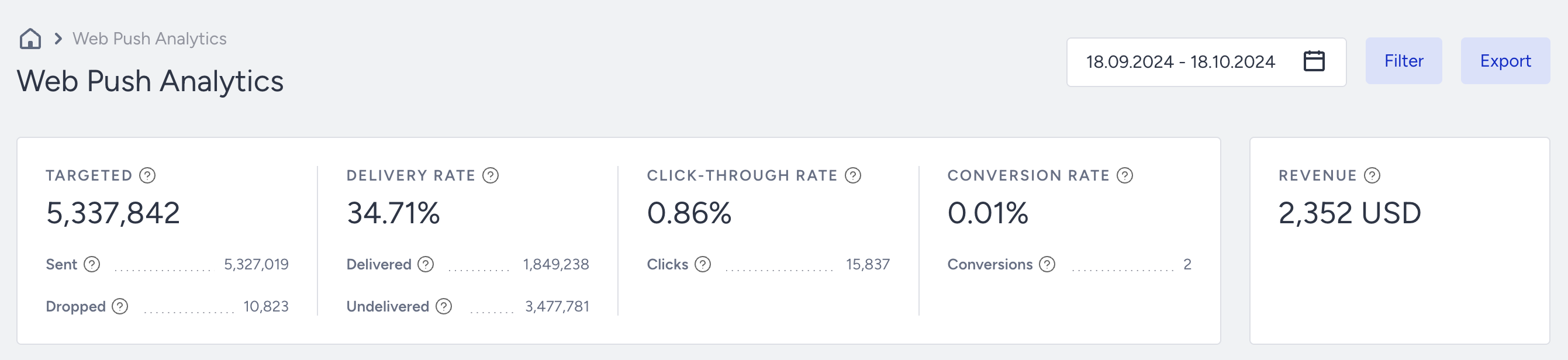
Use this endpoint to retrieve aggregated top-level metrics for your Web Push campaigns over a specified date range. The response returns data equivalent to the Key Metrics section of the Web Push Analytics page, broken down by campaign type, drop reasons, and delivery status.
Endpoint and Headers
POST https://web-push.api.useinsider.com/v1/statistics/top-metrics
Visit our Postman collection to test this request.
Header | Sample Value | Description |
|---|---|---|
Authorization | Bearer 1a2b3c4d5e6f | This key is required to authorize your request. Refer to API Authentication Tokens to generate your token. |
Content-Type | application/json | This header specifies the media type of the resource. |
Body Parameters
Parameter | Description | Data Type | Required |
|---|---|---|---|
partner_id | This is your partner identification number, available from Inone Settings > Account Settings. | String | Yes |
start_date | Start of the analytics date range. Format: YYYY-MM-DD. Cannot be earlier than your account creation date. If an invalid date is provided, the API returns a 400 error. | String | Yes |
end_date | End of the analytics date range. Format: YYYY-MM-DD. Must be equal to or later than start_date. | String | Yes |
Sample Request
The sample below displays a request to fetch top metrics statistics for Web Push campaigns within a specific date range.
Before sending the request, make sure:
To replace the authorization value with your API key.
To replace the sample values in partner_id, start_date, and end_date with your values in the required data type.
curl --location --request POST 'https://web-push.api.useinsider.com/v1/statistics/top-metrics' \
--header 'Content-Type: application/json' \
--header 'Authorization: Bearer 1a2b3c4d5e6f' \
--data '{
 "partner_id": "YOURPARTNERID",
 "start_date" : "2023-06-01",
 "end_date" : "2023-06-08"
}'
Sample Responses
200 OK
{
    "success": true,
    "overview": {
        "total": {
            "targeted": "470,621,008",
            "deliveryRate": "0.00%",
            "ctr": "0.63%",
            "conversionRate": "0.00%"
        },
        "targeted": {
            "sent": "468,743,394",
            "dropped": "1,877,614"
        },
        "deliveryRate": {
            "delivered": "6,221",
            "undelivered": "468,737,173"
        },
        "ctr": {
            "clicks": "39"
        },
        "conversionRate": {
            "conversions": "0"
        },
        "revenue": "0 TRY"
    },
    "performance": [
        {
            "label": "Single",
            "campaignCount": 2172,
            "deliveryRate": "0.00",
            "ctr": "0.47",
            "conversionRate": "0.00",
            "revenue": "0"
        },
        {
            "label": "Trigger",
            "campaignCount": 3,
            "deliveryRate": "20.00",
            "ctr": "0.00",
            "conversionRate": "0.00",
            "revenue": "0"
        },
        {
            "label": "Cart Reminder",
            "campaignCount": 1,
            "deliveryRate": "0.00",
            "ctr": "0.00",
            "conversionRate": "0.00",
            "revenue": "0"
        },
        {
            "label": "Back In Stock",
            "campaignCount": 5,
            "deliveryRate": "0.00",
            "ctr": "0.00",
            "conversionRate": "0.00",
            "revenue": "0"
        },
        {
            "label": "Price Drop",
            "campaignCount": 1,
            "deliveryRate": "200.00",
            "ctr": "16.67",
            "conversionRate": "0.00",
            "revenue": "0"
        },
        {
            "label": "Single API",
            "campaignCount": 14,
            "deliveryRate": "0.00",
            "ctr": "11.69",
            "conversionRate": "0.00",
            "revenue": "0"
        }
    ],
    "dropped": [
        {
            "label": "frequencyCapped",
            "count": "0",
            "percentage": "0.00"
        },
        {
            "label": "silentHours",
            "count": "0",
            "percentage": "0.00"
        },
        {
            "label": "unsubscriptions",
            "count": "63",
            "percentage": "3.51"
        },
        {
            "label": "serviceProviderErrors",
            "count": "1,734",
            "percentage": "96.49"
        },
        {
            "label": "internalErrors",
            "count": "0",
            "percentage": "0.00"
        }
    ],
    "undelivered": [
        {
            "label": "offlineRecipients",
            "count": "468,737,173",
            "percentage": "100.00"
        },
        {
            "label": "other",
            "count": "0",
            "percentage": "0.00"
        }
    ]
}
You can refer to Web Push Analytics Key Metrics for further details.
401 Unauthorized
Returned when the Authorization header is missing, malformed, or contains an invalid token.
{
"message": "Unauthorized"
}
424 Failed Dependency
Returned when an upstream service dependency fails. Retry the request. If the error persists, contact the Insider One team.
{
  "message": "SERVICE:-"
}
Error Codes
400 Bad Request: Returned when a required parameter is missing, an invalid date format is used, or start_date is later than end_date.
401 Unauthorized Request
424 Failed Dependency
429 Request limit exceeded: Returned when the request rate exceeds 30 requests per minute. Wait before retrying. See API Rate Limits for details on limits and how to request a higher threshold.
Limitations
All functions must be executed with an HTTPS POST request.
The API Key should be provided as the authorization key in the request header. If the key is incorrect, the operation will not be executed, and an authorization error will return in the response.
You can make 30 requests per minute in aggregate.
The default limit shown here is a standard baseline. If your use case requires higher capacity, feel free to reach out to the Insider One team. We can adjust it to fit your needs.