Frequency Capping Settings help control the number of Web Push notifications users receive within a specified time frame, ensuring a balanced and user-friendly engagement experience.
The settings you configured under Channel Frequency Capping (CFC) may be the reason why a user receives no Web Push notifications from your brand. If Channel Frequency Capping (CFC) is enabled and the limit is set to 3, your users can receive at most 3 Web Pushes per day. In this case, your users will not receive the Web Push when you want to send the fourth on the same day. Therefore, we highly recommend checking CFC settings if you suspect your users are not receiving Web Push notifications from your brand, as this may affect your analytics.
With a user-based counter, each notification the user receives increments the Campaign and Channel Frequency Capping counts by one if capping settings are configured. Once a user reaches the set limit, they will be restricted from receiving further notifications until the counter resets in the next cycle (daily, weekly, etc., depending on configuration).
On the Web Push, two levels of Frequency Capping are available:
Channel Frequency Capping
You can reach Channel Frequency Capping through Settings > Inone Settings > Advanced Settings. Notifications sent through Architect journeys are also included in the user's frequency cap.
If the Multiple Frequency Capping feature is available in your current plan, you can set the Channel Frequency Capping daily and weekly. Daily and weekly options are available, and you can use them together.
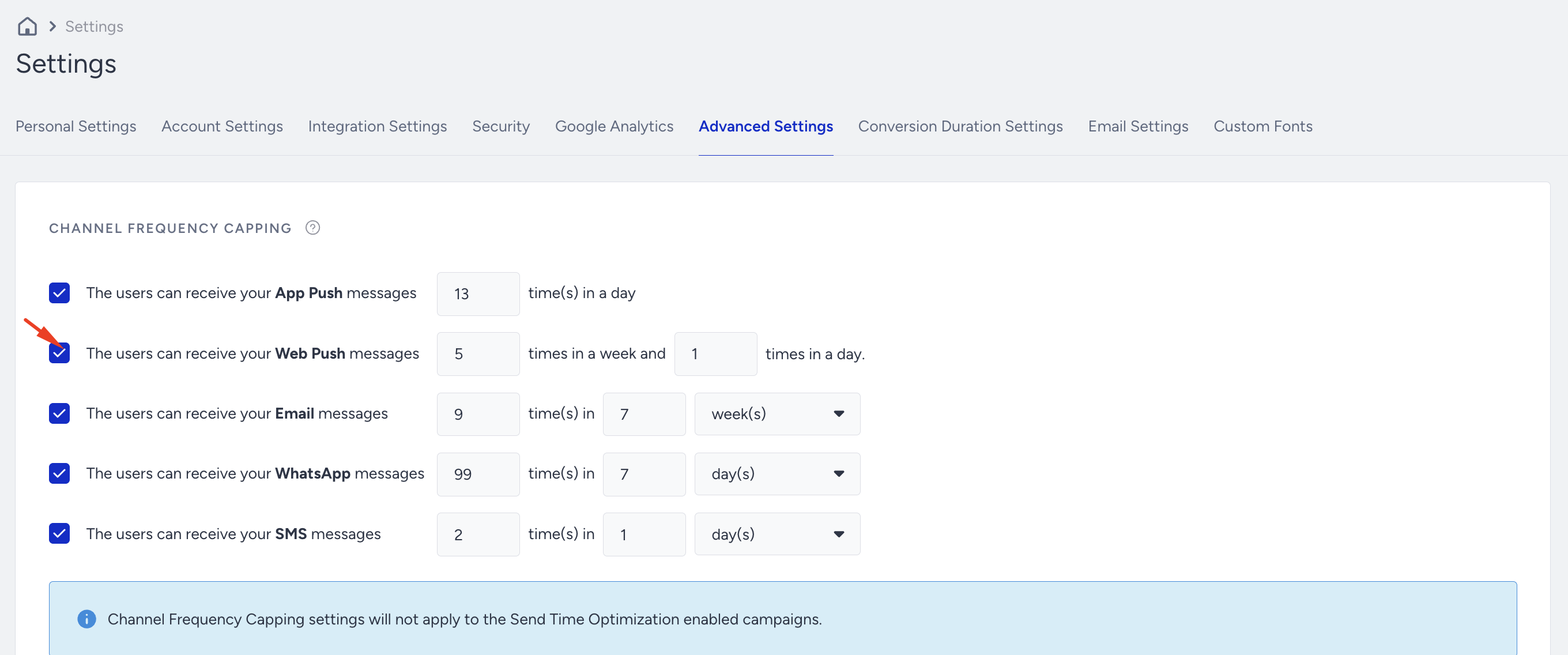
Daily Channel Frequency Capping Example
Assume that you set the daily channel frequency cap to 2. Push Notification A is sent at 3:00 pm, followed by Push Notification B at 6:00 pm on the same day. If a user receives both notifications, they will reach their daily limit. Consequently, they will be eligible to receive the next notification 24 hours after the first Web Push notification, which will be sent the following day at 3:01 pm.
Scenario | Campaign Launch Time | Daily Frequency Cap Status |
|---|---|---|
Push Notification A | 15:00 | push received (1/2) |
Push Notification B | 18:00 | push received (2/2) – daily limit reached |
Push Notification C | 19:00 | The user will not receive this notification since the capping is reached. |
Push Notification D | Next day at 15:01 | push received (2/2) |
Weekly Channel Frequency Capping Example
Assume that you set the weekly channel frequency cap to 2. Push Notification A is sent at 5:00 pm on Monday, and Push Notification B follows at 7:00 pm on Tuesday. If a user receives both notifications, they will hit their weekly limit. As a result, they will only be eligible to receive the next notification after 168 hours have passed since the first Web Push notification, which would be the following Monday at 5:01 pm.
Scenario | Campaign Launch Time | Weekly Frequency Cap Status |
|---|---|---|
Push Notification A | Monday 17:00 | push received (1/2) |
Push Notification B | Tuesday 19:00 | push received (2/2) – weekly limit reached |
Push Notification C | Wednesday 18:00 | The user will not receive this notification since the capping is reached. |
Push Notification D | Next Monday 17:01 | push received (2/2) |
Daily and Weekly Frequency Capping Example
Assume you set the daily frequency cap to 2 and the weekly frequency cap to 3. Push Notification A is sent at 3:00 pm on Monday, followed by Push Notification B at 6:00 pm on the same day. If a user receives both notifications, they will reach their daily limit. As a result, they will not receive Push Notification C sent at 7:00 pm on the same day, as the daily cap has been reached.
On Tuesday, Push Notification D is sent at 4:00 pm. The user will receive this notification, but will hit the weekly limit as they have already received three notifications (A, B, and D) by then. Therefore, they will not be eligible to receive Push Notification E sent at 8:00 pm on Tuesday, as the weekly frequency cap has been reached. The user will be eligible to receive notifications again on Monday at 3:01 pm.
Scenario | Campaign Launch Time | Daily Frequency Cap Status | Weekly Frequency Cap Status |
|---|---|---|---|
Push Notification A | Monday 15:00 | push received (1/2) | push received (1/3) |
Push Notification B | Monday 18:00 | push received (2/2) – daily limit reached | push received (2/3) |
Push Notification C | Monday 19:00 | The user will not receive this notification since the daily capping has been reached. | - |
Push Notification D | Tuesday 16:00 | push received (2/2) – daily limit reached | push received (3/3) – weekly limit reached. |
Push Notification E | Tuesday 20:00 | push received (1/2) | The user will not receive this notification because the weekly frequency capping has been reached. |
Push Notification F | Next Monday 15:01 | push received (1/2) | push received (1/3) |
Campaign Frequency Capping
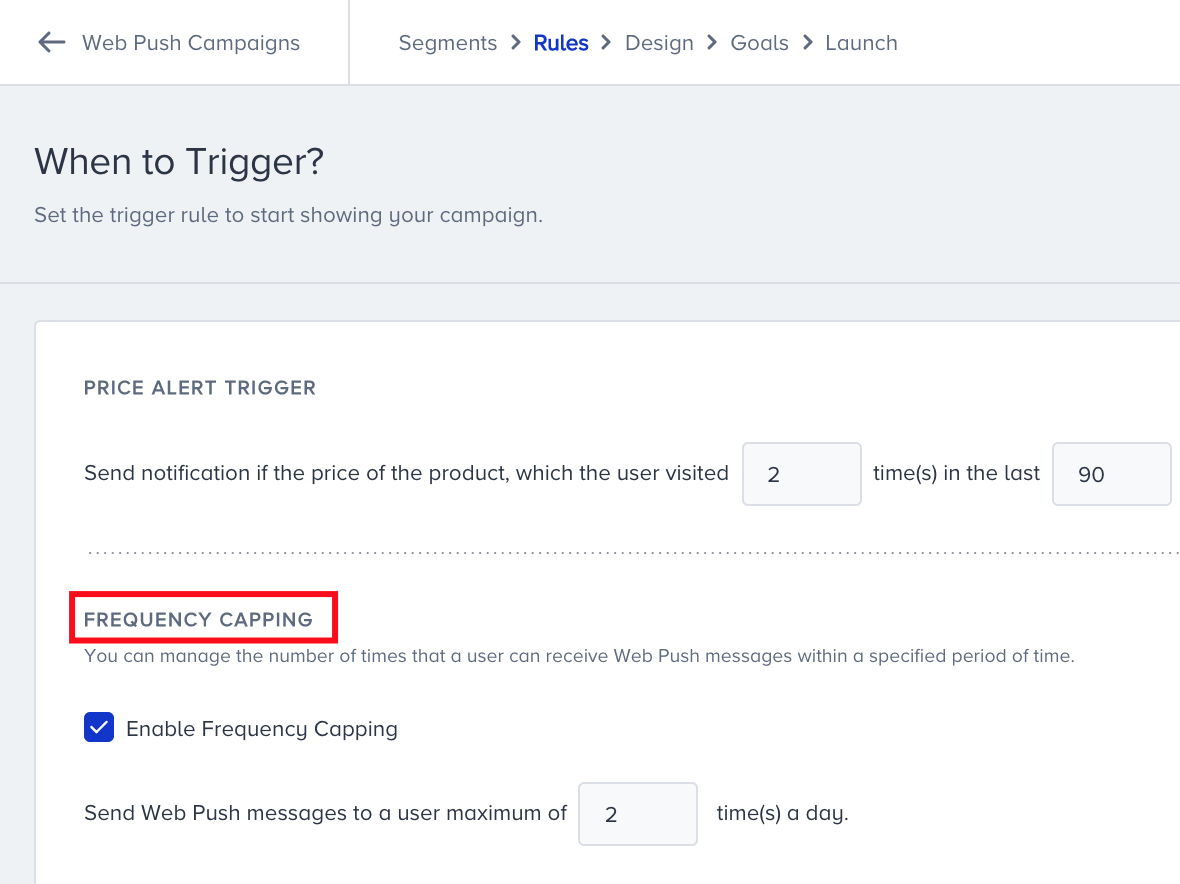
Campaign Frequency Capping is also available in the Rules step for Cart Reminder, Back in Stock, and Price Drop push campaigns. It limits the daily number of notifications a user can receive from that specific campaign.
If you enable the “bypass” option at the Launch step of your Web Push campaign, users who have reached the channel frequency cap will still receive that campaign, effectively bypassing any capping restrictions. This option provides flexibility for high-priority campaigns, ensuring they get the entire user base regardless of frequency limits.
Web Push notifications from campaigns in the Test status do not count toward Frequency Capping limits and are unaffected by them.