Several reasons might prevent your account from receiving emails. The most common ones are as follows:
GDPR & Email Opt-in do not have true value
If a user is not receiving emails, you should check their reachability first.
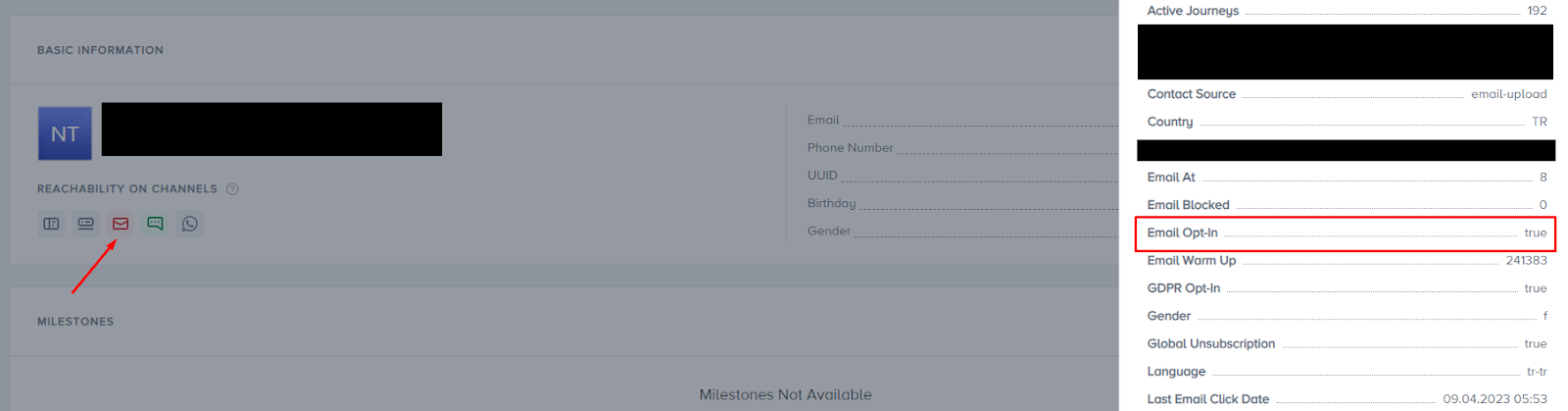
To check whether the GDPR and email opt-in have the true value:
1. Navigate to Audience > User Profiles to find the respective profile.
2. Check the Reachability on Channels section or click the View All User Attributes button to see the value for the opt-in fields.
You must also confirm that the user is not listed under Global Unsubscribe, Unsubscribe Groups, Bounces, or Invalids, and has not unsubscribed from emails through a test email. You can also check the Blocks list. A block does not stop later sends, but it shows that the recipient's mail server rejected an earlier email, e.g., because the mailbox was full. Later emails can be rejected in the same way until that issue is resolved. For more information, see Manage Email Suppressions.
If an email sent to a group email address does not arrive, check whether the address itself is suppressed. Suppression is tied to the email address, not to the person. If any member of the group unsubscribed, marked an email as spam, or caused a hard bounce, nobody using that address receives the email. To restore delivery, remove the address from the list it appears on, such as Global Unsubscribe, Unsubscribe Groups, or Bounces. You do not need to remove the address from Blocks, because a block does not stop later sends.
Default frequency capping limits the number of emails
All email campaigns have a 15-minute frequency capping to prevent a single user from receiving more than one email in 15 minutes.
Transactional emails, Architect emails, and test emails will not affect the cap or be affected by the default frequency cap.