Default Frequency Cap is a control mechanism in Insider One’s email product that prevents multiple emails from being sent to the same recipients due to human or integration errors. This frequency capping helps improve your domain's deliverability.
This guide explains the following concepts:
Default Frequency Capping has the following two checks in its mechanism :
Check 1: No user will receive multiple emails from the same campaign.
Let’s say you decide to send a Christmas promotional campaign. You have customer contact lists to which you wish to send the same promotional campaign.
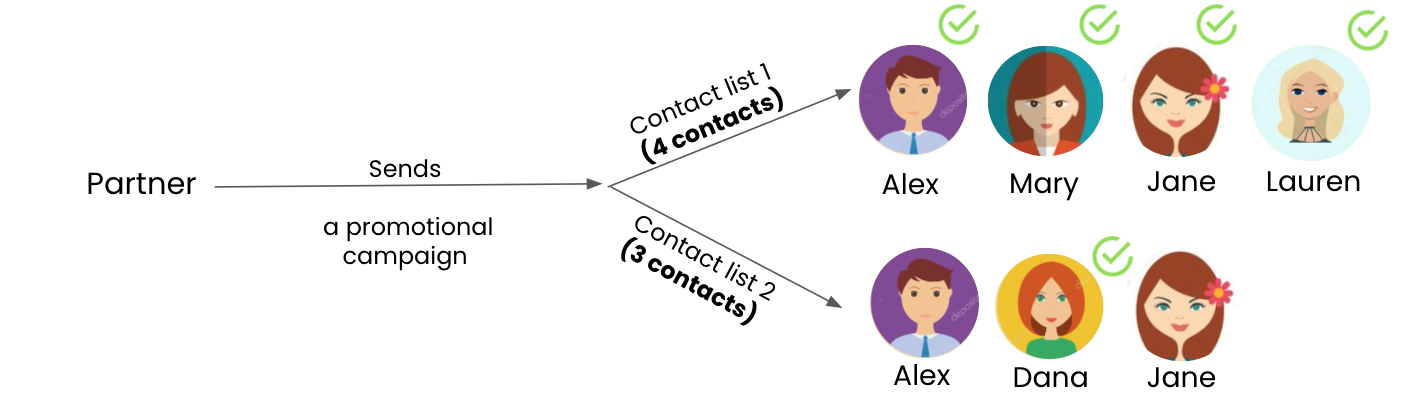
After you launch the campaign, you realize you have duplicated people in your contact list. From now on, you don’t need to worry about this problem. With Default Frequency Capping, we ensure that each contact receives the email only once.
Check 2: No user will receive more than 1 email within a 15-minute period.
The second check prevents the same user from receiving more than 1 email from different campaigns within 15 minutes. In such a short duration, it is unhealthy for a user to receive more than 1 email. Based on the example above, Alex will receive the next email from a different campaign only after 15 minutes of the first delivery.
What email campaign types count towards the default frequency cap?
The types of email campaigns adding to the default frequency cap are:
Promotional emails
Recurring emails
Experiment email campaigns
Transactional emails, Architect emails, and Test emails will not affect the cap / will not be affected by the default frequency cap, as it is only for promotional bulk emails.
How is the number of dropped users tracked?
The campaign analytics page shows users who didn’t receive the campaign because of the default frequency capping. You can see these statistics under “Dropped Emails” along with the reason.
Is it possible to turn off the control mechanism?
It is enabled by default for all partners who are actively using Insider One’s email product. After several checks on the recipients' experience and partners' deliverability health, we do not recommend turning it off. However, if you want to turn it off, you can share this request with the Insider One team.