Your contract defines the SMS usage limits. You can monitor your SMS utilization on the Usage Analytics page.
To see your current SMS usage, go to Reports > Usage Analytics.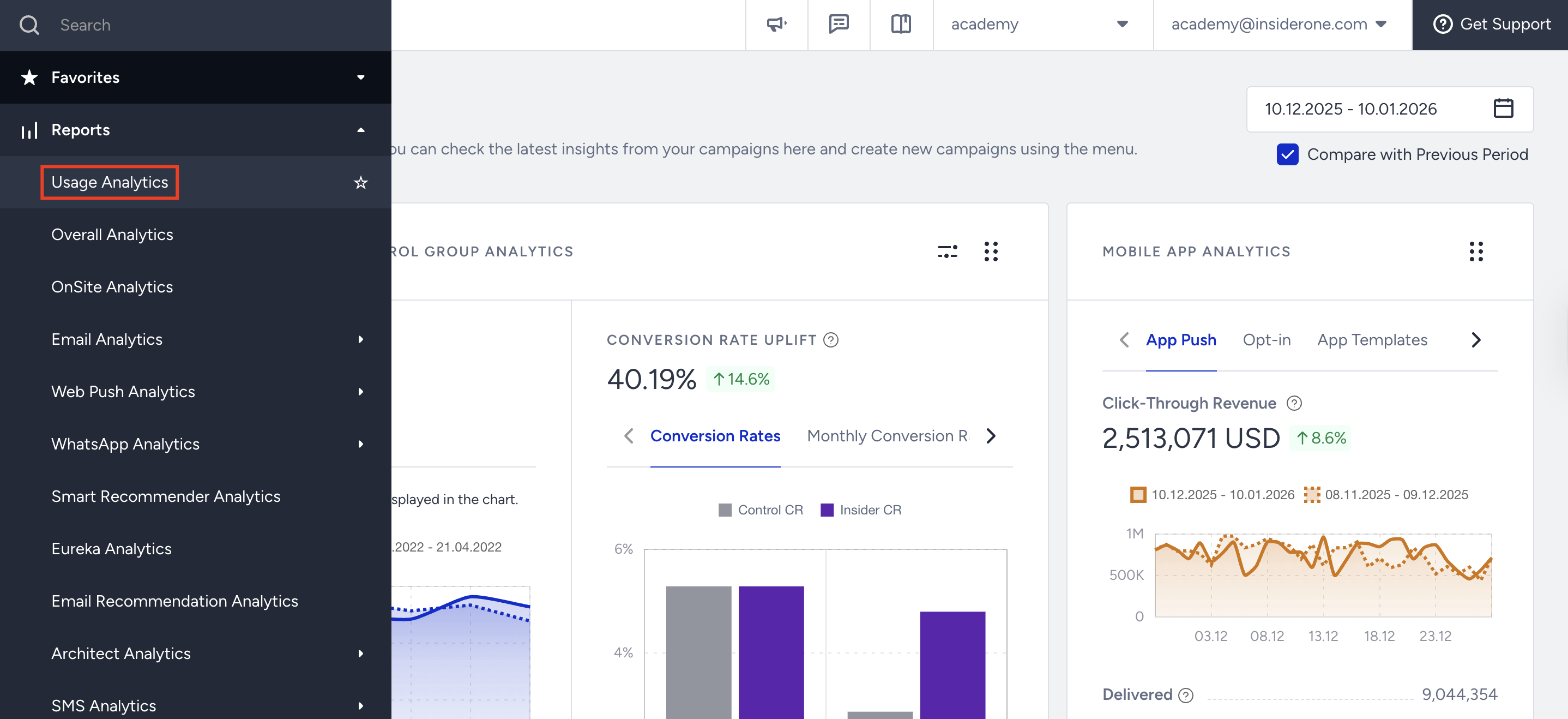
Depending on your plan type, you will see SMS Volume, your SMS quota, the number of SMS, the number of Architect SMS Channel message parts sent to your recipients, and data on allocation by country. 
Messages sent via auto-reply are deducted from your total SMS quota and are reflected in your usage reports. This means that any automated response triggered by user actions will count towards your total SMS usage.
For example, if you are using the opt-out process with a keyword (e.g., STOP), and a recipient replies with that keyword, the system will automatically send a confirmation message based on your setup.
To view usage related to auto-replies, click on the country name in the SMS Volume section. This will expand the details and display the “Responses” row, which reflects the number of auto-reply messages sent.
If you observe a discrepancy between Usage Analytics and SMS Campaign Analytics, it is likely due to their time zone settings. Usage Analytics operates based on UTC+0, whereas SMS Campaign Analytics follows the time zone defined in your Account Settings.
Plan Types and Usage Views
Depending on your contract type and the number of countries you serve, you can see the usage details for both the Combined and Monthly Plan.
Combined Plan
If you're on a Combined Plan:
You can view both Overall and Monthly usage.
Switching to the Monthly view shows usage details, but not quota information, since the quota isn't divided by month.
Monthly Plan
If you're on a Monthly Plan:
Both your monthly quota and usage are displayed.
A label clearly indicates that you're on a monthly plan.
Account Structure
Your SMS usage and quota information are displayed differently depending on your account structure. The sections below explain how usage data appears for different configurations, whether you're managing a single account or multiple accounts across one or more countries.
One Country, One Account
This account type applies if you operate with a single account serving one country. You can see the details for the Monthly Plan and Combined Plan in the Usage Analytics page for your account type below:
Monthly Plan: You can view your monthly quota and usage specific to your account in the SMS Volume section, along with details such as the account name, country, SMS types, and channels.

Combined Plan: This section displays your account’s combined quota and usage in the SMS Volume section, along with details like account name, country, SMS types, and channels. If you're on a combined plan, you can see the usage and quota information. You can easily switch between Monthly and Combined views.

If you switch to the Month tab, you can only see the usage information.
Multi-Country, One Account
This account type applies when you manage a single account serving multiple countries. You can see the details for the Monthly Plan and Combined Plan in the Usage Analytics page for this account type below:
Monthly Plan: In the SMS Volume section, you can view the monthly quota and usage for your accounts. You'll find details like account name, country, SMS types, and channels. Each country's usage and quota are listed separately, making it easy to monitor them individually.

Combined Plan: In the SMS Volume section, you can see your account’s combined quota and usage. You'll see details such as account name, country, SMS types, and channels. When a combined plan is selected, usage and quota information are shown. You can easily switch between combined and monthly views.

If you switch to the Month tab, you can only see the usage information. 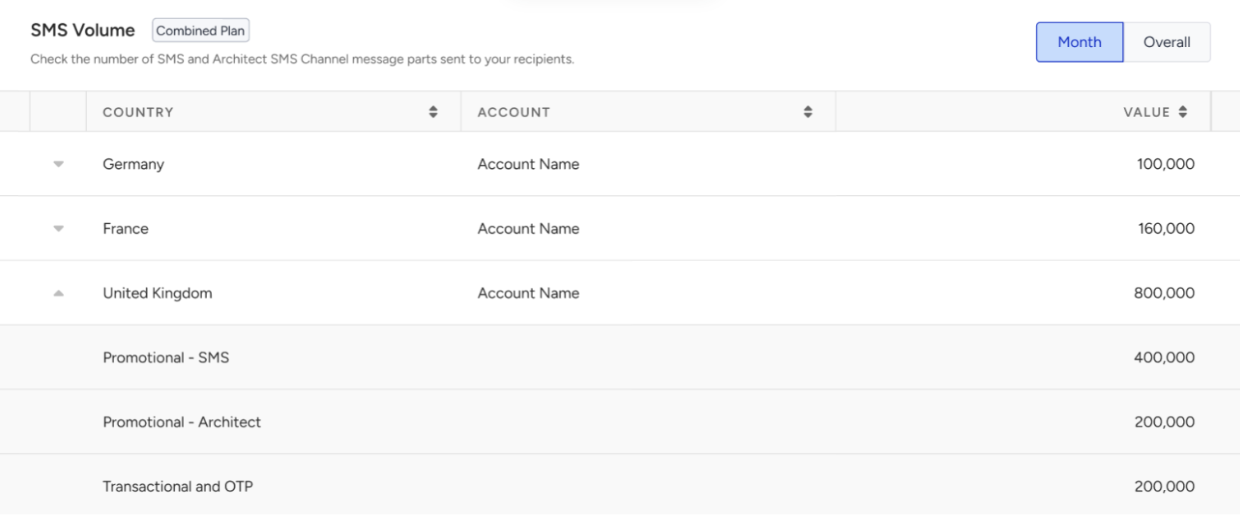
Multi-Country, Multi-Account
This account type applies when you manage multiple accounts across different countries. You can see the details for the Monthly Plan and Combined Plan in the Usage Analytics page for your account type below:
Monthly Plan: In the SMS usage area, you can view your accounts' monthly quota and usage. You'll see account names, country information, SMS types, and channels. Each account’s and each country’s usage and quota are clearly broken down for easy tracking.
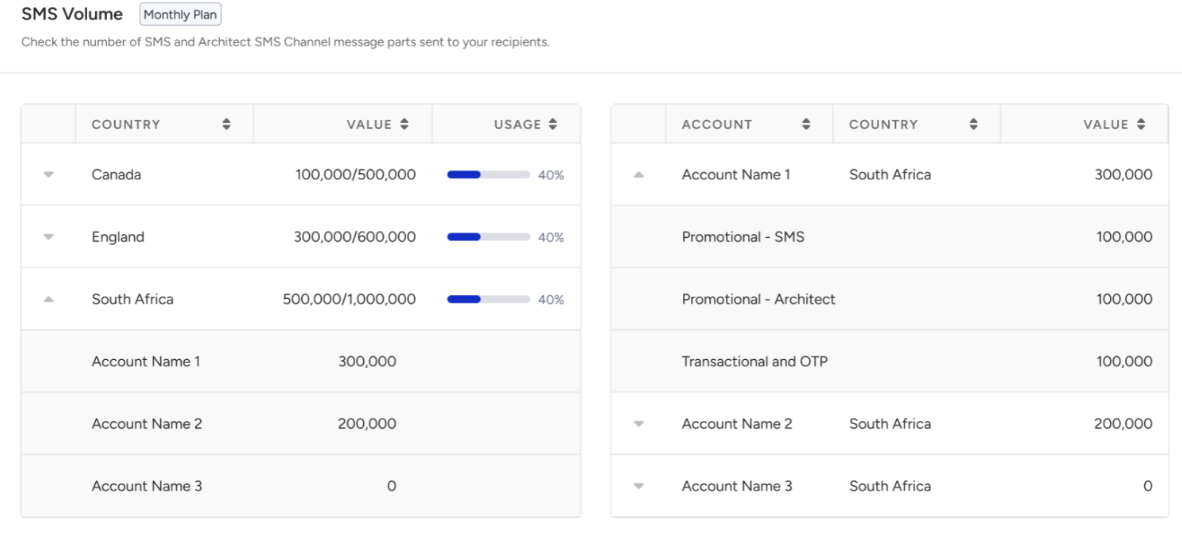
Combined Plan: You can see your account's combined quota and usage. You'll see details like the account name, country information, SMS types, and channels. When you select a combined plan, both usage and quota details are displayed. You can easily switch between Monthly and Combined views.

If you switch to the Month tab, you can only see the usage information.