Jewelry and watches are deeply personal, emotional purchases influenced by aesthetics, material preferences, lifestyle, and life moments. From timeless wristwatches to gold necklaces and diamond rings, buying decisions are often occasion-driven and tied to milestones or expressions of style. Because shoppers seek both inspiration and confidence, recommendations are especially powerful in this vertical, helping to guide discovery, build trust, and increase average order value through elegant upsell opportunities.
What you can achieve with Smart Recommender
Style-based product discovery
Encourage customers to complete their look by suggesting matching accessories, for example, pairing a gold watch with a bracelet or recommending earrings to go with a necklace. Place these recommendations on product and cart pages to maximize cross-sell opportunities.
Trending now to spark exploration
Highlight in-demand or newly launched pieces such as “Most Gifted Watches This Month” or “Trending Gold Hoops.” Use real-time browsing and purchase data to create urgency and inspire discovery.
Personalized by material or occasion
Tailor recommendations to shoppers’ preferences and context. For instance, show silver rings to customers with a silver affinity, or highlight elegant jewelry during seasonal events like weddings or anniversaries.
Re-engage lapsed users with new arrivals
Win back inactive shoppers by surfacing new arrivals aligned with their past behavior, such as minimalist leather-strap watches for those who frequently browsed minimalist collections.
Upsell with complementary items
Increase the average order value by recommending add-ons, such as extra watch straps, jewelry cleaning kits, or complete matching sets, that enhance the main purchase.
Test to discover winning strategies
Run A/B tests on algorithms, widget placements, and filters to optimize performance. For example, compare “Best Gifts Under 200 USD” with “You May Also Like” to find the messaging that resonates most with different customer types.
Walkthrough: Increasing AOV with Jewelry Pairing Bundles
Shoppers in the jewelry and watches category often look for pieces that complement each other, creating a polished and coordinated style. Cross-sell strategies can encourage customers to buy sets rather than single items, increasing both satisfaction and average order value (AOV).
In this example, we’ll walk through how to set up an A/B test on a necklace product detail page, comparing two cross-sell approaches:
One strategy recommends bracelets that match or complement the necklace.
The other strategy recommends earrings to complete the look.
By running these two strategies side by side, you can identify which type of cross-sell—bracelets or earrings—drives higher engagement and greater AOV.
1. Create your Recommendation Strategy
It's time to create your first recommendation strategy. Navigate to the Recommendation Strategies and click Create.
Select your page type as Product Detail Page.
Select your algorithm as Purchased Together to recommend suitable products for cross-selling.
Enter the number of products you want to recommend.
Exclude the recently purchased products in the last 4 weeks to keep your customer engaged.
Add a filter for the category attribute to display recommendations from the “Bracelets” category.

Then, create the second strategy that you want to test against.
Select your page type as Product Detail Page.
Select your algorithm as Purchased Together to recommend suitable products for cross-selling.
Enter the number of products you want to recommend.
Exclude the recently purchased products in the last 4 weeks to keep your customer engaged.
Add a filter for the category attribute to display recommendations from the “Earrings” category.

2. Launch your campaign
Now, launch your first campaign using your strategies.
Go to the Web Smart Recommender page and click Create.
Select your integration method for the widget.
On the Segments step, pick the audience.
For this example, you can select customers with a low AOV under Purchasing Behavior and set your threshold.
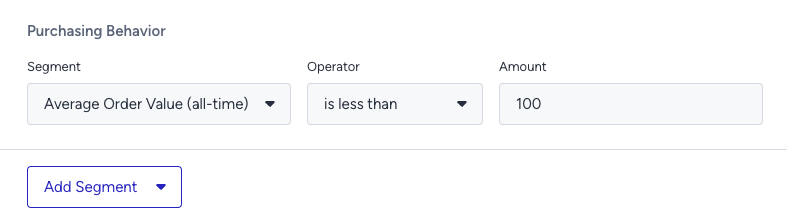
On the Rules step, decide where and when to show your campaign.
Use Page Rules to show the campaign on the product detail pages of necklaces.
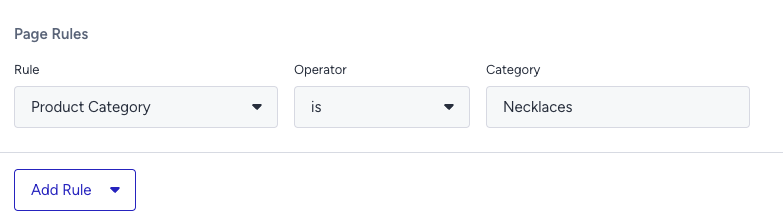
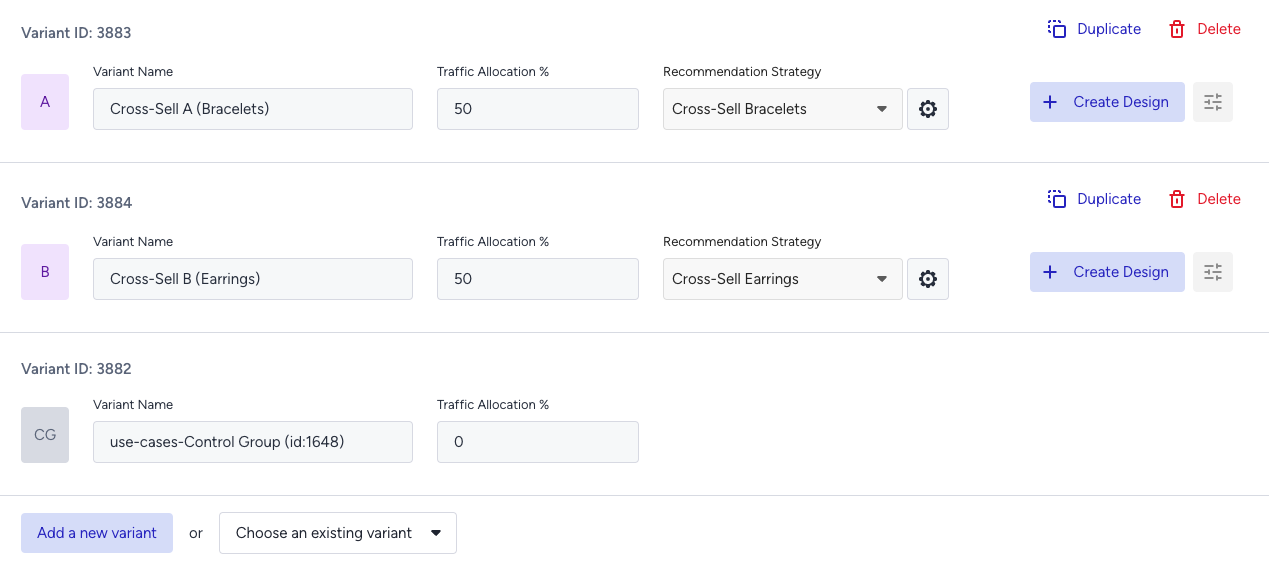
On the Design step:
Assign your two strategies to the variants.
Assign traffic allocation for each variant.
Now you’re ready to design your widget. Click Edit Design to open the Advanced Product Card Designer. Here, you can customize your product cards however you like.
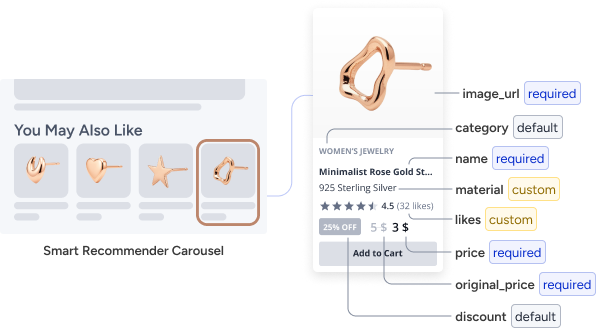
Make sure all the attributes you want to display are included in your product catalog. If you need to show more information on your product cards, you can create custom attributes from Product Attributes page.
After finalizing your campaign design, the next step is to select the locales and stores where you want the campaign to appear.
Once your targeting is set:
Review the campaign details.
Confirm that all settings match your objectives.
Click Launch to activate your first campaign.
3. Track your campaign metrics
You’ve launched your campaign—great work! Now it’s time to track its performance.
Go to the Smart Recommender Analytics page.
Locate your campaign under the Campaign and Variant Metrics table. Once the experiment duration ends, click your campaign name.
Compare key metrics, including Direct Revenue, Average Order Value (AOV), and Conversion Rate.
You can see which product category—Bracelets or Earrings—led to higher AOV for low-spending customers.
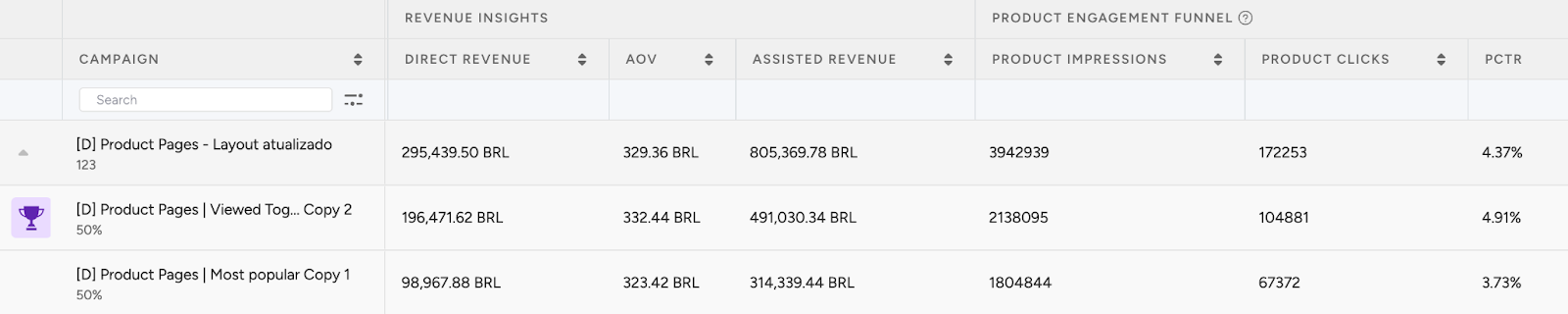
If one variant is clearly winning, adjust the traffic allocation to 100%. This ensures the best-performing strategy receives all traffic and maximizes impact.
You can expand this test by trying other combinations like pairing rings or jewelry cleaning kits with watches.
4. Optimize your campaigns
Once your campaigns are live and running, it’s time to review results and apply data-driven improvements.
Go to the Smart Recommender Analytics page.
Evaluate campaign performance based on engagement metrics.
Track Engagement Funnel Metrics: Understand how users interact with your recommendations at every step. View product impressions, clickthrough rate, add-to-cart rate, and conversion rate for each campaign to pinpoint where you’re driving engagement and where there’s room to improve.

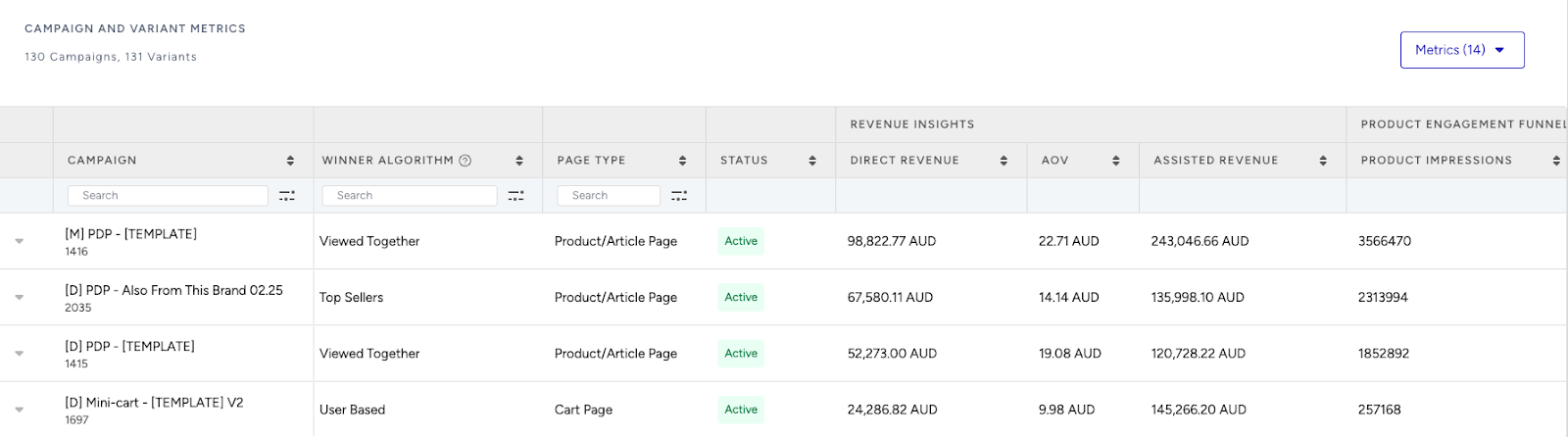
Compare Campaign and Variant Performance: Use the Campaign and Variant Metrics table to review key KPIs like AOV, Conversion Rate, and Direct Revenue. Identify which strategies are delivering the best results and refine or scale your winning variant accordingly.
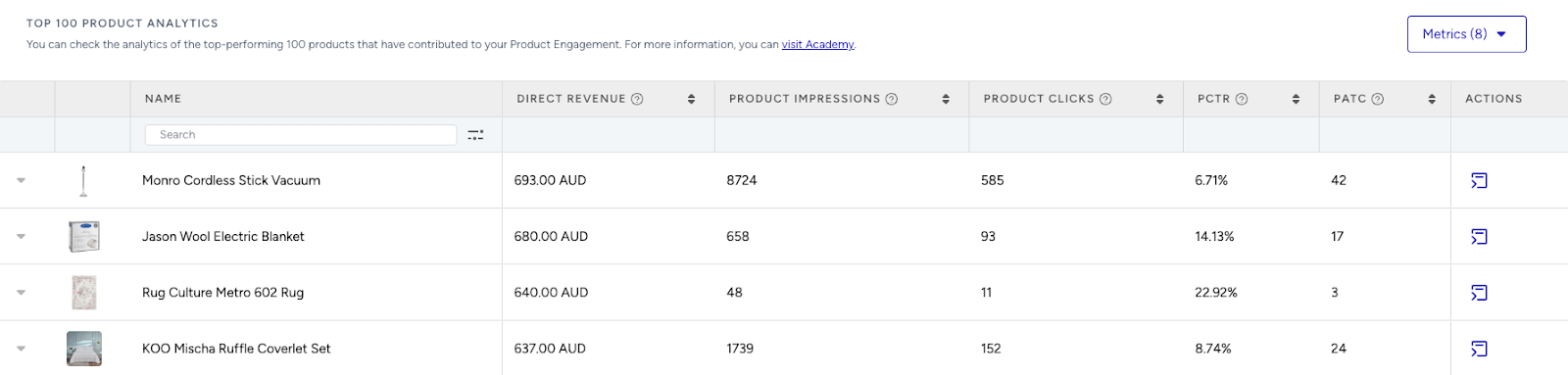
Analyze Product-Level Impact: Visit the Top 100 Product Analytics to see which products are performing well within your campaigns. Consider giving extra visibility to low-performing but strategic items by highlighting them in future recommendation widgets.
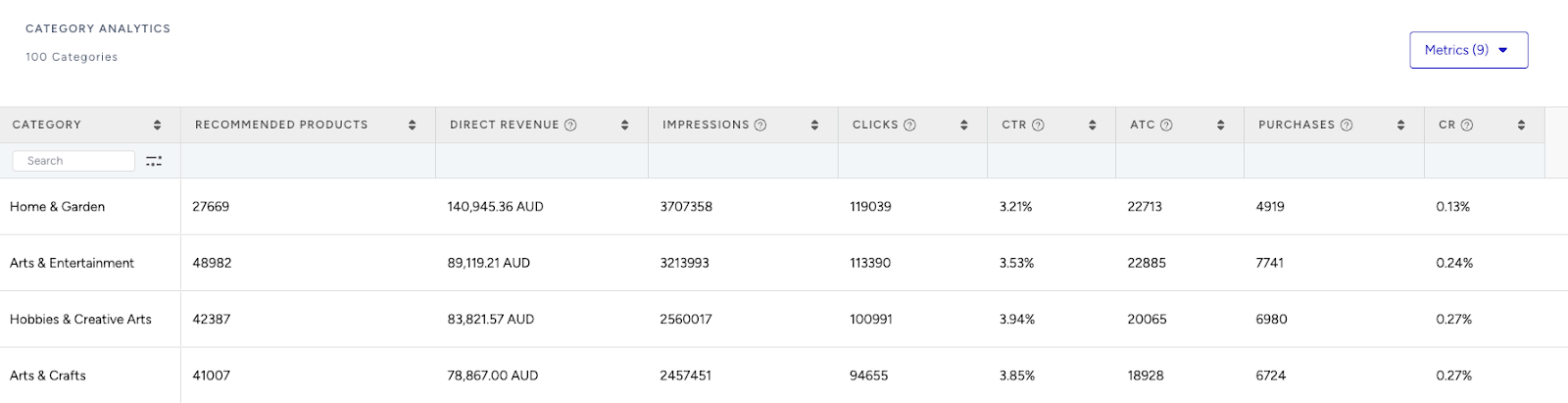
Review Category Trends: Use the Category Analytics view to assess which product categories drive the most conversions. You can prioritize high-performing categories to maximize conversions or spotlight underperforming categories to help boost their visibility and performance.
Use cases based on the page types
Home Page
Timeless bestsellers
Guide undecided shoppers with elegant staples that consistently perform well, such as classic gold hoops, tennis bracelets, or minimalist watches.
Create a strategy with the Most Popular algorithm to highlight top-viewed seasonal products.
Add a filter, such as category + is one of + Earrings, Necklaces, Watches to focus your campaign on core items.
Apply a segment rule for new visitors to provide familiar, trustworthy options early in the journey.
A/B test carousel vs. grid-style layout to find which design drives more exploration of hero products.
Recently viewed sparkle
Help returning customers pick up where they left off by showcasing the jewelry or watch items they recently viewed.
Create a strategy with the Recently Viewed algorithm to reintroduce items from previous sessions and bring shoppers back into their journey.
No filters are required — this algorithm automatically draws from user history.
Apply a segment for returning users to limit display to those with recent activity.
Enable the exclusion toggle on the strategy to hide already purchased items.
A/B test placement of this widget near the top of the homepage versus lower on the page to optimize revisit-to-cart behavior.
Recently Viewed and User-Based are personalized algorithms that rely on a user's past behavior. To use them effectively, ensure your segments are set to returning users.
Style by occasion
Help shoppers find the perfect match for special moments, such as weddings, anniversaries, or gift-giving.
Create a strategy with the Top Sellers algorithm.
Add a filter like occasion + is + Valentine's Day to match the mood of the moment.
Use a segment for new users.
Label this widget by use case (e.g., “Gifts They’ll Love”). Use this campaign on special occasion days to highlight perfect matches.
Product Detail Page
Matching Sets & Complements
Encourage styling ideas and larger baskets by suggesting complementary items, such as earrings to match a necklace or a bracelet that pairs well with a featured watch.
Use the Viewed Together algorithm to surface items commonly visited with the one currently viewed.
Add a filter, such as category + doesn't match the item they're currently viewing to ensure visual variety and avoid repetition.
Apply another filter as material + matches the item they're currently viewing to ensure the items look cohesive. Connect these two filters with AND connector.
Enable the “Enhance recommendations based on Attribute Affinity” toggle to personalize based on previous aesthetic preferences.
Try positioning this widget immediately after the product description to capture attention before the user scrolls to the reviews.
Customers also viewed after this
Encourage exploration by showing jewelry or watches that others often browse right after viewing the current item — such as recommending dainty rings or luxury timepieces that follow engagement rings in browsing patterns.
Create a strategy with the Real-Time User Engagement algorithm to surface follow-up products based on real-time user behavior.
Exclude the recently purchased products to avoid showing items that the customer may have already completed.
Use headlines like “You May Also Love” or “Complete Your Jewelry Story” to invite users to continue browsing naturally.
You can A/B test emotional messaging (e.g., “Fall in Love Again”) versus functional messaging (e.g., “Shoppers Also Viewed”) to see what style drives more clicks on detail pages.
Category Page
Top picks in this category
Surface best-selling items within the category the shopper is currently browsing, like watches, rings, or earrings.
Create a strategy with the Trending Products algorithm to feature customer favorites that align with the current category.
Add a filter, such as category + matches the currently viewing category’s attribute, to ensure results match the browsing context.
No segmentation is necessary — this campaign works well for all users exploring category pages.
Enable the “Enhance recommendations based on Attribute Affinity” toggle to personalize based on material or design preferences.
A/B test this strategy against a “Viral Favorites” version using static content to determine which creates more engagement.
You can set the Attribute Affinity to Material, Category, and Brand attributes to personalize recommendations based on these attributes from the Product Attributes page.
Inspired by your interests
Tailor the category browsing experience based on what the user has shown interest in across the site.
Create a strategy with the User Based algorithm to recommend products according to the user’s taste in style.
Apply a filter, such as category + matches the currently viewing category’s attribute, to maintain context.
Target this campaign to returning users or those with enough browsing behavior for personalized recommendations from User Based algorithm.
Enable the “Enhance recommendations based on Attribute Affinity” toggle to highlight items most likely to match their style.
Compare the performance of this personalized campaign against the New Arrivals algorithm to evaluate click-through improvements.
Limited-time favorites
Encourage quick decisions by highlighting category-specific items that are currently on sale or part of a promotion.
Create a strategy with the Highest Discount algorithm to feature the best deals in the category being browsed.
Add a filter, such as category + matches the currently viewing category’s attribute, to focus on compelling offers within the category.
This campaign can run for all users, but is especially helpful during promotion-heavy periods.
Enable the “Enhance recommendations based on Attribute Affinity” toggle to display discounts in the user’s specific taste.
Try using urgency labels like “Almost Gone” or “Ends Soon” in the widget title to boost click-throughs.
Cart Page
Complete the look
Increase the average order value by offering complementary pieces based on the shopper’s cart content, particularly for last-minute purchases.
Create a strategy with the Purchased Together algorithm to recommend popular combinations, such as ring + necklace or watch + bracelet.
Apply filters based on product_set + matches the items currently in their cart to recommend matching items of a set.
Leave affinity off to prioritize functional relevance.
A/B test a “Bundle and Save” style offer versus a simple “You Might Also Like” heading to see what drives more upsell conversions.
Boost to free shipping
Encourage upsells by showing products that help users meet shipping thresholds.
Create a strategy with the Checkout Recommendation algorithm with a spend threshold (e.g., 100 USD).
No filters required, attribute affinity is optional.
Highlight remaining spend with a note like “Top up to 100 USD more for free shipping!” for urgency. If you don’t have a free shipping campaign, you can also use the Purchased Together algorithm to recommend possible upsell products, aligning with the products in their cart.