Suggested reading: Integrate CraftGate
CraftGate is an application that serves as a bridge between companies and banks. It enables seamless management of payment transactions across various POS systems and methods through a unified panel. MindBehind utilizes its "Payment by Link" solution.
How to create a payment link
To create a payment link, follow the steps below:
To create a payment link via an assistant, a "POST" request must be sent to the following endpoint using the "Integration Module":
Endpoint: {baseUrl}/cpayments/craftgate/v1/incoming/createLink
baseUrl should be as follows:
For partners on GCP servers: https://app.mindbehind.com
For partners on TR servers: https://trapp.mindbehind.com
2. As a result of the "Integration Module", you should send the #CRAFTGATE_URL response as a message action to the end user. "#CRAFTGATE_URL?lang=en" must be used to send the link shared here in English.
Requirements to create a payment link
For the request mentioned above to be fulfilled correctly, the required parameters in the assistant parameter should be filled in as follows:
PAYMENT_PRODUCT_CURRENCY: "TRY" or "AED" or "USD" or "EUR"
PAYMENT_INTEGRATION_TYPE: "CRAFTGATE”
COMPANY_NAME: Title on the payment screen. (For example, MyCompany WhatsAppOrder)
PAYMENT_INTEGRATION_ID: The ID of the CraftGate integration installed.
The parameters that should be included in the bot parameter are as follows:
PAYMENT_AMOUNT: The totalPrice parameter should be saved as this parameter.
PAYMENT_PRODUCT_DESC: If it is to be constant, it should be added as an assistant parameter. It will return from integration if it is dynamic (including product names).
orderId: This is not required. If the company has its orderId, it must include it (a conversation ID is sent when it is not found).
Receipt of payment status
In CraftGate setups, the payment process starts with the link being shared. You should use the Wait for Action Module after the Message Action with the payment link. Wait for Action allows information from third-party applications to be used in the assistant. However, since input from the customer while waiting for payment is also counted as third-party input, a solution like the one below should be used.
We recommend you follow the product tip steps below:
Specify a required timeout for payment.
Choose a Logic Action as a fallback.
Create these three conditions:
If LASTMESSAGEVALUE is equal to {"fallback": true}, connect to Delete Link integration.
If LASTMESSAGEVALUE is not equal {"fallback": true}, connect to a message module (For example, you can refer to the link above to complete your payment. If you would like to cancel your payment transaction, type "CANCEL".) and then go back to the “Wait For Action” module.
If LASTMESSAGEVALUE is equal to CANCEL, connect to Delete Link Integration.
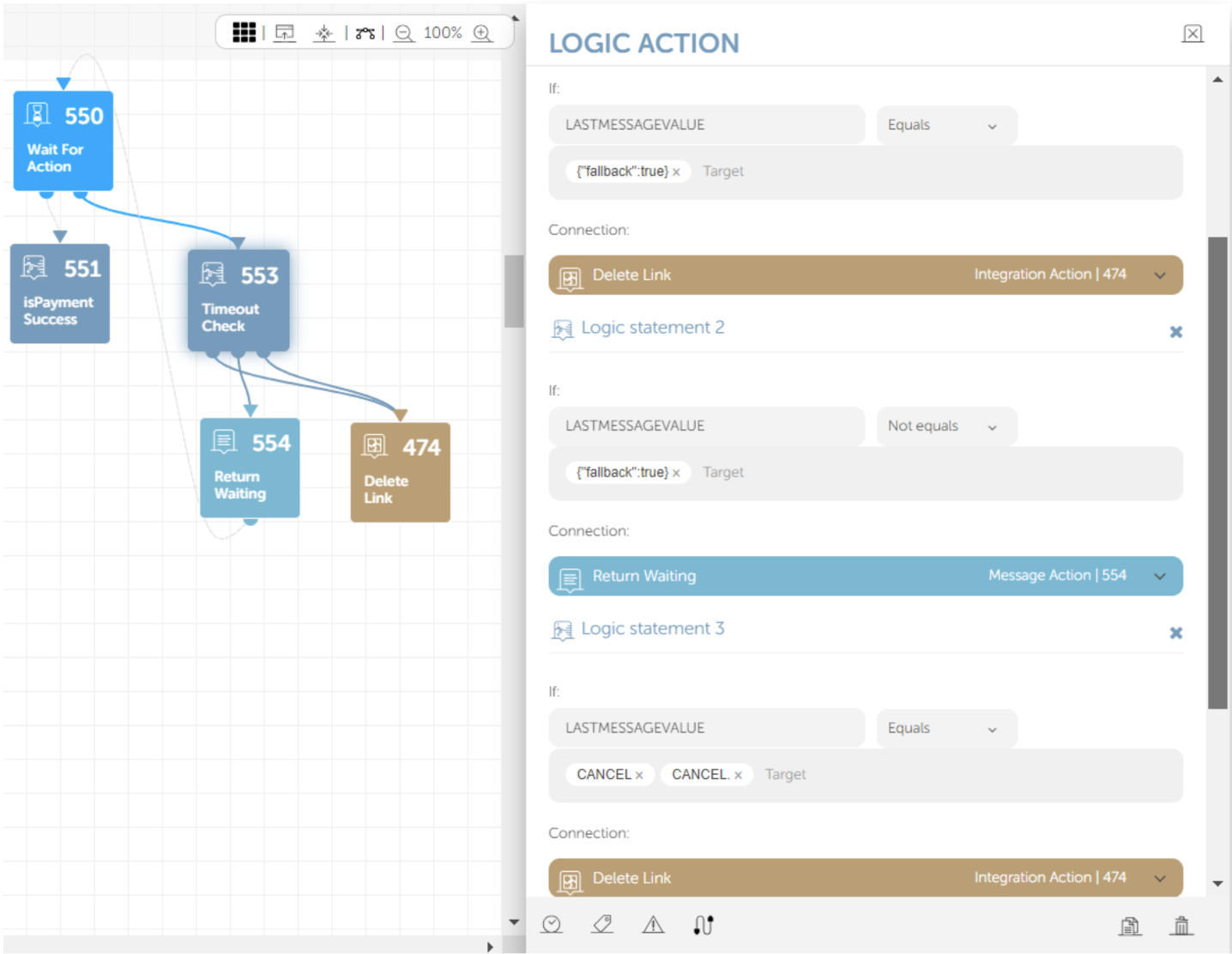
Control of payment: Payments are checked at the beginning of every minute. The PAYMENT_IS_SUCCESS parameter comes to the bot via the Wait for Action module. For this reason, after the Wait for Actions, a Logic Action is used to check whether the PAYMENT_IS_SUCCESS parameter is “1”. Suppose the response is “1”, a “Payment Successful” response should be conveyed to the end user. In other cases, a “Payment Failed” response will be sent.
For the bot to receive the expected response with the “Wait for Action”, the “Get Management Token” button must be used after the installation for the channel that is used to complete the installation.
How to delete the payment link
Select an "Integration Module" on the fallback link of the "Logic Action" created above and connect it with this module. A "DELETE" request must be sent to the following endpoint using this "Integration Module".
Endpoint : {baseUrl}/cpayments/craftgate/v1/incoming/deleteLink
baseUrl should be as follows:
For partners on GCP servers: https://app.mindbehind.com
For partners on TR servers: https://trapp.mindbehind.com
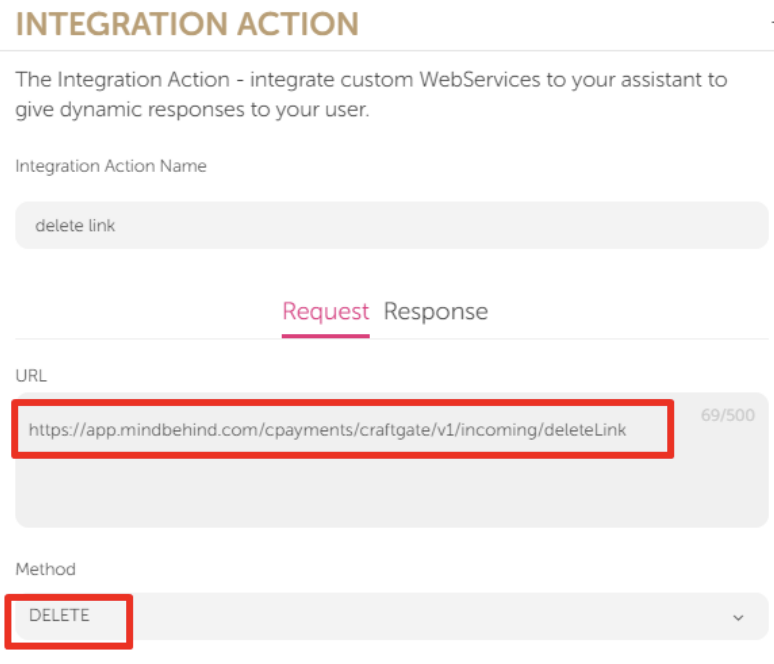
If the payment from the links created on CraftGate is not made within the specified time, the customer should be prevented from making the payment after the conversation ends.