The subscription change for Web Push notifications varies depending on several factors, including the timing and presentation of the opt-in prompt, the content of notifications, the Quieter Permission UI implemented by browsers for visitors, and others.
Given the complexity and diversity of factors influencing subscriber trends, there is no one-size-fits-all solution for achieving better results. Much like optimizing campaign performance, it's essential to experiment with different approaches and formulate a strategy based on the outcomes. To improve your subscriber trends, consider the following suggestions:
Create value from notifications
Communicating the benefits of subscribing to notifications is crucial for convincing visitors to allow the prompt to appear. However, making promises and not following through can harm retention rates. Providing ongoing value to subscribers is essential. Otherwise, subscribers might lose interest over time. Sharing exclusive campaigns, user-friendly payment options, and generic discount coupon codes periodically through Single Pushes is a proven strategy to incentivize visitors to remain subscribed and ensure they don't miss out on these benefits.
Use personalization, emojis, and rich images
Personalization is crucial for creating a sense of ownership and enhancing engagement. Sending the same messages to all users in a dull tone might lead to lower subscription rates. Sending personalized content with dynamic attributes, adding emojis to messages to create a friendlier tone, and incorporating rich images into messages can significantly impact subscriber engagement and retention in the long term.
Utilize Welcome Notifications
Welcoming subscribers and informing them about the benefits of their subscriptions is a courteous gesture. Immediately after users opt in, send a push message directing them to a designated page to explore new products, discounted items, best-sellers, and more. This immediate value showcase can significantly enhance subscriber engagement.
Reach out to the Insider One team for customization of the Trigger Web Push.
Use Opt-in Reminder and Opt-in Bell templates
The Quieter Permission UI or browser settings can prevent users from seeing the native opt-in prompt. To address this issue for visitors who have previously blocked notification requests or are affected by the Quieter Permission UI, consider using Opt-in Reminder and/or Opt-in Bell templates. These solutions can effectively increase subscribers by prompting users who may have missed the initial opt-in prompt.
The Opt-in Bell remains visible when the user’s notification setting is set to “default,” meaning that if the user does not allow or block notifications (for example, when they do not see the opt-in due to Quieter Permission UI). Users can click on the bell at any time to subscribe to Web Push notifications, which could be beneficial since they may not see the opt-in due to Quieter Permissions' block.
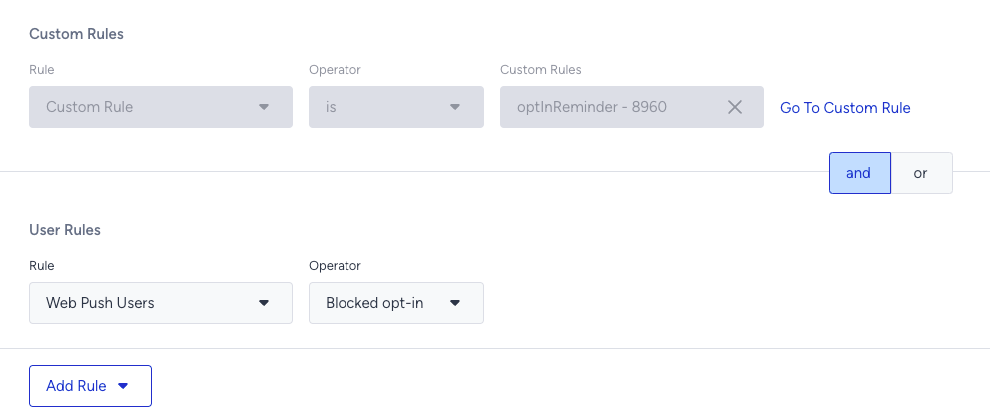
The Opt-in Reminder template can be used for each notification condition based on the user’s choice. Using it when the notification setting is “blocked” might make more sense, as it’s the only way to regain users who have previously blocked your notifications. To target users who have blocked the prompt, you can set the following rules: