The "Duplicate to Other Accounts" option allows you to duplicate an email campaign from one of your panels to your other linked panels.
Your panel should be linked to the respective account to duplicate your campaigns to another account. The Insider One team can enable this feature for your account.
.png) This feature allows for streamlined replication and distribution across multiple accounts. Using it, you can quickly and easily duplicate an email campaign you created on an account and transfer it to your other Inone panel.
This feature allows for streamlined replication and distribution across multiple accounts. Using it, you can quickly and easily duplicate an email campaign you created on an account and transfer it to your other Inone panel.
This guide provides details on the following topics:
Elements of an email campaign that can be duplicated
You can transfer various campaign elements and settings to a target account. The content duplication includes the following: Email design, subject and preheader text, images, and settings.
Email Design
The email design includes HTML, media content, links, and dynamic content such as custom events and attributes. These elements will be duplicated to the target account. If the respective custom events and attributes do not exist in the target account, they will be dropped from the duplicated campaign.
Subject & Preheader Text
The subject and preheader text, including dynamic content with custom events and attributes (if any), will be duplicated to the target account. If the respective custom events and attributes do not exist in the target account, they will be dropped from the duplicated campaign.
Images
Images used in the campaign will be duplicated to the target accounts.
Settings
The drag & drop settings associated with the campaign will be duplicated to the target accounts.
Elements that cannot be duplicated
The Recipients step and Segmentation settings cannot be duplicated. You should set up the recipients lists and segments separately for your duplicated campaign on the target account.
Users and their information cannot be duplicated.
Launch step settings cannot be duplicated. You should configure them separately for your duplicated campaign.
Settings > Inone Settings > Email Settingscannot be duplicated. You should configure them separately for your linked account.
Accessing the "Duplicate to Other Accounts" option
To access the "Duplicate to Other Accounts" feature, follow these steps:
Only users with access levels Collaborator, Editor, and Administrator can duplicate campaigns from a source account to a target account.
1. Your panel should already be linked to the account you want to transfer your campaign to. That's why you should be sure to request the Insider One team to enable this feature for your Inone panels.(2).png)
2. Go to Experience > Message > Email on the panel from which you want to duplicate your campaign.
3. Click the three-dots menu against the campaign you want to duplicate to click the Duplicate to Other Accounts button.
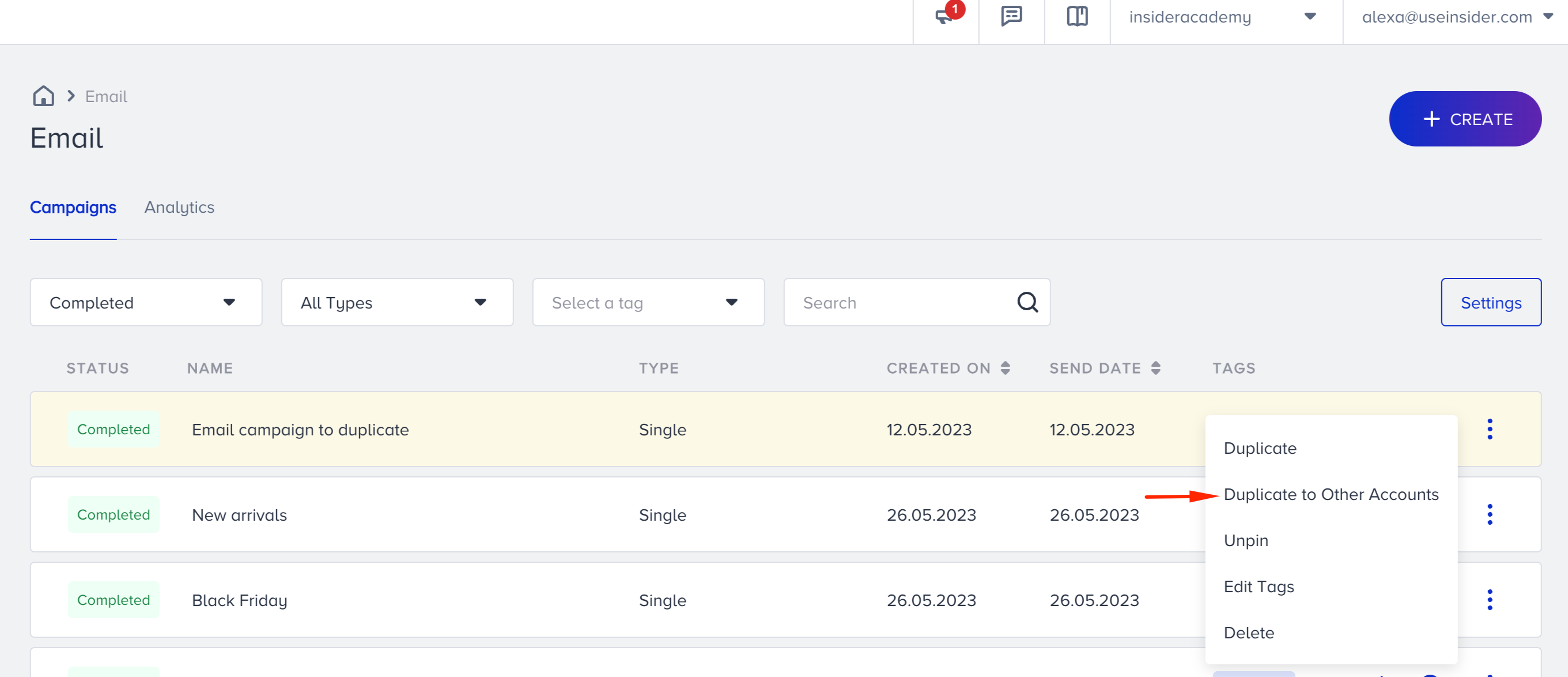
Selecting target accounts
A target account is a sub-account that is linked to your Inone account.
Once you click the Duplicate to Other Accounts button, a side modal will open from the right side of the panel. The modal provides the necessary options and information for duplicating your campaign.(2).png)
To duplicate an email campaign to a target account, follow these steps:
1. Select your target account(s) to transfer your campaign to. The Target Accounts dropdown lists the sub-accounts linked to your Inone account. You can select one account or more, or choose the option to duplicate your campaign to all accounts. The accounts you select will be highlighted.(3).png)
If you do not select any account, you will see an error message stating, "Select one or more Target Accounts to continue.".
2. The Duplicate Campaign Name displays the name of your campaign after duplication. You can edit this name and rename your campaign on the target account.
3. Click the Duplicate button. A toaster notification will appear to inform you that your request has been received.(2).png)
4. Once the duplication process is completed, you will receive an email notification in your mailbox.
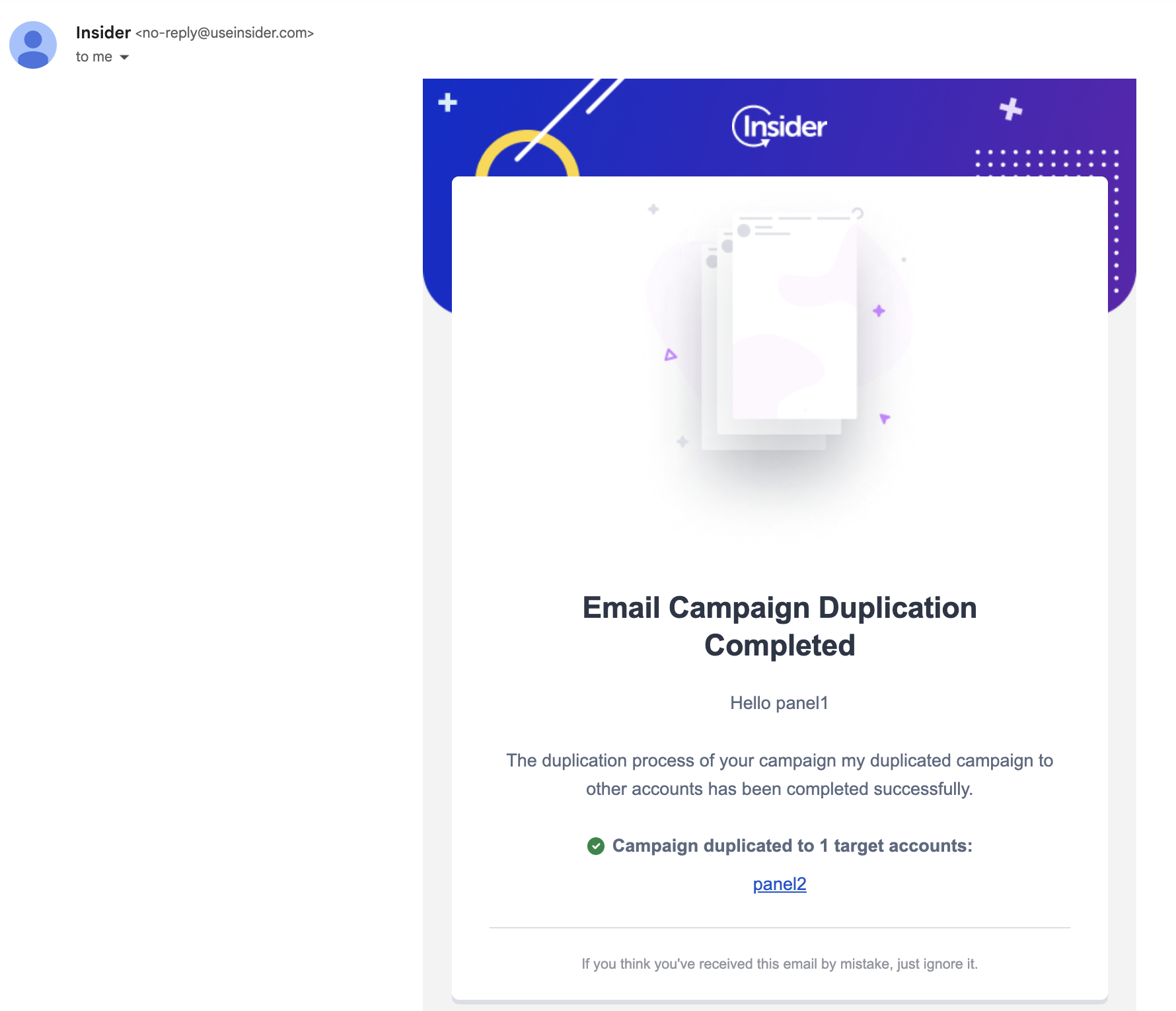
If the duplication is not completed or partially completed, you will receive emails stating "Email Campaign Duplication Not Completed" or "Email Campaign Duplication Partially Completed," respectively.
Duplicated campaign elements
Once you duplicate your email campaign to another account, you can expect to see the following:
The emaildesign, including HTML, media content, links, and dynamic content, will be transferred during the duplication. Make sure to have the same custom attribute(s) on the target account in case of dynamic content.
The subject and preheader text, including dynamic content, will also be transferred to the target account. Make sure to have the same custom attribute(s) on the target account in case of dynamic content.
The recipients and segments will not be included in the duplicated campaign.
The "From" and "Reply To" addresses will be selected based on the default address of the target account.
If the email recommendation block is activated in the target account, the recommendation block will be duplicated as well.
If the coupon feature is activated for the target account, the coupon module will be duplicated. Coupon lists will not be duplicated.
If the coupon feature is not activated for the target account, the coupon tag will be removed on the fly, and coupon lists will not be duplicated.
If the email template is created via the drag & drop editor in the source account, it will be opened with the drag & drop editor in the target account.
If the email template is created via the HTMLeditor in the source account, it will be opened with the HTML editor in the target account.
That's it! You have successfully duplicated your email campaign to other account(s) in the Inone panel.
Sender address for campaigns duplicated to other accounts
You can create a draft email campaign even if no sender address is configured. However, you will need to select a sender address before launching the campaign. Use the Add Sender Address button to navigate to the Domain and Sender Management page to create or select an address.
Default Sender Address: When a new sender address is added, it will automatically become the default. Any existing campaigns without a sender address will also use this new default sender address.
From and Reply-To Fields: If no sender address is selected, the From and Reply-To dropdowns will be in an unselected state. Users can click Add Sender Address to create a new address via the Domain and Sender Management page.
You cannot delete the last sender address or domain in your account. If an address is already in use or set as the default, it must first be replaced before deletion.